 FlashBoards Learn
- Learn
- Post-Production & VFX
- Cinemagraph
Post-Production & VFX · Film language
Cinemagraph
Also called: living photo, motion photo, moving still
A cinemagraph is a still image in which one small element keeps moving in a seamless loop: steam rising from a cup, surf rolling in, a curtain breathing in the wind. Everything else stays frozen. The contrast makes the viewer look twice, because the picture feels like a photograph that has quietly come alive.
- What it does
- Freezes a whole scene except one repeating motion, so the eye locks onto that motion and lingers.
- Use it when
- You need a mood image that holds attention on a page, a poster, a title card or a social feed without cutting.
- Watch out
- Anything that crosses the edge of the moving area (a shadow, a hand, a change of light) breaks the illusion at the mask line.
- Try this prompt
locked-off still life, black coffee in a white enamel mug on an oak windowsill, thin ribbon of steam in a shaft of morning sun, 50mm, everything else perfectly still

What is a cinemagraph?
A cinemagraph sits halfway between a photograph and a shot. Technically it is a short video, usually two to six seconds, played as an endless seamless loop. Almost every pixel comes from one held frame; only a single region is taken from moving footage and repeated. Water, steam, smoke, hair, fabric and candle flames are the classic subjects, because they move in cycles and never have to arrive anywhere.
The name was coined around 2011 by photographer Jamie Beck and designer Kevin Burg, whose fashion-week images for the web made the format popular. It is also called a living photo, moving still or motion photo.
Why does a cinemagraph hold attention?
The eye is built to notice motion against stillness. In a cinemagraph one living detail sits inside a dead-still frame, and attention goes straight to it. The effect is slightly uncanny: time has stopped for the world but not for the steam.
- Mood before story. It sets tone without asking the viewer to follow action: a title card, a menu background, the first image of a pitch.
- Emphasis. Whatever moves is what the image is about.
- Holding time. A loop with no visible join can run for minutes and still read as calm.

Feature films rarely use true cinemagraphs, but they are full of locked-off frames that already behave like one: a static shot of a beach where only the surf moves, or a close-up where only the wine pours.
How to shoot and build a cinemagraph
Shoot the plate. Lock the camera on a tripod, with manual exposure, white balance and focus, and stabilization off; any drift exposes the mask later. Record 10–20 seconds at 24, 25 or 30 fps with a normal shutter (1/50 at 25 fps). Avoid people who cannot hold still, and avoid changing light: a passing cloud alters the whole frame.
Choose the motion. Small, repeatable and contained: steam over a cup, a pour, a flag, a strand of hair. It must never cross what you want frozen, and its shadows and reflections belong inside the moving area.
Build the loop. Put the video on the bottom layer and one still frame from the same clip on top. Cut a feathered mask in the still where motion should show through. Trim to one cycle and hide the join with a half-second crossfade, or with a forward-backward boomerang, which suits ripples and fabric but looks wrong on smoke, since it visibly reverses.
Export light. Two to six seconds as MP4 or WebM; GIF bands gradients and bloats files.
Cinemagraph vs. freeze frame
A freeze frame stops the entire image in the middle of a moving shot, for emphasis or as an ending; it is an event inside an edit, with a before and an after. A cinemagraph starts from a still and lets one part of it keep going forever. The freeze frame stops time; the cinemagraph splits it in two.
It also differs from a slow pan across a photograph: there the camera moves over a frozen picture, here the camera never moves and something inside the picture does. More finishing techniques are in the post-production hub.
Cinemagraph in motion





9 clipsWatch for the one thing that moves: smoke, water, hair or fabric keeps cycling while everything around it stays as frozen as a photograph. In the best loops the join is hidden so well that the motion never seems to start or stop.



How to create a cinemagraph with AI
3 promptsGenerate a still that is already composed for stillness, then animate only the element that should move. The video starts from that exact image, so still and clip line up and can be masked together. Keep the plate, every take and the final loop on one FlashBoards board to compare them side by side.
Locked-off still life: black coffee in a chipped white enamel mug on a weathered oak windowsill, a thin ribbon of steam rising through a single shaft of low morning sun, dark blue-grey wall behind, 50mm lens at table height, f/4, everything else perfectly still, soft film grain
"Locked-off" and "everything else perfectly still" set up the frozen frame. Steam against a dark wall inside a sunbeam gives the one moving element contrast and a contained area to mask.
Open FlashBoardsWide cinemagraph plate: a woman in her late twenties with a short copper bob, freckles across the nose and a small silver hoop in her left ear, green wool coat, standing motionless at a ferry railing on the left third of the frame, gaze fixed on the horizon, one loose strand of hair lifted by the wind, overcast silver sea stretching across the frame behind her, 85mm at eye level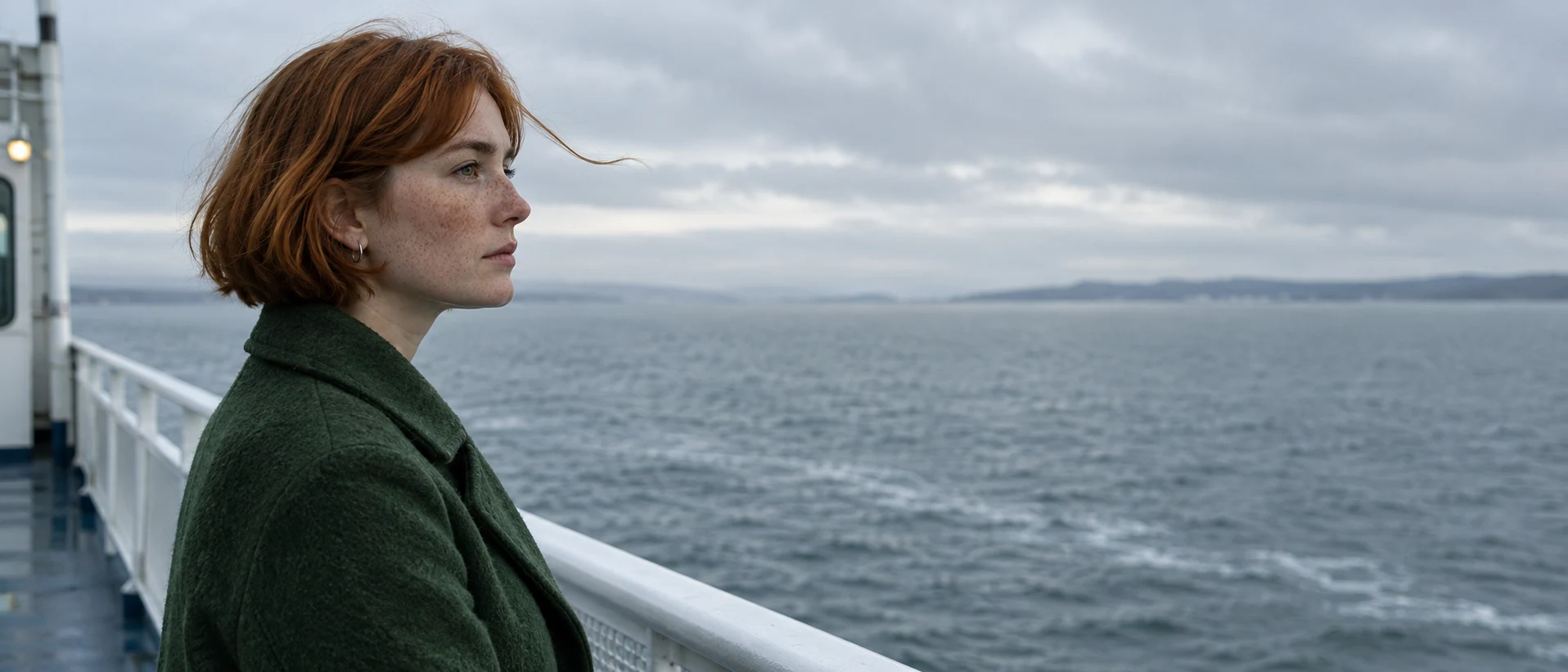
A wide take for headers. "Standing motionless" and "gaze fixed" freeze the face; "one loose strand of hair" names what will move. Overcast light avoids shifting shadows.
Open FlashBoardsCamera: completely static, locked off on a tripod from the first frame to the last. Action: Steam is already rising from the coffee and curling slowly left through the sunbeam. The ribbon thins into soft wisps near the top of the frame, and a new ribbon rises from the coffee in the same place. The mug, windowsill and wall stay perfectly still, and the sunlight stays constant.The camera line stops the model drifting into a push-in, and the steam moves from the first sentence. A full cycle (rise, thin, new ribbon) gives material for a clean loop; mask the clip over recipe 1's still.
Open FlashBoardsCommon mistakes
- Video models like to move the camera. State "completely static, locked off on a tripod", or the mask no longer fits.
- The whole scene tends to come alive. Describe the frozen parts as still, then freeze them in post with the first frame anyway.
- Motion that travels (a glass filling up) won't loop. Ask for a repeating cycle.
Keep the reference frames, prompts and every generated take side by side — images and video in one canvas.
FAQ
4 questionsWhat is a cinemagraph?
A cinemagraph is a still image in which one element moves in an endless, seamless loop while everything else stays frozen: steam over a cup, waves on a beach, hair in the wind. Technically it is a short video of two to six seconds, saved as MP4, WebM or GIF, that reads as a photograph partly come alive.
What is the difference between a cinemagraph and a GIF?
GIF is a file format; a cinemagraph is a type of image. Most GIFs are short clips in which the whole frame moves. A cinemagraph keeps almost the entire frame still and lets only one masked area move. Many early cinemagraphs were GIFs, but today they are usually exported as MP4 or WebM for smaller files and cleaner color.
Is a living photo the same as a cinemagraph?
Often the terms are used interchangeably, along with "moving still" and "motion photo". Strictly, a cinemagraph is deliberately masked and looped so only one area moves. Phone features that record a moment of video around a snapshot play the whole scene in motion, so they are not cinemagraphs until you mask and loop them.
How do you make a cinemagraph?
Shoot 10 to 20 seconds on a locked tripod with manual exposure, focus and white balance. In an editor, place one still frame above the video, mask the area that should move, and trim to one cycle of motion. Hide the join with a crossfade or a forward-backward loop, then export two to six seconds as MP4 or WebM.
Related terms
2- Freeze FrameEditing
A freeze frame holds a single frame on screen so the action stops dead — to end a film, introduce a character, underline a moment or cue narration.
- MaskPost-Production & VFX
A mask blocks or isolates part of the frame with a shape — an iris circle, a binocular or keyhole outline, a hand-drawn window — in front of the lens, in an optical printer or in compositing, to limit what we see, reveal a second image or treat one area separately.
Further reading
Ron Brinkmann, The Art and Science of Digital Compositing (Morgan Kaufmann): masking, mattes and layer compositing.