 FlashBoards Learn
Editing · Film language
Freeze Frame
Also called: frozen frame, still frame
A freeze frame is an editing effect that repeats one frame of a shot so the action stops dead on screen while the film keeps running. It turns a moving moment into a held image, forcing the viewer to study it: to end a story, introduce a character, land a punchline or give narration room to speak.
- What it does
- Stops time on one frame so a single moment becomes the thing the audience remembers.
- Use it when
- An ending, a character introduction, a voice-over aside or a peak-action beat needs to hang in the air.
- Watch out
- A frame with motion blur or dead, static grain looks like a technical fault rather than a choice.
- Try this prompt
Wide shot, a teenage runner with a shaved head and a red windbreaker mid-leap over a tide pool, crisp 1/1000 shutter, overcast beach, 35mm grain

What is a freeze frame in film?
A freeze frame is one frame held on screen for a stretch of running time. On film it was made on an optical printer by rephotographing the same frame again and again; in a digital timeline it is a frame hold. Sound usually carries on underneath (music, a voice-over, the noise of the scene), which separates a freeze from a cut to a photograph.
The effect is made in the edit, one of the core editing tools, but the moment you will freeze has to be chosen and protected on set.
Why filmmakers use a freeze frame
End a film without resolving it. The 400 Blows (1959) ends with Antoine at the sea, turning to the camera as Truffaut zooms in and freezes on his face — a signature image of the French New Wave. Butch Cassidy and the Sundance Kid (1969) freezes its outlaws charging into gunfire; Thelma & Louise (1991) holds the car in mid-air.
Introduce a character. Freeze a face, add a name, and the audience files that person away.
Make room for narration. Goodfellas (1990) freezes the picture while Henry Hill's voice-over explains what we just saw.
Land a beat. A punch or a leap held for a second becomes a punchline. A speed ramp into the hold makes the action brake to a stop.
How to shoot and cut a freeze frame
Plan it on set. At 24 fps with a 1/48 s shutter a running body smears, and a smeared frame held for three seconds looks like an error. For shots you will freeze, raise the shutter to 1/250–1/1000 s or shoot at 48–120 fps, and budget 1–3 extra stops of light.
Pick the peak. Scrub frame by frame to the apex: feet off the ground, head fully turned, eyes open, no hand across the face.
Build the hold. Add Frame Hold in Premiere Pro, Freeze Frame in DaVinci Resolve's retime menu, Hold in Final Cut Pro. Two to four seconds suits a character intro; an ending can hold under the credits.
Keep it alive. A single digital frame has static grain and reads as dead. Add a moving grain overlay, a slow push-in, a shift toward monochrome or a title.
What does a freeze frame ending mean?
A freeze frame ending stops the story on its last open question and hands it to the audience. It says this moment is the point, not what follows, so it suits endings about escape or defiance. The frozen image has to carry the theme alone. The Breakfast Club (1985) ends on a raised fist, frozen; the image is the argument, and the denouement happens in the viewer's head.
Freeze frame vs. cinemagraph and film still
- A freeze frame sits inside the film's running time: motion stops, sound often continues, then the film cuts on or ends. Its force comes from motion suddenly stopping.
- A cinemagraph is a still with one small element moving in a seamless loop: steam, hair, a flickering sign. It is a standalone loop, not a beat in an edit.
- A film still is a frame grab or set photograph that represents the film in publicity or mood boards. It never plays as part of the cut.
Freeze Frame in motion




6 clipsWatch for the instant the motion stops: the action runs, then one frame is held while grain, titles or the next cut carry on. The frame the editor picks to freeze, a scream, a punch, a stare, is the whole point.
How to create a freeze frame with AI
3 promptsVideo models generate continuous motion, so the freeze itself is a cut you make afterwards. The AI job is a clean peak: a crisp start frame, a clip that builds to the pose you will hold, and a second take for a character intro. Keep them on one FlashBoards board and compare peaks side by side.
Cinematic wide shot on a grey overcast beach, a fourteen-year-old boy with a shaved head, big ears and a faded red windbreaker two sizes too large runs along wet sand toward the surf, both feet off the ground mid-stride, tripod at chest height, 40mm lens, crisp 1/1000 shutter, sharp body, flat horizon, muted color with fine film grain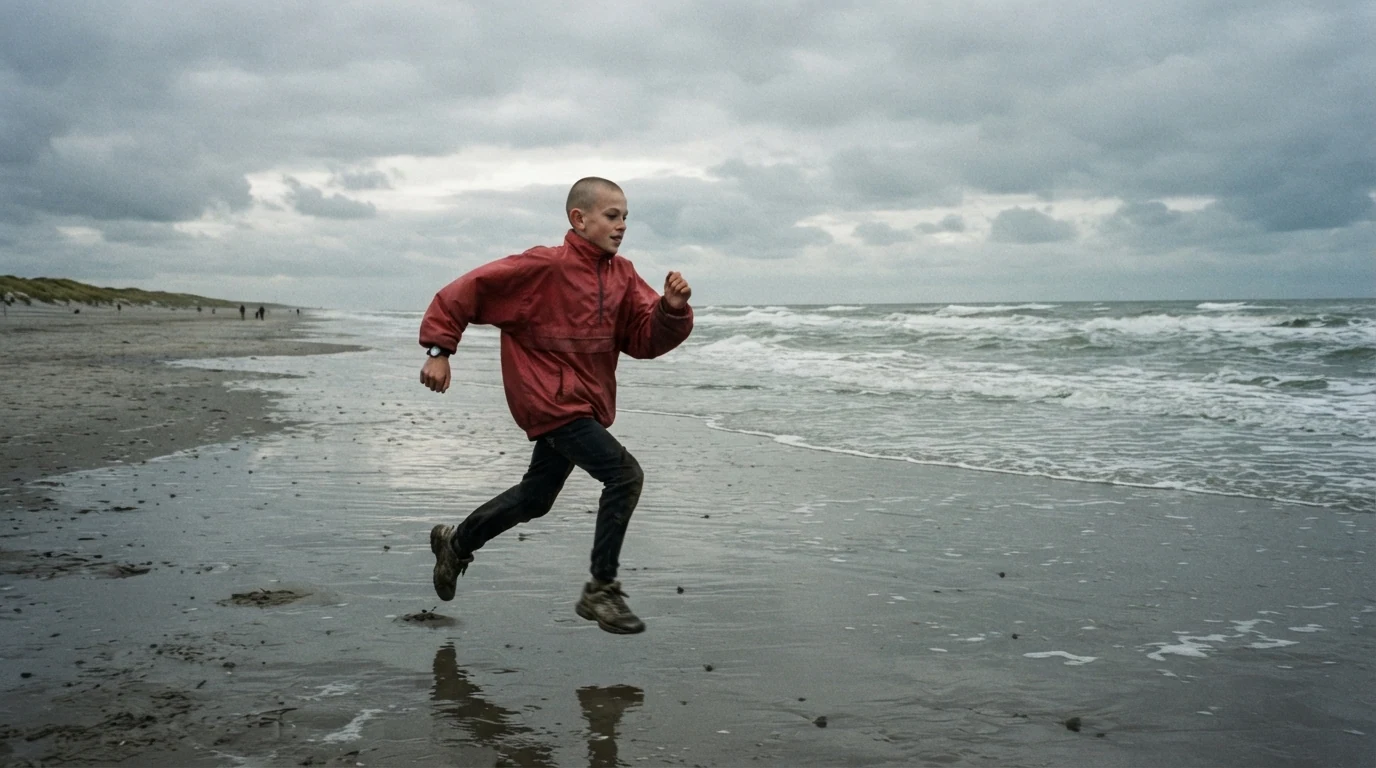
Both feet off the ground mid-stride puts the frame at a peak. Crisp 1/1000 shutter, sharp body keeps the pose clean enough to hold. Tripod at chest height, flat horizon gives a simple, stable background.
Open FlashBoardsAnamorphic medium shot in a smoky 1970s pool hall, a heavyset man in his fifties with a grey handlebar mustache, a gold tooth and a burgundy velvet blazer throws his head back mid-laugh, cue raised in one hand, framed on the right third with dark empty space on the left, warm tungsten practicals, green felt table in the foreground, crisp focus on his face, rich grain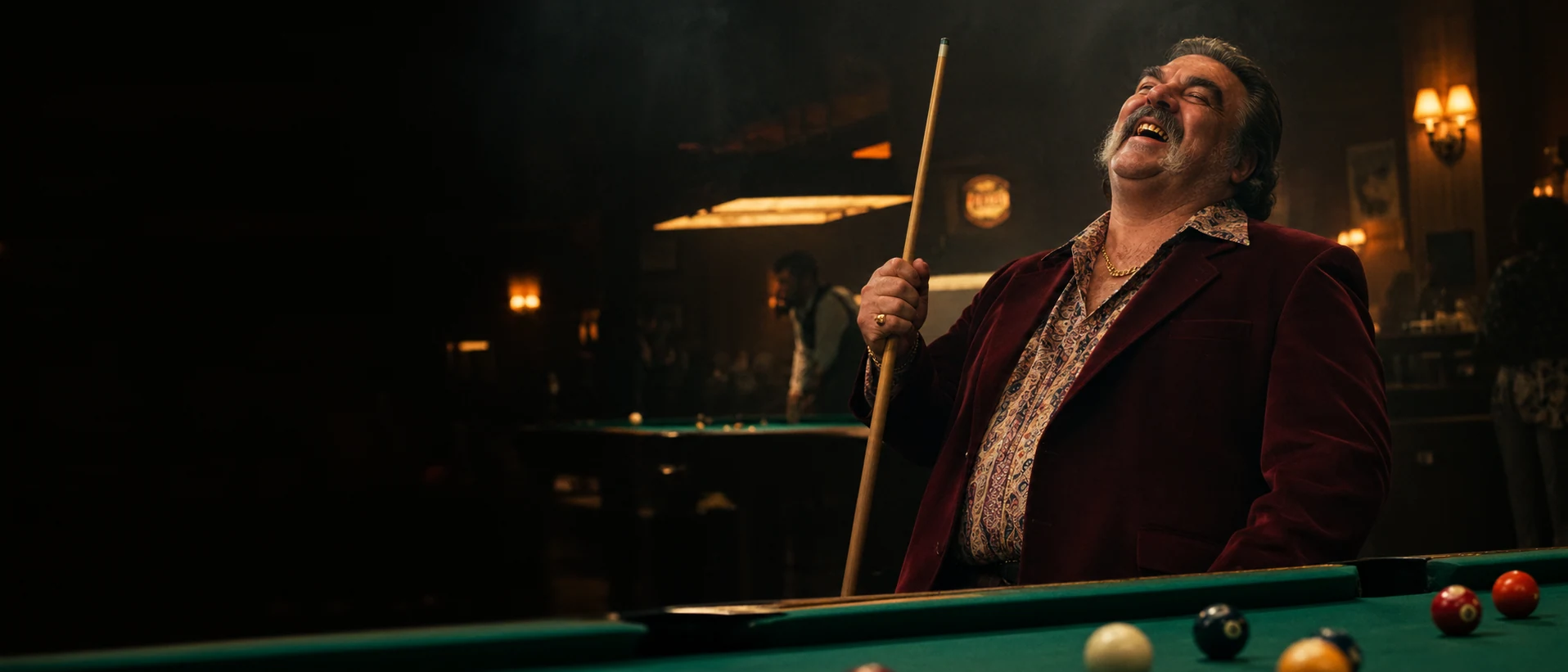
The character-intro freeze. Mid-laugh, cue raised defines him in one expressive peak. Dark empty space on the left leaves room for his name on screen. Anamorphic, 21:9 makes it read like a frame from a feature.
Open FlashBoardsCamera: locked-off tripod shot, the frame stays still for the whole clip. Action: the boy in the red windbreaker is already sprinting along the wet sand from the first frame, arms pumping. He splashes into the shallow surf and slows to a stop. At the end he turns his head and shoulders sharply toward the camera and looks straight into the lens, breathing hard, wind moving his jacket.Already sprinting from the first frame keeps the shot alive instead of drifting into a slow push-in. Locked-off tripod asks for a still frame; the model may still follow the run, but it settles once he stops, so the final look is steady. The clip ends on a turn into the lens — the frame you hold in the edit for an ending.
Open FlashBoardsCommon mistakes
- "Freeze frame" or "time stops" in a video prompt tends to give slow motion or a stiff drift. Generate natural motion and hold the frame in your editor.
- Frames pulled from video are softer than stills. If the hold looks mushy, regenerate the pose as an image.
- Models add motion blur to fast action; state the shutter speed and "sharp" in the image prompt.
- Closed eyes or an arm across the face kill a freeze. Describe the face you want.
Keep the reference frames, prompts and every generated take side by side — images and video in one canvas.
FAQ
4 questionsWhat is a freeze frame in a movie?
It is a single frame repeated on screen so the action stops while the film keeps running, often with music or narration underneath. Editors use it to end a film on an open moment, introduce a character, let a narrator comment, or punctuate a punch or a leap.
What is the most famous freeze frame ending?
The last shot of The 400 Blows (1959) is the most cited: Antoine reaches the sea, turns to the camera, and the camera zooms in to a freeze on his face. Butch Cassidy and the Sundance Kid (1969) and Thelma & Louise (1991) also end on freezes that stop the heroes just before a fate the audience can guess.
How do you make a freeze frame effect?
Put the playhead on the frame you want and create a hold: Add Frame Hold in Premiere Pro, Freeze Frame in DaVinci Resolve's retime menu, or Hold in Final Cut Pro. Extend it to two to four seconds, then add moving grain, a push-in, a color shift or a title so the hold reads as intentional.
Why do freeze frames look blurry?
Footage at 24 fps is usually shot at about 1/48 second, so fast movement smears within each frame — invisible in playback, obvious once held. For moments you plan to freeze, use a shutter around 1/500 second or a higher frame rate, then pick the sharpest frame at the peak.
Related terms
7- CinemagraphPost-Production & VFX
A cinemagraph is a still image in which one small element keeps moving in a seamless loop — steam rising, hair in the wind — while everything else stays frozen.
- Film StillFormats & Exhibition
A film still is a single image representing a film — either a frame grab taken from the footage or a production still shot by the set photographer for publicity; stills are the raw material of lookbooks and mood boards.
- Slow MotionCameras & Capture
Slow motion stretches time on screen: the camera records at a higher frame rate than playback — for example 120 fps played at 24 — so action unfolds several times slower, used for spectacle, violence, grief or to reveal what the eye normally misses.
- Voice-OverSound & Music
Voice-over is speech heard over the picture from someone not speaking on screen at that moment — a narrator, a character's inner thoughts, a documentary commentary.
- DenouementStorytelling
The denouement is the final part of the plot after the climax, where loose threads are tied up and the new balance of the characters' world is shown.
- French New WaveFilm Movements & Styles
The French New Wave (late 1950s–60s) was launched by Cahiers du cinéma critics turned directors — Truffaut, Godard, Chabrol, Rohmer — who shot cheaply on the streets with handheld cameras, jump cuts and a personal, playful voice (The 400 Blows, Breathless).
- Post-ProductionPost-Production & VFX
Post-production is everything after the shoot that turns footage into a finished film: editing, sound design and mix, music, VFX, color grading, titles and delivery masters.
Further reading
Walter Murch, In the Blink of an Eye (Silman-James Press). David Bordwell & Kristin Thompson, Film Art: An Introduction (McGraw-Hill).