 FlashBoards Learn
Post-Production & VFX · Film language
Mask
Also called: masking, matte, iris mask, window mask
A mask in film is a shape that blocks or isolates part of the frame: a binocular outline, a keyhole, an iris circle or a drawn window. Placed in front of the lens, in an optical printer or in compositing, it limits what the viewer sees, reveals a second image or lets one area be treated separately.
- What it does
- Decides which part of the frame the audience is allowed to see, and how the edge of that view looks.
- Use it when
- You need a character's point of view through an optic, a reveal of a second image, or one area graded or replaced on its own.
- Watch out
- A hard, generic circle reads as a cheap effect; match the edge softness and shape to a believable source.
- Try this prompt
Binocular POV shot, two overlapping circular openings in solid black, soft edges, a woman on a balcony across a courtyard
What is a mask in film?
A mask is a deliberate border inside the image. Outside the shape the frame is black, blurred or replaced; inside, the scene plays normally. It is made in one of three places:
- In front of the lens. A card cut into a circle, keyhole or binocular rings sits in the matte box.
- In the optical printer. A matte blocks part of one negative and a counter-matte the rest of another, joining two images, a controlled cousin of double exposure.
- In compositing. A drawn digital shape with adjustable feather, tracked or rotoscoped. Most masking in post-production happens here.
Matte usually means a specific composite layer; mask is the general tool for choosing the visible area.
Why do filmmakers use masks?
Point of view. When the frame takes the shape of binoculars, a telescope or a peephole, we look through someone's eyes and through an object. Rear Window (1954) makes watching the subject; the night-vision goggle view in The Silence of the Lambs (1991) turn the same device into dread. A mask is the strongest form of the POV shot: it names the instrument, not just the viewer.
Restriction. Hiding most of the frame makes the visible part urgent.
Joining images. Silent films closed scenes with a shrinking iris, an ancestor of the wipe.
Masking in video editing and mask transitions
In an editing or compositing app, masking means drawing a shape so an effect or layer shows only in part of the frame. The controls: shape (ellipse, rectangle, hand-drawn path), feather (a few pixels for a sky swap, fifty for a soft spotlight), tracking (the mask follows movement, or is rotoscoped by hand) and invert (treat the outside instead).
A mask transition uses something in shot, such as a pillar or a person crossing close to the lens, as the moving border between two shots. Plan it on set with foreground motion in the same direction and speed in both. Done well it plays as one seamless transition; the same tool drives background replacement.
Window masking: several images in one frame
Window masking shows separate images inside shaped openings in a black field. Unlike a split screen, the windows need not be equal panels: an arch, a circle and a slot can coexist at different sizes. One small rectangle inside black can mark footage as a memory or archive, close to a shadow box.
In a frame within a frame a real doorway or window in the set does the framing; a window mask is laid over the image.
How to shoot or build a mask
In camera. Cut the shape from matte black card and mount it in the matte box, 10–20 cm in front of the lens. On a 50mm at T2 a binocular mask goes soft; at T8–T11 it hardens into a crisp outline. Expose for the opening, not the black.
Shapes that read. Two overlapping circles, each about 60% of frame height, read as binoculars; one hard circle reads as a telescope.
For post. Shoot the clean full frame and mask later, keeping shape and feather open in the edit.
Mask vs. vignette
A vignette darkens the edges to steer the eye, and the audience barely notices it. A mask has a readable shape we are meant to see. If the shape tells us how we are looking, it is a mask.
Mask in motion






9 clipsWatch the border, not just the picture: in each clip a shape stays put while the image inside or outside it changes. Notice how hard or soft the edge is and whether the mask is a silhouette, a window or an object in the scene.
How to create a mask with AI
3 promptsImage models drift toward a vague vignette unless you name the shape, the color outside it and the edge softness. Build the masked frame first, then animate what happens inside it. Keep the reference loops and every take on one FlashBoards board to compare edges.
Binocular point-of-view shot. Solid black frame except for two overlapping circular openings side by side, each about 60% of frame height, slightly soft edges. Through them, across a sunny courtyard, a woman in her sixties with cropped silver hair, round tortoiseshell glasses and a mustard cardigan waters red geraniums on a third-floor iron balcony. Long-lens compression, warm late-afternoon light, film grain.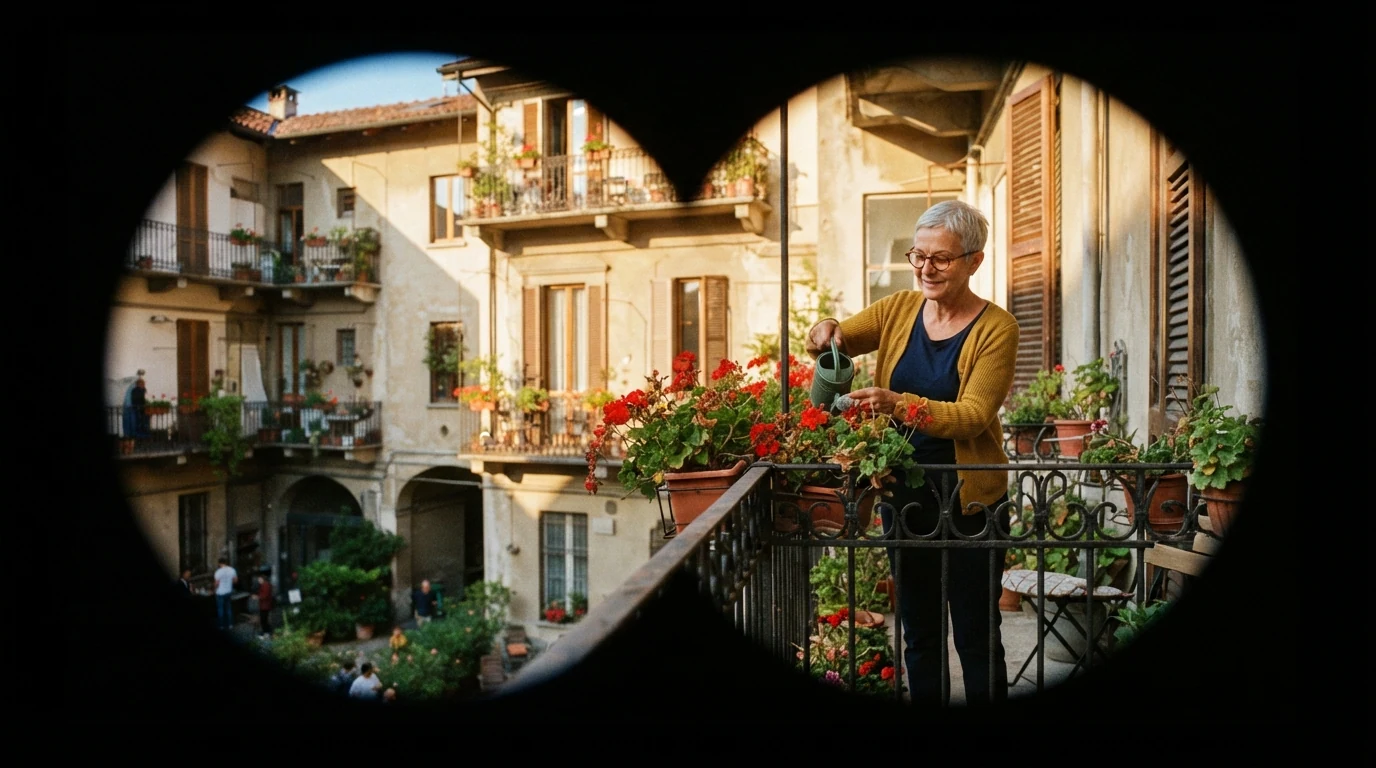
Solid black frame except for two overlapping circular openings spells out shape and surround; 60% of frame height and slightly soft edges stop it shrinking into a vignette. Long-lens compression makes the view feel distant.
Open FlashBoardsWindow masking composition: a solid black field with three separate openings. Left, a tall arched window showing a rainy night street with a yellow taxi. Center, a large circle showing a man in his forties with a red beard, a navy knitted cap and a scar through his left eyebrow, reading a letter. Right, a narrow vertical slot showing a lighthouse beam over a grey sea. Crisp hard edges.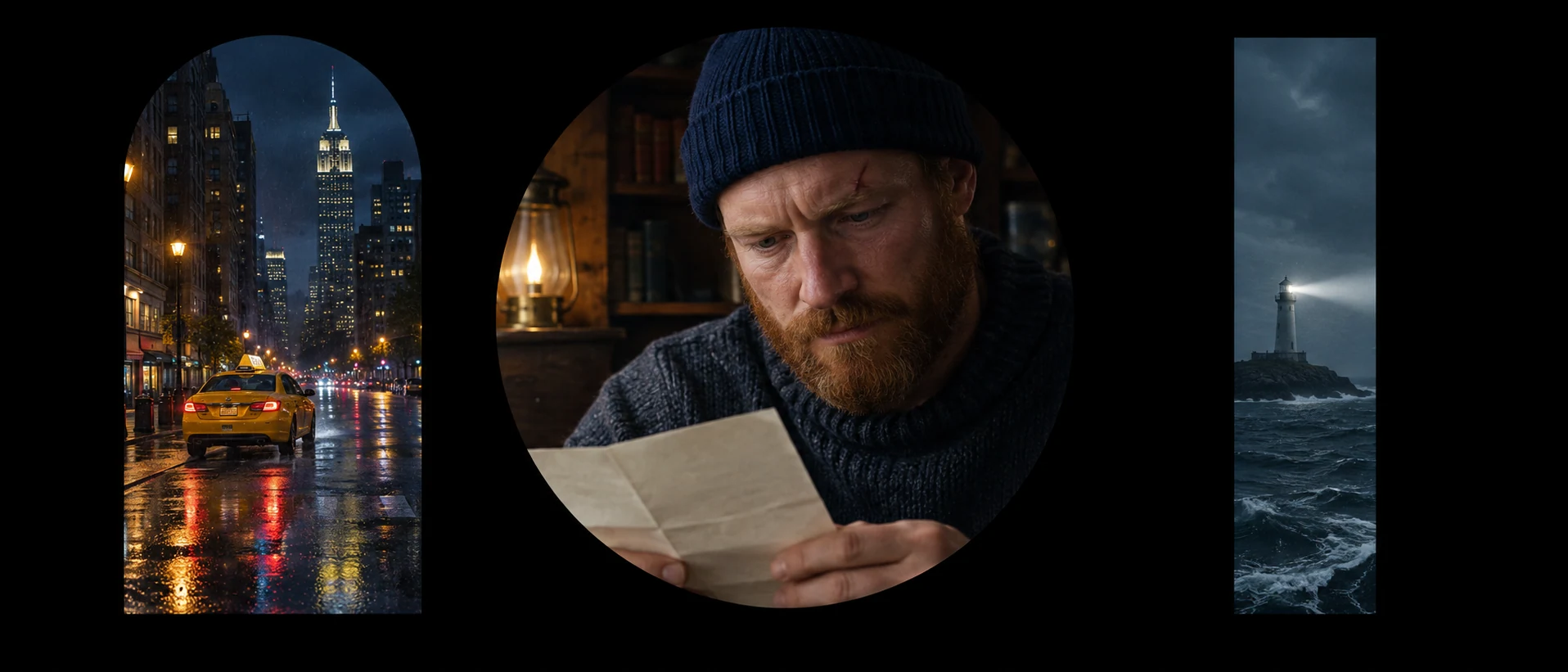
Solid black field with three separate openings forces a mask layout instead of a collage. A different shape and space per window gives the window-masking look; crisp hard edges keeps them from blending.
Open FlashBoardsCamera: handheld binocular view with a slight constant drift, panning slowly right; the two black circular openings stay locked to the frame. Action: from the first frame water pours from her can onto the red geraniums. In the middle she sets the can on the rail and turns her head. At the end she touches her glasses and looks straight across the courtyard.Openings stay locked to the frame keeps the mask fixed while the image inside moves, as real binoculars behave. Water already pouring starts motion at once; the look across the courtyard pays off the point of view.
Open FlashBoardsCommon mistakes
- Mask turns into a vignette. Say solid black outside and give the opening size and edge.
- Binoculars drawn as an object. Write binocular point-of-view shot and describe the black field.
- Mask slides in video. State that the openings stay locked to the frame.
Keep the reference frames, prompts and every generated take side by side — images and video in one canvas.
FAQ
5 questionsWhat is a mask in film?
A mask is a shape that hides part of the frame so only a chosen area shows: binoculars, a keyhole, an iris circle or a drawn window. It can be a card in front of the lens, a printer matte or a digital shape, used for point of view, reveals and local treatment.
What is masking in video editing?
It means drawing a shape on a clip or effect so it touches only part of the image. You set the shape, feather the edge, track it to movement and invert it when needed. It underlies sky replacements, local grades, object removal and mask transitions.
How does a mask transition work?
A mask transition hides the cut behind something moving through frame, such as a person crossing close to the lens. A mask follows that edge, with shot A on one side and shot B on the other. Plan both shots on set with matching direction and speed.
What is the difference between a mask and a matte?
They overlap. A matte usually means a specific composite element: a black-and-white hold-out layer, a painted background or the printing matte that blocks part of the negative. Mask is the broader word for any shape selecting the visible area; on set the two are often interchangeable.
What is an in-camera matte?
An in-camera matte is a mask placed in front of the lens during the shoot, usually black card cut to a shape in the matte box. The border is recorded with the image, so no post work is needed; the stop and focal length set how sharp the edge looks.
Related terms
2- Frame Within a FrameComposition & Framing
Frame within a frame uses a doorway, window, mirror, arch, corridor or shadow inside the shot as a second border around the subject, isolating it, adding depth or suggesting entrapment.
- Double ExposureCameras & Capture
Double exposure records two images on the same piece of film — or blends them in post — so both show through at once, often a face merging with a landscape; in camera it was the classic way to create ghosts and visions.
Further reading
Raymond Fielding, The Technique of Special Effects Cinematography. Steve Wright, Digital Compositing for Film and Video.