 FlashBoards Learn
- Learn
- Cameras & Capture
- Slit-Scan
Cameras & Capture · Film language
Slit-Scan
Also called: slit-scan photography, slit scan effect

Slit-scan is a technique that exposes an image through a narrow moving slit, so each strip of the frame records a different moment in time. Space and time get mixed in one picture: light stretches into streaking corridors and bodies bend like taffy. The Star Gate in 2001: A Space Odyssey is the classic example.
- What it does
- Gives every strip of the frame its own moment, so motion becomes stretched, sheared or streaked shape.
- Use it when
- You need a journey through space or time, a mind coming apart, or a body turned into pure motion.
- Watch out
- Without a clear anchor (a horizon, a face, a vanishing point) it reads as random glitch rather than time.
- Try this prompt
Slit-scan light corridor, one-point perspective, stretched magenta and amber streaks racing to a black vanishing point
What is slit-scan?
A normal frame records the whole picture at once. Slit-scan records it one strip at a time: light reaches the film or sensor through a thin opening while the slit, the camera or the subject moves. The left edge of the frame is captured at a different instant from the right edge.
That time difference is the effect. Static things stay recognizable; anything moving relative to the slit is rewritten.
- Streak slit-scan (analog, the 2001 kind): a long exposure per frame while the camera travels toward a slit with artwork moving behind it. Light smears into sharp ribbons receding into depth.

- Time-displacement slit-scan (digital): each row or column of the output comes from a different video frame. Bodies bend while locked-off backgrounds stay sharp.
It sits in the cameras and capture toolkit because the effect is born in how the image is recorded.
How was the Star Gate in 2001 made?
For Stanley Kubrick's 2001: A Space Odyssey (1968), Douglas Trumbull built a slit-scan machine, developing earlier experiments by animator John Whitney: a camera on a motorized track, a sheet with a thin slit in front of it, and large backlit artwork moving behind the slit.
For each frame the shutter stayed open while the camera tracked toward the slit and the artwork slid past. Every point of light was painted across the film as a streak whose angle depended on the camera's distance, building a wall of light that recedes to infinity. Two such walls around a black center line became the corridor the audience falls through.
The principle later stretched starships into warp in Star Trek: The Next Generation and drove the tunnel titles of 1970s Doctor Who.
Why do filmmakers use slit-scan?
Slit-scan shows what a normal frame can't: time as a shape.
- Passage. Hyperspace jumps, time travel. The corridor reads as impossible speed with a vanishing point to hold on to.
- A mind breaking. Stretched faces and melting limbs are a strong altered-state effect: perception loses its grip on sequence.
- Movement as sculpture. Music videos turn a dancer's arms into ribbons, a cousin of the echo print, which stacks copies instead of bending them.
It is not motion blur. Blur averages a moment into softness; slit-scan keeps edges sharp and relocates them.
How to create a slit-scan effect today
Digital time displacement is the practical route:
- Lock the camera off. Shake turns into warping; a static background makes the subject's bend readable.
- Shoot at a high frame rate. 60–240 fps gives more distinct moments per strip, so the stretch is smooth, not stair-stepped.
- Choose the scan direction. Vertical strips shear sideways motion; horizontal strips stretch jumps and falls; a radial map blooms from the center.
- Set the time span. In a compositing time-displacement filter, the gradient map sets how far back each strip reaches. 0.5–1 s across the frame looks elegant; 3–5 s liquefies people.
- Light evenly. Flicker and noise become bands.
Analog streak slit-scan still works for titles: a motion-control slider, a 1–3 mm slit in black card, a backlit print behind it, one long exposure per frame.
Slit-scan vs. time slice
Both mix moments in one image, at different scales. Time slice joins a few wide strips from a time-lapse or long-exposure series spanning hours, so a skyline runs from day to night across the frame.
Slit-scan uses hundreds of hairline strips spanning fractions of a second to a few seconds. The transition is continuous, so you see moving things change shape. Time slice shows when; slit-scan shows how something moved.
Rolling shutter is an accidental slit-scan: the sensor reads rows top to bottom, which is why propellers bend.
Slit-Scan in motion


11 clipsTwo film clips and ten loops, from the analog Star Gate to digital time displacement. Watch what stays sharp and what bends: static backgrounds hold while moving bodies stretch, shear and streak, because each strip of the frame records a different moment.

How to create a slit-scan with AI
3 promptsImage models recognize slit-scan's look rather than compute it, so describe the result physically: sharp-edged streaks, a vanishing point, bodies sheared against a sharp background. Keep all three takes on one FlashBoards board and compare them side by side.
Slit-scan light corridor, symmetrical one-point perspective, two vast vertical walls of stretched light streaks rushing toward a tiny bright vanishing point at frame center, streaks sharp-edged and ribbed like stretched film, magenta, amber and cyan bands, thin black gap through the middle, deep black background, fine film grain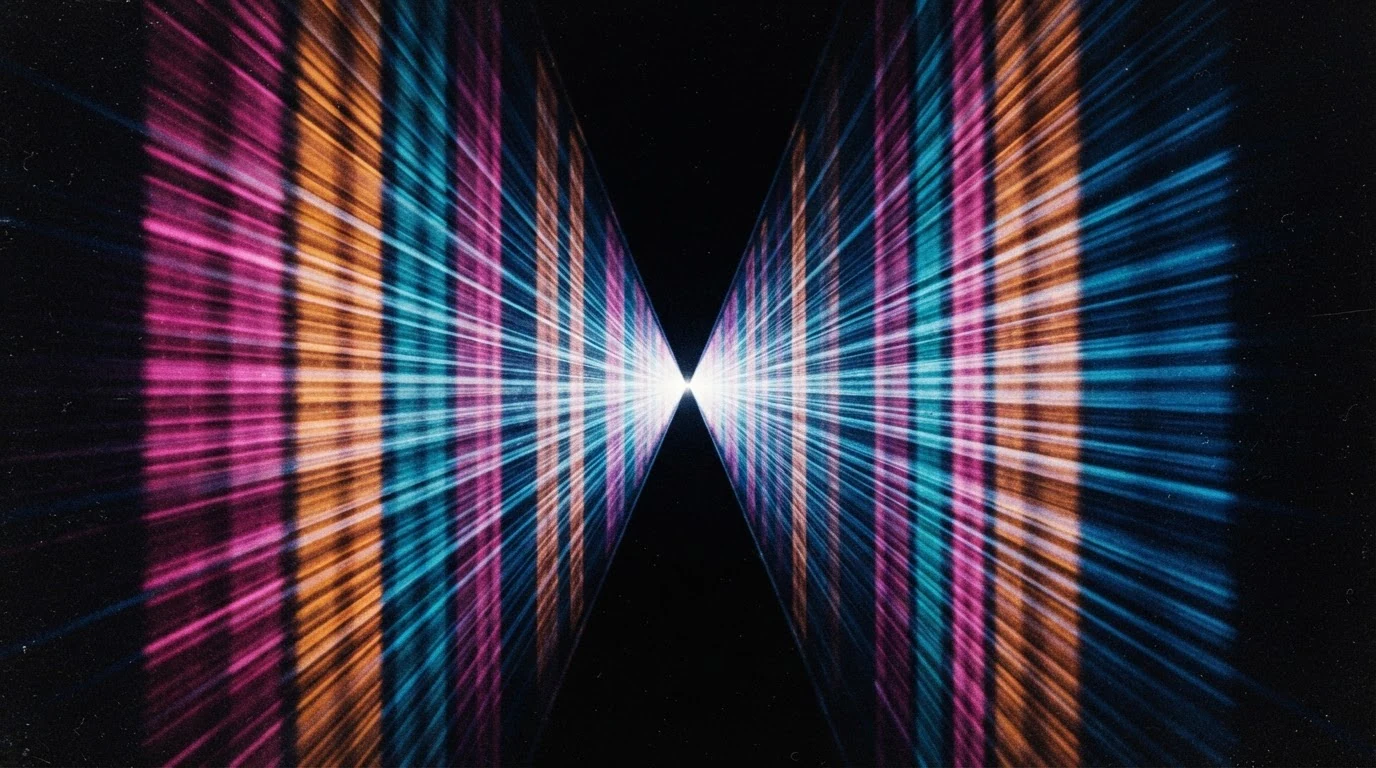
One-point perspective sets the structure; sharp-edged and ribbed like stretched film stops soft hyperspace blur. Two walls and a black gap rebuild the Star Gate layout without naming the film.
Open FlashBoardsDigital slit-scan, wide frame, time displacement: a fictional dancer in her thirties with a cropped silver bob, freckles and a rust-orange jumpsuit spins in an empty white studio; her body and arms are sheared sideways into long smooth ribbons stretching across the frame, as if each vertical column was captured a moment later than the one to its left, face partly legible, a black stool perfectly sharp, soft top light, 50mm lens, locked-off camera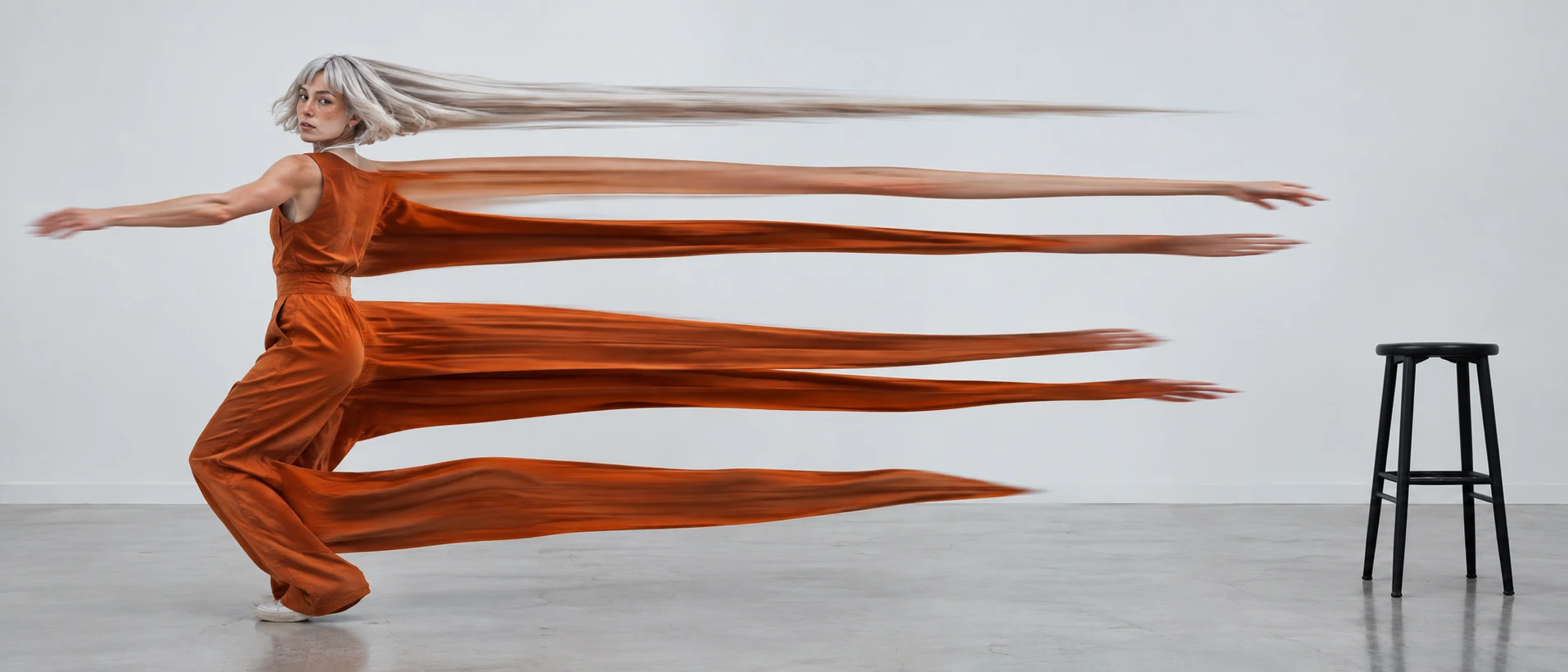
Each vertical column captured a moment later names the distortion, and the wide frame gives the ribbons room; the perfectly sharp stool and locked-off camera give the static anchor that makes the stretch read as time. Bob, freckles and jumpsuit keep the dancer fictional.
Open FlashBoardsCamera: fast forward travel along the center line straight toward the vanishing point, constant speed, no turns. Action: from the first frame the light streaks on both walls race outward past the frame edges. New magenta, amber and cyan bands keep emerging from the vanishing point and stretch as they approach. The black gap in the middle stays steady.Fast forward travel and from the first frame keep the shot alive. The action names only the walls, colors and gap already in recipe 1, so the model streams existing streaks instead of inventing stars.
Open FlashBoardsCommon mistakes
- Models default to soft blur or starfield hyperspace. Say sharp-edged streaks, ribbed like stretched film.
- Distorted people without a static anchor read as a glitch. Name one object that stays sharp.
- Video models don't do true time displacement. Generate a clean locked-off clip and apply a time-displacement filter in compositing.
Keep the reference frames, prompts and every generated take side by side — images and video in one canvas.
FAQ
4 questionsWhat is the slit scan effect?
The slit-scan effect records an image through a narrow moving slit, or builds it from strips of different video frames, so each part of the frame shows a different moment. Static things stay normal; moving things stretch, shear or streak. It is used for hyperspace corridors, time travel and psychedelic dance shots.
How was the slit scan in 2001: A Space Odyssey done?
Douglas Trumbull built a machine for the Star Gate: a camera on a motorized track moving toward a thin slit, with backlit abstract artwork sliding behind it. The shutter stayed open for each frame, so every light point painted a streak receding toward infinity. Two mirrored walls of streaks formed the corridor.
Can you do slit-scan digitally?
Yes. Shoot a locked-off clip, ideally at a high frame rate, and apply a time-displacement filter in a compositing program, or use a slit-scan camera app on a phone. Each row or column of the output comes from a different frame, so moving subjects bend while the background stays sharp.
What is the difference between slit-scan and motion blur?
Motion blur averages movement during one exposure, so moving edges turn soft. Slit-scan keeps edges crisp but moves them: each strip is a clean slice of a different moment, so shapes stretch, bend or streak with sharp outlines. That is why slit-scan looks uncanny rather than simply fast.
Related terms
3- Long ExposureLenses, Focus & Exposure
A long exposure keeps the shutter open for a long time, so still things stay crisp while anything moving — car lights, water, crowds, stars — smears into streaks and silky blur.
- Motion BlurLenses, Focus & Exposure
Motion blur is the smear a moving subject leaves when it travels during the exposure of a frame; its amount depends on shutter speed or shutter angle, and it makes movement feel smooth, fast or, when exaggerated, frantic.
- Altered State EffectPost-Production & VFX
An altered-state effect makes the image behave like a drugged, drunk or feverish mind — warped lenses, smeared motion, doubled exposures, color shifts, rubbery time — so the audience shares the character's perception.
Further reading
Douglas Trumbull, "Creating Special Effects for 2001: A Space Odyssey," American Cinematographer, June 1968. Piers Bizony, The Making of Stanley Kubrick's 2001: A Space Odyssey (Taschen).