 FlashBoards Learn
- Learn
- Formats & Exhibition
- Frame Rate
Formats & Exhibition · Film language
Frame Rate
Also called: fps, frames per second, HFR, high frame rate
Frame rate is how many frames a camera captures or a screen shows per second, measured in fps. Cinema runs at 24 fps, broadcast video at 25 or 30, and high frame rate (HFR) at 48–120 fps looks hyper-smooth. Capture faster than playback and you get slow motion; capture slower and action speeds up.
- What it does
- Sets the rhythm of motion on screen: 24 fps reads as cinema, 60 fps as live video, and the gap between capture and playback rate bends time.
- Use it when
- Choosing a project rate before the shoot, planning slow motion or fast motion, or delivering to cinema, broadcast or the web.
- Watch out
- Mixing rates on the timeline causes stutter; lights on 50/60 Hz mains can flicker at odd rates; HFR can make sets and makeup look fake.
- Try this prompt
Cinematic film still, 24 fps film look, a galloping horse on a salt flat, legs softly motion-blurred, rider sharp, low golden sun
What is frame rate?
A film is a stack of still pictures. Frame rate is how many of them pass each second, written as frames per second (fps). There are two numbers, and they don't have to match:
- Capture rate — how many frames the camera records per second.
- Playback (project) rate — how many frames per second the projector, TV or editing timeline shows.
When the two are equal, motion plays at real speed. When the camera runs faster than playback — say 120 fps shown at 24 — each second of action is stretched over five seconds of screen time. That is slow motion. Run the camera slower than playback, for example 12 fps shown at 24, and action doubles in speed: undercranking. Push the gap to extremes — one frame every few seconds — and you are in time-lapse territory.
Frame rate also sets the cadence of motion — the texture of how movement steps from frame to frame. At 24 fps a fast pan shows visible judder; at 60 fps the same pan glides. Each carries its own associations: 24 feels like a movie, 30 like television or the web, 60 like sports, news and video games.
Frame rate is one of the basic delivery specs of a film, alongside resolution and aspect ratio, and it is covered with the other exhibition standards in formats and exhibition.
Why is 24 fps the cinema standard?
Silent films had no fixed rate. Cameras were hand-cranked, typically somewhere between 16 and 20-odd frames per second, and projectionists ran prints at whatever speed suited the show — often faster than they were shot, which is one reason silent comedies look sped up today.
Synchronized sound ended that freedom. An optical soundtrack printed beside the picture only sounds right at a constant speed, so in the late 1920s the industry settled on 24 frames per second. It was a compromise: fast enough for intelligible sound and acceptably smooth motion, slow enough to keep film stock costs down. It is still the default for features, cinematic series and most commercials.
What makes 24 fps feel "filmic" is not the number alone. It is the combination of that cadence with the motion blur of a half-open shutter — the 180-degree shutter rule, 1/48 or 1/50 s per frame. Each frame smears slightly in the direction of movement, and the brain blends the smears into continuous motion.
Two details worth knowing:
- Projectors flash each frame two or three times. A film projector's shutter interrupts the light twice or three times per frame, so the audience sees 48 or 72 flashes per second. That removes flicker without adding new pictures — the motion is still 24 fps.
- 23.976 is "24" in video. Digital cinema cameras and most editing systems offer 23.976 fps, a rate that fits the North American video standard. For web, streaming and TV, 23.976 is usually what "24p" means; true 24.000 is used for cinema (DCP) delivery. Pick one at the start and keep it.
24 vs 30 vs 60 fps: common frame rates and what they look like
Most footage you'll meet sits on a short list of rates, set by history and by the electricity grid:
| Rate | Where it comes from | How it reads | |---|---|---| | 24 / 23.976 fps | Sound film, digital cinema | The "movie look": slight judder, natural blur | | 25 fps | PAL/SECAM TV in 50 Hz countries (Europe, much of Asia, Africa) | Nearly identical to 24 | | 29.97 / 30 fps | NTSC TV in 60 Hz countries (Americas, Japan), web video | Slightly smoother, reads as TV, vlog or news | | 48 fps | HFR cinema | Smooth, very clear, divisive on fiction | | 50 / 59.94 / 60 fps | Live broadcast, sports, games, phone video | Hyper-real, "you are there" | | 96–240+ fps | High-speed capture | Played back at 24 or 30 as slow motion |
24 vs 30. The difference is subtle on a talking head and obvious on a fast pan or a running figure: 30 fps has less judder and less blur per frame, so it feels closer to live video. That's why narrative filmmakers shooting for the web still choose 24, while streamers, sports and many YouTube formats shoot 30 or 60.
Why 25 in Europe? Early TV locked its field rate to mains electricity to avoid hum bars — 50 Hz gave 25 frames (50 interlaced fields), 60 Hz gave 30. When color arrived in North America, the rate was nudged to 29.97 for technical compatibility, and that odd number has stuck ever since.
Converting between them. Showing 24 fps films on 50 Hz television was traditionally done by simply running them at 25 — about 4% faster, with the pitch rising unless corrected. On 60 Hz systems, 24 frames are spread across 60 fields with a repeating 3:2 pattern ("pulldown"), which adds a faint stutter to pans. Modern TVs add their own layer: motion smoothing invents in-between frames, turning 24 fps films into the glossy "soap opera effect" many cinematographers ask viewers to switch off.
High frame rate (HFR) movies
High frame rate means capturing and projecting above 24 fps — the extra frames are used for smoother, sharper motion, not for slow motion. The idea is older than digital: in the 1950s the Todd-AO widescreen process launched at 30 fps, and in the late 1970s effects artist Douglas Trumbull developed Showscan, 70mm film at 60 fps, which he found gave audiences a stronger sense of presence. Neither replaced 24 in theaters.
Digital projection revived HFR, almost always paired with 3D, where extra frames reduce strobing and eye strain:
- The Hobbit: An Unexpected Journey (2012), dir. Peter Jackson, was released in 48 fps 3D in selected theaters — the first wide HFR release, and a lightning rod for the debate.
- Billy Lynn's Long Halftime Walk (2016) and Gemini Man (2019), both dir. Ang Lee, were shot at 120 fps in 3D, aiming for extreme clarity and intimacy with faces.
- Avatar: The Way of Water (2022), dir. James Cameron, used HFR selectively in some scenes, switching between 48 and 24 fps within the film in HFR presentations.
Why it divides audiences. HFR removes most of the blur and judder that people have learned to read as "a movie". Motion becomes crystal clear — and so do sets, wigs, prosthetics and CGI. Many viewers describe it as looking like live TV, a making-of video or a video game. Others find action and 3D far easier to follow. The practical lesson: HFR is not a free upgrade. It changes production design, makeup, VFX workload and data volume, and it only reaches audiences through projectors and screens set up for it.
For most productions, the smarter use of high frame rates is at capture: shoot 48, 60 or 120 fps and play it back at 24 for slow motion, or keep the extra frames for speed ramps in the edit.
How to choose and shoot a frame rate
Decide in this order: delivery, look, then capture.
- Set the project rate from the delivery. Cinema and most narrative work: 23.976 or 24. Broadcast in 50 Hz countries: 25. Live events, sports, gaming, some social content: 30, 50 or 60. Everything else on the timeline gets conformed to this rate.
- Pick capture rates per shot. Real-time shots match the project rate. Slow motion shots are multiples: 48 fps for a gentle 2×, 96–120 for 4–5×, 240+ for water, fire, debris. A camera's high-speed modes often cost resolution or sensor area — check before you promise 4K at 240.
- Set shutter with frame rate. Keep roughly a 180-degree shutter: 1/50 s at 24–25 fps, 1/60 at 30, 1/120 at 60, 1/240 at 120. Every doubling of frame rate halves exposure, so high-speed shots need about one stop more light per doubling — 120 fps needs over two stops more than 24.
- Watch the lights. Fixtures running on AC mains pulse at 100 or 120 Hz. Shoot at a rate that doesn't divide cleanly into that pulse and cheap LEDs, fluorescents and practical bulbs will flicker — worst at high speed. Test the practicals, use flicker-free lights, or pick a safe shutter.
- Plan the look deliberately. Lower capture rates with a repeated frame give a stuttering, smeared feel — the step printing look Wong Kar-wai and DP Christopher Doyle used in Chungking Express (1994). Animation often runs "on twos" (12 drawings per second inside 24 fps) — Spider-Man: Into the Spider-Verse (2018) mixes ones and twos to give characters distinct rhythms.
Slow motion is the frame-rate effect audiences feel most. The opening blast of The Hurt Locker (2008) plays in extreme slow motion, grit lifting off a car body as the shock wave passes — time stretched to show what the eye never sees in real life.
In FlashBoards, write the frame-rate plan onto the board itself: a note beside each storyboard panel ("120 fps, played at 24"), slow-motion reference clips next to the shots they inspire, and AI test clips grouped by cadence so the director sees which moments stay real-time and which bend time before the camera package is booked.
Frame rate vs. shutter speed
The two get confused because both are fractions of a second, but they control different things.
- Frame rate is how many pictures are taken per second. It sets smoothness, cadence and — when capture and playback differ — the speed of time on screen.
- Shutter speed is how long each picture is exposed. It sets brightness and how much motion blur every single frame carries. On cine cameras it's usually expressed as shutter angle.
Frame rate caps shutter speed: at 24 fps you cannot expose a frame longer than 1/24 s. Within that limit, you can change the shutter without touching the frame rate. A narrow shutter at 24 fps — used in the Omaha Beach landing of Saving Private Ryan (1998) and countless action scenes since — keeps the movie cadence but strips the blur, so explosions, sand and debris look crisp and staccato. A wide shutter smears movement into a dreamy trail. Neither changes the speed of the action; only the relationship between capture and playback rate does that.
Rule of thumb: frame rate chooses time, shutter chooses texture. Choose the frame rate for playback speed and cadence, then set the shutter for the texture of the motion.
Frame Rate in motion
4 clipsNone of these clips is slowed down or sped up: each runs at the ordinary cinema cadence of about 24 frames per second. Watch whatever moves fastest, a wiper blade, a hand, a figure crossing the lens, the background in a pan, and notice the soft smear and slight stepping that 24 fps gives motion, the look that 60 fps would smooth away.
How to create a frame rate with AI
4 promptsImage models make single frames, so frame rate shows up in two places: in the stills, as motion blur (24 fps cinema) or frozen detail (high-speed capture), and in the video, as cadence and slow motion. Start with a crisp high-speed frame, make a 24 fps contrast take, then animate the first frame as slow motion. Keep the takes and your reference clips side by side on one FlashBoards board to judge the motion. The fourth prompt re-shoots a real film shot from a text description alone, and the original plays next to the result so you can compare.
Cinematic film still, medium shot, 50mm lens, camera at chest height. A young line cook with a shaved head, a thin gold hoop in his left ear and a burn-scarred forearm tosses vegetables from a black steel wok in a cramped restaurant kitchen at night. High-speed camera look, shot at 120 fps: sliced red peppers, bok choy leaves and droplets of oil hang in the air above the wok, each piece crisp and frozen, a tongue of orange flame curling up from the burner. Steam, stainless steel behind him, warm tungsten key light from the left, deep shadows.
Shot at 120 fps and each piece crisp and frozen describe what high-speed capture does to a single frame: very short exposures, no smear. Listing the airborne objects gives the video in recipe 3 something to move slowly.
Open FlashBoardsAnamorphic widescreen film still, wide shot, 40mm lens, camera low near the ground. A rider in her fifties with a long gray braid, a weathered brown duster coat and a red scarf gallops a dark bay horse across a white salt flat at sunset. 24 fps cinema look with a 180-degree shutter: the horse's legs and the flying coat tails softly motion-blurred, the rider's face and the distant mountains sharp. Low golden sun behind, long shadows, dust kicked up behind the hooves, 35mm film grain.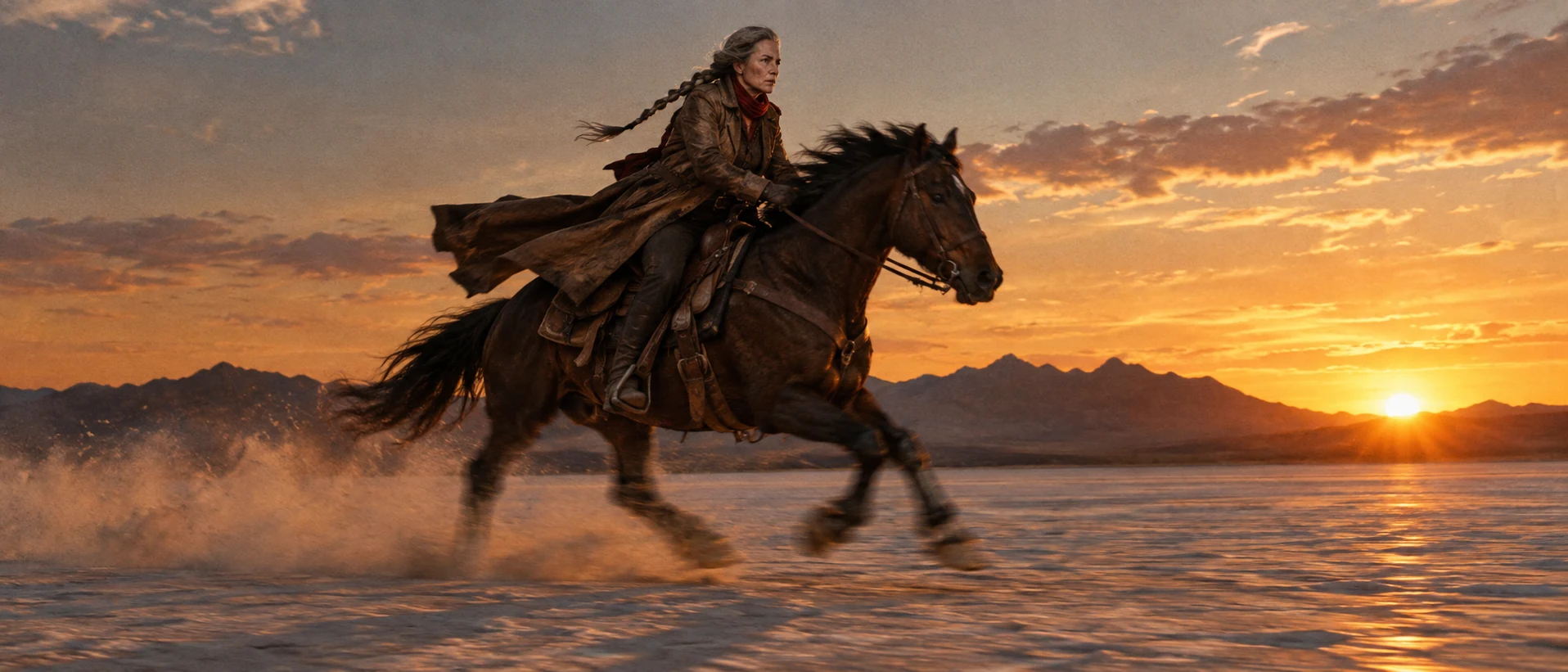
The contrast take. 24 fps cinema look plus the split between what blurs (legs, coat tails) and what stays sharp (face, mountains) produces the familiar feature-film motion, where recipe 1 freezes everything.
Open FlashBoardsCamera: locked-off medium shot at chest height, holding still for the whole clip. Action: extreme slow motion, as if filmed at 120 fps and played at 24 — the vegetables and oil droplets are already in the air, rising slowly above the wok, turning over one by one. The flame rolls lazily upward and folds in on itself. The pieces peak, hang for a moment, then drift back down into the wok as the cook's wrist tilts the pan to catch them. Steam curls slowly past his face.Already in the air makes the clip alive from the first frame, and as if filmed at 120 fps and played at 24 names the frame-rate gap. Rolls lazily, drift and hang keep every movement slow and consistent.
Open FlashBoards{
"output": "Full-screen live-action shot from its very first frame: one continuous shot, a remake of a moment from J. Edgar (2011), shot on 35mm at 24 frames per second with a 180-degree shutter, so every movement carries soft natural motion blur and the gentle stepping cadence of cinema. Dim period government office, cool gray daylight through venetian blinds behind her, one warm desk lamp, deep shadows, desaturated steel-green and ivory palette, scope widescreen.",
"characters": {
"S1": {
"name": "Helen Gandy, played by Naomi Watts",
"look": "slim woman, blonde shoulder-length hair set in soft 1940s waves, ivory silk blouse with a large pussy-bow at the throat, dark tailored jacket with a small round brooch on the lapel, dark skirt",
"voice": "silence: she says nothing"
}
},
"shots": [
{
"shot": 1,
"camera": "starts low at waist height close to her, then pulls back steadily while tilting up to her face and panning right to follow her; ends locked off on a closed office door with a frosted glass panel. Anamorphic lens feel, shallow focus, handsome film grain",
"action": [
"BEGINNING: alive from the first frame, S1 is already walking straight toward camera between a dark wooden desk on the left of frame and a tall window with venetian blinds on the right; only her skirt, jacket hem and loose hands are in frame, her hands swinging softly with the step.",
"THEN: she keeps walking toward camera at an even pace; the camera backs away and tilts up past the ivory pussy-bow blouse and the brooch, a lit desk lamp with a pleated shade glowing behind her on the left of frame.",
"THEN: her face rises into frame, a medium close-up: lips slightly parted, eyes fixed ahead just past the camera, face composed and tight; a framed landscape picture hangs on the dark wall behind her on the left.",
"THEN: she turns her head and shoulders toward the right side of frame and the camera pans right with her; her eyes drop down and to the right, toward the door edge, as she reaches out with her arm on the right of frame.",
"THEN: a dark wooden door frame slides into view from the left as the pan continues; she stands at the right edge of frame, head lowered, and swings the door toward the camera.",
"THEN: the frosted glass panel of the door sweeps across the frame from left to right and pushes her out of view at the right edge; the door shuts.",
"END: the camera holds still on the closed door: pale frosted glass crossed by dark wooden bars fills the frame; behind the glass her blurred dark silhouette moves slowly from the right toward the centre and stays there, a soft shadow."
],
"dialogue": [],
"voice": "silence: nobody speaks in this shot, no voice at all"
}
],
"sound": {
"ambience": "quiet office room tone, her heels on a wooden floor, the soft click of the door latch",
"speech": "no words in this video; the only human sounds are breaths and movement",
"never_spoken": "no narration and no voice-over: the descriptions, performance notes and step words of this prompt are never spoken aloud",
"music": "a film score under the scene, always below the voices: a slow, somber solo piano with soft low strings",
"subtitles": "none"
}
}Remakes the office exit from J. Edgar (2011), dir. Clint Eastwood, DP Tom Stern: the walk toward a retreating camera, the tilt up to the face, the pan right and the frosted door closing on her silhouette, all at 24 fps cadence.
Frame rate lives in the output line: 24 frames per second with a 180-degree shutter and soft natural motion blur ask for cinema cadence rather than the glassy 30 or 60 fps look video models drift toward. The action steps keep every move from the original (walk, tilt, pan right, closing door) so the blur has something to fall on.
Common mistakes
- Numbers alone do nothing. "48 fps" or "120 fps" in an image prompt barely changes the result; describe the visible outcome: frozen droplets, blurred legs.
- Everything frozen by default. Image models lean toward fast-shutter photography. For a 24 fps cinema frame, name what should blur and in which direction.
- Slow motion that stalls. If the video starts from a static moment, the model may just drift in on a still. Start mid-action and give every object a slow path.
- Mixed speeds. Models sometimes play the cook in real time while the food floats. Put the whole scene under one speed: "everything in extreme slow motion".
- Frame rate of the file. Generated clips come out at the model's own frame rate. Check it and conform the clip to your project rate in the edit rather than trusting the timeline to guess.
Keep the reference frames, prompts and every generated take side by side — images and video in one canvas.
FAQ
6 questionsWhat is frame rate in film?
Frame rate is the number of still frames a camera records or a projector shows each second, measured in frames per second (fps). Feature films are shot and projected at 24 fps, TV and web video at 25 or 30, and live sports or games at 50–60. Recording faster than the playback rate creates slow motion; recording slower speeds action up.
24 fps vs 30 fps vs 60 fps: which should I use?
Use 24 (or 23.976) fps for a cinematic look: narrative films, music videos, branded films. Use 25 or 30 fps when delivering to broadcast in those regions or for vlogs, interviews and news-style content. Use 60 fps for sports, gaming and fast live action where clarity matters more than the film look — or shoot 60 and play at 24 for gentle slow motion.
Why do movies use 24 fps?
When synchronized sound arrived in the late 1920s, film needed one constant speed for the soundtrack to play correctly. Twenty-four frames per second was fast enough for clear sound and smooth-looking motion while keeping film stock costs manageable. Audiences have since learned to read 24 fps cadence, with its natural motion blur, as the look of cinema.
What is HFR (high frame rate)?
HFR means shooting and projecting above 24 fps, typically 48, 60 or 120 fps, so motion looks smoother and sharper. Notable releases include The Hobbit: An Unexpected Journey (48 fps, 2012) and Ang Lee's Gemini Man (120 fps, 2019). Many viewers find HFR looks like live video, which is why it remains rare in feature films.
Does a higher frame rate mean better quality?
No. A higher frame rate gives smoother motion and less blur, but not more detail per frame, and it changes the look toward live video. It also needs more light, storage and processing. The right frame rate depends on delivery and intent: 24 for a film look, higher rates for sports, games or for slow motion.
What is the soap opera effect?
The soap opera effect is the ultra-smooth, video-like motion you see when a TV's motion smoothing setting invents extra frames between the real ones. It turns 24 fps films into something resembling high-frame-rate video. Many filmmakers recommend switching it off (often called motion interpolation or a brand-specific name) to see films as they were shot.
Related terms
5- Shutter SpeedLenses, Focus & Exposure
Shutter speed is how long each frame is exposed to light; on cine cameras it is often set as a shutter angle, and it controls both brightness and how much blur movement leaves.
- Slow MotionCameras & Capture
Slow motion stretches time on screen: the camera records at a higher frame rate than playback — for example 120 fps played at 24 — so action unfolds several times slower, used for spectacle, violence, grief or to reveal what the eye normally misses.
- UndercrankingCameras & Capture
Undercranking shoots at a lower frame rate than playback — for example 12 fps played at 24 — so action runs faster than life on screen, used for slapstick, frantic chases and punchier action.
- 180-Degree Shutter RuleCameras & Capture
The 180-degree shutter rule sets the shutter speed to roughly double the frame rate — 1/48 or 1/50 s at 24 fps — which gives the natural motion blur audiences associate with cinema; breaking it makes movement stuttery (narrow shutter) or smeary (wide shutter).
- Step PrintingPost-Production & VFX
Step printing repeats each frame several times (often from footage shot at a low frame rate), producing smeared, stuttering motion — the signature look of Chungking Express.
Further reading
Society of Motion Picture and Television Engineers (SMPTE) standards for film and video frame rates; American Cinematographer Manual (ASC Press), chapters on camera speed and shutter angle.