 FlashBoards Learn
Editing · Film language
Split Screen
Also called: split-screen, multi-image, multiscreen

Split screen divides one frame into two or more panels, each showing a different shot at the same time. Instead of cutting between a caller and the person on the other end, or between two parallel actions, the film lets the viewer watch both at once and compare them.
- What it does
- Shows two or more spaces, times or points of view in one frame, so the viewer compares them live.
- Use it when
- Both sides of a moment matter at the same instant: a phone call, a chase and its target, expectation against reality.
- Watch out
- Mismatched eyelines, horizons and head heights make the panels feel pasted together instead of connected.
- Try this prompt
Split-screen film frame, thin black vertical line down the center, left: woman on a phone at a rainy booth facing right, right: old man on a phone at a kitchen table facing left, matched eye height
What is split screen in film?

A split screen divides the image into panels, and each panel carries its own shot. The classic form is two vertical halves separated by a thin line, but panels can be unequal, boxed over a full-frame shot, or multiplied into grids (multi-image or multiscreen).
A cut replaces one image with the next; a split screen keeps both on screen, so meaning comes from comparison inside the frame. That makes it a spatial cousin of juxtaposition. Unlike a screen within the screen, the division isn't an object in the set: it belongs to the edit, one of the most graphic tools in film editing.
Why do filmmakers use split screen?
Phone calls. Pillow Talk (1959) put its two leads in opposite panels of a shared phone line, and When Harry Met Sally (1989) splits the frame so Harry and Sally watch the same late movie in separate beds.

Suspense. Brian De Palma made the device a signature. In Sisters (1972) and the prom sequence of Carrie (1976) he runs two views of one crisis side by side, so cause and effect land in one glance.
Comparison and irony. The "Expectations vs. Reality" scene in 500 Days of Summer (2009) plays the party Tom imagines next to the one he gets. Annie Hall (1977) puts Alvy's and Annie's therapy sessions in one frame, so the same fact becomes two opposite complaints.
Form as the whole film. Timecode (2000) runs four continuous takes in four quadrants, Vortex (2021) stays split almost start to finish, and Hulk (2003) slides panels like a comic page.
How to shoot a split screen
- Frame for the panel. Half of 16:9 is nearly square (8:9). Mark it in the monitor and compose inside it.
- Face the characters toward the divide. Left panel looks screen right, right panel looks screen left.
- Match lens and height. Same focal length (40–50mm on Super 35 suits most singles), same camera height, eyes on one horizontal line.
- Choose the divider. A 2–8 px black or white bar reads as a graphic split; no bar reads more fluid.
- Shoot 4K or more for an HD finish so each panel can be reframed in post.
- Lead with sound. The mix tells the audience which panel to watch first.
Keep the divider fixed unless its movement means something, like a wipe that opens a second panel.
Frame division: splits without a visible line
Frame division splits the frame into zones with no drawn border: images meet edge to edge, often along a natural line such as a door frame or wall corner. Music videos use it for collage-like layouts of floating boxes on black.
The same invisible seam puts one actor in the frame twice, as with the twins in The Parent Trap (1961) and Adaptation (2002). Lock the camera, keep exposure identical and keep performers off the seam.
Match split: two halves that read as one image


A match split lines the panels up so they continue each other: the horizon runs straight through the divide, a street carries on from left to right, two half-faces form one face. The eye reads one image first, then notices two places or times. Shoot both halves from the same position, height, lens and tilt, and match the horizon to the pixel. It is the spatial version of a match cut.
Split screen vs. cross-cutting
Cross-cutting alternates between parallel actions over time, so the editor controls what we see and every cut away is a small cliffhanger. Split screen shows both at once and lets the audience choose where to look.
Cross-cut when withholding builds tension. Split when seeing both sides is the tension, like a threat approaching while its target keeps talking.
Split Screen in motion



11 clipsWatch the lines between panels: where they fall, whether they move, and how each side answers the other. The examples run from steady two-way splits to shifting grids and match splits that build one face out of two.
How to create a split screen with AI
3 promptsImage models can compose a split screen in one generation if you describe the layout first and each panel second. Keep reference frames, takes and the video on one FlashBoards board to compare eyelines and horizons before animating.
Split-screen film frame divided down the middle by a thin black vertical line. Left panel: a woman in her late 30s with a cropped silver-dyed bob, freckles and a mustard wool coat, in a rain-streaked phone booth at night, receiver at her right ear, facing screen right, medium close-up, 50mm, orange sodium light. Right panel: a heavyset man in his 60s with a white handlebar mustache and burgundy cardigan at a kitchen table under a green-shaded lamp, corded phone at his left ear, facing screen left, medium close-up. Both faces at the same eye height, 35mm film grain.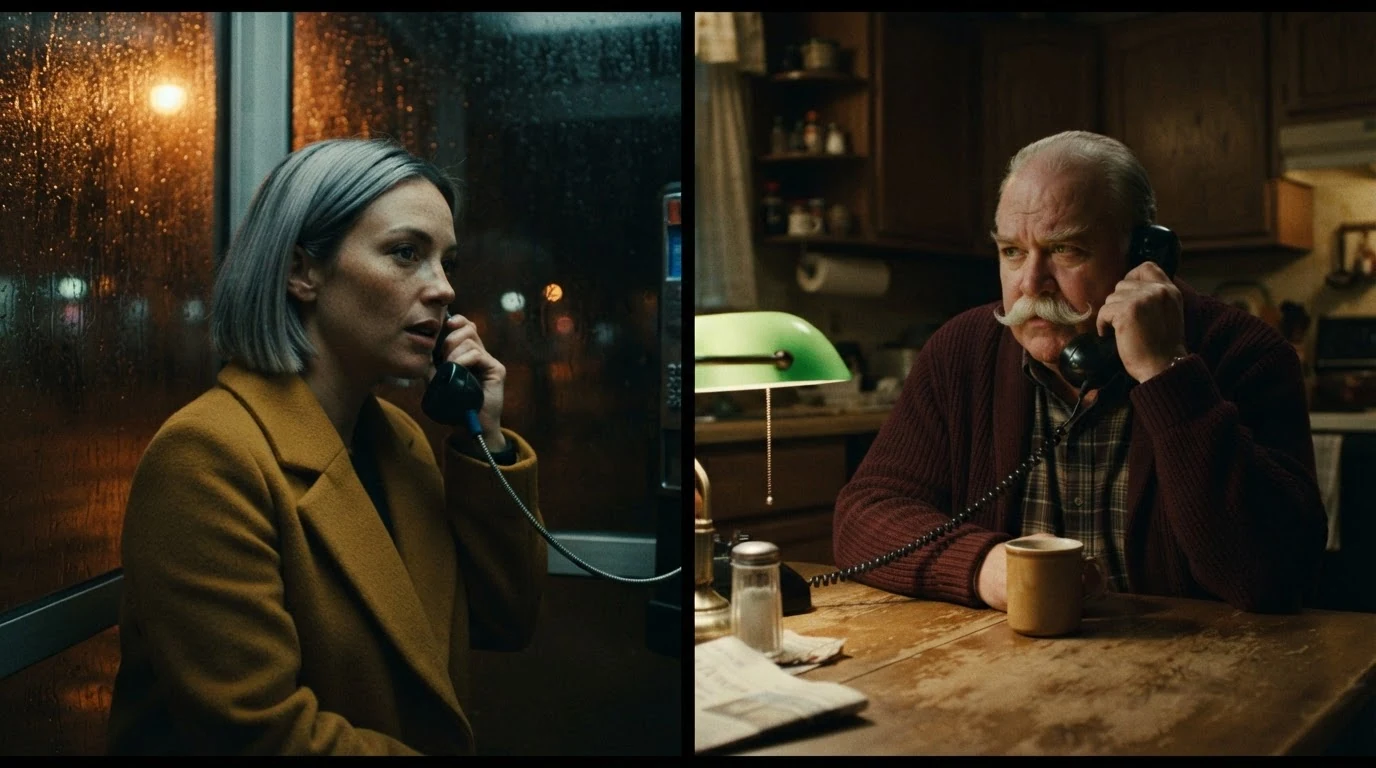
Naming the line first fixes the layout. "Facing screen right / left" builds the eyeline link, and "same eye height" balances the panels.
Open FlashBoardsMatch split frame, 21:9, divided in the center by a hairline white seam. The same small-town main street from the same camera position in both halves: left half at noon with hard shadows and a red pickup, right half at night under wet neon and blue streetlights. Curb, road markings and rooftops continue straight across the seam. Camera at 1.5 m, 35mm, level horizon.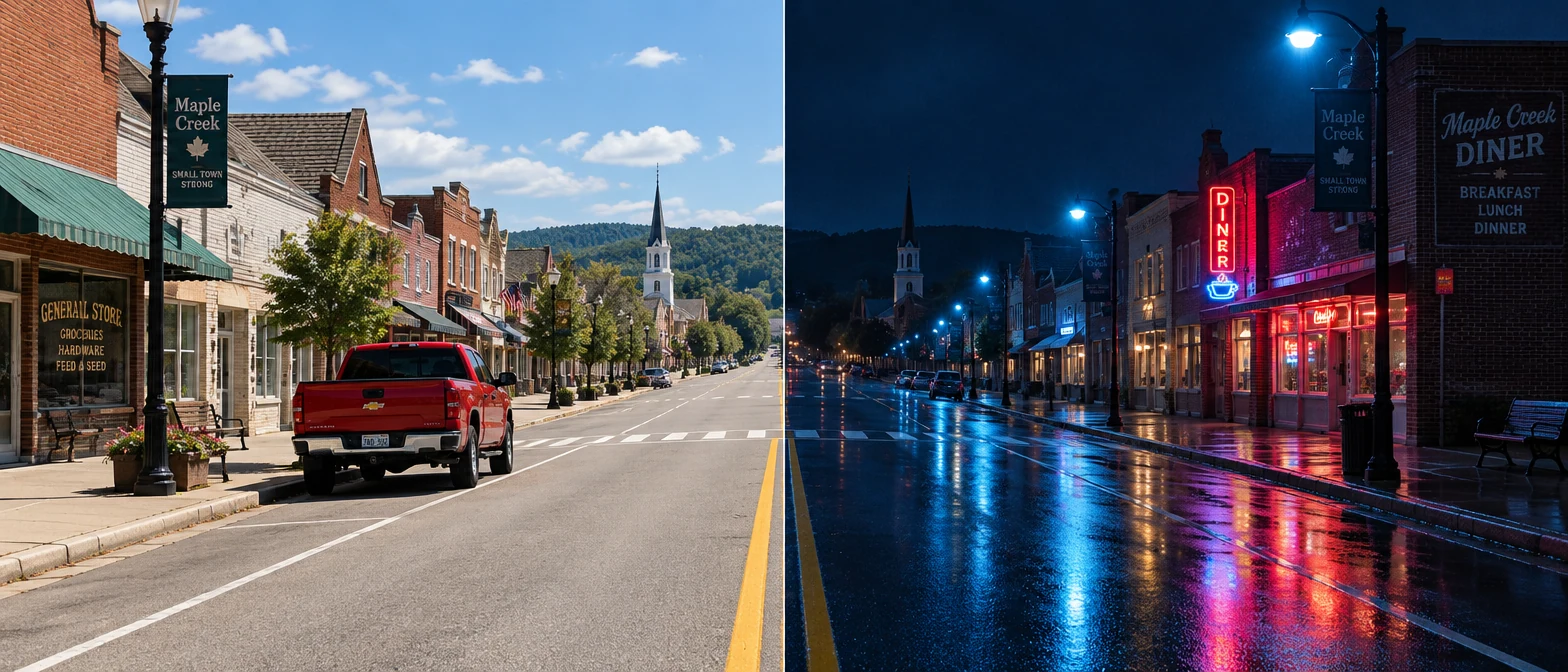
"Same camera position" and the list of lines that must continue across the seam turn two images into one street.
Open FlashBoardsCamera: both panels are locked-off static shots; the thin black line stays fixed in the center. Action: From the first frame rain runs down the booth glass and the woman on the left talks fast into the receiver, shifting her weight. On the right the man listens, lowers his eyes and presses his free hand on the table. At the end she leans her forehead on the glass while he slowly nods.A fixed line keeps the layout from drifting, motion from the first frame keeps the shot alive, and parallel beats make the panels answer each other.
Open FlashBoardsCommon mistakes
- Panels merge into one scene: start with the layout and name the divider.
- Both characters face the camera: write "facing screen right" and "facing screen left".
- Scales or eye heights differ: ask for the same shot size and eye height.
- In video the line slides: state it stays fixed and each panel is static.
Keep the reference frames, prompts and every generated take side by side — images and video in one canvas.
FAQ
5 questionsWhat is a split screen in film?
A split screen divides the frame into two or more panels, each showing a different shot at the same time. It is used for phone calls, parallel actions and comparisons. The audience compares both images directly instead of waiting for a cut.
Which directors are known for split screen?
Brian De Palma is the name most tied to it, from Sisters (1972) to Carrie (1976). Mike Figgis built Timecode (2000) from four simultaneous panels, Ang Lee used comic-style panels in Hulk (2003), and Gaspar Noé kept Vortex (2021) split almost throughout.
What are good split screen effect examples?
Classic examples: the phone calls in Pillow Talk (1959) and When Harry Met Sally (1989), "Expectations vs. Reality" in 500 Days of Summer (2009), the therapy scene in Annie Hall (1977), the quadrants of Timecode (2000) and season two of Fargo (2015).
Is split screen the same as cross-cutting?
No. Cross-cutting alternates between actions over time, one shot after another, so the editor controls what you see. Split screen shows them in one frame at the same moment, so the viewer decides where to look.
How do you make a split screen look natural?
Plan it before shooting. Frame for the panel's shape, keep the same lens and camera height on both sides, put eyes on one horizontal line and turn characters toward the divide. Keep the divider thin and consistent.
Related terms
2- Cross-CuttingEditing
Cross-cutting alternates between two or more lines of action happening in different places, usually at the same time, so each strand builds tension or meaning against the other.
- JuxtapositionEditing
Juxtaposition places two contrasting images side by side — in one frame or across a cut — so their collision creates a meaning neither has alone.
Further reading
David Bordwell and Kristin Thompson, Film Art: An Introduction (McGraw-Hill).