 FlashBoards Learn
Editing · Film language
Wipe Transition
Also called: wipe transition, iris wipe, clock wipe
A wipe transition replaces one shot with the next by a moving edge that travels across the frame: a straight line, a sweeping clock hand, a closing circle or a body passing the lens. Unlike a cut, the change is visible and has direction, so the audience feels the story moving sideways to somewhere new.
- What it does
- Swaps one shot for the next behind a moving edge, so the change of place or storyline is openly announced.
- Use it when
- You jump between parallel storylines or locations and want a playful, storybook rhythm instead of a hidden cut.
- Watch out
- Wipes date fast and read as comic or retro if the rest of the film cuts invisibly.
- Try this prompt

Side-on tracking shot at waist height, a dark concrete pillar in the extreme right foreground about to sweep across the lens
What is a wipe transition?
A wipe is one of the classic film transitions: the incoming shot is revealed behind an edge that moves across the screen until it has replaced the outgoing shot. Neither picture moves, only the boundary. That separates it from a push (one image slides out, the next slides in) and a flip, which are different transitions.
On film, wipes were built in an optical printer with traveling mattes. Today every editing app ships them as presets, but the principle holds: a moving mask decides which shot shows at each point of the frame. The wipe is an editing device, yet the best ones are planned on set.
Types of wipes: line, clock, iris and natural
- Line (edge) wipe. A straight border crosses the frame horizontally, vertically or diagonally: the "Star Wars wipe".
- Clock wipe. A radius sweeps around the center like a clock hand. It reads as time passing.
- Iris wipe. A circle closes to a point (iris out) or opens from one (iris in), a staple of silent cinema.
- Shape wipe. Stars, blinds, checkerboards. Mostly TV and comedy now.
- Natural wipe. A pillar, a passing body or a hand crosses the lens and the editor changes shots behind it, close kin to the seamless transition.
A wipe that stops halfway and holds both pictures is no longer a transition but a split screen.
Why do filmmakers use wipes?
A cut hides itself; a wipe shows its hand and says meanwhile, elsewhere. George Lucas built Star Wars (1977) on wipes, borrowing them from Akira Kurosawa's samurai films such as Seven Samurai (1954) and from 1930s adventure serials. They move the story briskly between planets and storylines without pretending nothing was skipped.
Wipes also carry direction: left to right feels like turning a page forward, and an edge that follows a character carries their momentum into the next scene. In comedy the self-awareness becomes the joke, as in Edgar Wright's body wipes.
How to shoot and cut a wipe
In the edit. Start at 12–20 frames at 24 fps; shorter flickers, longer drags. Move the edge with the on-screen motion. A hard edge looks graphic and retro; a 10–30 pixel feather softens it. Don't let the edge slice through a face.
On set, for a natural wipe:
- Place a dark occluder (pillar, doorframe, extra in dark clothes) within a meter of the lens.
- Use a 24–35mm lens so it crosses in 4–8 frames.
- Truck or pan past it at steady speed; start the incoming shot behind a matching dark edge, same direction and speed.
- Keep the occluder underexposed and both horizons at one height.
Wipe vs. dissolve
A dissolve blends two shots over the whole frame, overlapping them in time; it is soft and suggests time passing or a link between ideas. A wipe divides the frame in space: at any point you see the old shot or the new one, never both. That makes it crisp and directional, better for jumping between places or parallel storylines than for easing across time. To end a chapter instead, use a fade to black.
Wipe Transition in motion




4 clipsEvery loop here is a natural wipe: something dark crosses close to the lens, fills the frame for a few frames, and a new shot is waiting behind it. Watch the direction of the sweep and how the incoming shot picks up the same motion.
How to create a wipe transition with AI
3 promptsVideo models generate continuous shots, so the most reliable AI wipe is a natural one: a foreground object sweeps across the lens and leaves a dark frame to cut on. Keep both shots, the mid-wipe frame and timing notes on one FlashBoards board.
Side-on medium wide shot of a covered night market walkway, camera at waist height, 28mm lens, a thick dark concrete pillar in the extreme right foreground, out of focus and nearly black, covering the right fifth of the frame; a fictional woman in her thirties with a shaved head, gold hoop earrings and a mustard raincoat walks left to right past lantern-lit food stalls, wet reflective floor, cinematic still, film grain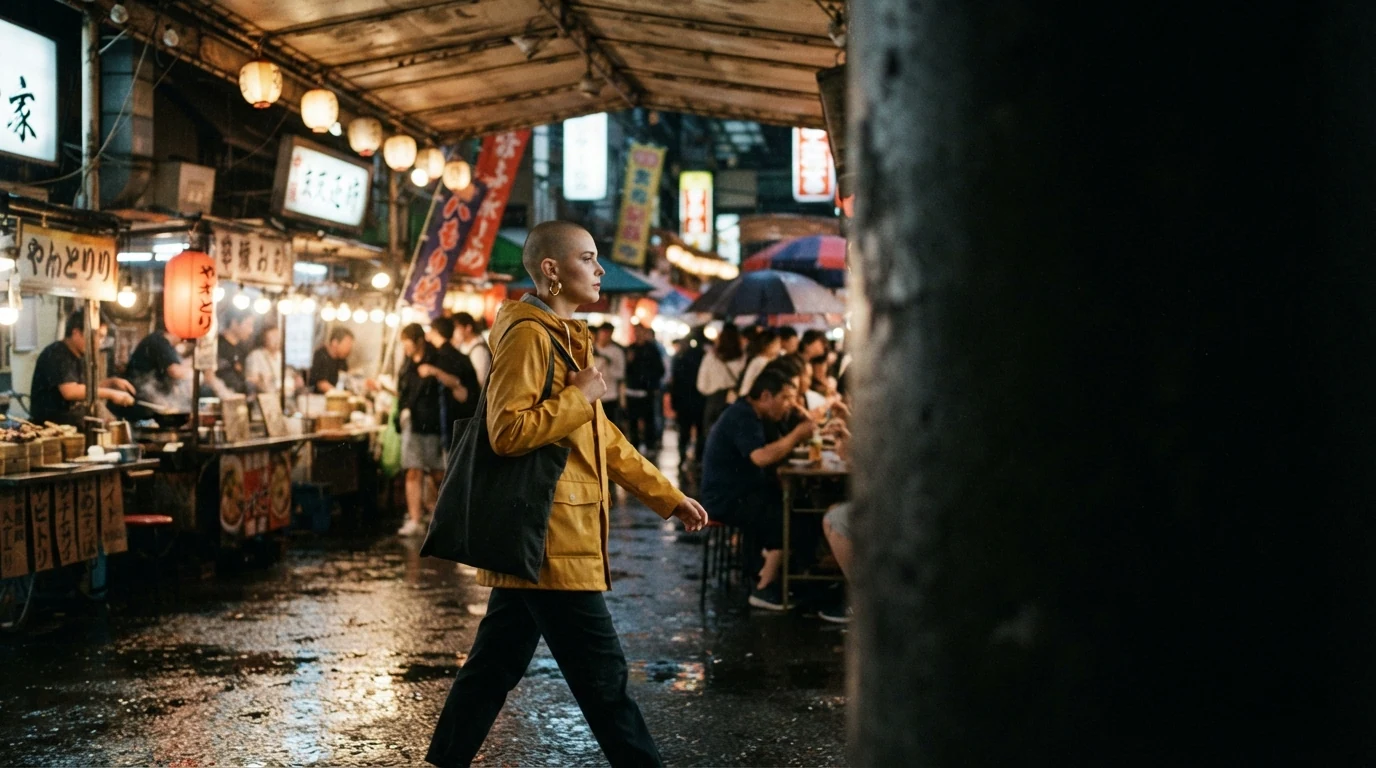
Extreme right foreground, nearly black and covering the right fifth place the occluder where a rightward move will pull it across the lens. Walks left to right sets the wipe's direction; the 28mm at waist height keeps the pillar big.
Open FlashBoardsA film frame caught exactly halfway through a horizontal line wipe: a razor-sharp vertical edge down the center, both halves fully opaque. Left half: a desert canyon at noon, orange rock, a small figure in a white hooded robe. Right half: a steel corridor lit by blue ceiling strips, a fictional heavyset older mechanic with a round face, a bushy white beard, thick-rimmed glasses and a teal work jumpsuit at a console. Anamorphic widescreen, 1970s adventure film look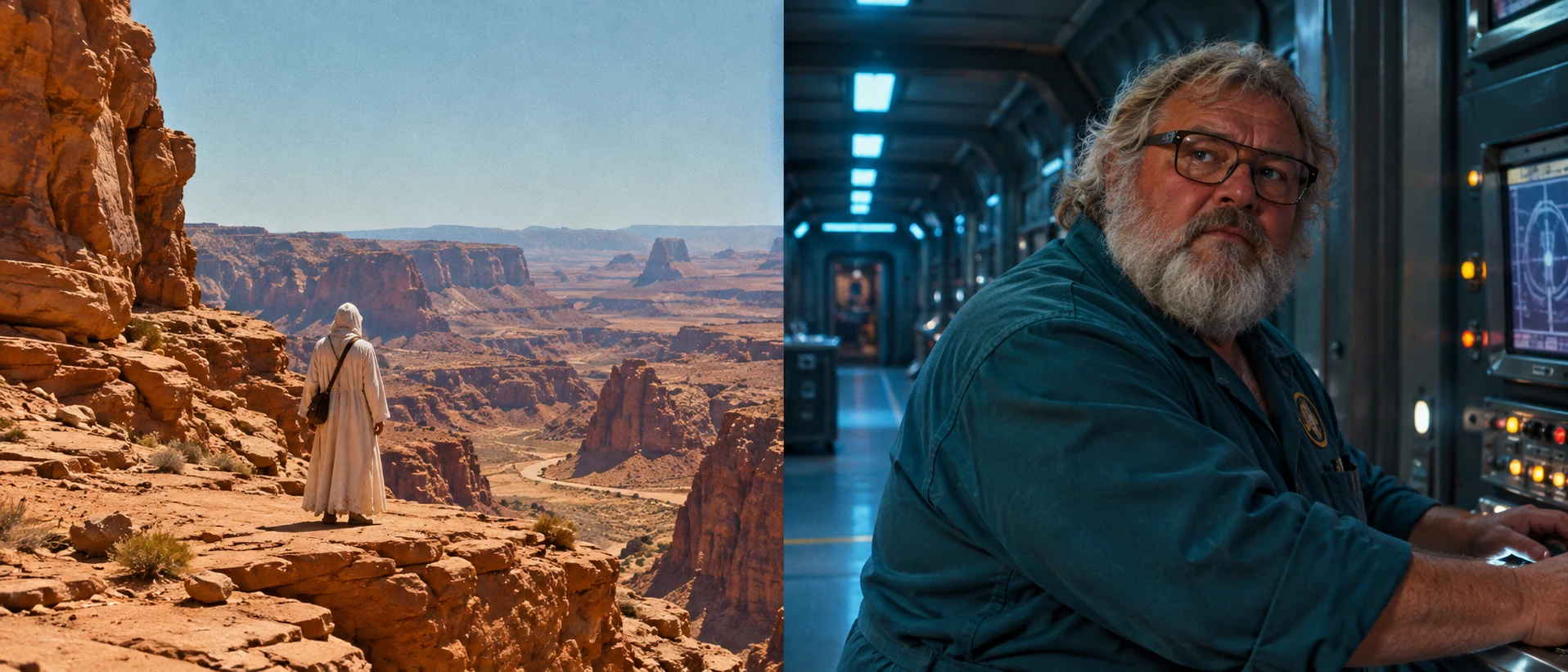
The wipe itself, not its setup. Razor-sharp vertical edge and both halves fully opaque prevent a double-exposure blend; warm desert against cold steel makes the edge read.
Open FlashBoardsCamera: trucks right at a steady walking pace from the first frame, level and smooth, keeping the woman centered. Action: the woman in the mustard raincoat is already walking left to right past the lantern-lit stalls. The dark pillar in the right foreground slides leftward across the lens and fills the whole frame with black for a moment. The camera clears the pillar and she reappears in the center, still walking, lanterns glowing on the wet floor.Trucks right from the first frame keeps the shot alive; fills the whole frame with black gives the editor frames to cut on. Only elements from recipe 1 are named, so nothing new appears.
Open FlashBoardsCommon mistakes
- The pillar barely moves. Put it in the "extreme foreground" and write "fills the whole frame" in the video prompt.
- Blend instead of wipe. Ask for "both halves fully opaque".
- Direction flips between shots. State the direction in both prompts and compare frames on the board.
- The character changes behind the occluder. Reuse one short description.
Keep the reference frames, prompts and every generated take side by side — images and video in one canvas.
FAQ
5 questionsWhat is a wipe transition in film?
A wipe transition replaces one shot with another by moving an edge across the frame: a straight line, a rotating clock hand, a closing circle or a real object passing the lens. Unlike a cut or a dissolve, it is visible and directional, openly signaling a jump elsewhere.
Why does Star Wars use wipes?
George Lucas used wipes throughout Star Wars (1977) as a nod to Akira Kurosawa's samurai films and to 1930s adventure serials. They give the saga its brisk, storybook rhythm, moving between planets and parallel storylines while openly acknowledging each jump instead of hiding it inside a cut.
What is an iris wipe?
An iris wipe uses a circle as the moving edge. In an iris out the circle shrinks around a detail until the frame goes black or reveals the next shot; an iris in opens from a point. Common in silent films, it now reads as a retro or cartoon touch.
What is a clock wipe?
A clock wipe reveals the next shot behind a line rotating around the center of the frame, like a clock hand sweeping a full circle, so it suggests time passing. Most editing apps include it as a preset; around 20 frames at 24 fps keeps it readable without dragging.
How long should a wipe transition be?
Most wipes work between 12 and 20 frames, about half a second to just under a second at 24 fps. Under 8 frames the edge flickers; past a second it drags. Natural wipes are shorter: a pillar or body crosses the lens in 4 to 8 frames.
Related terms
5- DissolveEditing
A dissolve blends one shot into the next: the first fades out while the second fades in over the same frames, briefly overlapping — often to mark passing time or link two ideas.
- FadeEditing
A fade gradually brings the picture up from black (fade in) or takes it down to black or another colour (fade out), marking the start or end of a scene or a big jump in time.
- Film TransitionsEditing
Transitions are the ways one shot or scene gives way to the next — the plain cut, dissolve, fade, wipe, match cut and hidden or stylised moves like whip and mask transitions.
- MaskPost-Production & VFX
A mask blocks or isolates part of the frame with a shape — an iris circle, a binocular or keyhole outline, a hand-drawn window — in front of the lens, in an optical printer or in compositing, to limit what we see, reveal a second image or treat one area separately.
- Seamless TransitionEditing
A seamless transition hides the cut inside matching motion, a camera move, a dark object crossing the lens or a shared shape, so two shots play as one continuous action.
Further reading
Walter Murch, In the Blink of an Eye (Silman-James Press). Ken Dancyger, The Technique of Film and Video Editing (Focal Press).