 FlashBoards Learn
Editing · Film language
Match Cut
Also called: graphic match, graphic match cut, match transition

A match cut joins two different shots through something they share: a shape, a movement, a composition or a sound. The bone that becomes a spacecraft in 2001: A Space Odyssey is the textbook case. Because the eye carries the matched element across the cut, the viewer reads a link between two places, times or ideas.
- What it does
- Carries a shape, movement or sound across a cut, so two unrelated shots feel connected and the jump in time or place reads as meaning.
- Use it when
- You need to leap across years or locations in one beat, rhyme two characters or ideas, or turn a transition into a statement.
- Watch out
- If the matched element changes position, size or direction across the cut, the match collapses into an ordinary hard cut.
- Try this prompt
Low angle against a pale overcast sky, a round brass compass spinning in midair, centered in the upper middle of the frame, 35mm, empty sky around it
What is a match cut?
A match cut is a cut where the outgoing and incoming shots share a strong visual or aural element, lined up so it seems to pass straight through the edit. The two shots usually show different subjects, places or times. What makes it a match is that one thing stays constant while everything around it changes.
The canonical example is in 2001: A Space Odyssey (1968). An early hominid throws a bone into the air; as it tumbles against the sky, Kubrick cuts to a long white spacecraft drifting in orbit. Similar shape, similar screen position, and the cut skips millions of years in one frame. The bone and the spacecraft are the same thing: tools.
Match cuts come in a few families, and the strongest combine two or more:
- Graphic match (shape transition). A similar outline sits in the same place in frame: a round lid becomes a moon.
- Match motion. A movement with the same direction and speed continues across the cut while the subject changes.
- Compositional match. The whole arrangement repeats: the same table, the same blocking, the same center framing, years apart.
- Sound or dialogue match. A line started in one scene is finished in another. In Citizen Kane (1941), Thatcher wishes the young Kane a merry Christmas, and the next shot, years later, completes it with "and a happy New Year."
- Conceptual match. The link is an idea, closer to juxtaposition, but still anchored by a shared visual.
In film editing terms, a match cut is a hard cut. Handled with a dissolve, the same idea becomes a match dissolve: in Psycho (1960), the water spiraling down the shower drain dissolves into Marion's eye.
Why do filmmakers use match cuts?
A regular cut asks the viewer to accept a change. A match cut asks them to compare. That is why the device shows up at the most important joins in a film.
To jump through time or space in one beat. In Lawrence of Arabia (1962), Lawrence blows out a match, and David Lean cuts straight to the sun rising over the desert. Two bright points on dark fields: the cut takes us from a cramped office to the open desert and announces the scale of what is coming, without a line of dialogue.
To state an idea. The 2001 cut is an argument about technology. In Un Chien Andalou (1929), a thin cloud slicing across the moon is matched with a razor slicing an eye, and the rhyme is what makes the image unbearable.
To move the plot fast, with a wink. The Graduate (1967) cuts Benjamin from launching himself onto a pool raft at his parents' house to landing on Mrs. Robinson in a hotel bed, compressing a whole summer into one gesture.
To smooth a jarring change. Because the eye is locked onto the matched shape, the cut nearly disappears, the same principle as a seamless transition, used openly instead of hidden.
A match cut is a strong spice. One or two can define a feature; a dozen in a row turn into a montage of tricks that means nothing.
Graphic match and shape transition
A shape transition, also called a graphic match cut, links two shots through a similar outline in the same place in the frame. The subjects can be unrelated: an eye and a camera lens, a coin and a full moon, a drain and a pupil. What must match is geometry.
Three things make a graphic match land:
- Position. The shape sits at the same point of the frame in both shots. A shift of even 10% of frame width reads as a jump.

- Size. The shape occupies roughly the same area. When the real objects differ wildly in scale, fix it with lens and distance: a long telephoto on a distant moon and a 35mm lens close to a coffee lid can make both fill the same slice of frame.
- Contrast and silhouette. A dark shape on a light field should cut to a dark shape on a light field. Tone matters more than color; a black-and-white preview of both frames tells you instantly whether the match holds.
Isolation helps. The cleanest graphic matches put one shape against an empty background (sky, water, a plain wall, black), because the eye has nothing else to track. Busy frames match through dominant lines: a horizon, a row of columns.
A graphic match is a visual rhyme, and it works best when the two shapes also mean something together. A circle cut to a circle is a trick; a wedding ring cut to a prison peephole is a story.
Match motion: carrying movement across the cut
A match-motion cut carries the direction and speed of a movement from one shot into the next, so two different subjects or places feel joined by one gesture. A hand throws something upward, and in the next shot a different object keeps rising at the same speed.
It is related to, but not the same as, match on action. Match on action continues the same movement of the same subject from another angle within one scene. Match motion continues a similar movement with a different subject, usually across a jump in time or place.
How to make the motion match:
- Keep screen direction. If the thrown object moves left to right and upward, the incoming object must too.
- Match speed at the cut point. The easiest point is the apex of a throw or the middle of a turn, where motion briefly slows and the eye is most forgiving.
- Keep the moving element in the same part of the frame. Match motion is still a graphic problem; the object has to hand off from the same spot.
- Let the camera be the moving element. A whip pan, tilt or push-in that continues across the cut can join two places even when nothing inside the frame moves.
North by Northwest (1959) ends on a classic match-motion joke: Roger Thornhill pulls Eve up the face of Mount Rushmore, and the cut continues the same pull as he lifts her into an upper berth on a train.
How to plan and shoot a match cut
Match cuts are designed on paper and protected on set, rarely found by accident in the edit.
Board both halves together. Draw frame A and frame B side by side on the storyboard, mark the matched element with the same box in both and write the cut point ("apex of throw," "flame goes out") under them.
Shoot the harder half first. Usually one half is fixed by reality: a real moon, a landscape, a stunt. Shoot it, save a still and use it as the target for the other half.
Overlay on the monitor. Load frame A as a 50% onion-skin overlay and line up frame B against it. Match position within a few percent of frame width and match size by moving the camera, not by scaling in post, which softens the image.
Match camera height, angle and lens family. If shot A looks up at the sky from knee height, shot B should look up too. Mismatched perspective makes the eye notice the camera change instead of the continuity of shape.
Match light direction and exposure. A bright shape on a dark field keeps that relationship; if A is lit from the left, light B from the left.
Shoot handles. Give the editor at least a second on both sides of the planned cut point and, with movement, several takes at slightly different speeds.
Use sound. A match cut is stronger with a sound that bridges or rhymes: the hiss of a match, a scream that becomes a train whistle, as in Hitchcock's The 39 Steps (1935). A sound bridge that starts under shot A and ends under shot B glues the images even tighter.
Match cut vs. match on action (and jump cut)
These three get confused because they all cut between similar-looking shots.
| | Match cut | Match on action | Jump cut | |---|---|---|---| | Subjects | Different subjects, places or times | Same subject | Same subject | | What carries over | Shape, motion, composition or sound | One continuous action | Framing, while time skips | | Is the cut noticed? | Yes, the viewer is meant to compare | No, it hides inside the motion | Yes, it feels like a skip | | Typical job | Link ideas, leap time or space | Keep a scene continuous | Compress time, create unease |
A match on action is a continuity tool: a door opens in a wide shot and finishes opening in a close-up, and you never notice the edit. A match cut is a meaning tool: it wants you to register both shots and see the connection. A jump cut keeps the same subject and roughly the same framing but removes a slice of time, so the cut itself shows.
The borders are soft. The Graduate raft-to-bed cut continues an action like a match on action but changes place and time like a match cut, which is why it is filed under match cuts. If the cut wants to be read rather than hidden, it is a match cut.
Match Cut in motion




8 clipsWatch the moment of the cut: a shape, line or movement keeps its place in the frame while everything around it changes. Circles are the most common link here, alongside matched rows, poses and strides.
How to create a match cut with AI
3 promptsA video model renders one continuous shot, so a match cut is built from two generations designed to share one element in the same place in frame. Generate the outgoing frame, write the incoming prompt with the same position, size and angle, then animate the half that carries the motion. Keep both frames and the clip on one FlashBoards board to stack the silhouettes side by side and pick the cut point before you edit.
Cinematic low-angle shot looking up at a pale overcast sky, a round antique brass compass with a cracked glass face spinning in midair, the compass centered in the upper middle of the frame and about one sixth of the frame width, a woman's hand with a thin silver ring on the index finger and a frayed navy wool cuff just released it at the bottom right edge, empty sky around the compass, soft diffused daylight, 35mm lens, shallow depth of field, muted cool palette, 35mm film grain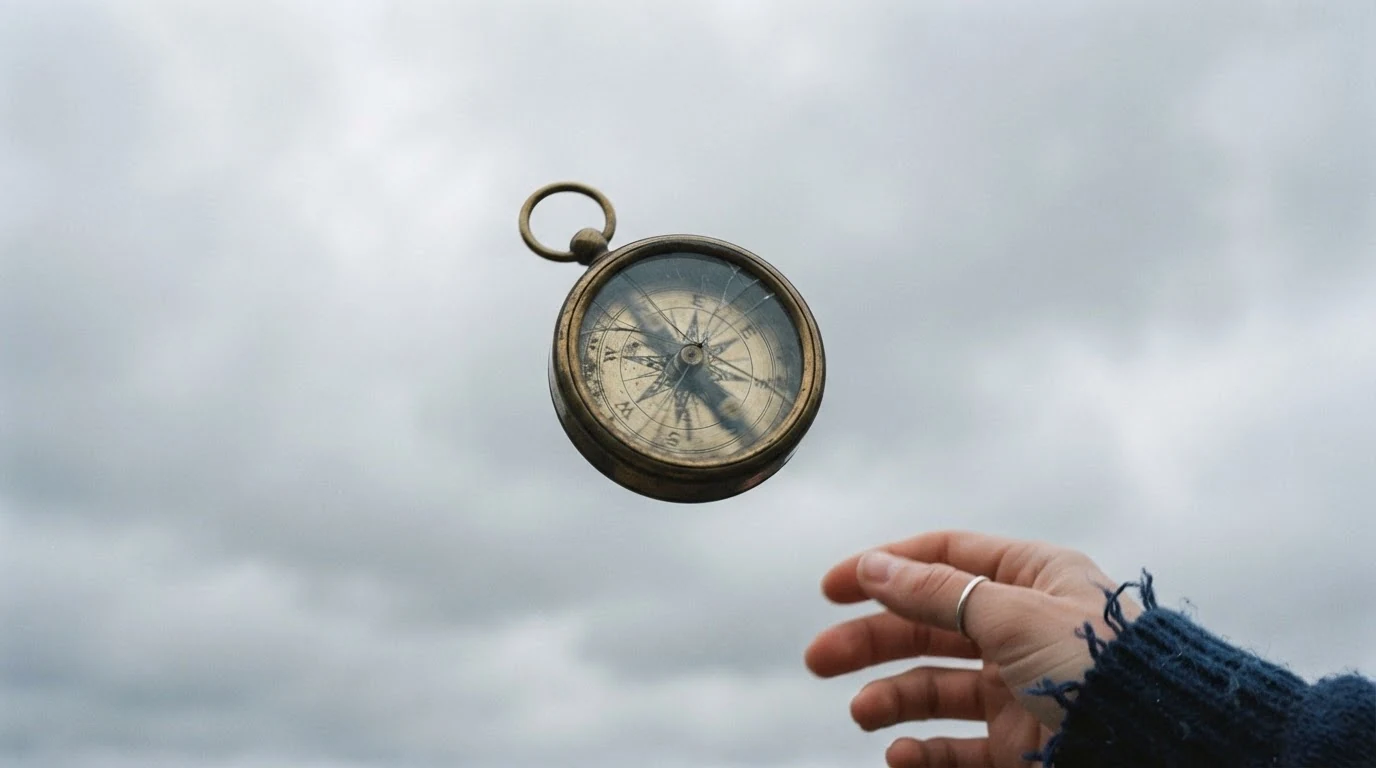
Centered in the upper middle and about one sixth of the frame width fix the two things a graphic match depends on: position and size. Empty sky around the compass isolates the silhouette the way the 2001 bone is isolated. Low-angle looking up sets a perspective you will repeat in the second half, and the hand that just released it puts motion into the still for the video.
Open FlashBoardsCinematic low-angle shot looking up at a deep blue night sky, a full pale moon with soft gray craters centered in the upper middle of the frame and about one sixth of the frame width, thin wisps of cloud drifting past its lower edge, the rooftop edge of an old stone bell tower in dark silhouette along the bottom right corner, nothing else in the sky, cool moonlight, 600mm telephoto lens, crisp detail, muted cool palette, 35mm film grain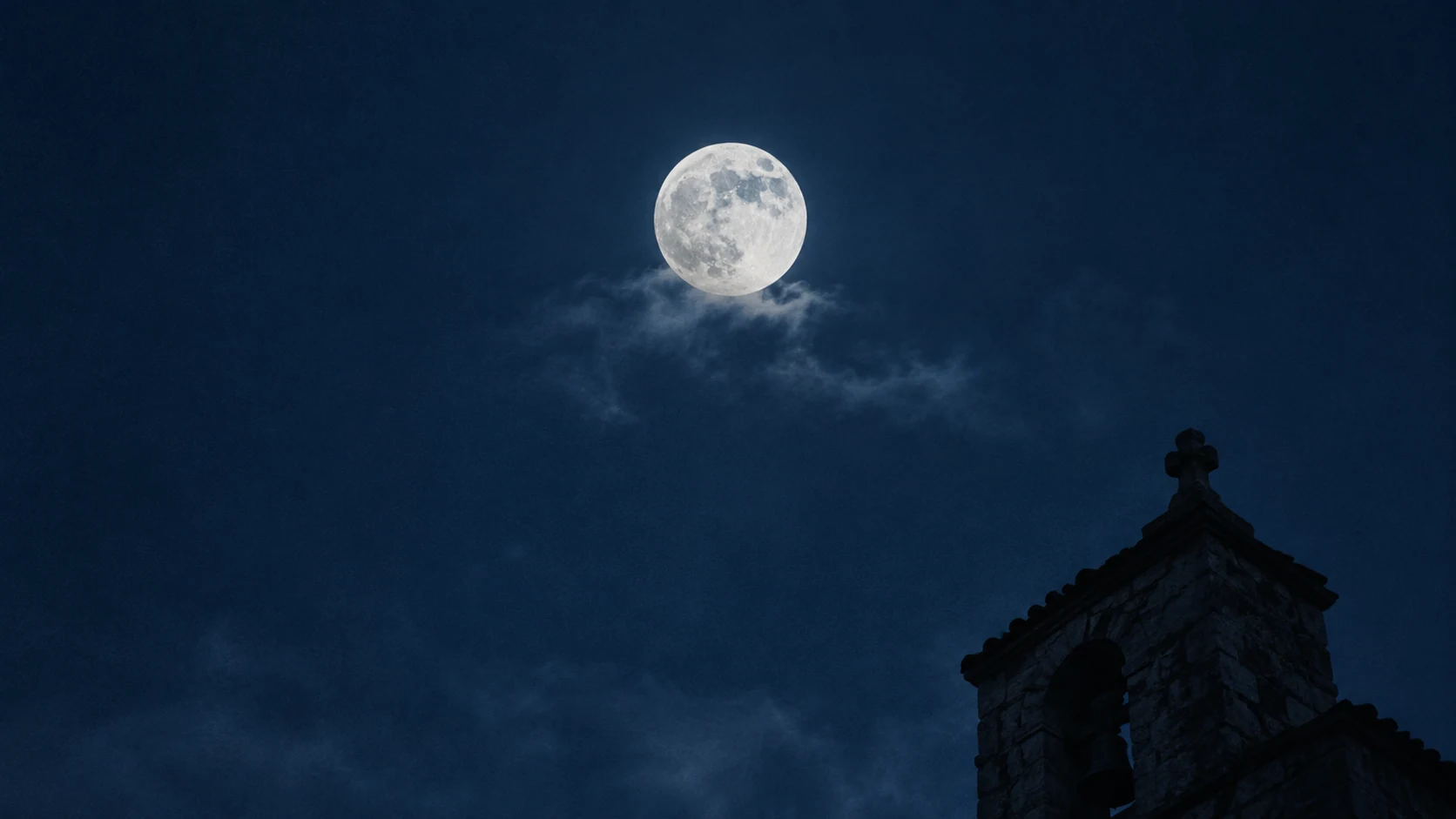
The incoming half. The prompt repeats the placement words (centered in the upper middle, about one sixth of the frame width, low-angle looking up) so the moon lands where the compass was, and the bell tower silhouette in the bottom right corner replaces the hand to keep the balance identical. 600mm telephoto is what makes a real moon that large in frame; stating it stops the model from drawing a small dot.
Open FlashBoardsCamera: locked off at a low angle looking up, completely still for the whole shot. Action: the brass compass is already rising and spinning fast from the first frame, the hand drops out of the bottom right corner. The compass slows as it climbs, turns its round glass face toward the lens and hangs almost still at the center of the upper middle of the frame against the gray sky. Then it starts to fall back down slowly while still turning.Already rising and spinning from the first frame keeps the shot alive instead of slowly pushing in on the still. Hangs almost still at the center of the upper middle writes an apex into the action: that is your cut point, where speed is lowest and the round face matches the moon. Locked off keeps the compass in place. In the edit, cut from the apex to the moon frame.
Open FlashBoardsCommon mistakes
- The shape drifts. Image models recenter or shrink objects. Repeat the placement words in both prompts and compare the two frames stacked on the board before animating.
- The angle changes between halves. State camera height and direction ("low angle looking up") in both prompts, word for word.
- Extra objects break the silhouette. Birds, strong clouds or buildings compete with the matched element. Describe what IS there ("empty sky around the compass") and keep everything else at the frame edges.
- Motion runs the wrong way. Write the screen direction ("moving left to right") in both shots; otherwise it is random.
- No usable cut point. Constant speed leaves nowhere to cut. Write an apex or pause into the action ("hangs almost still").
Keep the reference frames, prompts and every generated take side by side — images and video in one canvas.
FAQ
5 questionsWhat is a match cut in film?
A match cut is an edit between two different shots that share a strong element: a shape, a movement, a composition or a sound. The editor lines that element up so it seems to pass through the cut, and the viewer reads a link between the two scenes. The best-known example is the bone that becomes a spacecraft in 2001: A Space Odyssey (1968).
What is a graphic match cut?
A graphic match cut links two shots through a similar outline in the same place in the frame, like a circle that becomes a moon. The objects can be unrelated; what must match is geometry: the position, size and contrast of the shape. It works best when the two shapes also mean something together.
What are famous match cut examples?
The bone-to-spacecraft cut in 2001: A Space Odyssey (1968), the blown-out match that becomes a desert sunrise in Lawrence of Arabia (1962), the cloud and moon matched with a razor and an eye in Un Chien Andalou (1929), and Benjamin's jump onto a pool raft that lands him in a hotel bed in The Graduate (1967).
What is the difference between a match cut and match on action?
Match on action continues the same movement of the same subject from a new angle within one scene, and it is meant to be invisible. A match cut connects different subjects, places or times through a shared shape, motion or sound, and it is meant to be noticed, because the viewer should compare the two shots and read the connection.
How do you make a match cut?
Design both halves together. Put the matched element in the same position and at the same size in both frames, keep camera angle and light direction consistent and, for movement, keep screen direction and speed. On set, overlay frame A on the monitor while framing frame B. In the edit, cut where motion is slowest, such as the apex of a throw.
Related terms
6- Match on ActionEditing
Match on action cuts in the middle of a movement — a door opening, a punch, a glass raised — and continues it in the next shot from another angle, so the cut hides inside the motion.
- Jump CutEditing
A jump cut joins two shots of the same subject from nearly the same angle, so time visibly skips forward and the cut itself becomes noticeable — used for energy, unease or elapsed time.
- JuxtapositionEditing
Juxtaposition places two contrasting images side by side — in one frame or across a cut — so their collision creates a meaning neither has alone.
- Seamless TransitionEditing
A seamless transition hides the cut inside matching motion, a camera move, a dark object crossing the lens or a shared shape, so two shots play as one continuous action.
- Center FramingComposition & Framing
Center framing puts the subject on the vertical center line of the frame, giving it instant dominance and a formal, confrontational or claustrophobic feel; unlike symmetry, the two sides need not mirror each other.
- CutEditing
A cut is the instant change from one shot to the next with no transition effect — the basic unit of editing, from invisible continuity cuts to jarring jump and smash cuts.
Further reading
Walter Murch, In the Blink of an Eye (Silman-James Press, 2001). David Bordwell and Kristin Thompson, Film Art: An Introduction, chapter on editing and graphic relations between shots. Karel Reisz and Gavin Millar, The Technique of Film Editing (Focal Press).