 FlashBoards Learn
Filmmaking Process & Crew · Film language
Take
Also called: film take, take number
A take is one uninterrupted recording of a single camera setup, from "action" to "cut." A shot is what the audience sees; takes are the attempts at it. A shot may need one take or fifty, and the editor picks the best one or builds the moment from pieces of several.
- What it does
- Gives the director and editor several recorded attempts at the same shot to choose performance, timing and focus from.
- Use it when
- You need a clean, usable version of a setup, plus a safety or an alternative reading for the edit.
- Watch out
- Every extra take costs time on the schedule; a take nobody logged or slated is a take the editor may never find.
- Try this prompt
Clapper loader holding a slate reading SCENE 14B TAKE 7 in front of an actress in a kitchen set, locked-off medium shot, film set work lights
What is a take in film?
A take is everything the camera records between one start and one stop on a single setup. On a professional set it runs in a fixed order: "roll sound," "speed," "rolling," the second AC claps the clapperboard ("fourteen bravo, take seven, mark"), then the director calls "action" and, eventually, "cut."
Takes are the basic unit of principal photography: the schedule is counted in scenes and setups, but the day is spent in takes.
Take vs. shot: what's the difference?
A shot is a planned piece of the film: one setup with its framing, lens and camera move, such as "12C, close-up of Anna at the window." A take is one recorded attempt at it. Shot 12C might have six takes; one of them, or parts of two, ends up in the film.
On screen, a shot is the stretch between two cuts, and each one came from a specific take. For how shots build scenes, see shot, scene and sequence.
How takes are numbered and logged
In the common American system the slate carries the scene number, a setup letter and the take: 14B, take 7 is the seventh attempt at setup B of scene 14. Many UK and European crews use a running slate number per setup instead. The take count restarts at 1 for every setup.
The script supervisor logs each take: length, problems, dropped lines, and the director's favorites, the circled takes. On film only circled takes were printed at the lab, hence "print it." Digital takes all reach the editor, but the circles still say where to look first. A board clapped at the end, held upside down, is a tail slate. Good logs also keep continuity checkable.
How many takes does a shot need?
There is no rule, only the schedule. An insert may take one or two attempts, a dialogue close-up three to eight, a stunt or long camera move a dozen or more. Children, animals and effects rigs push the count up.
Directors differ. Clint Eastwood is known for keeping early takes; Stanley Kubrick and David Fincher for dozens per setup, with The Shining (1980) famous for scenes that reportedly passed a hundred. The practical test: stop when you have one take that works and one safety.
Types of takes you hear on set
- Safety take - one more after a good take, in case dailies reveal soft focus or a missed noise.
- Pickup - the take starts mid-scene to fix one section.
- False start - stopped almost immediately; the next attempt gets a new number.
- Alt take - a deliberately different reading for the editor.
- Long take - one take that plays uncut for minutes, as in Hitchcock's Rope (1948) or Russian Ark (2002), a single take for its whole running time.
- Blooper - a take ruined by an unplanned mistake; see blooper.
What happens to takes after "cut"
The film editor watches every take, not only the circled ones. A scene's coverage might hold forty takes across eight setups; the editor can use a line from take 3 and a reaction from take 6, as long as continuity holds.
With AI, each generation is a take. On a FlashBoards board you keep every generation of a shot next to its references and notes, compare takes side by side and mark the "circled" one before moving on. More in filmmaking process.
How to create a take with AI
3 promptsA take is easiest to show at its first second: slate in front of the lens, actor waiting. Nano Banana 2 Lite builds that frame, GPT Image 2.5 lays out four takes of one close-up the way an editor compares them, and MiniMax H3 Max Turbo plays the head of the take from recipe 1.
Behind-the-scenes still on a film set, locked-off medium shot at eye level, 35mm lens. In the foreground, a clapper loader's hands in black fingerless gloves hold a white clapperboard with black-and-white striped sticks raised open, clearly reading SCENE 14B TAKE 7. Behind it, in sharp focus, an actress in her mid-forties with a silver-streaked black bob, a thin scar through her left eyebrow and a mustard knit cardigan waits at a kitchen counter holding a chipped blue mug. Warm pendant light over the counter, soft key from camera left, a C-stand edge at the right of frame.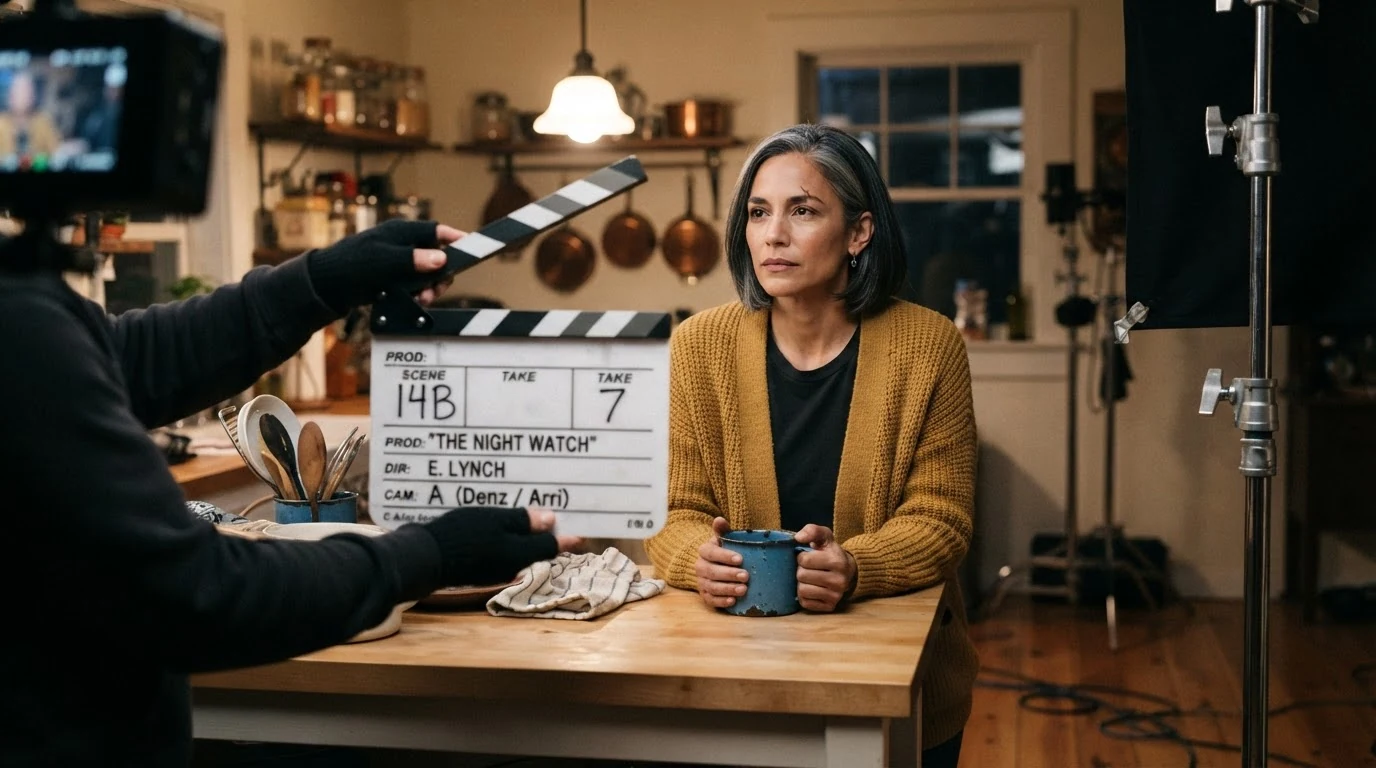
The raised sticks and readable SCENE 14B TAKE 7 make this the start of a take, not a scene from the film. Behind-the-scenes still and the C-stand put the set in frame. The scar, bob and cardigan define a fictional actress you can repeat.
Open FlashBoardsEditor's comparison grid of four takes of the same shot, two rows by two columns, thin white gutters, each panel a 16:9 film frame labeled in the top left corner TAKE 1, TAKE 2, TAKE 3, TAKE 4. Identical framing in all four: eye-level close-up, 50mm lens, the same actress in her mid-forties with a silver-streaked black bob, a thin scar through her left eyebrow and a mustard knit cardigan, warm kitchen, soft key from camera left. Only the performance changes: take 1 she looks down at a blue mug; take 2 she looks off camera right with wet eyes; take 3 she laughs behind her hand; take 4 she stares past the lens, jaw set. A red circle around the TAKE 2 label.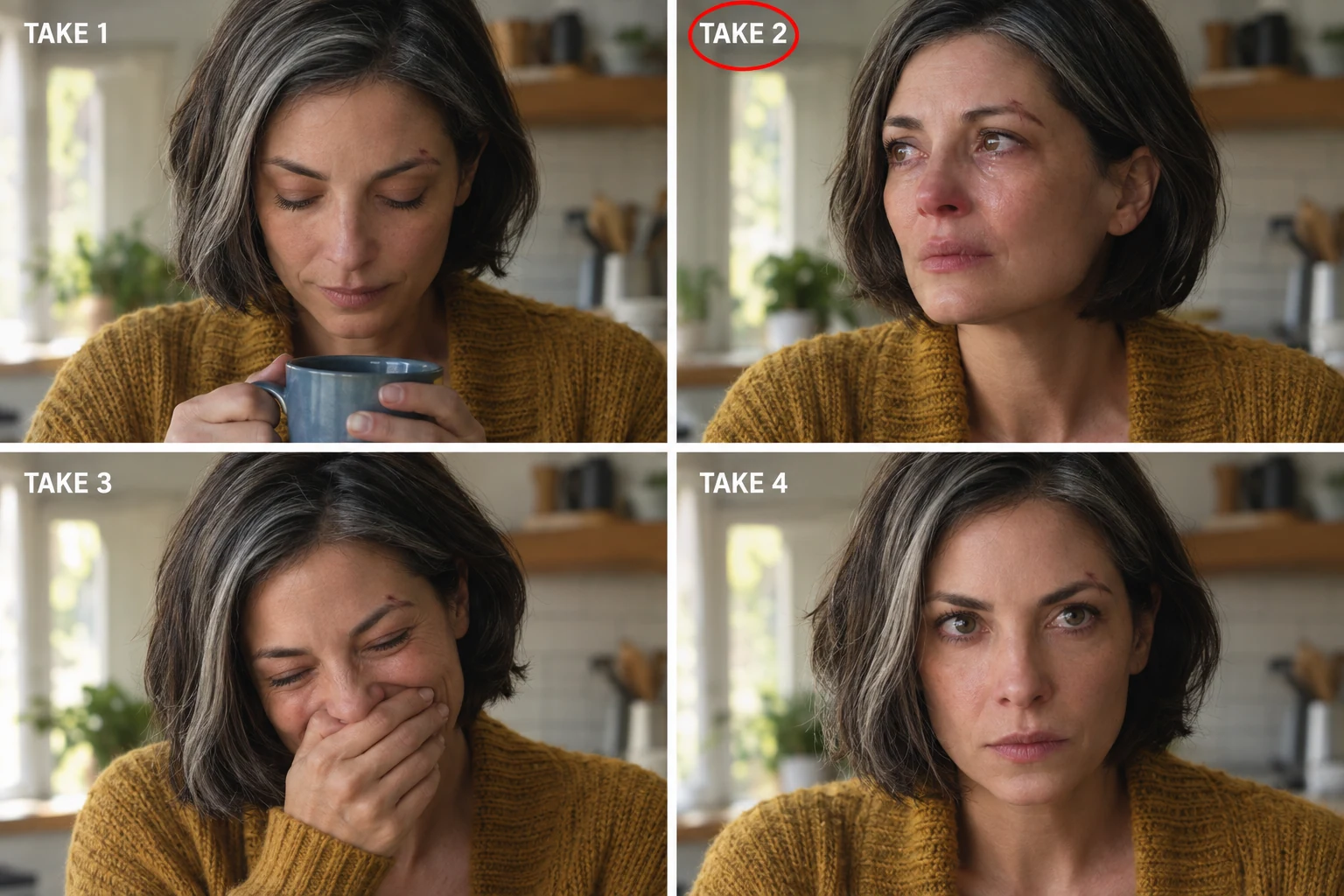
Identical framing in all four keeps the setup locked so only performance changes: that is what separates takes from shots. The red circle echoes a circled take.
Open FlashBoardsCamera: locked-off on a tripod, completely static for the whole shot. Action: the clapperboard sticks snap shut immediately and the gloved hands pull the board down and out of the bottom of frame. The actress holds still for a beat, then lifts the chipped blue mug, takes a slow sip, sets it down and looks toward camera left as if someone just walked in.The clap comes first, so the clip is alive from frame one, and the board leaves in a stated direction. Completely static stops the model drifting into a push-in; a take is one setup.
Open FlashBoardsCommon mistakes
- Garbled slate text: keep it short, in capitals, the board large and square to the lens.
- Different faces across the grid: repeat the full character description and state identical framing first.
- A frozen slate with a slow zoom: open the action with the clap and say the camera is static.
Keep the reference frames, prompts and every generated take side by side — images and video in one canvas.
FAQ
5 questionsWhat is a take in film?
A take is a single continuous recording of one camera setup, from "action" to "cut." Each attempt at a shot is a new take with its own number on the slate. The director marks the best ones, and the editor chooses which take, or which parts of several takes, end up in the finished film.
What is the difference between a take and a shot?
A shot is the planned piece of the film: one framing, lens and camera move, and on screen the stretch between two cuts. A take is one recorded attempt at that shot. Shot 12C may be filmed in six takes; the audience sees only the one the editor picked.
How many takes do movies usually do?
Most setups on a typical feature get roughly two to ten takes, depending on the shot and the director. Inserts can be done in one; stunts and long camera moves often need more. Kubrick and Fincher are known for dozens of takes, Clint Eastwood for very few.
What does "take 2" or a take number mean?
It counts attempts at the same setup. "14B, take 2" is the second recording of setup B in scene 14. The number is written on the slate, spoken before the clap and logged by the script supervisor, so the editor can find the take and match its picture and sound files.
What is a circled take?
A take the director marked as a keeper; the script supervisor circles its number in the log. In the film era only circled takes were printed, hence "print it." Digital cameras keep every take, but circled takes still guide the editor's first pass.
Related terms
4- Shot, Scene and SequenceEditing
A shot is one uninterrupted run of the camera, a scene is a continuous action in one place and time built from shots, and a sequence is a group of scenes forming one dramatic unit — the three building blocks of film structure.
- DailiesPost-Production & VFX
Dailies are the unedited takes from a shooting day, synced and delivered quickly so the director, DP and editor can check performance, focus, exposure and coverage.
- CoverageDirecting & Staging
Coverage is the full set of shots filmed for one scene — master, singles, over-the-shoulders, inserts, reactions — that gives the editor choices of pace, emphasis and performance.
- Principal PhotographyFilmmaking Process & Crew
Principal photography is the main shooting period of a film with the principal cast, from the first to the last scheduled shoot day; second-unit work, pickups and reshoots fall outside it.
Further reading
Walter Murch, In the Blink of an Eye (Silman-James Press, 2001). Pat P. Miller, Script Supervising and Film Continuity (Focal Press).