 FlashBoards Learn
- Learn
- Post-Production & VFX
- Glitch Effect
Post-Production & VFX · Film language
Glitch Effect
Also called: glitch art, digital glitch, pixel sorting
A glitch effect is a deliberate imitation of digital or analog failure: torn scanlines, displaced slices, square compression blocks, red and cyan channels pulling apart, frozen or repeating frames. It tells the viewer the image itself is unreliable: a hacked feed, a failing machine, or a mind coming apart.
- What it does
- Breaks the picture on purpose so the viewer feels malfunction, intrusion or mental breakdown.
- Use it when
- A screen, signal or character is failing, or you need a hard, nervous transition between two shots.
- Watch out
- Overuse turns it into wallpaper; keep glitches short and tie each one to a story beat or sound hit.
- Try this prompt
medium close-up, image corrupted by digital glitch: horizontal slices displaced sideways, red and cyan channels offset, band of square compression blocks
What is a glitch effect?
A glitch effect makes the image look like it is failing. It is part of the post-production toolkit, and it works by making the viewer suddenly notice the medium. The common ingredients:
- RGB split: red, green and blue channels shift a few pixels apart, leaving colored fringes on every edge.

- Slice displacement: horizontal bands of the frame jump sideways, like a signal losing sync.

- Block corruption: square macroblocks where the codec lost data.

- Pixel sorting: rows of pixels reordered by brightness, melting the image into streaks.
- Temporal breaks: repeated or dropped frames, cousins of the stutter effect and a sudden freeze frame.
Why do filmmakers use glitch effects?
A broken image is a story signal. It says someone else controls the screen (a pirate broadcast, a hacked camera feed), that a machine is dying, or, in a character's point of view, that their perception is failing. The degraded tape in Ring (1998) makes the image feel contaminated before anything happens in it.
Glitch is also the native texture of screens and consoles, so it sits naturally next to the video game aesthetic. As a 4–8 frame transition it gives a cut an electric jolt.
How to create a glitch effect
In post. Offset the red and blue channels 4–20 px in opposite directions. Animate a displacement map of random horizontal bars in bursts of 2–6 frames, add a few frames of block noise and scanlines, then snap back to clean.
Glitch transition. Put 3–4 corrupted frames at the tail of shot A and 2–3 at the head of shot B on a digital crackle in the sound design.
In camera. Film a CRT or LCD at a shutter that doesn't match its refresh rate to get rolling bars; bad cables and old tape decks give real analog breakup.
Pixel sorting
A script picks spans of pixels in each row or column and reorders them by brightness or hue, so bodies melt into streaks while hard edges survive. It reads best on a held shot or a freeze.
Datamosh: when one shot eats another
Datamoshing is a kind of glitch, not the other way around. Most compressed frames store only motion since the last keyframe. Delete the keyframe at a cut and shot B's motion is applied to shot A's pixels, so the old image smears along the new movement; repeating one motion frame makes it bloom. Kanye West's "Welcome to Heartbreak" (2009) made the look famous. Use it for dreams and altered states, with clear motion in the incoming shot so the melt has direction.
Video feedback and analog breakdown
Video feedback is the analog branch. Point a camera at the monitor showing its own output and the picture repeats inside itself as a pulsing tunnel; static, rolling bars and interference ghosts belong to the same family. Video artists such as Nam June Paik treated these failures as material. In drama, analog breakdown usually means a transmission: an intercepted broadcast or a tape that shouldn't be watched. Shoot it practically when you can.
Glitch effect vs. VHS effect
The VHS effect recreates one medium: soft tape detail, bleeding color, tracking lines, a date stamp. It feels nostalgic even when it is creepy. Glitch is broader and harsher: hard pixel edges, blocks and channel splits that tape never produced. Rule of thumb: soft and smeared is tape; square, sharp and sudden is glitch.
Glitch Effect in motion



11 clipsEleven loops, from slice displacement and pixel sorting to datamosh and analog interference. Watch for the moment the picture stops behaving: edges split into color, bands jump sideways, and old pixels get dragged along new motion.

How to create a glitch effect with AI
3 promptsImage models render glitches well when you name the specific failure (which channels split, which way slices move, how much of the frame breaks) instead of just writing "glitch". Keep the clean plate, glitched takes and sound notes on one FlashBoards board to compare side by side.
Medium close-up of a woman in her 40s with a shaved head, a silver septum ring and heavy freckles, in an orange raincoat, standing in a dim server room lit by cyan monitor glow, 35mm lens at eye level. The image itself is corrupted by a digital glitch: three horizontal slices across her face displaced left and right, red and cyan channels offset along her edges, a band of square compression blocks across her cheek, fine scanlines. The rest of the picture stays sharp.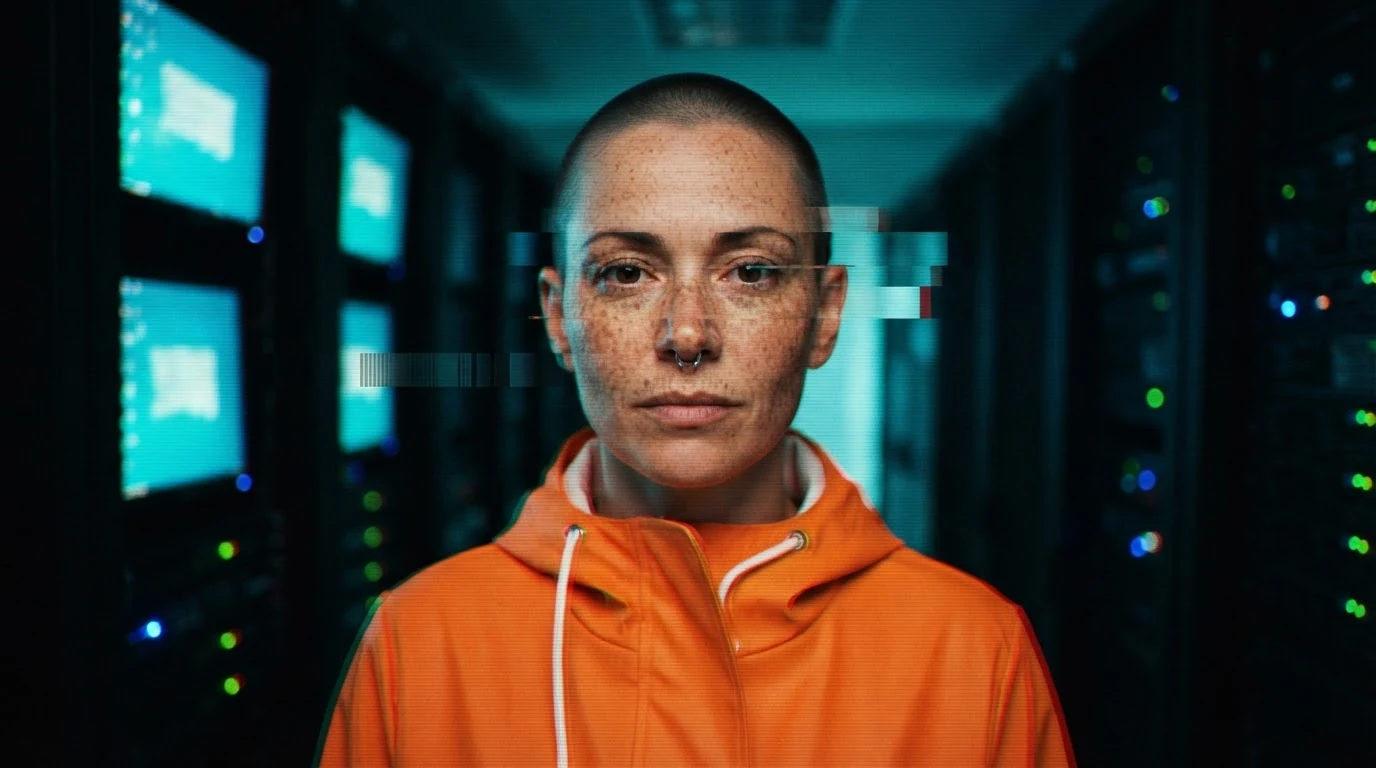
"The image itself is corrupted" keeps the glitch on the picture, not on a screen in the scene. Three named failures give a readable glitch instead of noise, and "the rest stays sharp" keeps the face legible.
Open FlashBoardsWide cinematic shot of an empty subway platform at night, a tall older man with a grey braided beard and a long green wool coat at the platform edge under fluorescent tubes, 28mm lens, symmetrical composition. The right half of the frame is pixel-sorted: coat, tiles and lights melt into long vertical streaks of sorted color, while the left half stays photographic and sharp. Muted teal and sodium-yellow palette.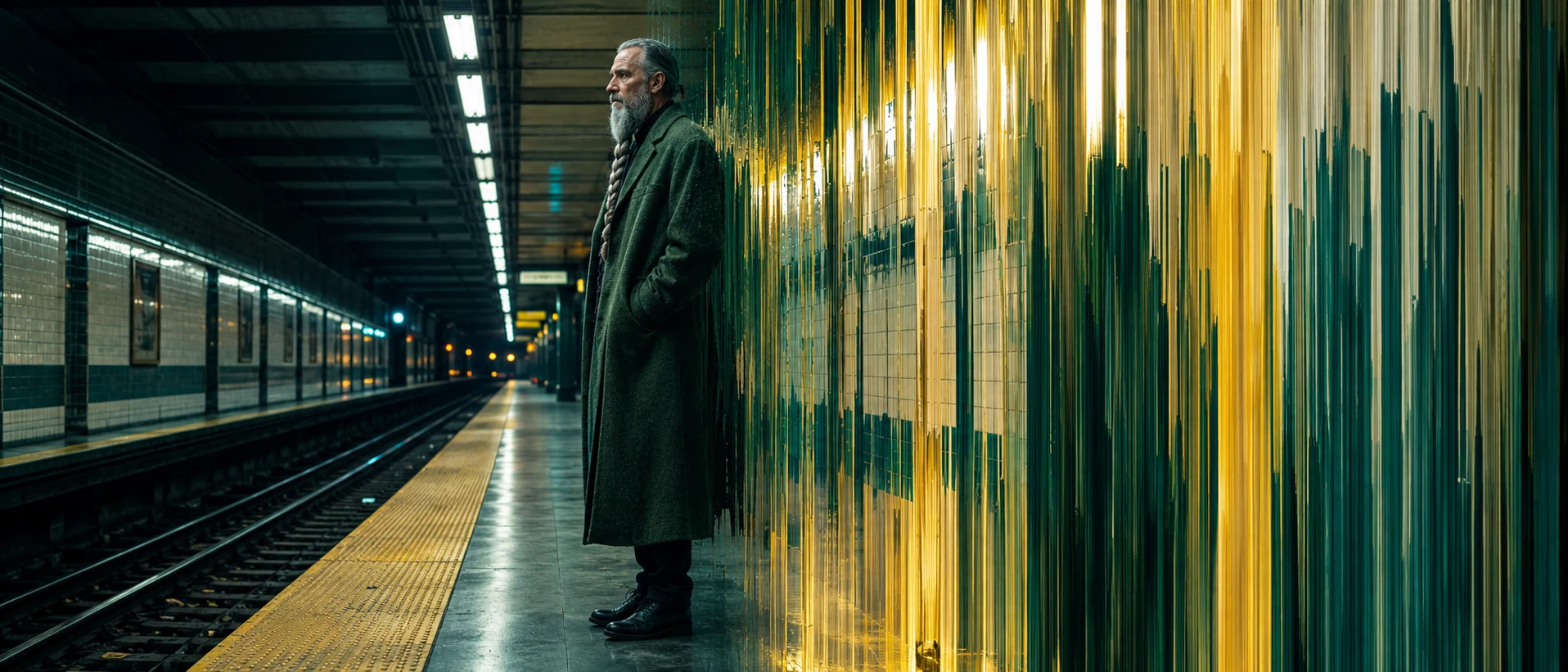
A different glitch family and a wider frame. "Pixel-sorted" plus "vertical streaks" names effect and direction; the clean/sorted halves tell the model where the corruption lives.
Open FlashBoardsCamera: locked-off medium close-up with a very slow push-in toward her face. Action: from the first frame the glitch bands flicker and jump sideways as she turns her head from the monitors toward the lens. Midway the whole image tears into horizontal slices, the red and cyan channels drift apart, then snap back. At the end her face is whole and sharp, eyes on the camera, scanlines rolling slowly.The glitch moves in the first sentence, so the shot is alive from frame one. Corruption is written as events (tear, drift, snap back) with a clean ending, the burst rhythm a real glitch needs.
Open FlashBoardsCommon mistakes
- Glitch lands on a device. Models draw a broken TV or cracked monitor. Write "the image itself is corrupted".
- Everything turns to noise. Limit the area: "three slices across her face", "right half of the frame".
- Soft wobble instead of hard breaks. Video models smooth glitches into a warp; write discrete events and keep clips short.
- VHS instead of digital. Ask for "square compression blocks" and "hard pixel edges".
Keep the reference frames, prompts and every generated take side by side — images and video in one canvas.
FAQ
4 questionsHow do you make a glitch effect in a video?
Offset the red and blue channels a few pixels apart, add a displacement map of random horizontal bars, and drop in a few frames of block noise and scanlines. Animate it in bursts of 2–6 frames between clean frames, each synced to a digital sound hit.
What is a glitch transition?
A glitch transition hides a cut inside a short burst of corruption: a few frames of slices, channel splits and blocks at the end of one shot and the start of the next, timed to a crackle or bass hit. It feels faster and harsher than a dissolve.
What is datamoshing?
Datamoshing removes compression keyframes so the motion of one shot is applied to the pixels of another. The first image smears along the new movement instead of cutting cleanly, which makes it a favorite for dreamlike or hallucinatory transitions.
What does a glitch effect mean in a film?
A glitch tells the audience the image can't be trusted: a hijacked feed, a failing machine, a simulation cracking, or a character losing their grip on reality. It works best when rare and motivated by the story, not used as constant decoration.
Related terms
3- VHS EffectPost-Production & VFX
The VHS look recreates home-video tape: soft detail, bleeding color, tracking lines, noise and a date stamp — used for nostalgia, found footage or unease.
- Video Game AestheticFilm Movements & Styles
The video game aesthetic borrows the look and logic of games — first-person gun POV, third-person follow camera, HUD graphics, respawning and level-like spaces — to make film feel playable.
- Post-ProductionPost-Production & VFX
Post-production is everything after the shoot that turns footage into a finished film: editing, sound design and mix, music, VFX, color grading, titles and delivery masters.
Further reading
Rosa Menkman, The Glitch Moment(um) (Institute of Network Cultures, 2011).