 FlashBoards Learn
- Learn
- Post-Production & VFX
- VHS Effect
Post-Production & VFX · Film language
VHS Effect
Also called: VHS look, VHS aesthetic, camcorder look
The VHS effect makes footage look like it was recorded on home-video tape: soft detail, color bleeding past edges, noise, rolling tracking lines, a 4:3 frame and often a date stamp. It reads instantly as the 1980s–90s home movie, so filmmakers use it for nostalgia, found-footage realism or quiet unease.
- What it does
- Makes an image feel like a real, private tape from the 1980s or 90s rather than a staged film shot.
- Use it when
- You need home-movie memory, found-footage evidence, a period broadcast or a sense that something is off.
- Watch out
- Stacking every artifact at full strength turns the tape into a cheap filter; real tape is mostly soft, not broken.
- Try this prompt
Frame grab from a 1990s VHS camcorder tape, 4:3, soft smeared detail, red color bleed, tracking noise band, date stamp
What is the VHS effect?
VHS is the consumer videotape format that ruled home recording from the late 1970s into the early 2000s. The VHS effect (also called the VHS look, VHS aesthetic or camcorder look) recreates what that tape did to an image, by shooting on real analog gear or by degrading clean footage in post.
The tape stored little information: roughly 240 lines of horizontal detail for brightness and far less for color. So edges go soft and colors smear sideways, especially reds. Then come the signal's failures:
- Chroma bleed — color drifts off its object.
- Tracking errors — noise bands that crawl through the frame.
- Head-switching noise — a ragged strip along the bottom edge.
- Dropouts — short white streaks from worn tape.
- On-screen text — date stamp, REC, PLAY.
It is a narrow cousin of the vintage film look: magnetic tape and an analog video signal, not film.
Why do filmmakers use the VHS look?
Memory. For anyone raised with a family camcorder, smeared color and a date stamp mean birthdays and living rooms. A cut to tape works like a flashback without a title card.
Evidence. Amateur video feels unauthored, so audiences trust it. The Blair Witch Project (1999) built found-footage horror on camcorder video and 16mm; the V/H/S (2012) anthology put the format in its title.
Period match. Pablo Larraín shot No (2012) on vintage U-matic video cameras so new scenes cut seamlessly with real 1988 campaign ads, making them indistinguishable from archival footage.
Unease. Tape hides detail: faces blur, corners fill with noise, a tracking band rolls through at the worst moment.
How to create a VHS effect
Shoot it for real. A used VHS-C or Hi8 camcorder gives behavior no plugin matches: exposure pumping, focus hunting, clipped skies. Or copy your digital edit onto a VHS deck and capture it back.
Fake it in post, in signal-chain order:
- Finish in 4:3 at 29.97 or 25 fps. See aspect ratio.
- Scale to about 640×480 and back up; detail loss first.
- Blur only the color channels horizontally (3–6 px) and shift red 1–3 px right.
- Lift blacks, clip highlights, lower saturation except skin and reds.
- Add streaky horizontal noise, not film grain.
- Put a head-switching strip on the bottom 6–10 lines; let a tracking band pass once or twice per scene.
- Add the date stamp last, in a blocky, slightly soft font.
Operate like an amateur: flat on-camera light, auto white balance errors, handheld framing, slow consumer zooms. Camera behavior sells the tape as much as the artifacts; see more post-production looks.
VHS effect vs. glitch effect
The VHS effect is a medium: a whole shot that looks like tape, soft and warm, with constant, mostly gentle artifacts. A glitch effect is an event: the image breaks for a moment, often with digital pixel blocks or frozen frames, to signal malfunction or a hacked feed.
If the artifact is always there, it's the VHS look; if it spikes and leaves, it's a glitch. A tape can glitch mid-take, which is often the scariest beat in found footage. Scratches, dust and burns belong to damaged film, never to tape.
VHS Effect in motion






11 clipsWatch what tape does to an image over a few seconds: edges go soft, color smears past faces and objects, and noise crawls through the shadows. Handheld camcorder framing and sudden exposure shifts sell the look as much as the artifacts do.

How to create a VHS effect with AI
3 promptsModels drift toward a generic retro filter unless you name the specific artifacts and the camcorder that made them. Start with a frame grab, make a second take, then animate the first frame. Keep reference tapes and takes on one FlashBoards board to compare them side by side.
Frame grab from a 1990s VHS camcorder home video, 4:3. Backyard birthday: a freckled ten-year-old boy with a red buzz cut and a gap-toothed grin leans over a sheet cake with lit candles on a picnic table, handheld medium shot at adult chest height. Blown-out pale sky, soft smeared detail, red chroma bleeding from his striped shirt, horizontal tape noise, a thin tracking band across the lower third, ragged distortion along the bottom edge, orange blocky date stamp JUL 14 1994 bottom right.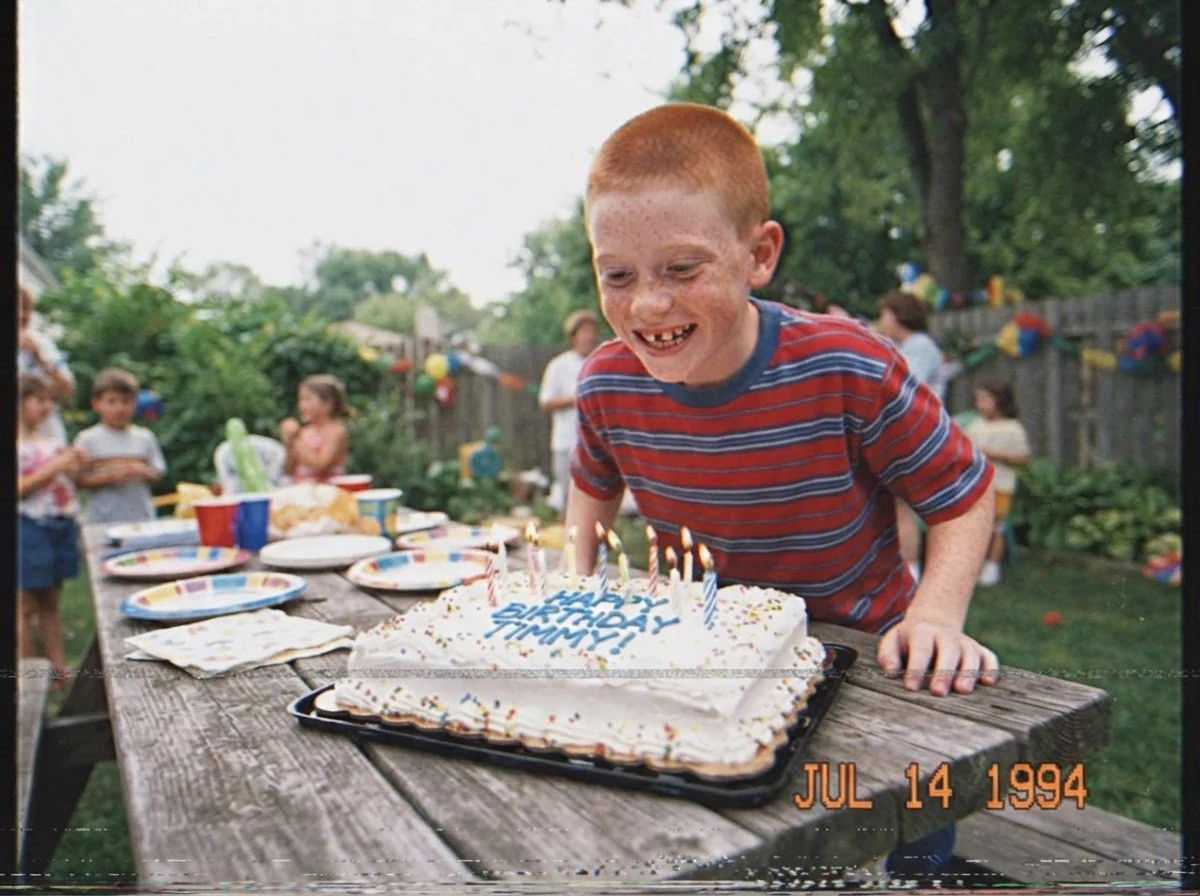
VHS camcorder home video sets the medium; red chroma bleeding, tracking band and ragged distortion along the bottom edge name real artifacts instead of a vague filter. Handheld at adult chest height and the date stamp add amateur behavior and era.
Open FlashBoardsFound-footage frame from a late-1980s VHS-C camcorder, 4:3, night. A narrow basement corridor lit only by the camera's harsh on-board light: a woman in her forties with a grey streak in her dark bob and a yellow raincoat looks back toward the lens, eyes wide. Overexposed center, corridor falling into muddy noisy black, blue-green cast, white dropout streaks, REC and a red dot top left.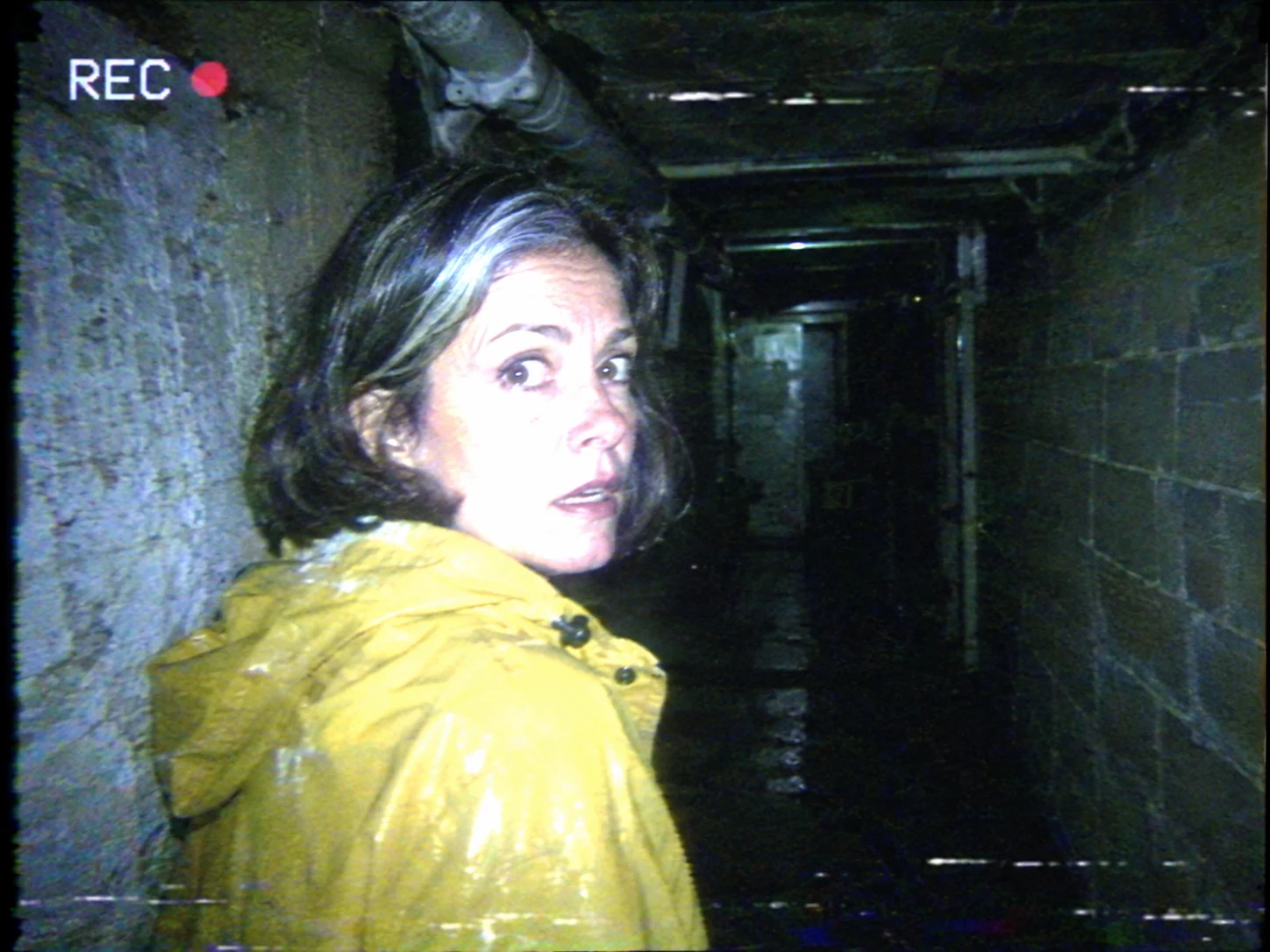
This take turns nostalgia into dread. Harsh on-board light, an overexposed center and muddy noisy black recreate how camcorders handle darkness; dropout streaks and REC frame it as evidence.
Open FlashBoardsCamera: handheld camcorder with constant small wobble, a slow consumer zoom in toward the boy's face across the shot. Action: The boy immediately blows hard across the cake; the flames bend and go out, thin smoke rising. He straightens, laughs with his gap-toothed grin and looks into the lens. A tracking band rolls up through the frame once, the image wobbles, then settles. The date stamp stays fixed bottom right.Immediately blows keeps the shot alive from frame one. Slow consumer zoom and small wobble are camcorder signatures; one rolling tracking band adds a tape event without turning it into a glitch. Date stamp stays fixed stops the text sliding.
Open FlashBoardsCommon mistakes
- Too clean. VHS look alone often yields a graded HD image. Name the artifacts: smeared detail, chroma bleed, tracking band.
- Film grain instead of tape noise. Say horizontal tape noise and dropouts, and camcorder, not film camera.
- Wrong frame. Set 4:3 in both prompt and aspect ratio.
- Garbled date stamp. Keep text short and in one corner.
- Artifacts everywhere. Ask for one thin tracking band, not a frame covered in lines.
Keep the reference frames, prompts and every generated take side by side — images and video in one canvas.
FAQ
4 questionsWhat is the VHS effect?
The VHS effect makes footage look like it was recorded on VHS videotape. Its signs are soft detail, color bleeding sideways past edges, horizontal noise, rolling tracking lines, distortion along the bottom edge, a 4:3 frame and camcorder text such as a date stamp. Filmmakers use it for nostalgia, found footage, period scenes and horror.
How do you get a VHS look on footage?
Record through real analog gear, such as an old camcorder or a VHS deck you copy your edit onto, or build it in post: frame for 4:3, downscale to about 640×480 and back, blur and offset the color channels, clip highlights, add horizontal noise, a bottom-edge distortion strip, an occasional tracking band and a date stamp.
What is the difference between the VHS effect and a glitch effect?
The VHS effect is a steady medium look: the whole shot feels like soft, bleeding analog tape. A glitch effect is a momentary break in the image, often digital, with pixel blocks, channel splits or frozen frames that signal malfunction. A tape can glitch, but a glitch alone doesn't make an image look like VHS.
Can AI generate a VHS effect?
Yes. Nano Banana 2 Lite and GPT Image 2.5 produce convincing VHS frame grabs when the prompt names the artifacts: 4:3 camcorder frame, red chroma bleed, tracking band, bottom-edge distortion and a date stamp. MiniMax H3 Max Turbo can then animate that frame with handheld wobble and a single rolling tracking band.
Related terms
3- Glitch EffectPost-Production & VFX
A glitch effect imitates digital or analog failure — tearing, pixel blocks, color-channel splits, frozen frames — to signal malfunction, a hacked feed or a character's breakdown.
- Vintage Film LookPost-Production & VFX
A vintage look stylizes new footage to resemble film or video of a past era — grain, faded or shifted color, soft optics, light leaks, gate weave, period aspect ratio and frame rate.
- Archival FootageEditing
Archival footage is previously shot material — newsreels, home movies, TV broadcasts — cut into a new film as historical evidence, texture or counterpoint, usually keeping the look of its original medium.
Further reading
Charles Poynton, Digital Video and HD: Algorithms and Interfaces (2nd ed., 2012) — analog video signals, interlace and chroma bandwidth.