 FlashBoards Learn
- Learn
- Formats & Exhibition
- Aspect Ratio Change
Formats & Exhibition · Film language
Aspect Ratio Change
Also called: ratio switch, variable aspect ratio, expanding aspect ratio
An aspect ratio change is a deliberate switch in the shape of the frame within one film: the image widens, narrows or grows taller to mark a new time period, a move into memory or fantasy, or a burst of spectacle. Because the frame edge itself moves, the audience feels the shift before they can name it.
- What it does
- Turns the frame shape into a story signal: new era, new state of mind, bigger world.
- Use it when
- A time jump, a subjective passage or a spectacle beat needs to feel different at a glance.
- Watch out
- Every switch must mean something; unmotivated changes read as a projection or streaming error.
- Try this prompt
Film still letterboxed to 2.39:1 with solid black bars, a lone traveler at the mouth of a canyon, composed to open up to full frame
What is an aspect ratio change?
Most films pick one aspect ratio and hold it to the last frame. An aspect ratio change breaks that contract on purpose, and it is one of the few formats and exhibition choices the audience sees directly: the black bars around the image move, appear or disappear.
It takes three common forms:
- Between sequences. A cut to a new scene arrives in a new shape, as in The Grand Budapest Hotel (2014).
- Inside a shot. The frame edges slide open or closed on screen, often motivated by a character. Here the switch overlaps with frame play.
- At the venue. Scenes shot in a large format fill a taller screen in the right theater: the IMAX switch of The Dark Knight (2008) and later Christopher Nolan films.
Why do movies change aspect ratio?
A change of frame shape is a change of rules, so filmmakers use it where the story changes rules too.
To mark time. Wes Anderson gives each era of The Grand Budapest Hotel the shape cinema of that era used: 1.37:1 for the 1930s, 2.35:1 for the 1960s, 1.85:1 for the later frame story.
To enter memory or fantasy. A different frame can mark a flashback, a dream or an imagined future without a title card. Most of Xavier Dolan's Mommy (2014) plays in a cramped 1:1 square; in a moment of release the teenage lead pushes the frame edges apart with his hands and the image opens to widescreen, before the square closes in again.
To mark transformation. In Brother Bear (2003) the image widens when the hero becomes a bear.

To deliver spectacle. Large-format scenes open the frame vertically for the biggest beats: the arena of The Hunger Games: Catching Fire (2013), the Burj Khalifa climb in Mission: Impossible – Ghost Protocol (2011), the Moon landing in First Man (2018), where the image expands as the hatch opens.
How to plan and shoot an aspect ratio change
Define the rule. "1.33:1 = the past, 2.39:1 = the present." If you can't state it in one line, the audience won't feel it.
Capture for the largest frame. Shoot open gate or full sensor height and extract the smaller shapes. Load every frame line in the monitor, and light and dress the taller area too.
Block for both shapes. Keep eyelines and key action inside the smaller frame; use the extra area for sky, ceiling, floor or a scale figure. Headroom that works at 2.39:1 can look empty at 1.43:1.
Pick the transition. A hard cut on a scene change is clean and nearly invisible. Bars sliding over one or two seconds are a statement, so motivate them with a camera move, a door opening, a music hit or a gesture.
Deliver in the right container. The master holds the largest shape, with the others letterboxed or pillarboxed inside it. Check the result on a TV and a phone: on home screens, shot-by-shot switches between IMAX and standard footage can read as an error.
Plan it on one board. In FlashBoards, lay out the story beats in columns by ratio, keep frames from films that switch shape next to your generated frames, and mark where each change happens, so the team sees the rule before the shoot.
Aspect ratio change vs. mask
Both hide part of the image and both can be animated. A mask blocks part of the frame with a shape (an iris circle, a keyhole, binocular outlines) to point the eye inside the composition or suggest a point of view. An aspect ratio change only moves the straight edges of the rectangle and redefines the canvas for a whole stretch of the film. An iris-in that ends a scene is a mask; a film that jumps from a square frame to widescreen when its story moves forty years is an aspect ratio change.
Aspect Ratio Change in motion




8 clipsWatch the black edges, not only the action. In each clip the frame itself changes shape: bars slide open or closed, a slit grows into a full picture, or a cut lands in a new ratio. Notice what the new shape does to the scene, whether it reveals scale, isolates a face or marks a new beat.



How to create a aspect ratio change with AI
3 promptsImage models deliver one fixed canvas, so show the switch in two steps: a start frame that holds the smaller ratio inside black bars, then a video that opens it. Keep both shapes side by side on one FlashBoards board to test the rule.
Cinematic film still letterboxed to 2.39:1, thick solid pure black bars across the top and bottom, the picture a wide band in the middle. Inside it, a wide shot at eye level, 35mm lens: a young traveler with a shaved head, a long green wool coat and a red backpack stands at the mouth of a narrow desert canyon, seen from behind. Warm late sun, orange sandstone walls, dust in the air, 35mm grain.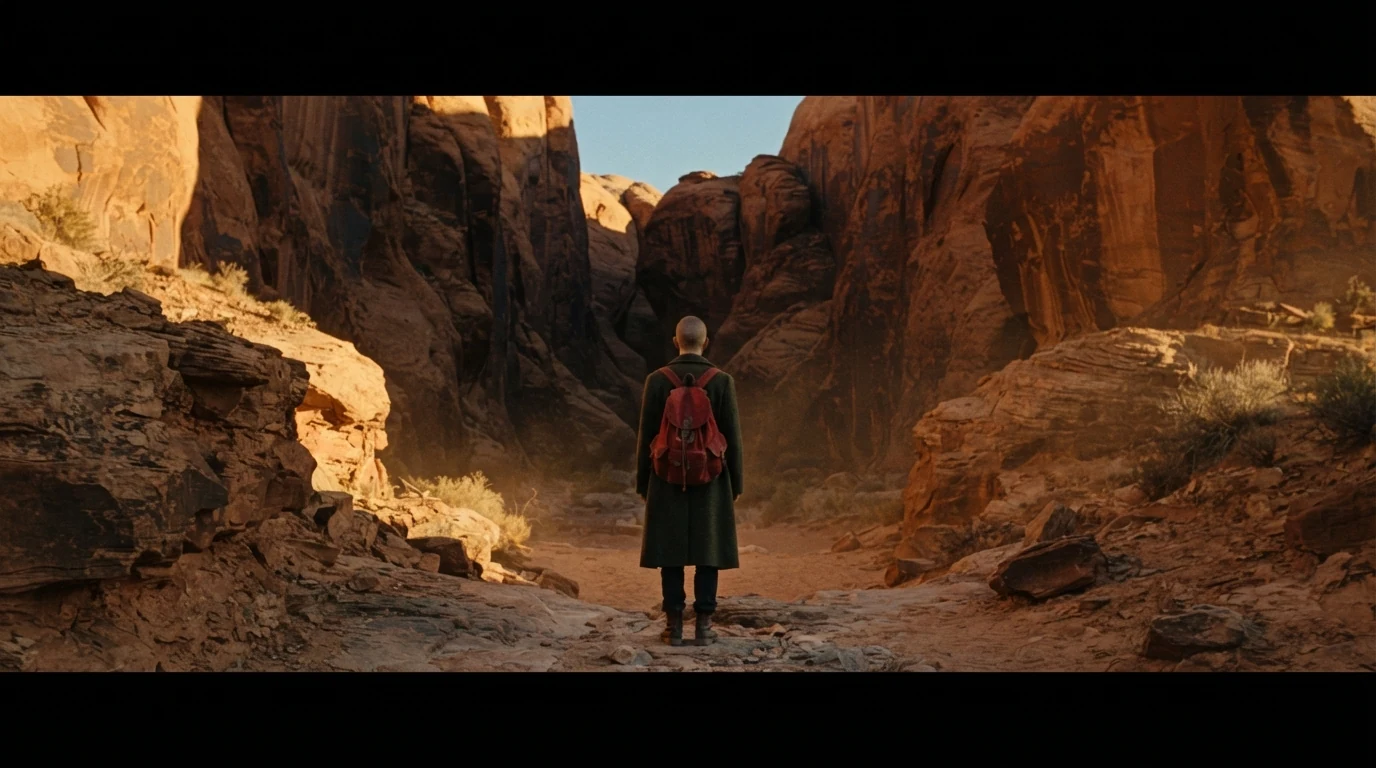
"Letterboxed to 2.39:1" and "solid pure black bars" set up the smaller shape inside a 16:9 canvas, leaving room for the frame to open. The centered figure is protected for both ratios.
Open FlashBoardsNear-square Academy-ratio film still from a 1930s memory sequence, centered composition, 40mm lens at chest height. An elderly baker with a white mustache, round wire spectacles and floury forearms hands a paper bag of bread across a wooden counter to a small girl in a yellow knitted cap. Soft window light, faded warm colors, visible film grain.
The narrow side of the switch. "Near-square Academy-ratio" and "centered composition" make the model stack the scene vertically; faded color and grain tie the shape to an era.
Open FlashBoardsCamera: locked-off wide shot at eye level, holding still. Action: from the first frame dust drifts through the sunlight and the traveler's green coat flaps in the wind. Right away the black bars at top and bottom slide outward, smoothly and steadily, revealing tall sandstone walls above him and the sandy canyon floor at his feet. By the end the picture fills the whole frame edge to edge and he steps into the canyon."Slide outward, smoothly and steadily" makes the reveal the motion from the first frame, and naming the walls and floor tells the model what to draw in the new area.
Open FlashBoardsCommon mistakes
- Bars come out grey or textured: write "solid pure black bars" and say where they are.
- Fixed canvas options only approximate film ratios (21:9 for 2.39:1, 4:3 for 1.37:1). For exact ratios, generate the full frame and matte it in the edit.
- "IMAX" alone gives a theater or a generic epic; describe the height instead.
- In video the bars may stay while the camera zooms: put the bar motion first in the action.
Keep the reference frames, prompts and every generated take side by side — images and video in one canvas.
FAQ
4 questionsWhy do some movies change aspect ratio?
To signal that the story's rules have changed: a new time period, a memory or fantasy, a transformation or a moment of spectacle. The new frame shape tells the audience something has shifted before dialogue explains it. In large-format theaters, the change can also come from scenes shot on IMAX cameras that fill a taller screen.
Which movies change aspect ratio mid-film?
Well-known examples: The Grand Budapest Hotel (2014), with a ratio for each era; Mommy (2014), where a square frame opens to widescreen; Brother Bear (2003), which widens after the hero's transformation; and IMAX-shot films such as The Dark Knight (2008) and First Man (2018), whose large-format scenes play taller in IMAX venues.
Why does the aspect ratio keep changing when I stream a movie?
The film most likely contains IMAX sequences, and the streaming version keeps their taller frame. Those scenes open to 1.90:1 while the rest stays at 2.39:1, so the black bars jump at those cuts. It is intended, not a playback fault, though on a TV it can feel distracting.
How do you change aspect ratio in the middle of a video?
Shoot or generate for the largest frame, then add a matte in the edit: black bars sized to the smaller ratio. To switch, cut to a shot without the matte, or animate the bars sliding open over one to two seconds. Keep the master at the largest shape so nothing is cropped when the frame opens.
Related terms
4- MaskPost-Production & VFX
A mask blocks or isolates part of the frame with a shape — an iris circle, a binocular or keyhole outline, a hand-drawn window — in front of the lens, in an optical printer or in compositing, to limit what we see, reveal a second image or treat one area separately.
- Aspect RatioFormats & Exhibition
Aspect ratio is the width of the frame relative to its height — 1.33:1 (Academy), 1.85:1 (flat), 2.39:1 (scope), 1.43:1 (IMAX), 16:9 (HDTV); it decides how much space surrounds a character and how a composition breathes.
- IMAXFormats & Exhibition
IMAX is a large-format system of cameras, film (15-perforation 70mm), projection and theaters with huge, tall screens; its native 1.43:1 frame is why films like Dunkirk and Oppenheimer switch ratio in IMAX scenes.
- LetterboxingFormats & Exhibition
Letterboxing shows a widescreen image on a narrower screen in full by adding black bars above and below; the vertical version, bars on the sides, is pillarboxing.
Further reading
American Society of Cinematographers, American Cinematographer coverage of The Grand Budapest Hotel (2014) and First Man (2018).