 FlashBoards Learn
- Learn
- Post-Production & VFX
- Background Replacement
Post-Production & VFX · Film language
Background Replacement
Also called: green screen, chroma key, background swap, blue screen
Background replacement keeps the actor or object from the shot and swaps everything behind them for a different image or world. It is done with green or blue screen keying, rotoscoping, masks, projection or LED walls, and when it works the viewer believes the person was really standing there.
- What it does
- Puts a performance filmed in one place into a background shot somewhere else, or invented.
- Use it when
- The real location is unsafe, unaffordable, impossible or needs total control of light and timing.
- Watch out
- Mismatched light direction, perspective, focus and motion blur give a replaced background away instantly.
- Try this prompt
Medium close-up of a driver in a vintage convertible, soft rear-projected coastal road behind her, warm studio key light, 50mm, film grain

What is background replacement?
Background replacement separates the foreground of a shot, usually an actor, from what sits behind it and puts a new image there. It is part of mask and matte work in post-production: a key or shape decides which pixels stay.
- Chroma key. The actor is filmed against an evenly lit green or blue screen, and software removes that color.
- Rotoscoping. Artists draw the matte frame by frame when there is no screen.
- Rear and front projection. A plate is projected behind the actor and filmed live.
- LED volumes. A wall of screens shows a rendered environment that moves with the camera.
Unlike superimposition, a good replacement is solid: no ghosting, the new world sits fully behind the subject.
Why do filmmakers replace backgrounds?
Control, safety and reach. Actors can't play a dialogue scene while steering through real traffic, so for decades studios shot driving scenes in a parked car in front of a projected road; the drunken drive in North by Northwest (1959) is a famous example. The Thief of Bagdad (1940) used an early color blue-screen traveling matte, and the Dawn of Man opening of 2001: A Space Odyssey (1968) put costumed actors in front of front-projected African landscapes on a stage.
Done well, it goes unnoticed. Done crudely on purpose, like music-video cutouts or a flat studio-era road, it becomes a style.
How to shoot for background replacement
Decide the background first, then light the foreground to match it.
- Screen color. Green keys cleanest on digital sensors; blue spills less and suits blond hair, green costumes and night scenes.
- Even screen light. Soft, broad fixtures, within about a third of a stop across the surface, exposed near your key level.
- Distance. At least 10 feet (3 m) between actor and screen, plus a rim light, keeps colored bounce off hair and shoulders.
- Match the plate. Copy its lens, camera height, tilt and sun direction. A 24mm plate behind an 85mm close-up never sits right.
- Edges. Tape tracking markers for camera moves, keep a 180-degree shutter so blur matches, and record with minimal compression.
How is a background replaced in post?
The compositor pulls a soft key for hair and a hard key for the body, cleans the matte with roto, and suppresses spill. What sells the shot comes next: light wrap bleeding the background over the edges, matched blacks and color temperature, matching grain and depth of field, and contact shadows where the subject touches the new world.
Background replacement vs. virtual production
Classic replacement builds the final image in post, weeks after the shoot. Virtual production puts the world on set: an LED volume shows the environment during the take, so its light and reflections land on the actors in camera. The Mandalorian (2019) made the approach famous.
Green screen keeps every option open but gives actors nothing to react to. An LED volume gives real interactive light but locks decisions early. It is a modern cousin of rear projection, one of the classic practical effects that used projected images as light and texture.
Background Replacement in motion


4 clipsFive loops from one music video that fakes its locations on purpose. Watch the performers stay in place while everything behind them changes, and notice what gives the cutout away: no contact shadows, mismatched light, edges that never blend.


How to create a background replacement with AI
3 promptsAI models build performer and replaced world in one frame, so the craft moves into the prompt: describe the background's lens, light and focus as carefully as the subject. Keep plates, references and takes on one FlashBoards board to compare how each background sits.
Classic 1960s studio process shot, medium close-up seen head-on through the windshield of a pale green 1960s convertible, a fictional woman in her forties driving and facing the camera, short silver bob, round tortoiseshell glasses, mustard silk scarf, hands on a thin ivory steering wheel; behind the car a coastal road with telephone poles and cypress trees as a soft rear-projection plate on a studio screen, slightly lower in contrast than her face; warm studio key light from frame left, 50mm lens at eye level, Technicolor palette, fine film grain
"Soft rear-projection plate on a studio screen, slightly lower in contrast than her face" creates the crisp-subject, flat-world split of classic process shots. "Key light from frame left" fixes one light direction.
Open FlashBoardsFull-length studio shot of a fictional dancer, a tall man in his twenties with a shaved head, a thin gold hoop earring, loose white linen shirt and charcoal trousers, mid-spin with arms out, 3 meters in front of an evenly lit chroma green cyclorama with small white cross tracking markers, cool rim light outlining his shoulders, clean neutral skin tones, 35mm lens at waist height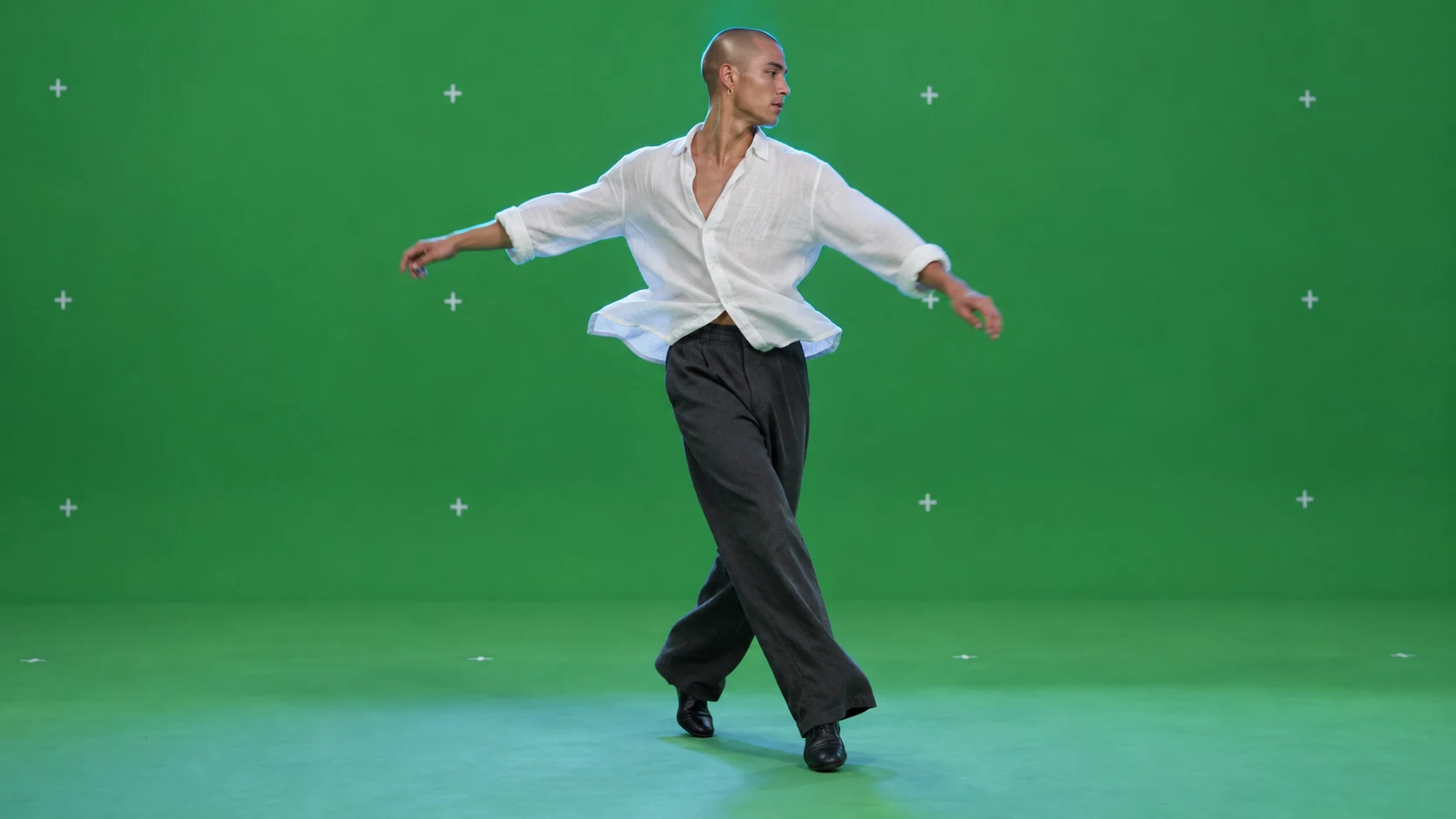
The production side: a performer ready to key onto your own plate. "Evenly lit," "3 meters in front" and "rim light" describe a clean key; "clean neutral skin tones" steers away from green spill.
Open FlashBoardsCamera: locked off at eye level through the windshield, completely static. Action: The coastal road behind the woman is already sliding back toward the horizon, telephone poles and cypress trees passing at a steady speed. Her mustard scarf flutters as she glances ahead and turns the ivory wheel slightly left. She smiles and straightens the wheel while the road keeps streaming away.A static camera and a moving background are the whole illusion, so both come first. The scarf moves from frame one, and every object named already exists in the start frame.
Open FlashBoardsCommon mistakes
- Subject and background get different light directions. Name one key side for both.
- Backgrounds come out as sharp as the face. Ask for a soft plate or shallow depth of field.
- Feet float. Describe the floor and "a soft shadow under his feet".
- In video, the background freezes and the camera pushes in. Describe the background's motion first and lock the camera off.
Keep the reference frames, prompts and every generated take side by side — images and video in one canvas.
FAQ
4 questionsWhat is the difference between green screen and chroma key?
Green screen is the physical backdrop: a painted wall, fabric or cyclorama in saturated green. Chroma key is the process that removes a chosen color and makes it transparent so a new background shows through. Any color can be keyed, but green and blue sit furthest from skin tones.
Why is green used more often than blue for chroma key?
Digital sensors capture green with the most detail and least noise, so green keys cleanly with less light. Blue is chosen for green costumes, blond hair and night scenes, because blue spill on skin is less noticeable. In the film era, blue was the more common choice.
Can you replace a video background without a green screen?
Yes. Rotoscoping draws a matte around the subject frame by frame, and AI matting tools separate a person from ordinary footage automatically. Both handle clear silhouettes well but struggle with flyaway hair, motion blur, smoke and glass. For planned shots, a screen still gives the cleanest edges.
How far should an actor stand from a green screen?
Usually at least 10 feet, about 3 meters. The distance stops green light bouncing onto hair and skin, lets you light screen and actor separately, and throws the screen slightly out of focus to hide wrinkles. In a small studio, add a rim light and more spill suppression in post.
Related terms
4- Virtual ProductionFilmmaking Process & Crew
Virtual production combines live-action shooting with real-time rendered environments — typically on LED walls driven by a game engine and synced to camera tracking — so backgrounds, light and parallax are captured in camera.
- MaskPost-Production & VFX
A mask blocks or isolates part of the frame with a shape — an iris circle, a binocular or keyhole outline, a hand-drawn window — in front of the lens, in an optical printer or in compositing, to limit what we see, reveal a second image or treat one area separately.
- Practical EffectsPost-Production & VFX
Practical effects are created physically on set — animatronics, prosthetic makeup, miniatures, pyrotechnics, rain and wind machines — and captured by the camera rather than generated with CGI in post.
- SuperimpositionPost-Production & VFX
Superimposition layers one image over another so both are visible at once — a face over a landscape, a ghostly figure, a memory over the present — made optically or in compositing.
Further reading
The VES Handbook of Visual Effects, ed. Jeffrey A. Okun and Susan Zwerman (Focal Press). Steve Wright, Digital Compositing for Film and Video (Focal Press).