 FlashBoards Learn
- Learn
- Post-Production & VFX
- Step Printing
Post-Production & VFX · Film language
Step Printing
Also called: step-print, step framing, smear motion
Step printing repeats each frame of a shot two, three or more times on the release copy, usually from footage shot at a low frame rate with a slow shutter. Motion turns into smeared streaks that stutter forward in jumps, so the world feels unstable while time seems to both rush and drag.
- What it does
- Turns movement into smeared, stuttering streaks that jump forward instead of flowing.
- Use it when
- A scene should feel restless, intoxicated, lonely inside a crowd or out of step with time.
- Watch out
- Without a slow shutter you get choppy but crisp frames that read as a glitch, not a smear.
- Try this prompt
Step-printed night street, one still figure sharp while the crowd smears into neon streaks, slow shutter, handheld 24mm

What is step printing?
Step printing is a post-production speed technique from the optical printer, which copies a negative one frame at a time. The operator chooses how many times each source frame is exposed onto the copy: twice and it holds for two frames, four times and it holds for four.
It does not put several images onto one frame; that is a multiple exposure, closer to an echo print. A step print repeats one frame across several frames of the copy.
Repeats alone make action slow and jerky. The signature look pairs them with a low frame rate at capture: at 6 to 12 fps each exposure smears movement, and the repeats restore roughly real speed in lurching steps.
Why do filmmakers use step printing?
Wong Kar-wai and cinematographer Christopher Doyle made it a signature of Chungking Express (1994) and Fallen Angels (1995): a character stands still and sharp while the Hong Kong crowd dissolves into colored streaks around them.
- Unstable time. Motion arrives in jumps, fast and suspended at once, like memory.
- Overload. Neon, headlights and bodies become strokes of paint.
- Isolation. A calm subject inside smeared movement shows loneliness in a crowd without a word.
Music videos and commercials borrowed it for rough energy.
How to create the step-print effect
1. Shoot at a low frame rate. 6, 8 or 12 fps; the lower the rate, the bigger each jump.
2. Open the shutter. At 8 fps a 180-degree shutter exposes each frame for 1/16 s, a 360-degree one for 1/8 s. That slow shutter speed creates the heavy motion blur the look needs. Add ND to hold exposure.
3. Move the camera. Handheld, 18 to 28 mm, close to the action. Panning with a runner keeps them readable while the background tears.
4. Anchor the frame. Keep one element still and sharp: an actor, a sign, a foreground face.
5. Hold frames in post. In a 24 fps timeline, hold 12 fps footage twice, 8 fps three times, 6 fps four times. Retime with nearest frame, never frame blending or optical flow.
6. Cover the sound. Low capture rates kill sync sound; lay music or atmosphere underneath.
Skip frame printing
Skip framing is the opposite printer operation: frames are dropped at a regular interval instead of repeated. Print every second frame and the shot plays twice as fast, slightly jerky. On film it sped up shots nobody had undercranked on set; digitally it is a speed change with frame blending off. Skip to set the speed, step to set the stutter.
Low frame rate effect
A low frame rate effect is the step-print cadence made in camera or in the edit: 6 to 12 unique images per second, each held twice or more on a 24 fps timeline, like animation shot "on twos". Held twice it reads rough and hand-made; four times, like a strobe or a half-remembered moment. Use it for tension, fever scenes or fights seen from inside, and keep the camera moving.
Step printing vs. undercranking
Step-printed footage usually starts as undercranked footage.
| | Step printing | Undercranking | |---|---|---| | Where | In printing or the edit | On set | | Speed on screen | About real speed, or slower | Faster than life | | Motion | Stutters and smears | Smooth but fast | | Feel | Dreamlike, dislocated | Comic, frantic, punchy |
Shoot 8 fps and play it straight at 24: action runs three times too fast. Hold each frame three times: it returns to about real speed, but now it staggers. Slow motion is the opposite family, adding frames so motion gets smoother.
Step Printing in motion







8 clipsWatch two things at once: the smear inside each frame and the jump between frames, as motion advances in steps instead of flowing. In the strongest loops one element, a face or a runner, stays readable while everything around it tears into streaks.

How to create a step printing with AI
3 promptsImage models can draw the smear; the stutter comes after. Build the start frame with Nano Banana 2 Lite, try a second take with GPT Image 2.5, animate recipe 1 with MiniMax H3 Max Turbo, then hold frames in your editor. One FlashBoards board keeps references, takes and retiming notes side by side.
Step-printed film still, night, crowded snack bar counter under green-white fluorescent tubes and red neon. A young woman with a short black bob, a thin scar through her left eyebrow and a yellow raincoat stands perfectly still and sharp, holding a paper cup with a straw. Around her the rushing crowd dissolves into long horizontal smears of color. Slow shutter 1/8 second, handheld 24mm lens at chest height, grainy saturated 35mm film.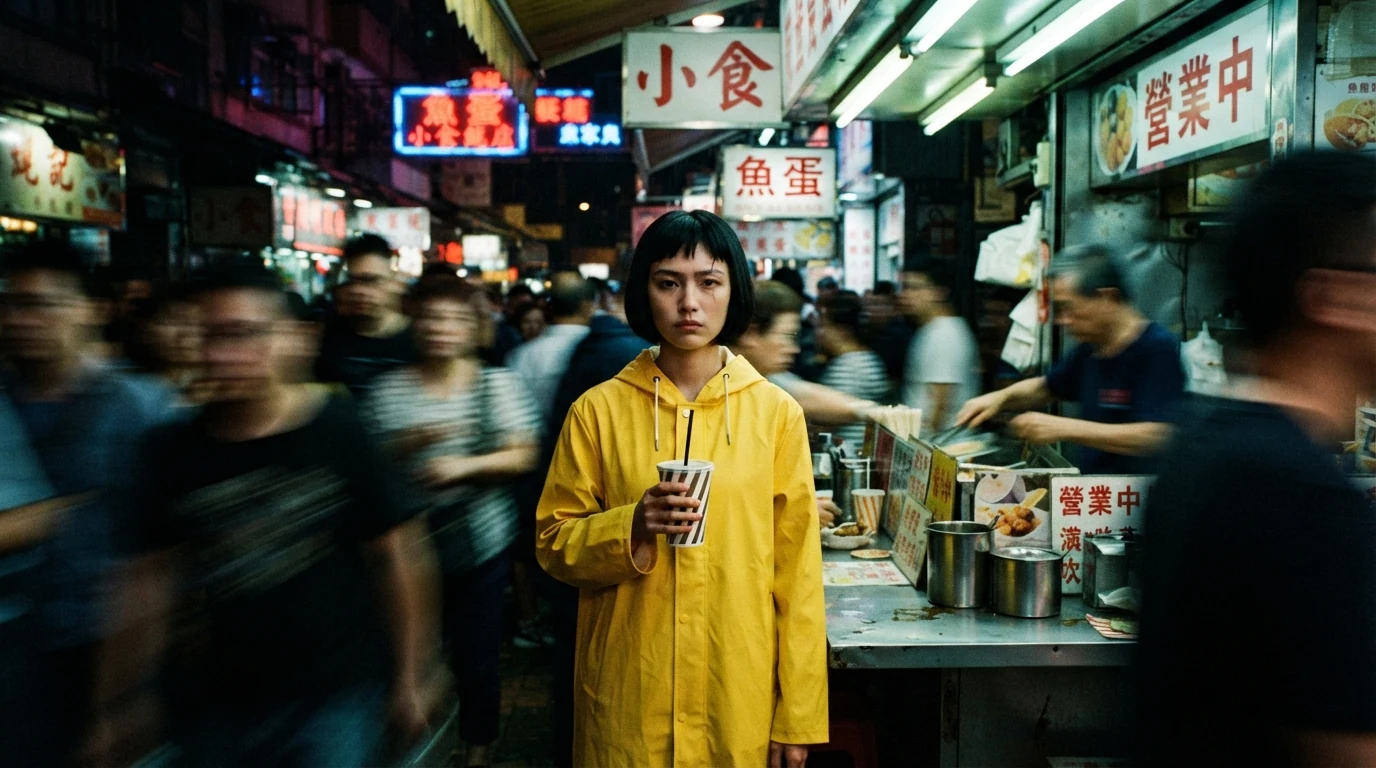
"Perfectly still and sharp" against "crowd dissolves into long horizontal smears" builds the anchor-versus-smear contrast; "slow shutter 1/8 second" and "handheld" give the blur a physical cause, and neon gives the streaks color.
Open FlashBoardsStep-printed smear motion, wide frame: a lean middle-aged courier with a shaved head, a short gray beard and a green canvas shoulder bag sprints down a white-tiled subway corridor. The camera runs beside him, handheld at shoulder height, 18mm lens. His face stays readable while his limbs and the wall tiles stretch into horizontal streaks. Harsh overhead fluorescent light, cool green cast, heavy 16mm grain, 1/10 second exposure.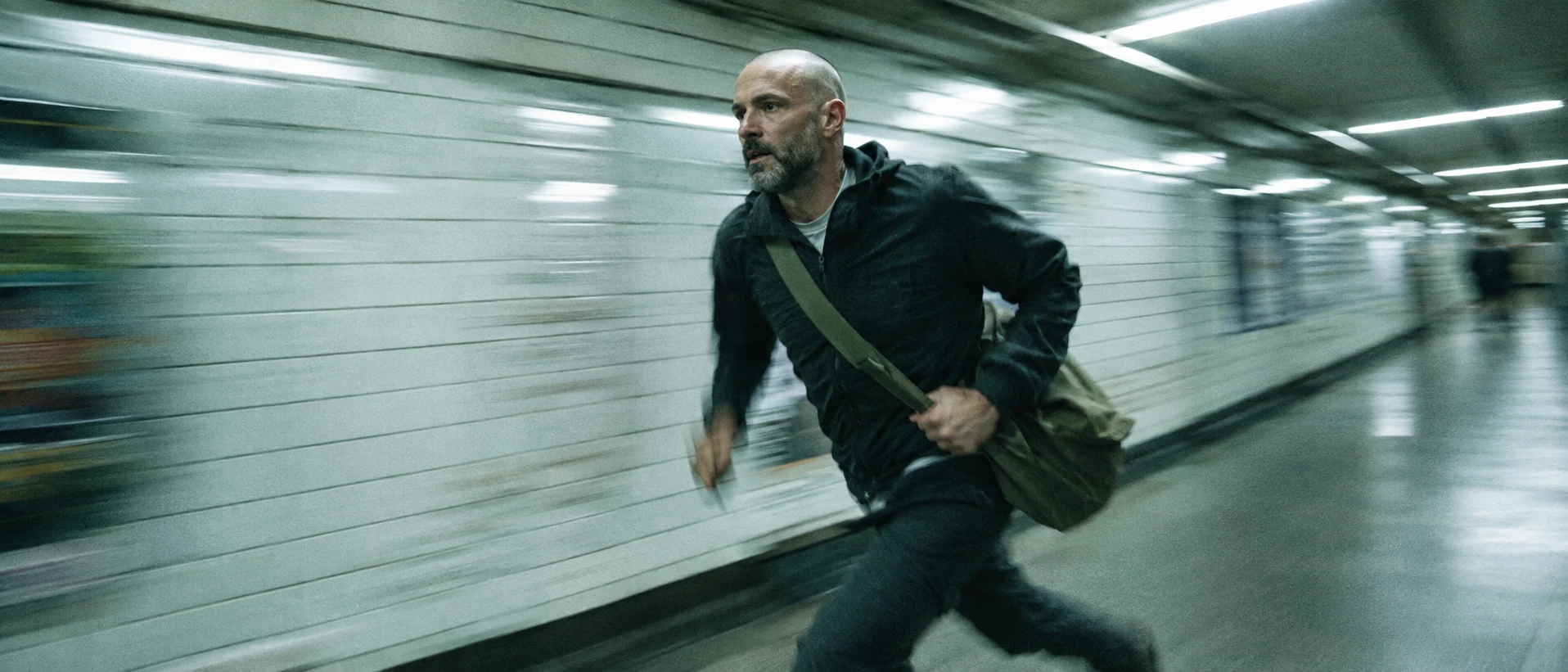
A tracked runner instead of a still figure. "Camera runs beside him" plus "face stays readable" places the sharpness; the repeating tiles show the direction of the smear.
Open FlashBoardsCamera: handheld, already drifting left at a slow walking pace with slight shake, ending closer on the woman's profile. Action: The crowd streams past the counter in both directions from the first moment, bodies smeared into red and green streaks. The woman in the yellow raincoat sips from her straw and stays still. Midway she turns her head toward the camera. At the end she lowers the cup as the blurred crowd keeps rushing. Style: choppy low frame rate, heavy motion smear.The crowd moves from the first moment, so the shot doesn't open frozen, and only what is already in the frame is described. For the real stutter, retime the clip to 8 fps with nearest-frame sampling afterwards.
Open FlashBoardsCommon mistakes
- Everything blurs. Say who stays "perfectly still and sharp", or the whole frame turns to mush.
- Clean sports blur. Bare "motion blur" gives crisp speed lines; add a slow shutter value, handheld camera and grain.
- "Low frame rate" becomes slow motion. Describe action at normal speed and create the cadence in post.
- Optical flow smooths it away. Retime with nearest frame, not frame blending.
Keep the reference frames, prompts and every generated take side by side — images and video in one canvas.
FAQ
4 questionsWhat is step printing in film?
Step printing repeats each source frame two or more times on the final copy. Combined with footage shot at a low frame rate and a slow shutter, it produces smeared motion that moves in visible jumps. Wong Kar-wai's Chungking Express (1994) is the best-known example.
How did Wong Kar-wai get the step-printing look?
Wong Kar-wai and Christopher Doyle shot key scenes of Chungking Express and Fallen Angels at a low frame rate with long exposures, often handheld, then repeated frames to restore about real speed. The long exposures make the smear; the repeated frames make the stutter.
How do you make a step print effect in Premiere Pro or DaVinci Resolve?
Ideally shoot at 6 to 12 fps with a wide-open shutter and let each frame repeat in a 24 fps timeline. On normal footage, Premiere's Posterize Time effect at 6 to 12 fps fakes the cadence; in Resolve, set retime process to nearest frame. Avoid frame blending and optical flow.
Is step printing the same as slow motion?
No. Slow motion records extra frames, so movement becomes slower and smoother. Step printing repeats existing frames, so movement becomes rougher. On normal 24 fps footage it slows action in jerky steps; on low frame rate footage it keeps roughly real speed while adding stutter and smear.
Related terms
5- UndercrankingCameras & Capture
Undercranking shoots at a lower frame rate than playback — for example 12 fps played at 24 — so action runs faster than life on screen, used for slapstick, frantic chases and punchier action.
- Slow MotionCameras & Capture
Slow motion stretches time on screen: the camera records at a higher frame rate than playback — for example 120 fps played at 24 — so action unfolds several times slower, used for spectacle, violence, grief or to reveal what the eye normally misses.
- Motion BlurLenses, Focus & Exposure
Motion blur is the smear a moving subject leaves when it travels during the exposure of a frame; its amount depends on shutter speed or shutter angle, and it makes movement feel smooth, fast or, when exaggerated, frantic.
- Shutter SpeedLenses, Focus & Exposure
Shutter speed is how long each frame is exposed to light; on cine cameras it is often set as a shutter angle, and it controls both brightness and how much blur movement leaves.
- Post-ProductionPost-Production & VFX
Post-production is everything after the shoot that turns footage into a finished film: editing, sound design and mix, music, VFX, color grading, titles and delivery masters.
Further reading
Raymond Fielding, The Technique of Special Effects Cinematography (optical printing, including skip and stretch printing).