 FlashBoards Learn
- Learn
- Cameras & Capture
- Slow Motion
Cameras & Capture · Film language
Slow Motion
Also called: slow-mo, slowmo, high frame rate
Slow motion stretches time on screen: the camera records more frames per second than the projector shows, so 120 fps played back at 24 fps runs five times slower than life. Filmmakers use it to turn a split second into a moment the audience can study, feel and remember, from a bullet's path to a last look.
- What it does
- Stretches a fast or important moment so the viewer sees detail and feels its weight.
- Use it when
- An impact, a leap, a loss or a triumph matters more than the seconds around it.
- Watch out
- Overuse drains it of meaning; every slowed shot also costs light and needs flicker-free lamps.
- Try this prompt
Slow motion, 120 fps look: a woman spins in a warehouse light shaft, a cloud of white chalk hanging in the air around her
What is slow motion in film?
Slow motion is any shot in which on-screen action runs slower than it happened in front of the lens. The classic way to make it is to capture more frames per second than the frame rate the film will be played at. Cinema plays at 24 fps, so the math is simple: divide the capture rate by 24.
| Capture rate | Played at 24 fps | 1 second of action lasts | |---|---|---| | 48 fps | 2× slower | 2 s | | 60 fps | 2.5× slower | 2.5 s | | 120 fps | 5× slower | 5 s | | 240 fps | 10× slower | 10 s | | 1,000 fps | about 42× slower | 42 s |
The extra frames are what make it smooth. Because each moment is sampled more often, movement is spread across more real images rather than invented between them. That is the difference between true slow motion and simply slowing a 24 fps clip in the edit, which either repeats frames (a stutter) or asks software to guess the missing ones.
Slow motion sits at one end of the motion speed scale. At the other end is undercranking, which captures fewer frames than playback so action runs fast, and beyond that time lapse. All of them are cameras and capture decisions first: you choose the speed of time before you roll.
Why do filmmakers use slow motion?
Slowing a shot does two things at once. It shows the eye detail it normally misses, and it tells the audience that this moment weighs more than the ones around it.
- Violence and consequence. Akira Kurosawa slowed a death in Seven Samurai (1954), and Sam Peckinpah built the shootouts of The Wild Bunch (1969) from slow-motion bodies cut against real-time action. The stretch makes the violence heavy rather than exciting.
- Triumph and ritual. The opening beach run in Chariots of Fire (1981) is slow motion under music: athletes become an image of effort and grace instead of a race.
- Spectacle. The Matrix (1999) made its slowed gunfights and frozen-in-space moments its signature, and 300 (2006) built whole battles from moves that slow into poses and snap back.
- Grief, memory and dread. Melancholia (2011) opens with a series of near-still ultra slow-motion tableaux, and The Hurt Locker (2008) opens on an explosion where grit leaps off a car in extreme slow motion as the shock wave arrives.
- Cool. The slowed walk under the opening credits of Reservoir Dogs (1992) is pure attitude: nothing happens except style.
The common thread is selectivity. Slow motion works as punctuation. A film that slows every second shot flattens its own emphasis, and the audience stops feeling the moments that matter. It also changes sound: there is no usable sync sound at high frame rates, so slowed shots are usually carried by score, a low drone or heavily designed effects, which is part of why they feel like a different state of mind.
How to shoot slow motion
1. Pick the rate from the screen time you want. Decide how long the moment should last on screen and work back. A jump that takes 0.8 seconds, shot at 120 fps, lasts four seconds at 24. For a dialogue beat, a lingering look or a walk, 48–60 fps is often enough; for sport and stunts, 96–120 fps; for liquids, glass and impacts, 240 fps and up.
2. Set the camera to play back at your project rate. Most cinema and mirrorless cameras have a high-frame-rate or S&Q mode that records at, say, 120 fps but flags the file to play at 24. If yours records a real 120 fps file, interpret it at 24 fps in the edit. Expect a crop or lower resolution at the highest rates on many bodies.
3. Keep the shutter honest. Following the 180-degree shutter rule, 120 fps means a shutter speed of about 1/240 s, 240 fps about 1/500 s. That keeps a natural amount of motion blur per frame. Go narrower (1/1000 s and faster) when you want particles, water and hair tack sharp.
4. Budget light. Every doubling of frame rate halves exposure. Going from 24 to 120 fps costs a little over two stops, so an interior lit for T2.8 at 24 fps needs roughly T1.3 or four to five times the light at 120.
5. Kill flicker. Mains-powered lights pulse 100 or 120 times a second. At 24 fps you never notice; at 120 fps and above, fluorescent tubes, cheap LEDs and some practicals strobe visibly. Use flicker-free LED fixtures, HMIs on flicker-free ballasts, or large tungsten units, and test every practical in frame at the actual rate.
6. Stage for the stretch. Slowed action reads best with something that traces the motion: hair, a coat, dust, rain, sparks, confetti, water. Hard backlighting makes those particles glow. Keep the camera mostly steady or moving slowly, because a fast move slowed down reads as floaty. Actors normally perform at full speed; the camera does the slowing. Rehearse the exact beat you want to stretch, because five seconds of screen time only buys you one real second of performance.
Overcranking: how in-camera slow motion is made
Overcranking is the original name for shooting faster than playback. Early cameras were hand-cranked, and an operator who turned the handle faster than normal exposed more frames per second; when the film was projected at the standard rate, the action slowed. The term stuck: on set, "overcrank to 48" still means record at 48 fps for a 24 fps project.
Overcranking is different from high-frame-rate exhibition. The Hobbit films were photographed at 48 fps and shown at 48 fps in HFR screenings, so movement played at real speed but looked unusually smooth. The same 48 fps footage played at 24 would be half-speed slow motion. Capture rate alone decides nothing; the ratio between capture and playback decides the speed.
Small overcranks matter more than people think. At 30–36 fps a performance looks almost normal but gains a faint, heavy calm. Cinematographers use that on walks, crowds, vehicles and miniatures to add weight without announcing slow motion. Explosions and model work have long been shot overcranked so that small debris falls with the slowness of something large.
Ultra slow motion
Ultra slow motion starts roughly where ordinary cinema cameras stop: hundreds to thousands of frames per second, recorded on dedicated high-speed cameras. At 1,000 fps a half-second event fills more than twenty seconds of screen time, and things the eye has never seen become visible: a water droplet forming a crown, a cheek rippling under a slap, a bullet pushing a shock wave through glass.
It comes with its own rules:
- Light, and a lot of it. At 1,000 fps with a 1/2000 s shutter you are around five and a half stops below 24 fps. Close subjects under big HMIs or daylight are the norm.
- Trigger, don't roll. High-speed cameras record into a short buffer that loops constantly; the operator presses a trigger after the event, saving the seconds just before and after it.
- Short events only. Liquids, breaking glass, impacts, sports contact and animal movement are ideal. A long action slowed this far becomes abstract.
Ultra slow motion is often shot as an extreme close-up or macro insert, so the image is almost scientific: a texture study rather than a scene. That is why it shows up in title sequences, commercials and prologues, and why a single ultra-slow shot inside a feature feels like time itself has stopped.
Slow motion vs. speed ramp
Slow motion holds one speed across the shot: the whole clip plays at, say, 20% speed. A speed ramp changes speed inside one continuous shot, typically running at real time, dropping into slow motion for the key beat, then snapping back to real time or faster.
| | Slow motion | Speed ramp | |---|---|---| | Speed | Constant across the shot | Changes within the shot | | Effect | A sustained, contemplative stretch | A jolt that accents one beat | | Typical use | Grief, triumph, spectacle, detail | Punches, jumps, hits, gun action | | How it's made | Overcrank and play at 24 | Shoot high frame rate, then vary playback in the edit |
They rely on the same capture: you can only ramp down smoothly if the footage was shot overcranked, so the ramp has real frames to spend. A ramp is also different from a freeze frame, which stops on a single image, and from reverse motion, which plays time backward. In fight scenes editors often combine them: real-time exchange, ramp into the landing blow, a short slow-motion reaction, back to speed.
Slow Motion in motion




7 clipsWatch for things that should vanish in a blink but stay on screen: splinters, confetti, a splash, a body in mid-leap. If you can follow a single splinter, strand of hair or drop from start to finish, time has been stretched.



How to create a slow motion with AI
4 promptsImage models freeze action well but don't know how fast time should run, so tell them. Name the rate you're imitating (slow motion, 120 fps look), give the frame something that traces motion (powder, water, hair, sparks) and describe a crisp, fast-shutter image. Then animate the start frame with the speed stated in the first words of the video prompt. On a FlashBoards board you can keep the film frames above next to your takes and compare them side by side. The fourth prompt re-shoots a real film shot from a text description alone, and the original plays next to the result so you can compare.
Cinematic slow-motion frame, 120 fps look, fast shutter, every particle tack sharp. Wide shot from knee height on a 35mm lens inside an empty concrete warehouse. A dancer in her twenties with a shaved head, a thin silver ring in her left nostril and a long rust-colored linen dress is mid-spin, arms thrown outward, the hem of the dress flared into a wide circle. From both hands a cloud of white chalk powder bursts outward and hangs in the air around her. A hard shaft of late-afternoon sun from a high window behind her backlights the chalk so it glows, dark shadowy walls, fine film grain.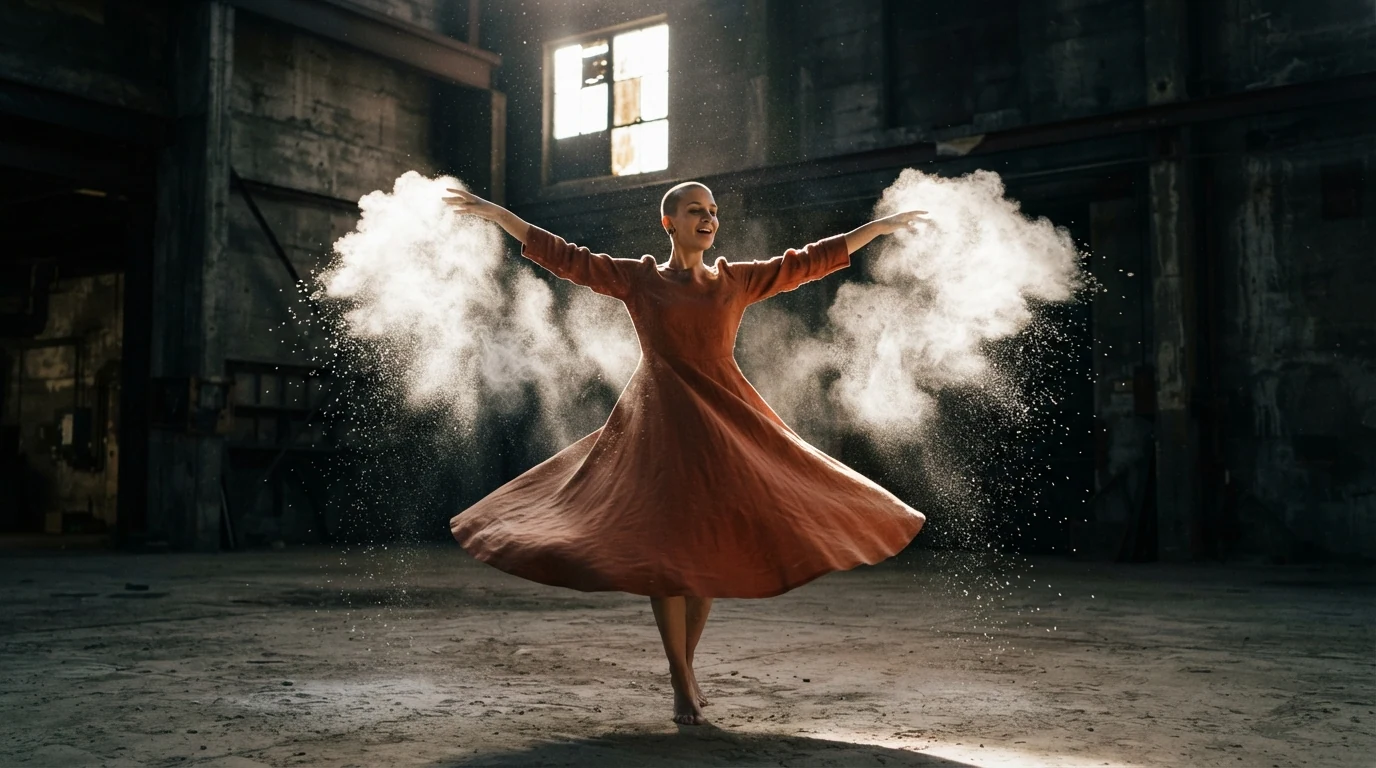
Slow-motion frame, 120 fps look, fast shutter, tack sharp tells the model the moment is stretched and sampled crisply rather than streaked. The chalk, the flared hem and the thrown arms are the motion tracers; backlights the chalk so it glows turns the particles into the subject. Her specific features keep her clearly fictional.
Open FlashBoardsUltra slow motion still, 1000 fps high-speed camera look, anamorphic widescreen. Tight side-on shot at shoulder height on an 85mm lens in a dim boxing gym. A boxer in her late twenties with a platinum buzz cut, a thin scar through her right eyebrow and bright green gloves lands a straight right into a black focus mitt held by a bearded trainer in a grey hoodie. At the moment of contact a halo of sweat droplets bursts off her glove and forehead and hangs in the air, each drop a crisp bead of light. Single hard overhead lamp, deep black background.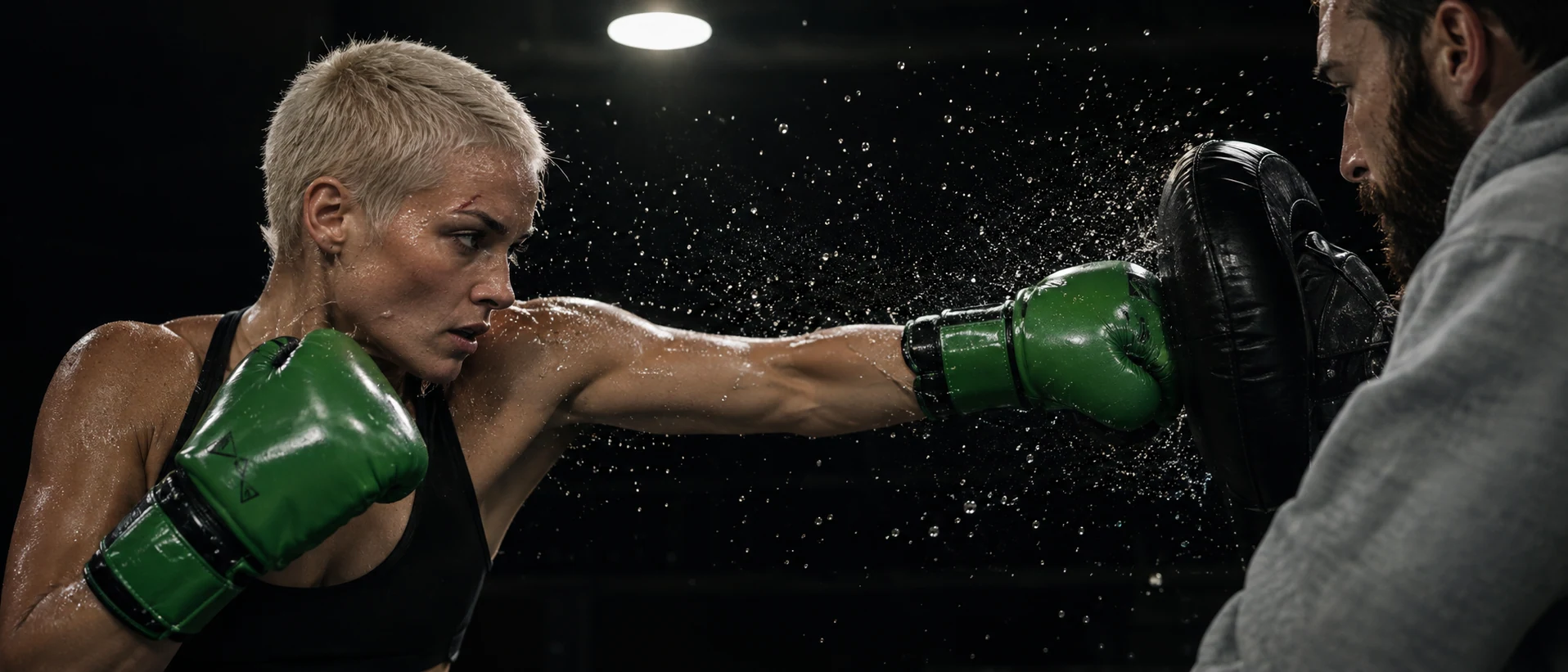
Ultra slow motion, 1000 fps high-speed camera look pushes the model toward frozen, scientific detail; at the moment of contact pins the exact instant. The sweat halo gives ultra slow motion its signature, and the single hard overhead lamp on black makes each droplet separate, just as high-speed cinematographers light it.
Open FlashBoardsSlow motion, about five times slower than real time, smooth and continuous from the first frame. Camera: a very slow push-in at knee height, moving about one meter toward the dancer over the whole shot. Action: she is already turning as the shot begins, the chalk cloud expanding outward from her hands and drifting through the shaft of sunlight. In the middle her spin carries her around to face the lens, her shaved head staying bare and smooth throughout, the rust dress swinging wide and settling. At the end her arms drop slowly to her sides while the glowing chalk keeps floating and sinking around her.The speed comes first (slow motion, about five times slower than real time), so the model sets the tempo before anything else. Already turning and expanding outward make the shot alive from the first frame, and every element named is already in recipe 1's frame, so nothing new gets invented; her shaved head staying bare locks the detail the model can't see once she turns away, where it would otherwise grow a ponytail. The slow push-in adds depth without the floaty drift a fast move gets when slowed.
Open FlashBoards{
"output": "Full-screen live-action slow-motion shot from The Matrix (1999), about eight times slower than real time, fast shutter, already slowed in its very first frame: one continuous shot, no cuts. Late-1990s 35mm anamorphic film stock with fine grain; the whole image carries the film's strong mint-green tint: a flat, bright overcast sky in pale mint green, almost white, and deep green glass; a worm's-eye view straight up beside a glass office tower.",
"characters": {},
"shots": [
{
"shot": 1,
"camera": "locked off, worm's-eye view looking straight up from the foot of the tower, wide lens, deep focus, anamorphic widescreen; static, the camera never moves for the whole shot",
"action": [
"BEGINNING: alive from the first frame and already slowed: a large dark helicopter hangs in silhouette in the left third of the frame, seen from directly beneath and filling almost the full height of the frame: its belly toward the lens, the tail boom pointing straight up to the top edge with its crossbar stabilizer, the nose near the bottom edge and a landing skid along its screen-left side",
"BEGINNING: a dense cloud of hundreds of brass shell casings is already pouring from the open door on the helicopter's screen-right side, each casing a finger-long gold cylinder clearly readable even at a distance, fanning out to the right and down toward the lens and filling the sky between the helicopter and the tower",
"BEGINNING: the tower's facade fills the right third of the frame in steep perspective: bands of dark green glass between bright white horizontal lines, all converging toward the helicopter at the left; near its left edge a tall dark gap where a column of windows has been shot out, cracked and crazed glass along the rows",
"THEN: the two-blade main rotor turns slowly clockwise on screen: the blade tip on the left swings up toward the tail while the tip on the right swings down toward the nose, the blade line going from level to upright and on around; each blade stays crisp and sharp, a lazy turn you can follow blade by blade",
"THEN: the casings keep streaming out, each one tumbling end over end and glinting gold as it catches the light; the ones falling toward the lens swell in size and sail out past the right and bottom edges of the frame",
"THEN: a few casings very close to the lens drift slowly across the upper left and the lower centre of the frame, soft and out of focus",
"END: the helicopter holds its place and size in the left third, the rotor still turning slowly clockwise and the dense cloud of casings still pouring and tumbling; the facade and the camera stay perfectly still"
],
"dialogue": [],
"voice": "silence: nobody speaks in this shot, no voice at all"
}
],
"sound": {
"ambience": "a deep, slowed-down rotor thud pulsing overhead, the stretched metallic ring of brass casings tumbling through the air, low wind",
"speech": "no words in this video; the only human sounds are breaths and movement",
"never_spoken": "no narration and no voice-over: the descriptions, performance notes and step words of this prompt are never spoken aloud",
"music": "a film score under the scene, always below the voices: pounding, dissonant orchestral action score, low brass stabs over driving percussion",
"subtitles": "none"
}
}Remakes the helicopter shot from The Matrix (1999): the prompt carried over the locked-off worm's-eye view beside the shot-out glass tower, the silhouetted helicopter with its tail pointing up, the rotor turning slowly clockwise and the casings tumbling toward the lens under the film's green tint.
The speed sits in the first words of output (about eight times slower than real time, fast shutter), so the model sets the tempo before it draws anything. Clockwise on screen is spelled out by which blade tip rises, and each blade stays crisp keeps the rotor readable instead of smeared into a disc. Hundreds of finger-long gold casings tumbling end over end are the tracers that make stretched time visible, the locked-off camera keeps every bit of motion inside the frame, and the explicit silence plus one line of score stop the model from adding a narrator.
Open FlashBoardsCommon mistakes
- Real-time video. Video models default to natural speed. Put slow motion and a factor such as five times slower than real time at the very start of the prompt, not at the end.
- A freeze instead of slow motion. If nothing keeps moving, the result looks like a still with drift. Give continuous motion that has somewhere to go: powder expanding, a spin completing, water falling.
- Streaky particles. Without shutter words, droplets and dust smear. Ask for a fast shutter and each drop a crisp bead of light.
- Hidden speed. A clean studio with no tracers reads as ordinary footage. Add hair, fabric, sparks, rain or dust, and backlight them.
- Accidental ramps. Long prompts with many beats can make the model speed up to fit them in. Keep one action per shot and one steady speed.
Keep the reference frames, prompts and every generated take side by side — images and video in one canvas.
FAQ
6 questionsWhat is slow motion in film?
Slow motion is an effect in which on-screen action moves slower than it did in reality. It is usually made by recording more frames per second than the playback rate, for example 120 fps played at 24 fps, which runs five times slower. Filmmakers use it to reveal detail the eye misses and to give a moment emotional weight, from a stunt to a goodbye.
What frame rate do you need for slow motion?
For a 24 fps film, anything above 24 fps slows action. 48 fps gives half speed and suits walks and subtle beats; 60 fps is 2.5 times slower; 120 fps, five times slower, is the common choice for action and sport. Water, glass and impacts usually need 240 fps or more, and ultra slow motion goes into the thousands.
How do you shoot slow motion?
Set the camera's high-frame-rate mode, say 120 fps, and make sure it plays back at your project rate of 24. Use a shutter around double the frame rate, 1/240 s, or faster for crisp particles. Add light, since 120 fps costs over two stops, use flicker-free lamps, and stage the action with hair, fabric, dust or water that shows the motion.
What is the difference between slow motion and high frame rate?
High frame rate describes capture or exhibition speed; slow motion is the result of a mismatch between them. Footage shot at 48 fps and projected at 48 fps, as in HFR screenings, moves at real speed and just looks smoother. The same footage played at 24 fps runs at half speed. Speed on screen always depends on the ratio of capture rate to playback rate.
Can you make slow motion in post-production?
Yes, but with limits. Slowing a 24 fps clip either repeats frames, which stutters, or uses frame interpolation that invents in-between images, which can warp edges, hands and fast-moving objects. It works for gentle movement and small slowdowns. For clean slow motion of fast action, shoot at a higher frame rate so the frames are real.
What is overcranking?
Overcranking means shooting at a higher frame rate than the film will be played at, such as 48 or 120 fps for a 24 fps project. The name comes from hand-cranked cameras, where turning the crank faster exposed more frames per second. It is the in-camera way to create slow motion, and the opposite of undercranking, which speeds action up.
Related terms
3- Speed RampPost-Production & VFX
A speed ramp changes playback speed within one continuous shot — slowing into a key moment and snapping back to real time or faster — to accent a beat of action.
- UndercrankingCameras & Capture
Undercranking shoots at a lower frame rate than playback — for example 12 fps played at 24 — so action runs faster than life on screen, used for slapstick, frantic chases and punchier action.
- Frame RateFormats & Exhibition
Frame rate is how many frames are captured or shown per second: 24 fps is the cinema standard, 25/30 fps is broadcast video, and 48–120 fps (HFR) looks hyper-smooth; shooting faster than playback creates slow motion.
Further reading
Blain Brown, Cinematography: Theory and Practice (Focal Press), chapters on frame rates and shutter. American Cinematographer Manual (ASC Press), sections on high-speed cinematography and flicker.