 FlashBoards Learn
- Learn
- Camera Movement
- Locked-On Shot
Camera Movement · Film language
Locked-On Shot
Also called: locked-on effect, subject lock, object-locked camera
A locked-on shot keeps one moving object pinned to the same spot in the frame while everything around it moves. The camera is either rigged to the object or stabilized on it in post, so the subject feels frozen, weightless or trapped as the world swings, streaks and rotates around it.
- What it does
- Anchors the frame to a subject instead of the world, so the background carries all the motion.
- Use it when
- You want speed, fixation, dizziness or a product hero moment without losing the subject for a single frame.
- Watch out
- Any flex in the rig or a sloppy track reads as wobble and breaks the illusion instantly.
- Try this prompt
Handlebar-mounted camera, cyclist locked dead center and sharp, night street streaking past in motion blur, 18mm lens
What is a locked-on shot?
Normally the frame belongs to the world: the room stays put and the actor moves through it. A locked-on shot flips that. The frame belongs to one object — a face, a wheel, a record label — which keeps its place, size and often its rotation while the world slides, tilts or revolves behind it.
- Physically: the camera is hard-mounted to the subject or whatever carries it — a car body, a bicycle, an actor's torso.
- In post: you shoot handheld or on a gimbal, track a point on the object and stabilize on it. The subject freezes; the frame edges swing, so crop in or keep the moving borders.
It is a camera movement that, at the center of the frame, looks like no movement at all.
Why do filmmakers use the locked-on effect?
It externalizes a state of mind. Pinning a drunk or panicking character's face while the room lurches puts us inside their tunnel vision — Martin Scorsese strapped the camera to Harvey Keitel for the drunken bar scene in Mean Streets (1973), an ancestor of the Snorricam.
It sells speed without losing the subject: a skateboard or wheel held steady while the ground rips past feels faster than a subject drifting through a tracking shot. Sports ads and music videos love it because the hero object never leaves its mark, so cuts land on the beat with it in the same place.
And it signals obsession: one object dead still while the world churns.
How to shoot a locked-on shot
Rig. Speed rail, clamps and short, triangulated arms — any bounce between object and camera reads as jitter. On vehicles use rated mounts with a safety line.
Lens. Wide and close: 14–24 mm at 40–80 cm from a face or wheel. Long lenses flatten the world and hide the motion.
Shutter. Keep 180° (1/48 at 24 fps) on physical rigs — background blur is the effect. For post stabilization shoot 1/100–1/200 for crisp tracking and add blur later.
For post. Frame 20–30% wider than delivery, with a high-contrast tracking point that never leaves the sensor.
Light. Practicals sweeping across a locked face tell the viewer the world is turning.
Locked-on lazy Susan
Subject and camera share one turntable: the actor sits on a rotating platform with the camera rigged to it, and the unit spins. The actor doesn't move in frame; the room revolves behind them and every fixed light sweeps across their face. One revolution in 10–20 seconds reads as a dreamlike drift; faster feels like a centrifuge. Dress the whole room — the camera sees 360°. Unlike an arc shot, where the camera orbits a still subject, here both orbit together.
Locked-on shadow box
Here the locked object is a rectangular inner frame — a window, a screen, a doorway or a box built around the lens — held still while its contents or the world outside move. It borrows the picture-in-picture logic of the shadow box. Rig the frame to the camera arm, or track its corners in post and stabilize on them. It feels theatrical, like a proscenium that refuses to move.
Locked-on shot vs. Snorricam
A Snorricam is one specific rig — a harness on the actor with the camera aimed back at their face — so it always makes a locked-on shot of a person. The locked-on shot is broader: any object, any mount, or pure stabilization in post.
Don't confuse either with a locked-off static shot: locked-off anchors the frame to the room, locked-on anchors it to the subject. When the locked object rotates, the horizon turns into a camera roll.
Locked-On Shot in motion









11 clipsIn every clip, find the one thing that never moves in the frame, a face, a wheel, a record label or a car interior, and watch the world do all the moving around it. The steadier the anchor, the more the background seems to spin, slide or streak.
How to create a locked-on shot with AI
4 promptsModels assume a world-stable camera, so spell out the mount, the sharp fixed subject and the moving background. Keep all your takes on one FlashBoards board beside your references to compare side by side. The fourth prompt re-shoots a real film shot from a text description alone, and the original plays next to the result so you can compare.
Camera rigidly mounted on bicycle handlebars, facing back at the rider, 60 cm from her face, 18mm lens, framed chest-up. A woman in her late thirties with short silver-dyed hair, freckles and a green rain jacket rides fast down a wet city street at night, locked dead center, face razor sharp. Slow shutter: everything behind her, neon signs, streetlights and shopfronts, streaks into long motion-blur light trails with no sharp detail. Cool blue and magenta light.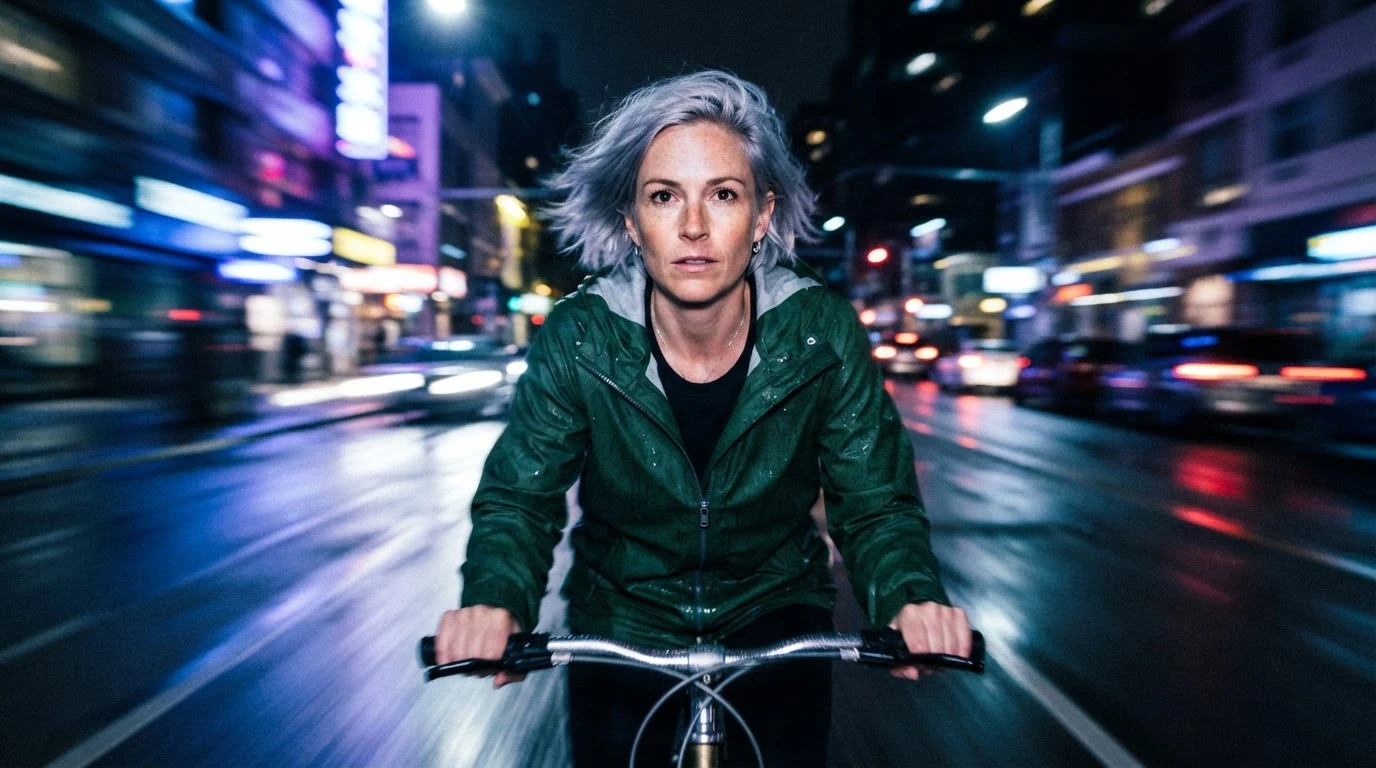
"Rigidly mounted… facing back" defines the rig, "locked dead center" and "razor sharp" hold the subject, and "slow shutter" with "streaks into long motion-blur light trails" puts the speed in the background.
Open FlashBoardsLocked-on lazy Susan shot: a man in his seventies with a white beard braided into two strands and a leather apron sits on a rotating platform in a clockmaker's workshop. Camera fixed to the same platform at eye level, 35mm lens; he stays centered and sharp while shelves of clocks smear into circular motion blur and tungsten lamps draw curved light trails.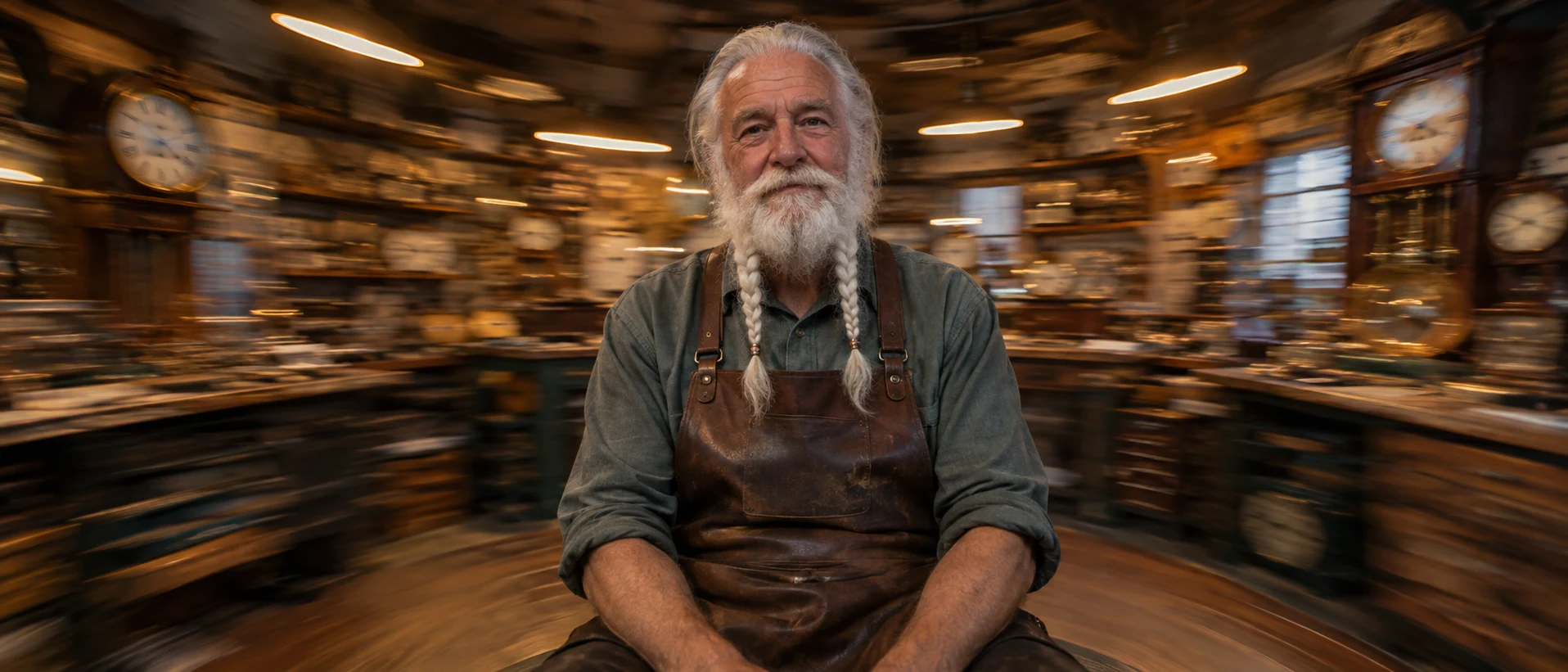
"Fixed to the same platform" anchors him; "circular motion blur" and "curved light trails" tell the model the world rotates rather than slides.
Open FlashBoardsCamera: rigidly mounted on the handlebars, traveling with the bicycle at fast cycling speed; the woman stays locked in the center of the frame for the whole shot. Action: She is already pedaling hard, streetlights sliding rapidly past behind her head. She leans into a left turn and the street swings around her while her face stays in place. She straightens up and glances over her shoulder as light streaks keep pouring past.Motion starts in the first sentence, so the clip is alive from frame one; "stays in the center of the frame for the whole shot" stops the model from orbiting or drifting.
Open FlashBoards{
"output": "Full-screen live-action scene from Caché (2005) from its very first frame: one continuous shot inside a slowly moving car, the camera rigidly fixed to the car's interior, never panning or drifting. Mid-2000s 35mm feel, soft flat overcast daylight, the side window bright and nearly blown out, muted beige and olive palette, quiet Paris street lined with a grey stone wall.",
"characters": {
"S1": {
"name": "Pierrot Laurent, played by Lester Makedonsky",
"look": "boy of about twelve, thick shoulder-length dark brown curly hair, olive-green hooded jacket over a dark navy top, sitting in the front passenger seat",
"voice": "quiet, flat, a little wary"
},
"S2": {
"name": "Georges Laurent, played by Daniel Auteuil",
"look": "never seen: he drives from the seat right behind the camera",
"voice": "calm, low, slightly guarded, heard off screen"
}
},
"shots": [
{
"shot": 1,
"camera": "car-mount locked to the car body: fixed at the driver's shoulder, looking right across the front of the car at the passenger seat on a three-quarter front angle, slightly above eye level, medium close-up; the beige leather backrest and headrest of S1's seat fill the right third of the frame and never move; the passenger side window fills the left of the frame behind S1; the whole car interior holds exactly the same place in frame from start to end, only the view through the window moves",
"action": [
"BEGINNING: alive from the first frame, S1 has just climbed in; he turns his head away toward the door on screen left so the camera sees the back of his curly head, and his right hand on screen left pulls the door shut.",
"THEN: he turns back into profile, looks down, reaches his right hand up behind his shoulder on screen left and pulls the seat-belt strap across his chest.",
"THEN: halfway through the pull he glances up sideways toward the driver just off frame right, a brief wary look, then drops his eyes again.",
"THEN: he leans forward and down, looking at his lap as he pushes the buckle into the latch low on screen right; outside, two women in red coats pass through the window from screen left to screen right.",
"THEN: he lifts his head and looks straight toward the driver just right of the camera, his right hand resting on the strap at his chest, and asks his question.",
"THEN: his eyes drop to his chest, fingers still on the strap; then he turns his head to screen left and looks out through the window and the windscreen.",
"END: the car speeds up and a row of parked cars streams past through the window behind his head from screen left to screen right, faster and blurring, while S1, his seat and the headrest keep exactly the same place in the frame; at the very end his eyes slide back toward the driver, face serious, no smile."
],
"dialogue": [
{
"speaker": "S1",
"on_screen": true,
"when": "from the first frame, while his head is turned away toward the door",
"delivery": "quick, offhand greeting",
"line": "<d>[French] Salut, papa.</d>"
},
{
"speaker": "S2",
"on_screen": false,
"when": "right after the greeting, while S1 turns back into profile",
"delivery": "warm but brief",
"line": "<d>[French] Salut, Pierrot.</d>"
},
{
"speaker": "S1",
"on_screen": true,
"when": "while he pulls the belt across and glances up at the driver",
"delivery": "quiet, suspicious",
"line": "<d>[French] Qu'est-ce qui se passe?</d>"
},
{
"speaker": "S2",
"on_screen": false,
"when": "while S1 looks down and fastens the buckle",
"delivery": "evasive, mild",
"line": "<d>[French] Comment ça?</d>"
},
{
"speaker": "S1",
"on_screen": true,
"when": "when he lifts his head and looks at the driver",
"delivery": "flat, wary",
"line": "<d>[French] Pourquoi tu viens me chercher?</d>"
}
]
}
],
"sound": {
"ambience": "car door thud, seat-belt click, steady engine hum rising as the car speeds up, tyres on asphalt, muffled street traffic heard from outside",
"speech": "exactly these spoken phrases, each said once, in this order",
"never_spoken": "no narration and no voice-over: the descriptions, performance notes and step words of this prompt are never spoken aloud",
"music": "a film score under the scene, always below the voices: a barely audible low sustained string drone, cold and uneasy",
"subtitles": "none"
}
}Remakes the car-grip shot from Caché (2005): the prompt keeps the camera fixed at the driver's shoulder on Pierrot in the passenger seat, his belt, his wary glance, the corpus lines in French, and the street streaming past the window.
The camera field bolts the lens to the car body and pins the seat and headrest in the right third, so the model has a fixed landmark it must not move. The action phases give the window something new at each beat (the stone wall, passers-by in red, parked cars speeding up), so all the motion lives outside while Pierrot keeps his place.
Common mistakes
- Everything blurs. Repeat that the subject is sharp and name what is blurred.
- The camera orbits. Name the mount and say the subject stays in the same place in frame.
- Static background. Ask for streaks, rotating light trails or a tilting horizon.
- Slow push-in on the still. Open the video prompt with action already underway.
- Rig drawn in frame. Describe the view from the mount, not the hardware.
Keep the reference frames, prompts and every generated take side by side — images and video in one canvas.
FAQ
4 questionsWhat is a locked-on shot?
A locked-on shot keeps one moving object — a face, a wheel, a product — at the same spot in the frame while the background moves around it. It is made by rigging the camera rigidly to the object or by tracking and stabilizing on it in post, so the subject looks frozen and the world supplies the motion.
How do you create the locked-on effect in post?
Shoot wider than your delivery format with a clear, high-contrast point on the subject. Track that point for position, rotation and scale, then apply the track as stabilization so it stays still. The frame edges will swing, so crop in or keep the moving borders as a style, and add motion blur if needed.
What is the difference between locked-on and locked-off?
A locked-off shot is a static shot: the camera is fixed to the world on a tripod, so the room stays still and actors move through it. A locked-on shot is fixed to the subject, so the subject stays still in frame and the room moves. The names sound alike but describe opposite anchors.
Is a Snorricam a locked-on shot?
Yes. A Snorricam straps the camera to the actor's body, aimed back at their face, so the face stays fixed while the surroundings lurch — a locked-on shot of a person. The locked-on shot is the wider category, covering any object and any method, from car mounts and turntables to stabilization done entirely in post.
Related terms
5- SnorricamCamera Movement
A Snorricam is a rig strapped to the actor's body with the camera aimed back at them, so their face stays locked in the frame while the world lurches around — a staple for drunkenness, panic or euphoria.
- Static ShotCamera Movement
A static shot keeps the camera completely still — locked off on a tripod or dolly with no pan, tilt, zoom or move — so all the energy comes from actors, light and composition inside the frame.
- Camera RollCamera Movement
A camera roll rotates the camera around its own lens axis, so the horizon and the whole image turn inside the frame — from a slow lean to a full 360° barrel roll — to convey disorientation, a shift of power or a stylised transition.
- Match CutEditing
A match cut joins two different shots through a shared shape, movement, composition or sound — the bone that becomes a satellite in 2001 — so the cut draws a link between them.
- Camera MovementCamera Movement
Camera movement is any change of the camera's position or direction during a shot — pans, tilts, dollies, cranes, handheld and more — used to guide attention, reveal space and set the emotional rhythm of a scene.
Further reading
Blain Brown, Cinematography: Theory and Practice (Focal Press) — chapters on camera support, mounts and rigging.