 FlashBoards Learn
- Learn
- Camera Movement
- Camera Roll
Camera Movement · Film language
Camera Roll
Also called: roll, barrel roll, roll rotation, rotating shot
A camera roll shot rotates the camera around its own lens axis, so the horizon and the whole picture turn inside the frame. It ranges from a slow lean to a full 360° barrel roll, and it tells the viewer that balance, gravity or control is slipping away.
- What it does
- Turns the entire image like a steering wheel, so the audience loses its sense of up and down.
- Use it when
- A character is dizzy, falling or losing control, or you need a stylised bridge into the next scene.
- Watch out
- The image turns around the frame center; anything off-center swings out of shot.
- Try this prompt
Straight-down overhead shot, the camera slowly rolls around its lens axis so the whole room turns around a man lying in the center of the floor
What is a camera roll shot?
Besides pan and tilt, a camera can rotate a third way: roll, around the axis through the lens. It keeps looking at the same point and turns the picture itself. A slow roll leans the horizon a few degrees; a barrel roll keeps going through 180° or 360°; a whip roll spins so fast the image smears. A roll that stops and holds leaves you in a Dutch angle. Among the tools of camera movement, it is rare, so it registers.
Why do filmmakers roll the camera?
The horizon is the viewer's anchor. Take it away and a roll reads as vertigo, drunkenness or panic. Most clips below are overhead shots, several of them of someone on the floor, as in The Big Lebowski, The Wolf of Wall Street and Thesis: seen from above, a person has no up or down, so the roll makes them seem to spin or drift. Rolls also turn geometry hypnotic: a stairwell or a grid of lights becomes a kaleidoscope, as in Alice Through the Looking Glass and Thor.
How to shoot a camera roll
- Rig. Full rolls need a remote head or gimbal with unlimited roll and horizon lock off; a Dutch plate handles a lean.
- Pivot. The picture turns around the frame center, so put the subject or vanishing point dead center.
- Lens and height. 14–24mm makes the turn feel bigger. For floor overheads, rig 3–5 m high.
- Speed. A lean: 5–15° over 4–6 s. A barrel roll: 180–360° over 4–8 s, eased in and out.
- Set. Every edge of the frame passes every position, so keep lights outside a circle, not a rectangle.
- Post. A full 360° rotation in the edit keeps only about half the width of a 16:9 frame; shoot with resolution to spare.
Roll clockwise
A clockwise roll turns the image to the right: the top of the frame travels toward the right edge. On set, agree whether "clockwise" means the picture or the camera body; they turn in opposite directions. Follow the action: the way a body falls or a staircase winds.
Roll counterclockwise
A counterclockwise roll turns the picture to the left. In a sequence, keep one direction unless the reversal is the point.
Whip roll
A whip roll spins 180° or more in a fraction of a second, so the picture dissolves into circular streaks. It hides cuts: end shot A mid-spin, start shot B spinning the same way, and the join vanishes, one of the classic seamless transitions. Use a 180° shutter or wider.
Camera roll vs. Dutch angle and arc shot
A Dutch angle is a fixed tilt held for the whole shot; a camera roll is the rotation happening on screen. A roll can end Dutch, but a Dutch frame never moves.
An arc shot moves the camera on a path around the subject, so the background slides past with parallax. A roll never changes position: everything in the frame turns together as one flat plane. A rotating set, as in Fred Astaire's wall dance in Royal Wedding (1951), is the opposite: the camera turns with the room.
Camera Roll in motion
8 clipsWatch the frame edges: the camera stays in place or moves straight up and down while everything in the frame turns around its center.
How to create a camera roll with AI
3 promptsNano Banana 2 Lite builds a centered overhead start frame, GPT Image 2.5 a mid-spin whip-roll still, and MiniMax H3 Max Turbo animates recipe 1 into a slow half roll. Compare takes side by side on one FlashBoards board.
Cinematic film still, straight-down overhead shot from 4 meters, 24mm lens: a woman in her fifties with cropped silver hair, a thin scar through her left eyebrow and a mustard corduroy suit lies on her back in the exact center of the frame on a black-and-white checkerboard floor, arms spread, playing cards scattered around her. A single hard lamp above makes a round pool of light, the corners fall into darkness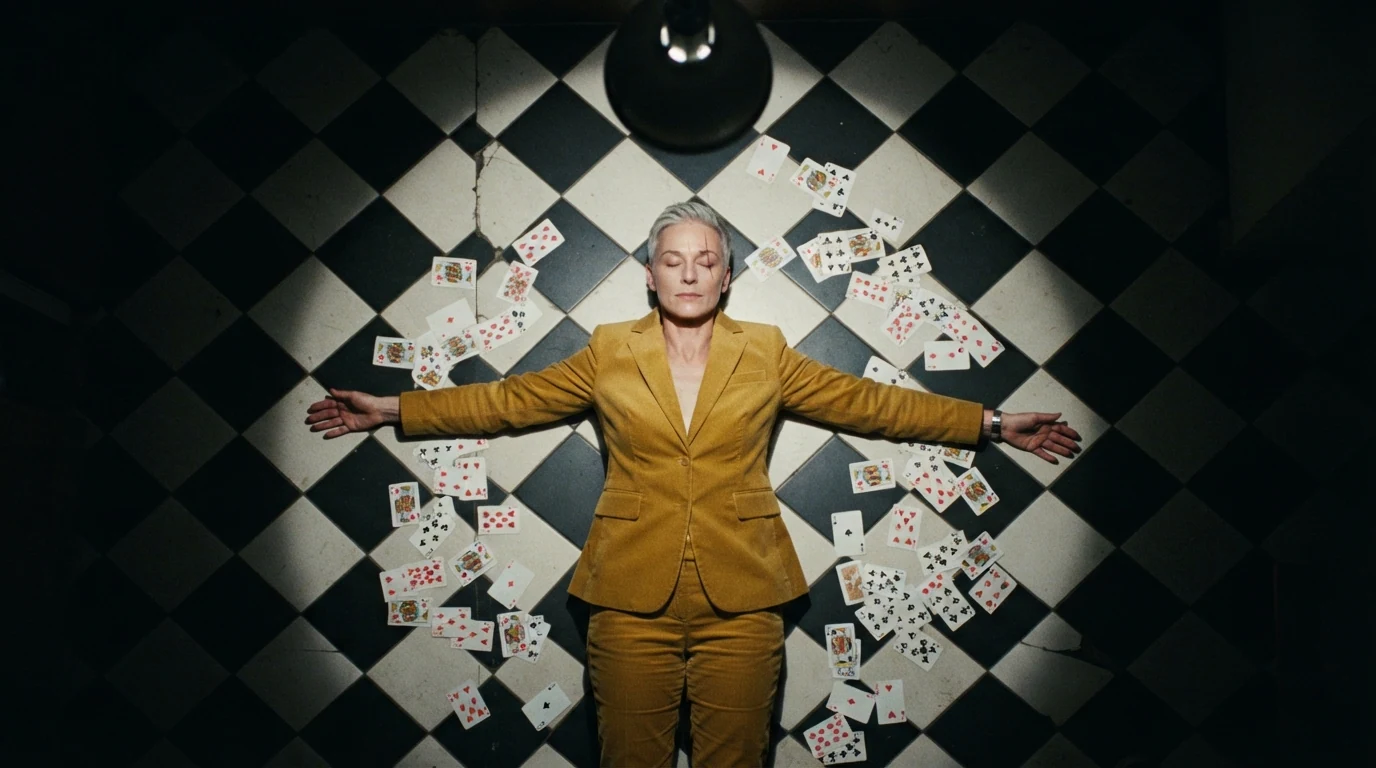
Straight-down overhead removes the horizon, exact center sets the pivot, and the checkerboard and cards give the eye shapes to track as they rotate.
Open FlashBoardsCinematic film still captured mid whip roll: a young man with a shaved head, round tortoiseshell glasses and an orange puffer jacket stands sharp in the center of an empty night subway car, the frame rotated 40 degrees clockwise, handrails and ceiling lights smeared into curved circular streaks that grow stronger toward the edges, 18mm lens, cold fluorescent light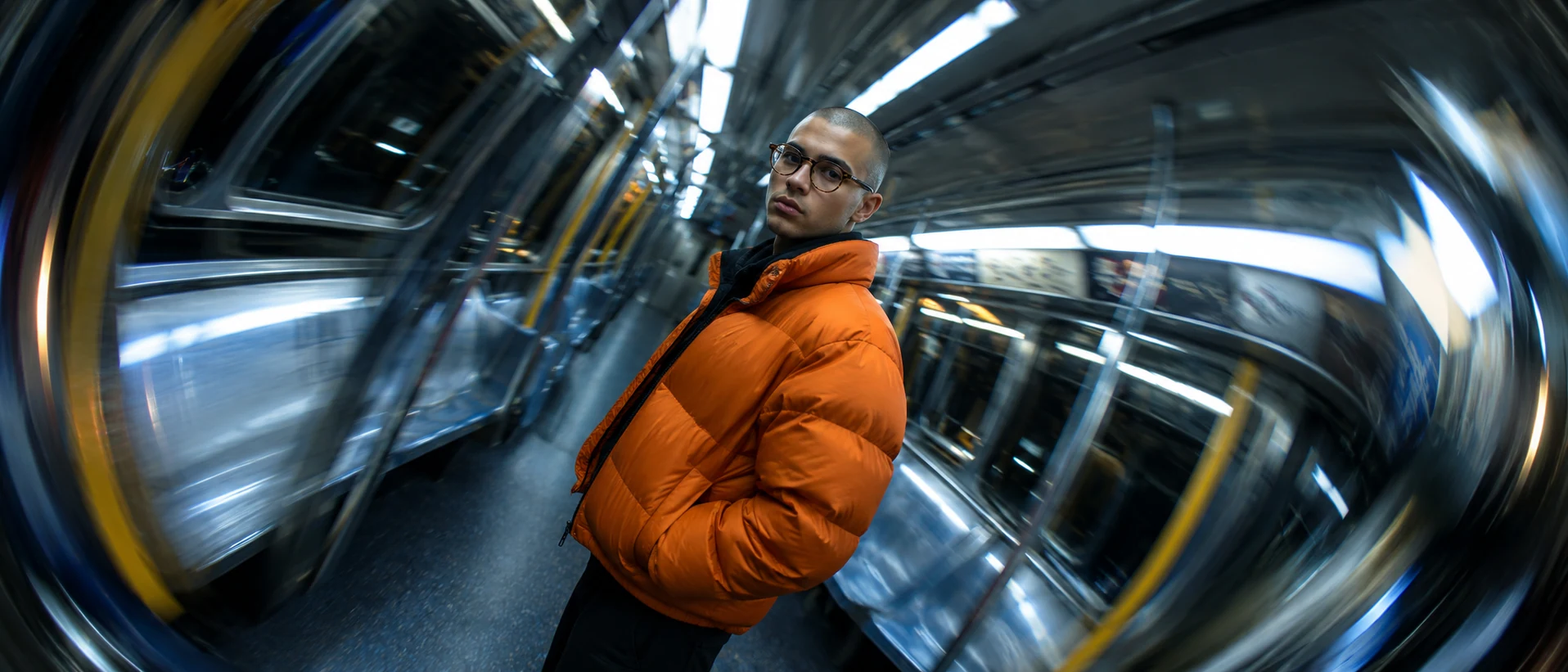
Rotated 40 degrees gives the tilt a number the model respects. Curved circular streaks toward the edges is the signature of a spin; plain "motion blur" reads as a whip pan.
Open FlashBoardsCamera: the camera stays straight overhead at the same height and rolls around its own lens axis from the first frame, turning the whole image clockwise at a slow, steady speed, half a turn over the shot, then eases to a stop. The floor, cards and woman turn together. Action: her fingers are already tapping on the tiles as the shot begins. Midway she turns her head toward a card. At the end she looks back up into the lamp and closes her eyes.Rolls around its own lens axis and the same height keep the model from dollying; half a turn gives an end point; tapping fingers keep it alive from frame one.
Open FlashBoardsCommon mistakes
- "Camera roll" alone often becomes a forward move. Say rolls around its own lens axis.
- Models spin the subject instead of the frame; say the floor and the person turn together.
- An off-center subject slides out of frame as the pivot drifts. Center them in the start frame.
- "Barrel roll" can conjure aircraft; describe the camera's rotation instead.
Keep the reference frames, prompts and every generated take side by side — images and video in one canvas.
FAQ
4 questionsWhat is a camera roll shot?
A camera roll shot rotates the camera around the axis through its lens, so the horizon and the whole picture turn while the camera keeps looking at the same point. It ranges from a slow lean to a full 360° spin and signals dizziness, falling or loss of control.
What is a barrel roll shot?
A barrel roll is a camera roll that keeps going through a full rotation, so the floor passes through the top of the frame. It needs a remote head or gimbal with an unlimited roll axis, and lights must stay out of frame at every angle of the turn.
What is the difference between a camera roll and a Dutch angle?
A Dutch angle is a static frame with the camera tilted sideways, so the horizon runs diagonally for the whole shot. A camera roll is the rotation happening on screen. A roll can end in a Dutch angle and hold there, but a Dutch angle alone never moves.
How do you do a camera roll without a special rig?
For a slow lean, turn the camera on a fluid head fitted with a Dutch plate. For a bigger roll, shoot level with extra resolution and rotate the image in the edit with eased keyframes. A full 360° in post costs about half the frame width, so frame loosely.
Related terms
6- Dutch AngleCamera Angles
A Dutch angle tilts the camera sideways around the lens axis so the horizon and verticals run diagonally, making the world look off-balance — a classic signal of unease, madness, intoxication or danger.
- Arc ShotCamera Movement
An arc shot moves the camera along a curved path around a subject, so the subject holds its place in the frame while the background revolves behind it — a way to heighten a climactic beat, bind two characters together or give a hero moment extra charge.
- Seamless TransitionEditing
A seamless transition hides the cut inside matching motion, a camera move, a dark object crossing the lens or a shared shape, so two shots play as one continuous action.
- SnorricamCamera Movement
A Snorricam is a rig strapped to the actor's body with the camera aimed back at them, so their face stays locked in the frame while the world lurches around — a staple for drunkenness, panic or euphoria.
- Locked-On ShotCamera Movement
A locked-on shot keeps one moving object pinned to the same spot in the frame — by rigging the camera to it or by stabilising on it in post — so the object seems frozen while the world swings around it.
- Camera MovementCamera Movement
Camera movement is any change of the camera's position or direction during a shot — pans, tilts, dollies, cranes, handheld and more — used to guide attention, reveal space and set the emotional rhythm of a scene.
Further reading
Steven D. Katz, Film Directing Shot by Shot (Michael Wiese Productions). The American Cinematographer Manual (ASC Press), chapters on camera support and remote heads.