 FlashBoards Learn
- Learn
- Cameras & Capture
- 180-Degree Shutter Rule
Cameras & Capture · Film language
180-Degree Shutter Rule
Also called: 180-degree shutter angle, shutter angle rule
The 180-degree shutter rule says to set your shutter speed to about double the frame rate: 1/48 or 1/50 s at 24 fps. Each frame then carries the amount of motion blur audiences read as cinema. A narrower shutter makes movement crisp and stuttery; a wider one makes it soft and smeary.
- What it does
- Gives moving subjects the natural, slightly soft blur that makes 24 fps playback feel fluid instead of choppy.
- Use it when
- By default on almost every shot; break it deliberately for combat, panic or dreamlike smear.
- Watch out
- Locking the shutter means controlling exposure with ND filters and aperture, and 1/48 s can flicker under 50 Hz lights.
- Try this prompt
Woman running across a wet street at dusk, 35mm, waist height, natural 24 fps motion blur on swinging arms, background sharp
What is the 180-degree shutter rule?
It is the default exposure time for motion pictures. A film camera's rotating shutter is a half-disc: for half of each turn the frame is exposed, for the other half the film advances in darkness. A 180° opening exposes each frame for half the frame interval.
The math: shutter speed = (angle ÷ 360) × (1 ÷ frame rate). At 24 fps, 180° gives 1/48 s; at 25 fps, 1/50; at 30 fps, 1/60. Cine cameras let you dial the angle, stills-style bodies ask for a shutter speed — hence "double your frame rate."
Exposure time decides how far a moving hand or wave smears across the frame. That smear is motion blur, and 180° gives the amount audiences read as normal movement. It is a convention, not physics — which is why breaking it reads as a choice.
Why does a 180-degree shutter look cinematic?
At 24 fps the eye gets only 24 samples of movement per second. If each is razor-sharp, the brain notices the gaps and motion looks like a flip book. A short blur trail on each frame bridges them; half the frame interval is enough to connect frames without dissolving detail.
That is why a phone at a fast shutter in bright sun often looks jittery even at the right frame rate. The convention is also a baseline to push against: in Saving Private Ryan (1998), Janusz Kamiński shot the Omaha Beach landing with narrow shutter angles, so water and debris hang sharp and the action feels stroboscopic and violent.
How to shoot with a 180-degree shutter
- Set frame rate first, then shutter. 24 fps → 180° or 1/48 s (1/50 if 1/48 is missing). For slow motion at 120 fps, 180° means 1/240 s.
- Expose with everything else. With the shutter locked, brightness comes from aperture, ISO and light — the rest of the exposure triangle. Outdoors you will need ND filters (ND 0.9–1.8 is common) to hold a wide aperture.
- Watch for flicker. Under 50 Hz mains lighting, 24 fps at 180° can pulse with HMIs, fluorescents and cheap LEDs. The classic fix is 172.8°, exactly 1/50 s at 24 fps.
- Keep it consistent within a scene. Cutting a 180° master against a 90° close-up makes one shot feel jittery. Change the angle per sequence, not per shot, unless the jolt is the point.
When to break the rule: narrow and wide shutter angles
Narrow shutter (90°, 45° or less) shortens the blur trail. Action turns crisp and staccato, spray and dust freeze into droplets and specks, impacts feel harder. Use it for combat, fights and panic. It also exaggerates judder on pans, so keep moves purposeful.
Wide shutter (270°–360°) lengthens the trail. Movement smears, lights streak, and the image feels drowsy or dreamlike. Digital cine cameras can open to nearly 360°, which also buys about a stop in low light. Push too far and the smear hides faces.
Shutter angle changes texture, not speed: for faster or slower motion, change the frame rate.
180-degree shutter rule vs. the 180-degree rule
Same number, unrelated ideas. The 180-degree rule is about staging and editing: keep the camera on one side of the line between two characters so screen direction stays consistent. The shutter rule is about exposure time and motion blur inside each frame. One governs where the camera stands, the other how long each frame is exposed. More capture settings live in the cameras and capture hub.
180-Degree Shutter Rule in motion
7 clipsShutter angle only shows while something moves, so watch the edges of whatever is fastest: spray, legs, a background during a pan. The first clips freeze motion into crisp, stuttering samples; the later ones let it trail into the soft blur of a normal or wider shutter.
How to create a 180-degree shutter rule with AI
4 promptsModels have no shutter dial, so describe the result: what blurs, what stays sharp. Make a start frame with natural 24 fps blur, a narrow-shutter take for contrast, then animate the first frame. Keep all three on one FlashBoards board beside your reference stills to compare the blur. The fourth prompt re-shoots a real film shot from a text description alone, and the original plays next to the result so you can compare.
Cinematic film still, medium-wide, 35mm lens, camera at waist height. A woman in her forties with a cropped silver undercut, a scar through her left eyebrow and a bottle-green raincoat runs left to right across a wet cobblestone street at dusk. Natural 24 fps motion blur, 180-degree shutter, not a frozen action photo: swinging arms and hands dissolve into soft ghosted smears, coat hem and splashing boots trail blurred horizontal streaks along her path, face readable, shop windows behind her sharp. Warm sodium light, blue sky, film grain.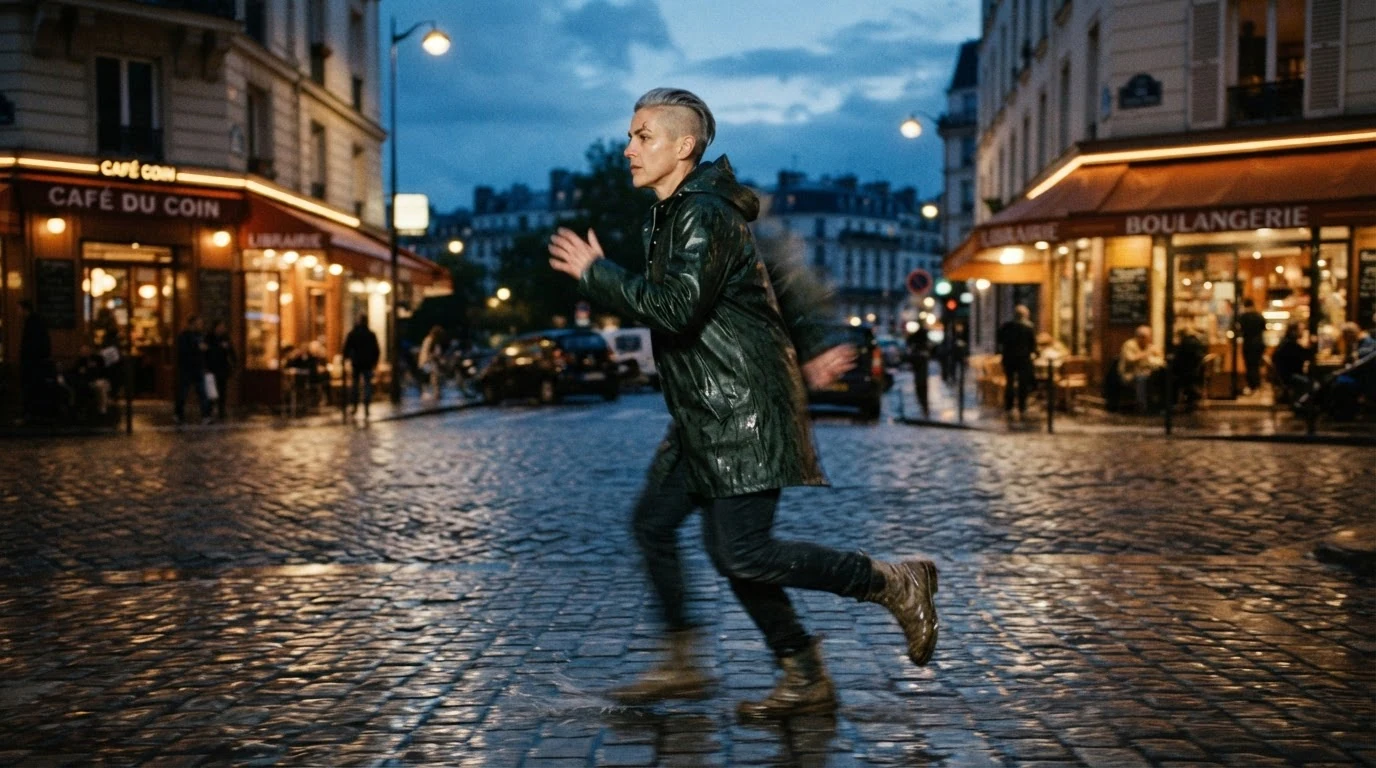
180-degree shutter sets the intent; the split does the work: what smears (arms, coat hem, boots), in which direction, and what stays sharp. Not a frozen action photo blocks the model's fast-shutter default. Without the split, models freeze everything or blur the whole frame.
Open FlashBoardsAnamorphic widescreen film still, wide shot on the deck of a fishing trawler in a storm, 28mm lens, camera low by the rail. A broad-shouldered deckhand with a red beard in two short braids and a yellow oilskin hauls a rope as a wave bursts over the bow. Narrow 45-degree shutter look: every drop of spray frozen as a crisp bead, foam hanging midair with hard edges, rope and hands pin-sharp. Overcast gray-green light.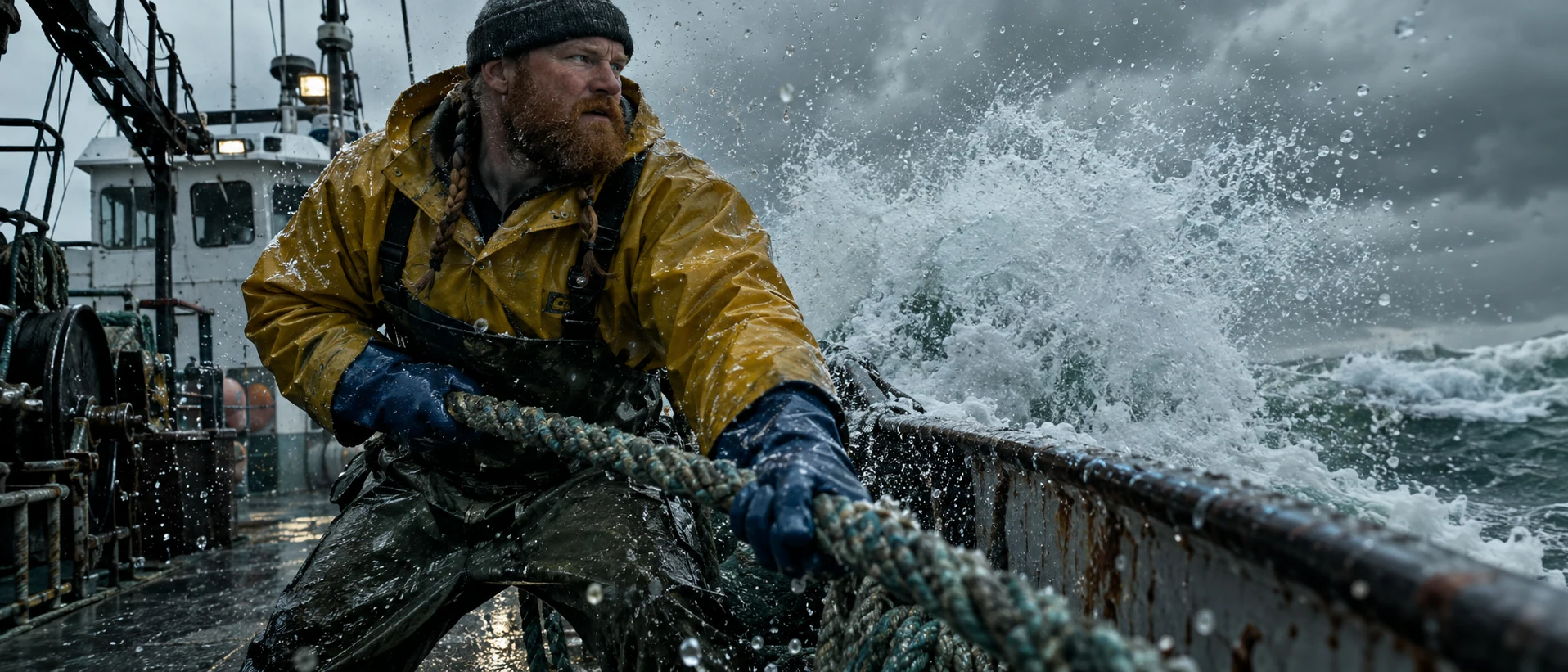
The opposite take. Frozen as a crisp bead and hard edges describe what a narrow shutter does to water, which models follow better than the angle alone.
Open FlashBoardsCamera: smooth tracking pan left to right following the woman at her running speed, at waist height, keeping her centered for the whole shot. Action: she is already mid-stride, raincoat flapping, boots splashing through puddles. She glances once over her shoulder, then runs on toward the lit shop windows on the right. Cinematic 24 fps cadence, natural motion blur on her arms and legs, the street behind her streaking softly with the pan.Already mid-stride makes the shot alive from the first frame. Tying the pan to her running speed gives readable background blur, and 24 fps cadence avoids a hyper-smooth video look.
Open FlashBoards{
"output": "Full-screen live-action shot from Crime Story (1993) from its very first frame: one continuous extreme-telephoto shot, no cuts. Overcast daytime Hong Kong harbor, flat gray light with no shadows, teal-green choppy water, dark hulls with rust-red waterlines, 1990s 35mm film grain, natural 24 fps motion blur from a standard 180-degree shutter: everything the camera does not follow smears sideways.",
"characters": {},
"shots": [
{
"shot": 1,
"camera": "extreme long telephoto lens from a quay far across the harbor, slightly above the water; wide framing, the boat small in the middle of the frame, about a third of the frame width, open choppy water in the lower half and a dark moored hull with a rust-red waterline across the top quarter; a fast pan left that follows the boat at its own speed, so the boat stays near the center while the water and every hull behind it rush toward the right of frame as long horizontal smears",
"action": [
"BEGINNING: alive from the first frame, a dark gray rigid-hull inflatable boat with a tall thin mast races right to left at full speed, bow lifted, four small distant figures in dark tactical gear and helmets crouched behind the console, a long white fan of spray streaming off the stern to the right.",
"THEN: the boat drifts slightly right of center as the pan races with it; its hull stays readable while the dark hull behind it blurs into flat bands.",
"THEN: a long moored barge slides into the background from the left, a row of black tire fenders and yellow rails on its dark side, all smeared into horizontal streaks by the pan.",
"THEN: the boat bounces over the chop, the bow slapping down and throwing fresh spray sideways.",
"END: a yellow tugboat cabin sweeps into the top left of the background, blurred sideways, and the boat hits a swell, a burst of white spray rising around the bow and half hiding the crew."
],
"voice": "silence: nobody speaks in this shot, no voice at all",
"dialogue": []
}
],
"sound": {
"ambience": "roaring outboard engines, hull slapping the chop, harbor wind",
"speech": "no words in this video; the only human sounds are breaths and movement",
"never_spoken": "no narration and no voice-over: the descriptions, performance notes and step words of this prompt are never spoken aloud",
"music": "a film score under the scene, always below the voices: driving low drums with urgent staccato strings, a 1990s Hong Kong action chase cue",
"subtitles": "none"
}
}Remakes the harbor pan from Crime Story (1993): the prompt carries over the long lens, the leftward pan with the speeding patrol boat, the barge fenders and yellow tug streaking behind it, and the silent shot under a chase score.
The JSON keeps it one continuous take and puts the technique in the camera line: a long-lens pan that tracks the boat at its own speed. That tie keeps the boat readable while the hulls behind it smear sideways, which is the 180° look on a pan.
Open FlashBoardsCommon mistakes
- Everything frozen: image models default to fast-shutter photography. Name what should smear and in which direction.
- Everything blurred: "motion blur" alone can look like camera shake. Say what stays sharp.
- Numbers without pictures: "1/48 s" changes little; add the visible result.
- Video that looks like video: ask for 24 fps cinematic cadence and tie the move to the subject's speed.
Keep the reference frames, prompts and every generated take side by side — images and video in one canvas.
FAQ
4 questionsWhat is the 180-degree shutter rule?
It is the convention of exposing each frame for half the frame interval — a shutter speed about double the frame rate, 1/48 or 1/50 s at 24 fps. It comes from the half-disc shutter of film cameras and gives the motion blur audiences associate with cinema.
What shutter speed should I use for 24 fps?
Use 1/48 s, or 1/50 s if your camera lacks 1/48 — the difference is invisible. On a cine camera, set 180°. If 50 Hz lights flicker, switch to 172.8°, exactly 1/50 s. Control exposure with ND filters and aperture, not a faster shutter.
How does shutter angle work with slow motion and high frame rates?
The rule scales with frame rate: 180° is 1/120 s at 60 fps and 1/240 s at 120 fps. Shorter frames need much more light, often two or three stops more than at 24 fps, but slowed-down footage keeps proportionate blur and still looks smooth.
Is the 180-degree shutter rule the same as the 180-degree rule?
No. The 180-degree rule is a staging and editing guideline that keeps characters' left-right positions consistent across cuts. The 180-degree shutter rule is an exposure setting that controls motion blur inside each frame. They share a number and nothing else.
Related terms
5- 180-Degree RuleComposition & Framing
The 180-degree rule keeps the camera on one side of an imaginary line between two characters (or along a movement), so their left-right positions and eyelines stay consistent from shot to shot; crossing it flips the geography and disorients the viewer.
- Shutter SpeedLenses, Focus & Exposure
Shutter speed is how long each frame is exposed to light; on cine cameras it is often set as a shutter angle, and it controls both brightness and how much blur movement leaves.
- Motion BlurLenses, Focus & Exposure
Motion blur is the smear a moving subject leaves when it travels during the exposure of a frame; its amount depends on shutter speed or shutter angle, and it makes movement feel smooth, fast or, when exaggerated, frantic.
- Frame RateFormats & Exhibition
Frame rate is how many frames are captured or shown per second: 24 fps is the cinema standard, 25/30 fps is broadcast video, and 48–120 fps (HFR) looks hyper-smooth; shooting faster than playback creates slow motion.
- Slow MotionCameras & Capture
Slow motion stretches time on screen: the camera records at a higher frame rate than playback — for example 120 fps played at 24 — so action unfolds several times slower, used for spectacle, violence, grief or to reveal what the eye normally misses.
Further reading
Kris Malkiewicz and M. David Mullen, Cinematography: Third Edition (2005). Blain Brown, Cinematography: Theory and Practice. American Cinematographer coverage of Saving Private Ryan (1998).