 FlashBoards Learn
- Learn
- Cameras & Capture
- Double Exposure
Cameras & Capture · Film language
Double Exposure
Also called: multiple exposure, double exposure effect
Double exposure puts two images on the same frame so both show through at once. On film it means exposing the same negative twice; today it is usually a blend made in post. The overlap tells the viewer two things belong together: a face and a landscape, a person and a memory, the living and a ghost.
- What it does
- Merges two images into one frame so the viewer reads them as a single thought: person plus place, present plus memory.
- Use it when
- You need a vision, a ghost, a memory, an inner state or a title-sequence portrait that one image can't carry alone.
- Watch out
- Two bright, busy layers turn into gray mush; one image needs dark areas for the other to show through.
- Try this prompt
in-camera double exposure, profile of a woman against white, pine forest filling her silhouette, film grain
What is double exposure in film?
Light builds up density on a film negative. Expose the same frame twice and the exposures add up: where the first image was dark, the second prints almost untouched; where both were bright, they wash toward white. Black is the empty space where the other picture lives.
Georges Méliès shot Four Heads Are Better Than One (1898) by exposing his own head several times against black. The Phantom Carriage (1921) used multiple exposures for its translucent spirits. With the stop trick, it is one of the founding in-camera illusions of cameras and capture and one of the purest practical effects.
Today most double exposures are composited, but the look copies that film rule.
Why do filmmakers use double exposure?
To show what can't be photographed: ghosts, visions, a memory rising over the present.
To fuse a character with an idea. At the end of Psycho (1960), a skull surfaces for a moment inside Norman Bates's face. The True Detective (2014) titles fill silhouettes of the cast with Louisiana refineries and wetlands.
To enter memory. Overlapping images often open or close a flashback.



To unsettle. In Mulholland Drive below, the frame refuses to settle into one reality.
How to shoot a double exposure
On film. Lock the camera, shoot the first pass, backwind, shoot the second. Mark framing in the viewfinder so the layers line up, and underexpose each pass by about one stop so combined highlights don't burn out.
Design the darks. A face lit hard from one side against black velvet leaves the whole shadow side free for the second image.
Digitally. Match frame rate and grain, stack the plates and use a screen or lighten blend, which imitates additive exposure. Keep one layer dominant, roughly 60/40.
Movement. A static close-up on a 50–85mm lens pairs best with a moving second layer: fog, traffic, water, trees in wind. Two moving layers compete.
Double exposure mask: filling a silhouette



The mask variant confines the second image to a shape, usually a head or body. Shoot the subject as a clean silhouette or profile against a white background. The white is already "full" and takes nothing; the dark figure takes the forest or skyline.
- Hard edge. Overexpose the background by two to three stops so the outline is crisp.
- Detail inside the shape. Place the second plate's strongest element inside the head or chest.
- One feature on top. Keep an eye, a nose line or a hand readable.
Double exposure vs. superimposition
Double exposure names the capture method, two exposures on one frame, in camera or imitated with a blend. Superimposition names the result of layering images by any means, usually in the optical printer or compositing, such as a title over a shot.
A dissolve is a superimposition that moves in time: one shot fades out as the next fades in. Hold the overlap and it becomes a double exposure image; let it resolve and it was a transition.
Double Exposure in motion




11 clipsWatch where the second image is allowed to show: it fills the darks of the base shot, a silhouette or a face, while bright backgrounds stay clean. In motion you can also see which layer moves and which one holds still.
How to create a double exposure with AI
3 promptsImage models know the words "double exposure" but tend to paste a landscape over everything. Say which layer is the base, what fills its dark areas and what stays clean. Keep reference frames and takes on one FlashBoards board to compare how each model balances the layers.
In-camera double exposure film still. First exposure: tight profile close-up of a fictional woman in her forties with a shaved head, heavy freckles and a small silver hoop in her left ear, facing left, soft window light, pure white background. Second exposure: a foggy winter pine forest at dawn, visible only inside the dark areas of her head and shoulders. The white background stays clean; her eye, nose and lips stay readable. 35mm film grain, muted teal and warm skin tones.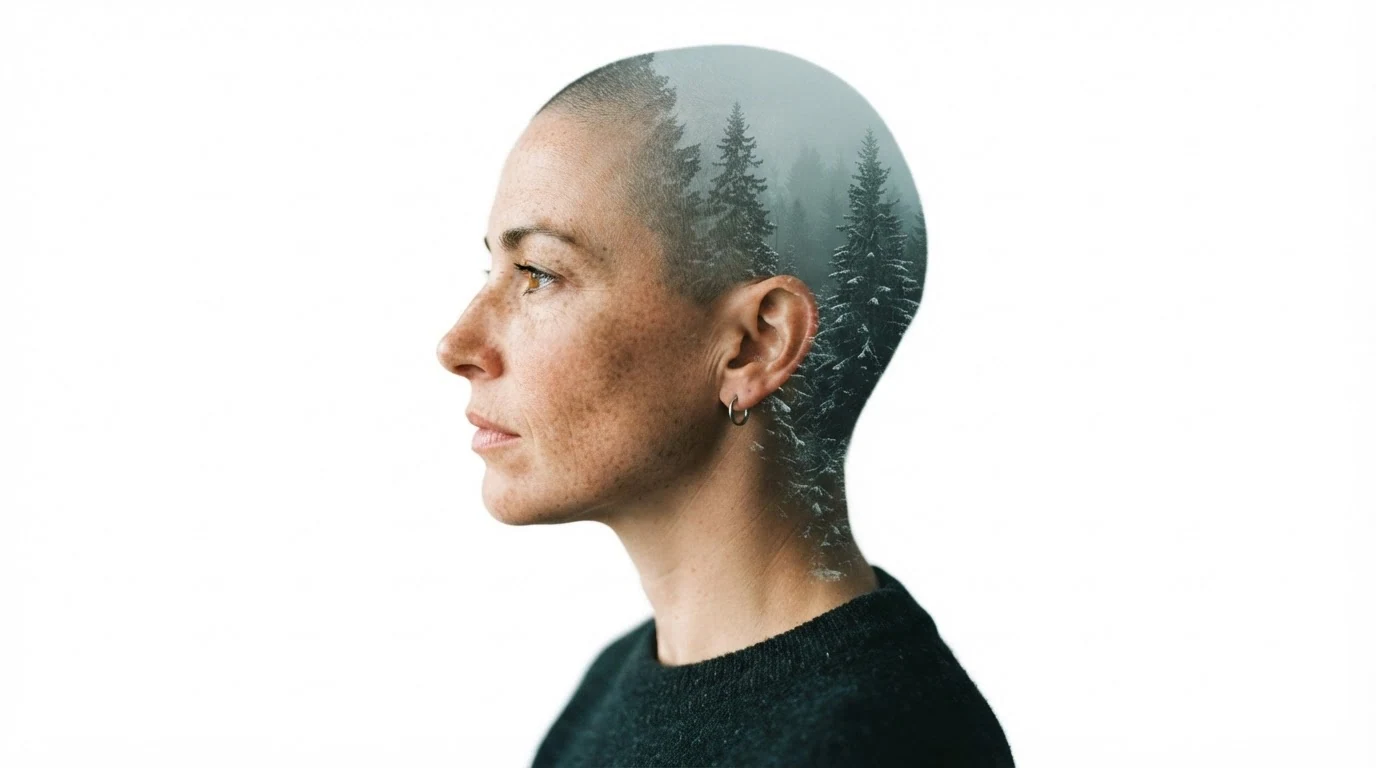
"First" and "second exposure" set the layer order. "Visible only inside the dark areas" plus a clean white background builds the mask the way film does; the readable eye keeps her a person.
Open FlashBoardsBlack-and-white 1950s double exposure film frame. Base image: a fictional man in his sixties with a white walrus mustache and a scar across his left eyebrow sits at a kitchen table in a dim room, sharp, lit by one hard lamp. Second exposure over the whole frame: a young girl in a pale dress by the dark window, at half strength, the wall and chair showing through her body. Heavy film grain.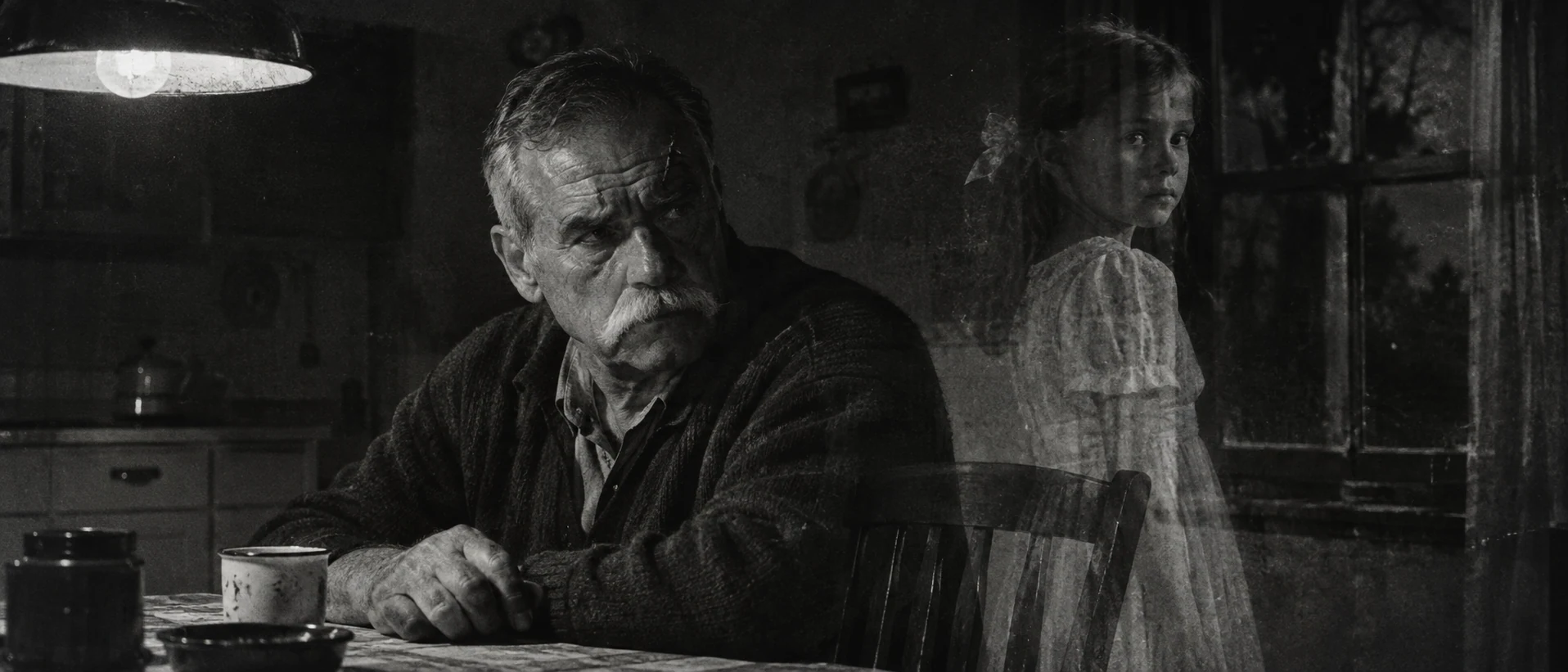
The classic ghost: "half strength" and "showing through her body" give translucency, and her pale dress over the dark window follows the additive rule.
Open FlashBoardsCamera: a very slow, steady push in toward her eye, starting at once, ending on a tighter profile. Action: From the first frame, fog drifts left to right between the pine trunks inside her silhouette. She lowers her eyes and breathes out slowly. The fog thickens and the trunks soften while her profile stays sharp against the clean white background.Fog moves from frame one, so the shot is alive immediately. Only the second layer moves while her face stays nearly still, the pairing that works on set.
Open FlashBoardsCommon mistakes
- Landscape everywhere. Say "white background stays clean" and "only inside her silhouette".
- Face disappears. Name the features that must stay readable.
- Hologram glow. "Transparent" alone reads as sci-fi; write "in-camera double exposure, film grain".
- Layers split in video. Keep the move small and animate one layer.
Keep the reference frames, prompts and every generated take side by side — images and video in one canvas.
FAQ
5 questionsWhat is double exposure in film?
Double exposure records two images on the same frame so both are visible at once. On film, the negative is exposed twice; digitally, two shots are blended in post. Dark areas of one image let the other show through, which is why a silhouette can be filled with a landscape. It is the classic way to show ghosts, memories and visions.
How do you create a double exposure effect in a video?
Shoot a base shot with strong dark or white areas, such as a profile against a white wall, and a textured second shot like a forest or city. Stack them in the editor with a screen or lighten blend. Add a luminance key if the second image must stay inside the figure.
Is double exposure the same as superimposition?
Nearly. Double exposure refers to the capture method: two exposures on one frame, in camera or imitated with a blend. Superimposition is the wider term for any image layered over another, usually in compositing. Every double exposure is a superimposition, but a title over a shot is superimposition without being a double exposure.
What is a double exposure mask?
A double exposure mask confines the second image to a shape, usually a head or body. The subject is shot as a dark silhouette or profile against a bright background; the background stays white while a landscape or city fills the figure. It needs a hard, clean outline.
Can you do a double exposure with a digital camera?
Many digital stills cameras have a multiple-exposure mode that combines frames in camera. Video cameras generally don't, so for moving images the effect is built in editing with blend modes. Plan it as on film: one image supplies the dark areas, one layer dominates.
Related terms
4- SuperimpositionPost-Production & VFX
Superimposition layers one image over another so both are visible at once — a face over a landscape, a ghostly figure, a memory over the present — made optically or in compositing.
- DissolveEditing
A dissolve blends one shot into the next: the first fades out while the second fades in over the same frames, briefly overlapping — often to mark passing time or link two ideas.
- Stop TrickCameras & Capture
The stop trick (arrêt) halts the camera, changes something in front of it and resumes shooting from exactly the same position, so on screen people or objects appear, vanish or transform instantly — the founding special effect of early cinema.
- Practical EffectsPost-Production & VFX
Practical effects are created physically on set — animatronics, prosthetic makeup, miniatures, pyrotechnics, rain and wind machines — and captured by the camera rather than generated with CGI in post.
Further reading
Raymond Fielding, The Technique of Special Effects Cinematography (Focal Press). American Cinematographer Manual (ASC Press).