 FlashBoards Learn
Editing · Film language
Dissolve
Also called: cross dissolve, lap dissolve, cross-fade, mix
A dissolve is an editing transition in which one shot fades out while the next fades in over the same frames, so for a moment both images share the screen. It tells the viewer that time has passed or that two images belong together, and it slows the rhythm where a cut would snap.
- What it does
- Blends the outgoing shot into the incoming one, reading as "later", "meanwhile" or "this is connected to that".
- Use it when
- You jump forward in time, slip into a memory, or want two images compared by placing them in the same part of the frame.
- Watch out
- Two busy images at half strength turn to mud, and too many dissolves make a film feel sleepy.
- Try this prompt
Film frame caught mid-dissolve: a fictional old sailor's weathered face blended 50/50 with a stormy harbor at dusk, both images semi-transparent, 35mm, cinematic still
What is a dissolve in film?
A dissolve is a transition in which the outgoing shot fades down while the incoming shot fades up over the same stretch of frames. For a moment both pictures are on screen at once, each partly transparent, and then only the second one remains. Editors also call it a cross dissolve, a lap dissolve, a cross-fade or, in British and broadcast usage, a mix.
It is one of the core film transitions of film editing, and it sits between the two most common ones. A plain cut replaces one image with the next in a single frame and says "now this." A dissolve takes its time and says "and then, a little later" or "and this is connected to that."
Mechanically, a dissolve is two opacity ramps running in opposite directions. At 24 fps a one-second dissolve uses 24 frames of each shot, and at the midpoint each image sits at roughly half strength. That has two practical consequences:
- It eats footage. The editor needs extra frames, called handles, past the cut point on both shots. If the camera stopped rolling the moment the action ended, there is nothing left to dissolve with.
- It creates a third image. Halfway through, the frame is a composite that neither shot contained. A good dissolve plans that composite; a careless one produces a muddy frame where two busy pictures fight for attention.
In a screenplay the transition is written as DISSOLVE TO: at the right margin, one of the few screenplay transitions writers still use regularly, usually to flag a jump in time.
Why do filmmakers use dissolves?
To show that time has passed. This is the dissolve's main job. Dissolve from daylight to lamplight in the same room, or from a young face to an old one, and the audience fills in the missing hours or decades. Editing has no cheaper or more readable tool for the passage of time. Saving Private Ryan (1998) pushes in on the eyes of an elderly veteran at a war cemetery and dissolves to landing craft heading for Omaha Beach in 1944: one transition crosses half a century and frames the battle that follows as remembered.
To enter a memory or a mind. Because both images coexist for a moment, a dissolve feels like thought, one picture surfacing through another. That is why it is the classic doorway into a flashback, and why long, slow dissolves feel dreamlike. Apocalypse Now (1979) opens with Willard's upside-down face layered over burning palm trees for so long that the transition becomes his state of mind.
To link two ideas. Put two shapes in the same part of the frame and dissolve between them, and the audience compares them. In Psycho (1960) the water spiraling into the bathtub drain dissolves into a close-up of Marion's eye, and one circle becomes the other. This matching dissolve is the softer cousin of the match cut.
To ease a move in space. A chain of dissolves carries the viewer on a journey without the jolt of cuts. Citizen Kane (1941) opens by approaching Xanadu through a series of dissolves, the one lit window holding its place in the frame while the fence, the gates and the grounds change around it.
To set rhythm and mood. Dissolves slow a sequence down. A string of them makes a montage feel wistful where the same shots joined by cuts would feel brisk. Overuse them and every dissolve becomes a small pause that drags the pacing.
Types of dissolves
The effect in your editing software is always the same blend, but editors use it in several distinct ways.
- Standard dissolve. A straight blend between two unrelated shots, usually 12 to 48 frames. It marks a change of scene with a softer punctuation than a cut.
- Matching dissolve. The two shots share a shape, a position or a movement: a drain and an eye, a candle flame and a sunrise, a spinning wheel and a clock face. Framing does the work, so it is planned at the storyboard stage.
- Same-frame dissolve. The camera stays locked on one composition and only the contents change: people appear and vanish, light swings from morning to night, a room fills with boxes and empties again. It depends on a rock-solid static shot, and it compresses time more precisely than any other device.
- Long dissolve. Stretched to several seconds, the midpoint lingers and the blend becomes a held superimposition. Use it for dreams, grief, memory and openings like the one in Apocalypse Now.
- Soft cut. A dissolve of 2 to 6 frames. Documentary and interview editors use it to smooth a jump in the same framing without pretending no time was removed.
How to plan, shoot and edit a dissolve
A dissolve is applied in the edit, but the good ones are decided on set.
1. Roll long. Give each shot three to five seconds before the action starts and after it ends. Those spare seconds are the raw material of the overlap.
2. For same-frame dissolves, lock everything. Heavy tripod, tape marks on the legs and the floor, the same focal length, manual focus, manual exposure and white balance. If the light is supposed to change between states, change it with lamps and flags, never with the iris, or the whole frame will pulse.
3. Compose for the midpoint. Put the detail of one image where the other is dark or empty. A face on a dark, plain background holds up under almost anything; two full-frame textures (foliage over crowd, water over brick) cancel each other out. Decide which image the audience should be looking at halfway through.
4. Balance brightness or design the shift. Dissolving from dark to bright feels like waking or dawn; bright to dark feels like dusk or loss.
5. Set the length by meaning. As a starting point at 24 fps:
- 2 to 6 frames: soft cut, smooths a jump without calling attention.
- 12 to 24 frames: a gentle change of scene.
- 36 to 72 frames (1.5 to 3 seconds): time passing, entering a memory.
- 4 seconds and more: the blend itself is the image.
6. Place it deliberately. Most editors center the dissolve on the cut, taking half its frames from each shot. Start it on the cut if the outgoing shot must finish, end it on the cut if the incoming action must start exactly on time.
Cross-fade: the editing-software name
Cross-fade is what most editing software and most sound editors call the same operation: the outgoing clip fades down while the incoming one fades up over the same frames. In the picture timeline the effect is usually labeled Cross Dissolve, and in Premiere Pro, Final Cut Pro and DaVinci Resolve it is the default video transition, a single keyboard shortcut away.
For picture, a cross-fade and a dissolve are the same thing. For audio, the word matters more, because the shape of the fade changes what you hear:
- Constant gain ramps both clips linearly. The combined level sags in the middle, so you hear a slight dip.
- Constant power curves the ramps so perceived loudness stays even across the join. It is the usual default for music and ambience.
- Short cross-fades of a few frames on dialogue edits remove clicks and hide changes in room tone without being heard as transitions.
Lap dissolve: the original name
Lap dissolve is the older, fuller name, and "lap" stands for overlap: the tail of one shot laps over the head of the next.
In the earliest films the effect was made in the camera. The operator faded the scene out by closing down gradually, wound the film back the same number of frames, and faded the next scene in over it. Georges Méliès was already joining the tableaux of his trick films this way around 1900. Later the work moved to the lab, where an optical printer rephotographed both shots onto one new strip of film. Because that strip was a generation further from the negative, the picture in many classic films turns softer and grainier a second before a dissolve begins, then snaps back to full quality after it ends. Digital editing ended that penalty, which is partly why dissolves are now so often overused.
Dissolve vs. fade: what's the difference?
A dissolve goes from one image straight into another. A fade goes through black (or white, or another color): the picture sinks to black, and the next scene rises out of it, a move editors call a dip to black when it happens mid-film.
The difference is punctuation. A cut is a comma, a dissolve a semicolon, a fade a full stop. Dissolve between two shots of the same afternoon and you have shown an hour passing; fade to black between them and you have ended a chapter, maybe a day. Fades open and close films and acts; dissolves connect scenes within them.
The midpoint of a dissolve can also look exactly like a superimposition or a double exposure, and people often mix them up. The test is time. A dissolve always resolves: the first image leaves and the second remains. A superimposition holds both images on screen as a composite for as long as the filmmaker wants, and a double exposure is recorded on the same frame in the camera, often with one image masked into a silhouette of the other.
Dissolve in motion







11 clipsWatch the midpoint of each clip and loop, where both images share the frame at half strength. Notice how the best ones place a face or a bright shape where the other image is dark or empty, so the blend stays readable.
![Dissolve in YUNGBLUD - When We Die [feat. Lil Yachty]](https://media.flashboards.app/v1/h01/objects/617e1f015dae079029ead535cdfb4e639b482c1493bab07448dfb3e579c0c629.webp)
How to create a dissolve with AI
3 promptsImage and video models can do two things for a dissolve: generate the frames on both sides of it with matching compositions, and generate the blended midpoint as a mood frame or poster. In FlashBoards the outgoing frame, the incoming frame and the blend sit side by side on one board, so you can check that shapes line up before the edit.
Locked-off wide shot of a small kitchen at dawn, a fictional woman in her sixties with a long silver braid, round tortoiseshell glasses and a moss-green cardigan sits alone at a wooden table by a window, holding a white mug with steam rising, cold blue morning light from the window, centered symmetrical composition, 35mm lens at seated eye height, quiet still-life calm, soft film grain, cinematic still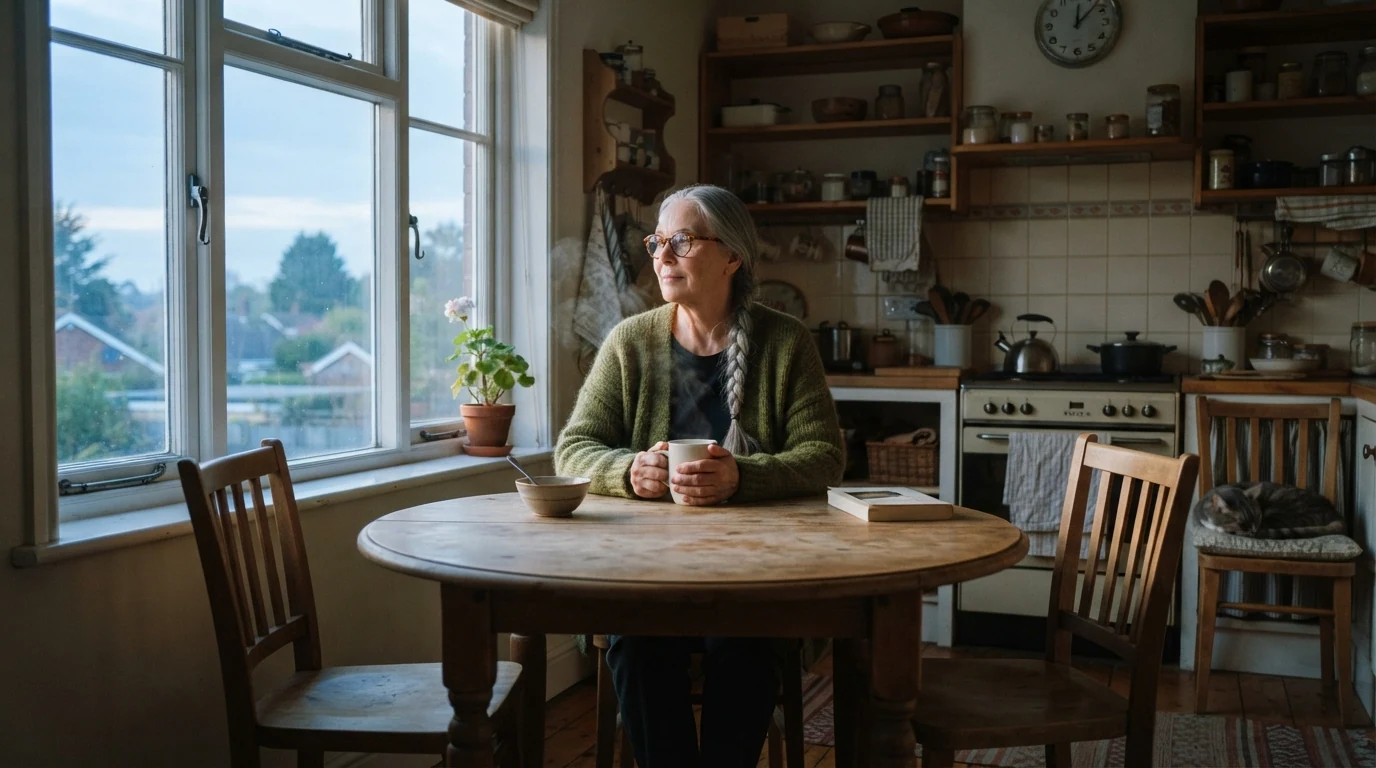
The outgoing shot of a same-frame dissolve. Locked-off, centered symmetrical composition and 35mm at seated eye height give a stable framing; cold blue morning light sets the start of the time jump, and the steam gives the video model motion from the first frame.
Open FlashBoardsA single film frame caught exactly halfway through a slow dissolve between two shots, uniform 50/50 blend across the whole frame: shot one is a close-up of a fictional young man with a red buzz cut, freckles and a chipped front tooth, eyes closed, face turned slightly down, lit from the left against a dark background; shot two is a wide night train platform with a row of sodium-orange lamps and a train pulling away. The lamps and rails show through his cheek and forehead, his face floats over the platform, both images equally transparent, anamorphic widescreen, 1990s 35mm film grain, melancholy mood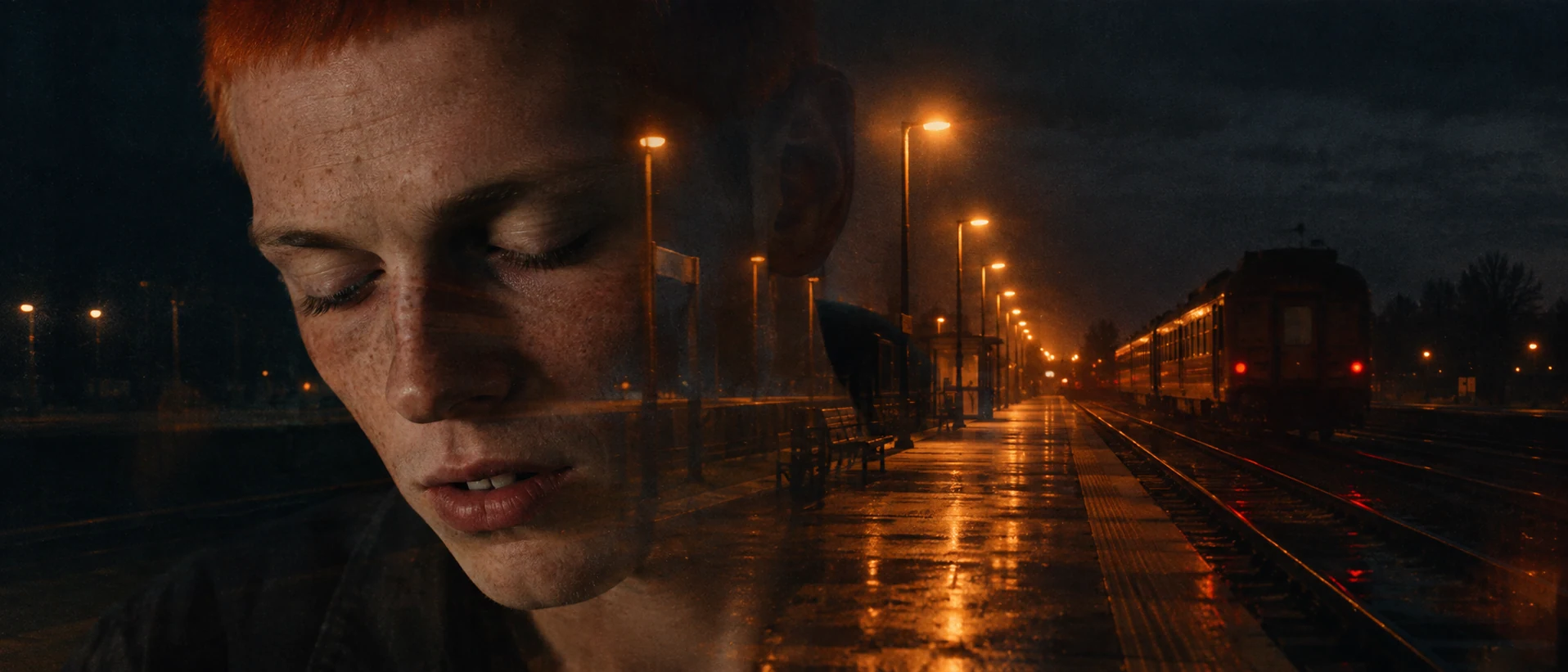
A second take on the technique: the midpoint instead of the start frame. Exactly halfway through a slow dissolve and uniform 50/50 blend across the whole frame push the model toward an even blend instead of a masked silhouette. A dark background behind the face gives the platform somewhere to show through.
Open FlashBoardsCamera: locked-off on a tripod, the frame stays perfectly still for the whole shot. Action: steam curls up from the white mug straight away and the woman lifts it and drinks, then sets it down and looks out of the window. Slowly the whole picture cross-dissolves into the same kitchen in the evening: the wooden chair stands empty, the white mug sits alone on the table, and warm orange sunset light lies across the table and the wall. The two moments overlap as transparent layers during an even, gentle dissolve, and the shot ends holding on the empty kitchen in orange light.The shot is alive from the first frame (steam, the lift of the mug), so the model does not creep in on a still image. Locked-off, the frame stays perfectly still keeps the composition identical on both sides, which is what makes a same-frame dissolve read as time passing. The incoming state reuses objects already in the frame (chair, mug, table, wall) and changes only the light. Overlap as transparent layers asks for a blend rather than a morph.
Open FlashBoardsCommon mistakes
- A double exposure instead of a dissolve. Image models tend to mask one picture inside the silhouette of the other. Ask for a "uniform 50/50 blend across the whole frame" and give the face a plain, dark background.
- One image wins. If one layer comes out at full strength, say "both images equally transparent" and describe what shows through where.
- Morphing instead of blending. Video models often reshape the first subject into the second. Keep the incoming image made of things already in the frame, and use "transparent layers" and "cross-dissolve" rather than "transforms into".
- Drifting framing. For same-frame dissolves, generate both states from the same start frame and repeat "locked-off, same framing"; then do the blend in the edit, where you control its length to the frame.
Keep the reference frames, prompts and every generated take side by side — images and video in one canvas.
FAQ
5 questionsWhat is the difference between a dissolve and a fade?
A dissolve blends one image directly into the next, so both are briefly visible together. A fade takes the picture down to black (or another color) or brings it up from black, with no second image overlapping. Dissolves connect scenes and suggest a short jump in time or a link between ideas; fades mark bigger breaks, such as the start or end of a film, an act or a day.
What does a dissolve mean in a film?
Most often a dissolve means time has passed between the two shots, anything from minutes to decades. It can also signal a memory or dream beginning, a move to another place without a jolt, or a link between two images placed in the same part of the frame. Audiences read it as a softer, slower join than a cut, so it also calms the rhythm of a sequence.
Is a cross dissolve the same as a lap dissolve?
Yes. Cross dissolve, lap dissolve, dissolve, cross-fade and mix all name the same transition: the outgoing shot fades out while the incoming one fades in over the same frames. "Lap dissolve" is the older term, from the overlap of the two strips of film. "Cross dissolve" is the name of the effect in most editing software, and "cross-fade" is the usual word in audio.
How long should a dissolve be?
It depends on what the dissolve has to say. At 24 fps, 2 to 6 frames smooths a jump almost invisibly, 12 to 24 frames makes a gentle change of scene, and 1.5 to 3 seconds reads clearly as time passing or a memory beginning. Anything past four seconds becomes an image in its own right. Make sure both shots have enough extra footage to cover the overlap.
How do you write a dissolve in a screenplay?
Write DISSOLVE TO: in capitals, right-aligned, after the last line of the outgoing scene, followed by the next scene heading. Use it sparingly, only where the transition carries meaning, typically a jump in time. Editors decide most transitions, so a script full of dissolves reads as directing on the page. Some older scripts wrote LAP DISSOLVE TO: for the same thing.
Related terms
6- FadeEditing
A fade gradually brings the picture up from black (fade in) or takes it down to black or another colour (fade out), marking the start or end of a scene or a big jump in time.
- SuperimpositionPost-Production & VFX
Superimposition layers one image over another so both are visible at once — a face over a landscape, a ghostly figure, a memory over the present — made optically or in compositing.
- Passage of TimeStorytelling
Showing the passage of time means telling the audience that hours, seasons or years have gone by — through montage, dissolves, time-lapse, title cards, changing light or aging characters.
- WipeEditing
A wipe replaces one shot with the next by a moving edge or shape travelling across the frame — a line, a clock hand, a closing iris — a stylised transition famous from Star Wars.
- Double ExposureCameras & Capture
Double exposure records two images on the same piece of film — or blends them in post — so both show through at once, often a face merging with a landscape; in camera it was the classic way to create ghosts and visions.
- Film TransitionsEditing
Transitions are the ways one shot or scene gives way to the next — the plain cut, dissolve, fade, wipe, match cut and hidden or stylised moves like whip and mask transitions.
Further reading
Walter Murch, In the Blink of an Eye (Silman-James Press, 2nd ed. 2001). Karel Reisz and Gavin Millar, The Technique of Film Editing (Focal Press). David Bordwell and Kristin Thompson, Film Art: An Introduction (McGraw-Hill).