 FlashBoards Learn
- Learn
- Cameras & Capture
- Halation
Cameras & Capture · Film language
Halation
Also called: film halation, halation glow
Halation is the red-orange glow that forms around bright highlights on motion picture film. Light passes through the emulsion, bounces off the film base and exposes the layers a second time from behind. The result is a warm halo on headlights, lamps and backlit edges that reads as celluloid, which is why digital grades imitate it.
- What it does
- Wraps the brightest points and edges of the frame in a thin warm halo that says "shot on film" before anyone thinks about it.
- Use it when
- Night exteriors with headlights and practicals, backlit windows, sunsets, any high-contrast frame you want to feel analog and warm.
- Watch out
- It is not a general glow: too wide, too white or on every midtone, it turns into cheap bloom and lifts the blacks.
- Try this prompt
35mm color negative at night, car headlights and a neon sign with a thin red-orange halation glow hugging their edges, deep clean blacks
What is halation?
Halation is an artifact of film stock itself, not of the lens. When a very bright point of light hits the negative, some of it passes through the emulsion, reflects off the clear base and re-exposes the emulsion in a small ring around the highlight, which prints as a soft halo.
Three things identify it. It sits tight to the edge of the highlight. It is colored, red outside and orange to yellow near the source. And it appears only where exposure is far over the rest of the scene: headlights, bare bulbs, the sun, a blown-out window.
Why is film halation red?
Color negative is a stack of layers: blue-sensitive on top, green in the middle, red-sensitive at the bottom, right on the base. Light bouncing back off the base hits the red layer first, so the stray exposure is mostly red. Stronger highlights warm it toward orange and yellow.
Motion picture negative carries an anti-halation backing, a black layer that absorbs light before it can reflect and is removed in processing. It reduces halation but cannot stop it on a light many stops over. Stills films sold with that backing stripped, such as CineStill 800T, are known for exaggerated red halos around streetlights.
Why do filmmakers want halation?
Halation used to be a flaw. Today it is a cue: after a century of film images where lights carry a warm fringe, a halo around a headlight signals memory and analog texture, alongside film grain.
It also changes how light feels. A headlight with a red rim reads warmer than a clean white clip, and the halo softens the edge between blown highlight and black night. Sensors in digital cinematography render that edge razor-sharp, so colorists add halation back to take the electronic bite off highlights.
How to get halation on film and digital
On film, halation depends on how hard you drive the highlights:
- Put bright sources in frame: practical lights, headlights, a low sun, a window.
- Overexpose them. Sources three to five stops above key halate visibly; two stops over barely shows.
- Use fast tungsten stock at night, exposed for faces, so every lamp blows out.
- Keep the blacks deep. Haze or fill that lifts the shadows hides the halo.
On digital, it is a grade built from the highlights:
- Key only the brightest values, roughly the top 5–10% of the signal.
- Blur that matte slightly, a few pixels at HD. A wide blur becomes bloom.
- Tint it red-orange and add it back at around 10–30% strength.
- Check that faces and skies stay clean.
Grading suites and film-emulation plugins now include halation controls that do this.
Halation vs. bloom and soft focus
All three make highlights glow, but differently.
- Halation forms inside the emulsion: narrow, red-orange, locked to the edges of the brightest sources.
- Bloom comes from diffusion, such as a mist filter from the lens filters kit or haze. It spreads wider, keeps the source's color and lifts the blacks.
- Soft focus softens detail across the whole image, faces included.
A lens flare is different again: streaks and ghosts from reflections inside the lens that shift as the camera moves. More capture choices live in cameras and capture.
Halation in motion




10 clipsWatch the brightest points in each clip and loop: headlights, streetlamps, a low sun, a backlit edge. Halation is the thin warm rim that stays locked to those highlights as the camera or the light moves, while the shadows around them stay dark.



How to create a halation with AI
3 promptsModels often answer "halation" with haze. Name the film look, list the sources that should glow, and describe the halo as thin, red-orange and hugging the edges, with deep blacks around it. On a FlashBoards board, place your takes next to the loops above and compare halo width.
Cinematic night exterior shot on 35mm tungsten color negative, 40mm lens at eye level. A woman in her thirties with a cropped platinum bob, a thin scar through her left eyebrow and an olive trench coat stands under a bus shelter lit by a sodium streetlight. Behind her, a red neon sign reading OPEN and a taxi's headlights approaching down the wet street. Every bright source has a thin red-orange halation glow hugging its edges. Faces and midtones clean, blacks deep, fine film grain.
Tungsten color negative sets the context; thin red-orange halation glow hugging its edges defines width, color and position. Naming the sign and headlights places the effect, and blacks deep keeps haze out.
Open FlashBoardsAnamorphic widescreen interior at dusk, 1970s roadside diner, shot on 35mm film. A man in his sixties with a wiry grey beard, a burgundy knit cap and a denim work shirt sits in a booth; low sun blows the window behind him to white, and bare bulbs burn above the counter. Strong film halation: a narrow orange-red fringe along the window frame, around his backlit shoulder and beard, and around each bulb. Dark wood, rich shadows, warm faded color.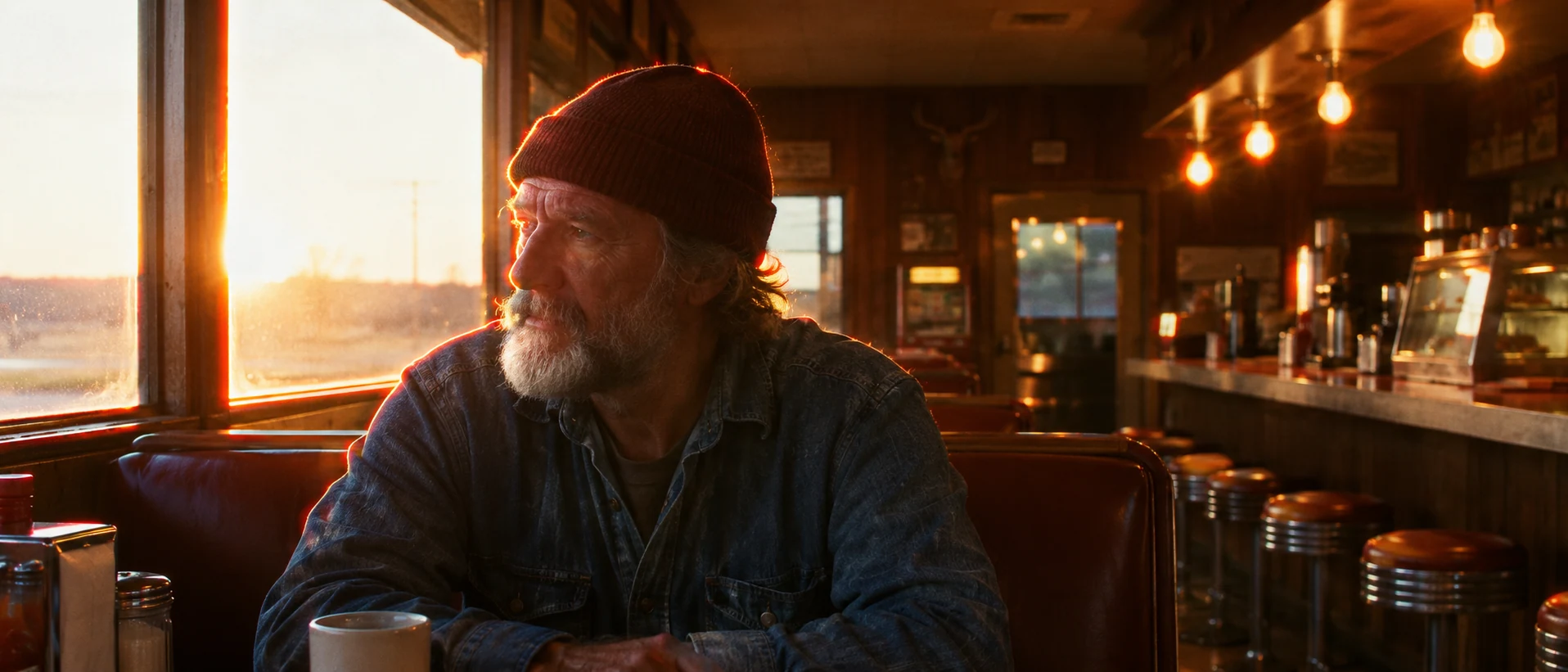
Here the halo lives on backlit edges, where film really halates when a window clips. Narrow fringe keeps it tight; rich shadows give it dark ground to show against.
Open FlashBoardsCamera: a slow, steady push in toward the woman, about half a meter across the whole shot, at eye level. Action: from the first frame the taxi's headlights move closer down the wet street, their red-orange halos growing larger. In the middle the woman turns her head toward the lights and the glow catches the edge of her platinum hair. At the end the taxi slows beside the shelter while the neon sign keeps its warm red rim.The approaching taxi moves from the first frame, so the halos change on screen. Only elements from recipe 1 are named.
Open FlashBoardsCommon mistakes
- Haze instead of halation. "Glow" alone gives milky bloom. Say thin, hugging the edges, blacks deep.
- Wrong color. Unstated, the halo comes out white. Write red-orange and a film stock.
- Glowing faces. Add faces and midtones clean and name the sources that glow.
- Streaks instead of rings. Describe halos as rings around each light, not lines across the frame.
- Static glow in video. Move the lights so the halo shifts.
Keep the reference frames, prompts and every generated take side by side — images and video in one canvas.
FAQ
4 questionsWhat is halation in film?
Halation is a warm glow around very bright highlights on film. Light passes through the emulsion, reflects off the base and exposes the film again from behind, leaving a red-to-orange halo around headlights, lamps, the sun and backlit edges. It stays tight to the source and appears only on strongly overexposed areas.
Why is halation red or orange?
In color negative the red-sensitive layer sits at the bottom of the emulsion, right against the base. Light reflected from the base hits that layer first, so the extra exposure is mostly red. Stronger highlights also reach the green layer, shifting the center of the halo toward orange and yellow.
How do you add a halation effect to digital footage?
Isolate the brightest highlights with a luminance key, blur that matte slightly, tint it red-orange and add it back at low strength. Many grading tools and film-emulation plugins have a halation control that does this. Keep the blur small and faces clean, or it turns into general bloom.
What is the difference between halation and bloom?
Halation forms inside the film emulsion: a narrow red-orange fringe locked to the edges of bright sources. Bloom comes from diffusion filters, haze or lens glass: a wider glow that keeps the source's own color and lifts the surrounding blacks. Film looks often combine a light bloom with halation.
Related terms
5- Soft FocusLenses, Focus & Exposure
Soft focus is a deliberately dreamy image in which the subject is still in focus but fine detail and contrast are softened and highlights bloom — produced by special lenses, diffusion filters or even a stocking over the lens, a classic of Hollywood glamour close-ups.
- Film GrainCameras & Capture
Film grain is the random speckled texture of silver-halide crystals in developed film; faster stocks and push processing make it coarser, and digital productions add it back to soften the clean video look.
- Film StockCameras & Capture
Film stock is the light-sensitive celluloid a movie is shot on: a base coated with emulsion whose format (16, 35, 65mm), speed and color response shape grain, contrast and palette before any grading.
- Lens FilterLenses, Focus & Exposure
A lens filter is glass placed in front of (or behind) the lens to change the image in camera: ND filters cut light, polarizers remove reflections, diffusion and mist filters soften detail and bloom highlights, color filters shift the tone.
- Practical LightingLighting
Practical lighting uses light sources visible in the shot — table lamps, neon signs, candles, TV screens — either as the real illumination or as the visible motivation for hidden film lights.
Further reading
Kodak, The Essential Reference Guide for Filmmakers (film structure, emulsion layers and anti-halation backing).