 FlashBoards Learn
- Learn
- Cameras & Capture
- Time Lapse
Cameras & Capture · Film language
Time Lapse
Also called: timelapse, time-lapse photography
A time lapse records one frame every few seconds, minutes or hours and plays them back at normal speed, so events that take an afternoon or a year pass in seconds. Clouds race, shadows sweep across a valley, cities flicker from day to night — and the audience feels time itself move.
- What it does
- Compresses hours, days or years into seconds, making slow change visible.
- Use it when
- You need to show time passing, reveal scale, or open or close a chapter.
- Watch out
- Flicker, a camera that shifts between frames, and intervals too short for the event.
- Try this prompt
Time-lapse, locked-off wide of a desert town at dusk, clouds racing, car light trails streaming, sun dropping behind the mesa
What is a time lapse?
A time lapse is captured at a far lower rate than it is played back: instead of 24 frames a second, the camera takes one frame every 2 seconds, every 30 seconds or every hour. Played at 24 fps, the gaps vanish and the event accelerates.
The math: speed-up = interval x playback fps. One frame every 5 seconds at 24 fps is 120 times faster than life. A 10-second shot needs 240 frames, so at a 5-second interval you shoot for 20 minutes.
It is the extreme end of frame rate manipulation. Shoot slightly below playback speed and you get undercranking; stretch the gap to seconds or minutes and motion stops reading as action and starts reading as process: weather, growth, construction.
Why do filmmakers use time lapse?
To show time passing. A time lapse says hours or years have gone by in one image, one of the cleanest tools for showing the passage of time. In Zodiac (2007) David Fincher marks the years of the investigation with the Transamerica Pyramid rising over San Francisco.
To reveal scale and rhythm. Koyaanisqatsi (1982), shot by Ron Fricke for Godfrey Reggio, builds a whole feature from time-lapse cities, traffic and clouds.
To make nature feel alive. Flowers opening, seedlings pushing through soil, tides filling a bay — slow change becomes gesture.
As punctuation. A 3–5 second skyline or sky is a reliable chapter break or opener, often cut into a montage between story beats.
How to shoot a time lapse
Gear. A camera with an interval mode or an intervalometer, a heavy tripod, and power for the whole session. Turn lens stabilization off.
Pick the interval from the subject:
- Fast clouds, crowds, traffic: 1–3 s
- Slow clouds, sunsets, moving shadows: 3–10 s
- Stars: 15–30 s, with 10–25 s exposures
- Plants opening: 1–10 min, under controlled studio light
- Construction, seasons: one frame per hour or per day
Lock everything. Manual exposure, white balance and focus; auto modes hunt between frames and cause flicker. Shoot wide open or use a manual-aperture lens to avoid aperture flicker.
Choose the shutter for the look. A short shutter gives crisp, staccato frames; a shutter near half the interval gives smooth motion blur. ND filters get you to 1/4 s or longer in daylight, turning car lights into trails — the same logic as long exposure stills.
Day-to-night shots need exposure ramping: shift shutter and ISO in small steps as light falls, then smooth the jumps in post.
How long should a time lapse run in the edit?
Narrative films usually hold a time lapse for 3–8 seconds; documentaries and title sequences run 10–20, so shoot twice what you need. Deflicker in post, and fix jerky motion with a longer shutter or frame blending, not by slowing the clip. A slow digital push-in across a high-resolution frame adds movement without a motion-control rig.
Time lapse vs. hyperlapse
A time lapse keeps the camera still, or crawling on a slider, while the world changes. A hyperlapse moves the camera a real distance between frames, so space rushes past along with time. Time lapse says time is passing here; hyperlapse says we are traveling through it. More capture techniques live in the cameras and capture hub.
Time Lapse in motion



6 clipsWatch what holds still and what doesn't. In each clip the buildings or the frame stay put while clouds boil, light swings from afternoon to dusk and plants grow in seconds. The Lucy clip runs the same trick backwards, peeling decades off a city.
How to create a time lapse with AI
4 promptsAn image model cannot show acceleration in one frame, so the still borrows time-lapse signatures — streaked clouds, light trails, ghosted crowds — and the video model supplies the speed. Keep all three takes on one FlashBoards board to compare them. The fourth prompt re-shoots a real film shot from a text description alone, and the original plays next to the result so you can compare.
Time-lapse look, locked-off extreme wide shot of a small desert town below a red mesa at golden hour, clouds smeared into long soft streaks, thin red and white car light trails along the highway, buildings and mesa perfectly sharp, 24mm lens on a tripod, horizon on the lower third, warm low sun from the right, deep blue zenith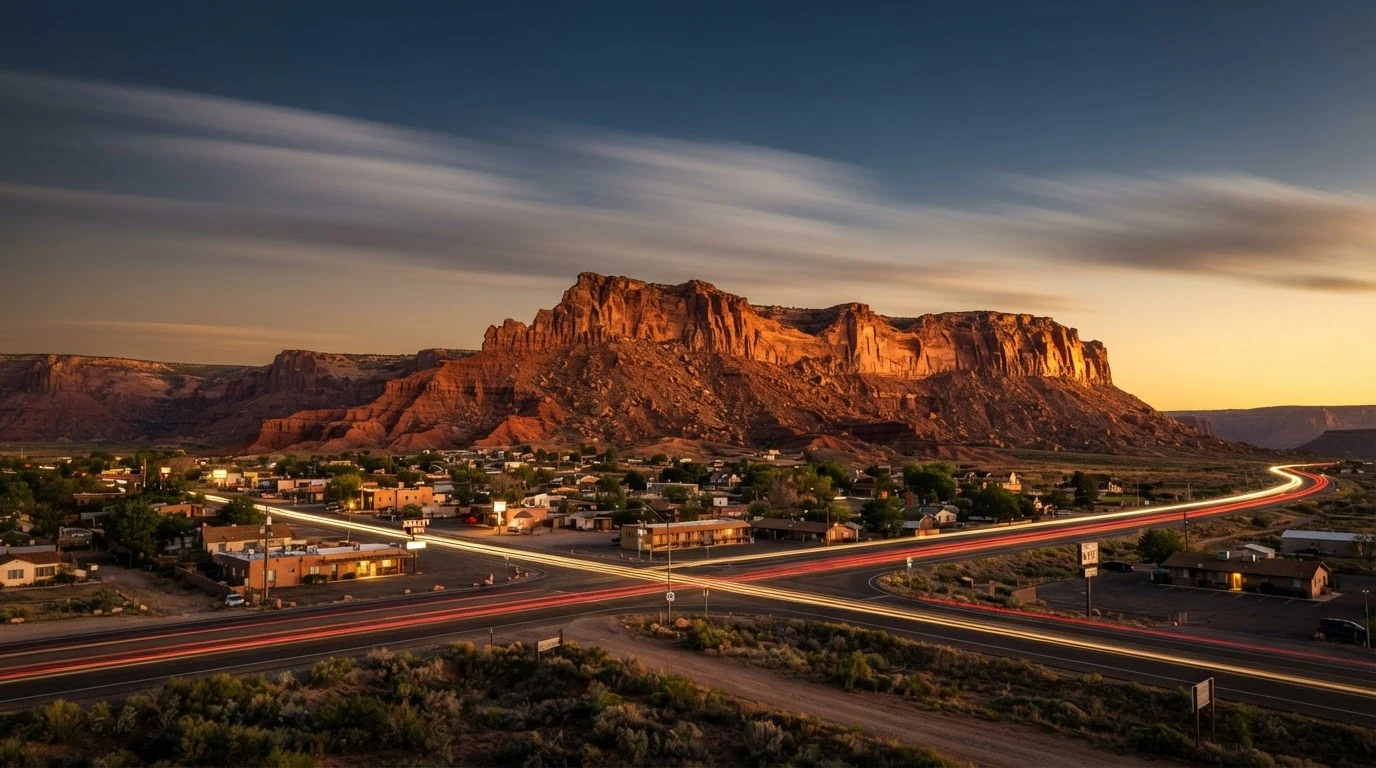
Clouds smeared into streaks and light trails are the still-image signs of a long interval; perfectly sharp buildings keep the contrast between static structure and moving world. The low horizon leaves the sky room to move.
Open FlashBoardsTime-lapse still of a crowded pedestrian crossing in a rainy city at night, high angle, 35mm lens, one man standing perfectly still and sharp in the center — tall, in his forties, shaved head, thick grey beard, mustard-yellow raincoat, closed black umbrella — while the crowd around him dissolves into translucent motion-blurred streaks, car light trails, wet asphalt reflections, cold blue-green neon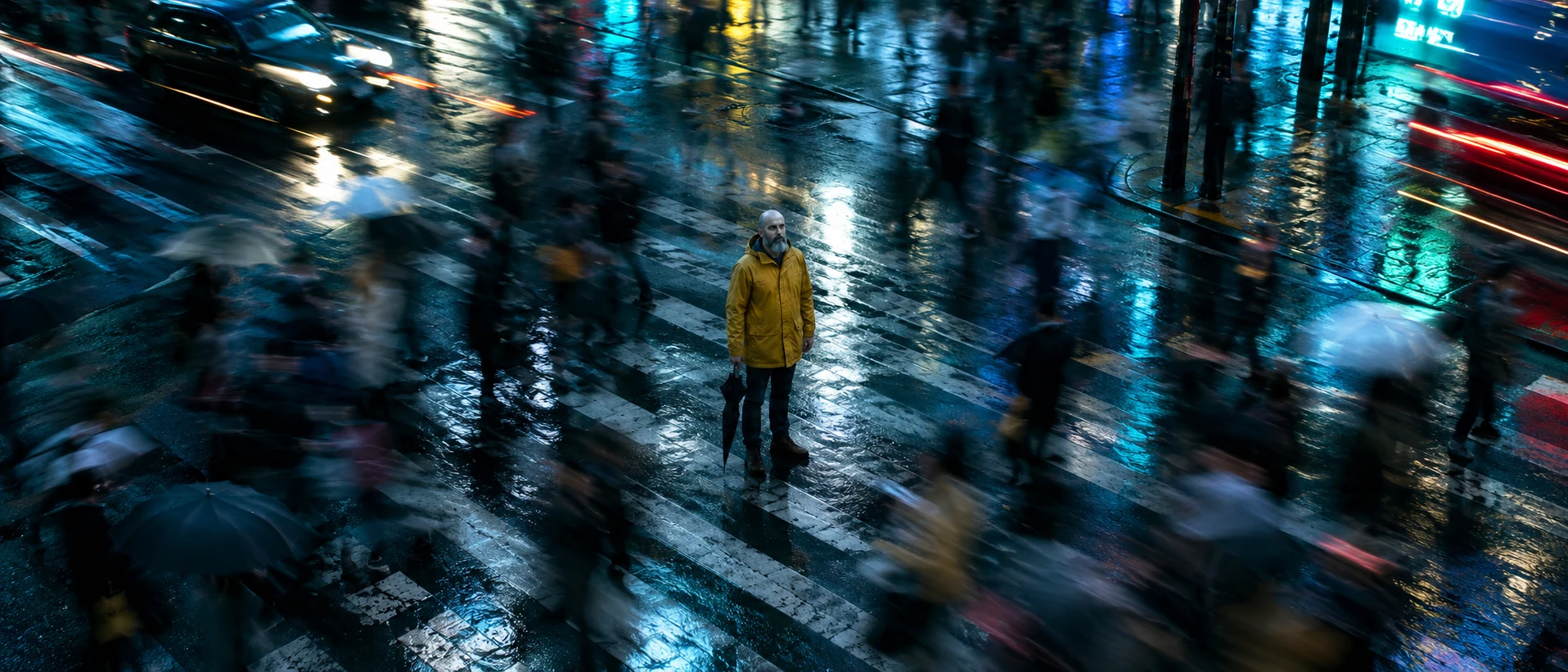
A still figure inside a blurred crowd is the classic time-lapse portrait: one sharp subject makes everything else read as time rushing past. The raincoat, beard and umbrella keep the character clearly fictional and repeatable.
Open FlashBoardsFast time-lapse. Camera: locked-off on a tripod, completely static for the whole shot. Action: from the first frame the clouds race from right to left across the sky and their shadows sweep over the mesa. The sun sinks behind the ridge and the light shifts from gold to deep blue. The car lights on the highway stream into continuous red and white lines, and the windows of the town switch on one by one as the sky darkens.Fast time-lapse plus completely static separates the two speeds. Motion starts from the first frame, and the action uses only what is in recipe 1's image, so the model has nothing to invent.
Open FlashBoards{
"output": "Full-screen live-action time-lapse shot from Zodiac (2007) from its very first frame: one continuous shot. Grainy 35mm film look, muted grey-gold sky over San Francisco, a narrow four-sided pyramid skyscraper under construction as a pure black silhouette.",
"characters": {},
"shots": [
{
"shot": 1,
"camera": "tripod at street level, low angle looking up; steady continuous tilt up the whole time; starts on the tower dead center with the flat roof of a dark office block at lower right, ends on the tower's upper half and open sky",
"action": [
"BEGINNING: alive from the first frame, grey clouds churn fast past the tower's crown in jerky time-lapse; a tower crane on the unfinished crown swings its jib left and right in quick jumps; the sun flares through the clouds behind the tower",
"THEN: the camera keeps tilting up and the office block sinks out of the bottom of the frame",
"THEN: the clouds stretch into streaks racing diagonally across a clearing blue sky while the black silhouette stays perfectly still",
"THEN: the streaks turn pink with sunset",
"END: only the tower's upper half and the crane remain against a sky sinking to deep blue dusk"
],
"dialogue": [],
"voice": "silence: nobody speaks in this shot, no voice at all"
}
],
"sound": {
"ambience": "a soft rushing city wind and distant traffic hum",
"speech": "no words in this video; the only human sounds are breaths and movement",
"never_spoken": "no narration and no voice-over: the descriptions, performance notes and step words of this prompt are never spoken aloud",
"music": "a film score under the scene, always below the voices: a slow, uneasy synth drone with a faint ticking pulse",
"subtitles": "none"
}
}A remake of the Zodiac (2007) shot of the Transamerica Pyramid rising over San Francisco: the prompt carries over the low-angle silhouette, the slow tilt up, the swinging crane jib and the sky running from grey afternoon through sunset to blue dusk.
Jerky time-lapse plus a sky timeline in steps (churning clouds, racing streaks, pink then blue dusk) makes hours pass, while the still black silhouette lets only sky and crane carry the speed. The empty dialogue and explicit silence keep the model from adding a narrator.
Open FlashBoardsCommon mistakes
- Models turn time lapse into a slow push-in on a still. State the static camera and start the cloud motion.
- If everything moves, the frame melts. Keep structures static; give motion to sky, light, traffic and crowds.
- Image models draw frozen clouds by default; streaked, smeared and trails suggest a long interval in a still.
Keep the reference frames, prompts and every generated take side by side — images and video in one canvas.
FAQ
5 questionsWhat is a time lapse video?
A time lapse video is built from frames captured at long intervals — one every few seconds, minutes or hours — and played back at normal speed. Because far fewer frames are recorded than are played, slow events such as moving clouds, a sunset or a flower opening happen in seconds on screen.
How do you make a time lapse?
Put the camera on a solid tripod, set exposure, white balance and focus to manual, and use an intervalometer. Choose the interval by subject: 1–3 s for traffic, 3–10 s for sunsets, minutes for plants. Multiply the clip length in seconds by 24 to get the number of frames you need.
How is time lapse used in film?
Filmmakers use time lapse to show time passing, to establish a place and to punctuate a story between scenes. Zodiac (2007) marks years with a skyscraper rising in time lapse, and Koyaanisqatsi (1982) builds a whole film from time-lapse cities and landscapes.
What is the difference between time lapse and hyperlapse?
In a time lapse the camera stays still or moves only slightly while the scene changes. In a hyperlapse the camera travels a real distance between frames, so the viewer moves through space as well as time. Hyperlapses need careful framing on a fixed point and strong stabilization.
Why does my time lapse flicker?
Flicker comes from exposure changing between frames: auto exposure, auto white balance, or an aperture that closes to slightly different positions each shot. Shoot fully manual, keep the aperture wide open or use a manual-aperture lens, and run a deflicker pass in post.
Related terms
4- HyperlapseCameras & Capture
A hyperlapse is a time-lapse in which the camera also travels a long distance between frames, so time and space rush past together — sweeping through cities or landscapes in a few seconds.
- UndercrankingCameras & Capture
Undercranking shoots at a lower frame rate than playback — for example 12 fps played at 24 — so action runs faster than life on screen, used for slapstick, frantic chases and punchier action.
- Long ExposureLenses, Focus & Exposure
A long exposure keeps the shutter open for a long time, so still things stay crisp while anything moving — car lights, water, crowds, stars — smears into streaks and silky blur.
- Passage of TimeStorytelling
Showing the passage of time means telling the audience that hours, seasons or years have gone by — through montage, dissolves, time-lapse, title cards, changing light or aging characters.
Further reading
Blain Brown, Cinematography: Theory and Practice (Routledge) — on frame rates, shutter and exposure.