 FlashBoards Learn
- Learn
- Cameras & Capture
- Hyperlapse
Cameras & Capture · Film language
Hyperlapse
Also called: moving time-lapse, walklapse
A hyperlapse is a time-lapse in which the camera also travels a long distance between frames, so time and space rush past together. Photographed one step at a time and locked onto a fixed point, it sweeps a viewer down a boulevard, across a city or around a landmark in a few seconds.
- What it does
- Compresses a long journey and a long stretch of time into one fast, steady move.
- Use it when
- You need to cover distance, show a place's rhythm, or bridge two scenes with energy.
- Watch out
- Without a fixed anchor point and constant camera height, the shot jitters and cannot be stabilized.
- Try this prompt

Hyperlapse down a crowded boulevard toward a domed clock tower, crowds streaking into ghosts, clouds racing
What is a hyperlapse?
A hyperlapse is a moving time-lapse. A regular time-lapse keeps the camera still and takes a frame every few seconds. A hyperlapse uses the same intervals but moves the camera a measured distance between frames, from half a meter to several meters. Played at 24 fps, two clocks run fast at once: crowds, traffic and clouds speed up, and the camera glides through space faster than anyone could walk.
The defining trick is the anchor point. Before each frame the operator re-aims so one distant feature, a spire, a doorway, a tower top, sits on exactly the same spot in the frame. Everything else shifts with parallax while the anchor stays pinned, so the shot reads as a purposeful approach, not a sped-up stroll.
The word spread with DSLR travel films in the early 2010s, and Instagram named a phone app after it in 2014.
Why do filmmakers use hyperlapse?
A hyperlapse says two things in one shot: we are going somewhere, and time is passing. Its usual jobs:
- Arrival. A fast approach to a skyline works as an establishing shot with momentum.
- Transition. A few seconds carry a character across town or bridge day to night without a dissolve.
- Rhythm of a place. Crowds smear into streams while the architecture stays solid, which reads as a city's pulse.
- Montage. Steady, fast moves cut cleanly on the beat, and editors often ease into real time with a speed ramp.
The look is energetic but impersonal. Faces become blur, so use it between scenes, not for a character beat.
How to shoot a hyperlapse
Do the math. At 24 fps, 5 seconds needs 120 frames. Set the step length to the subject: 30–50 cm for a statue, 1–3 m for a street approach, more for a distant skyline.
Go fully manual. Fixed exposure, ISO, white balance and focus, or the sequence flickers. A 16–24mm lens gives parallax and hides small errors; longer lenses magnify every wobble.
Slow the shutter. 1/4 to 1 second, with an ND filter in daylight, turns pedestrians into soft streaks. That motion blur is what makes the result fluid instead of stuttering.
Hold height and anchor. A tripod at fixed leg length is safest. Step, level, put the anchor on the same grid point, shoot, repeat.
Stabilize in post. Align on the anchor, stabilize, crop 10–20 percent, deflicker.
Video shortcut. Walking the route on a gimbal and speeding the clip up 10–30× is faster, but you lose the long-exposure streaks and the clean anchor lock.
Kinds of hyperlapse
Walklapse
On foot, one or two steps per frame, in a straight line toward a landmark.
Drivelapse
A camera rigged to a car fires on an interval; roads, tunnels and light trails are the usual subjects.
Orbit hyperlapse
The camera circles a statue or tower, keeping it centered while the background wheels behind it.
Rotating hyperlapse

The camera rolls a few degrees per frame while approaching, so the architecture spins as it grows.
Drone hyperlapse
An automated interval flight along a line or circle, for skylines and coastlines.
Hyperlapse vs. time-lapse: what's the difference?
Both photograph at intervals and play back at normal speed. The difference is the camera.
| | Time-lapse | Hyperlapse | |---|---|---| | Camera | Fixed, or a slow slider or pan | Travels meters between frames | | What moves | The world | The world and the viewpoint | | Main challenge | Exposure over hours | Anchor lock and stabilization |
Speeding up ordinary video, or undercranking, is a third thing: action runs fast, but short shutters and every bump of the walk stay in, so it rarely looks as smooth. More capture techniques live in cameras and capture.
Hyperlapse in motion





9 clipsWatch the anchor: in a good hyperlapse one landmark holds its place in the frame while streets, crowds and light rush past around it. Notice how the steps carry the camera through real distance, and how rolls and orbits add their own motion on top.



How to create a hyperlapse with AI
3 promptsThe start frame has to carry the hyperlapse signature: a centered anchor, deep perspective and long-shutter streaks. The video model adds travel and time, but only if you state speed, distance and a change of light. Keep references and takes on one FlashBoards board to compare them side by side.
Hyperlapse frame, long-exposure street photograph. Eye-level view from the center of a long straight pedestrian boulevard, 20mm lens. Dead center at the far end stands a sandstone clock tower with a green copper dome. Four-story stone buildings with awnings converge toward it. Crowds rendered as translucent motion streaks from a half-second shutter. Unlit iron street lamps line both sides. Late afternoon sun, fast-moving broken clouds, fine grain.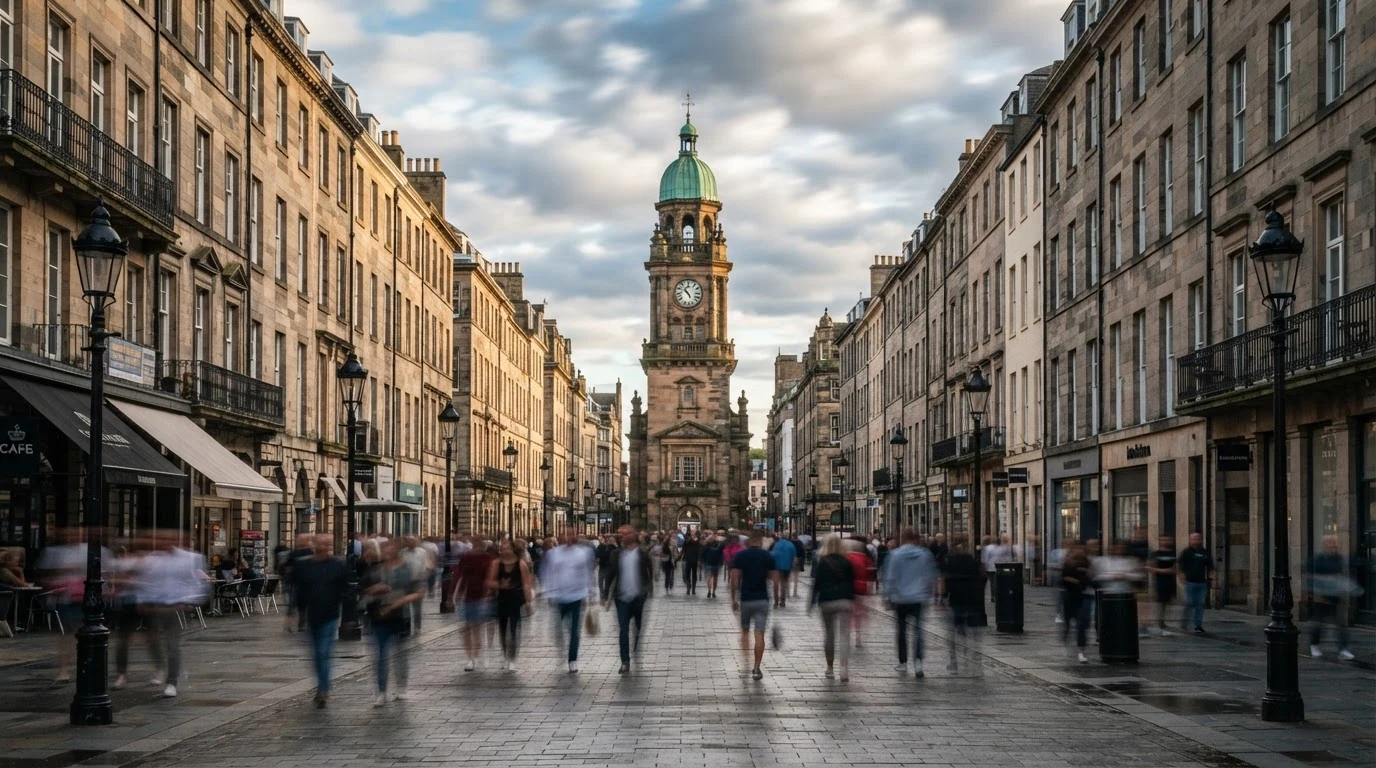
Dead center sets the anchor; converge gives the video a path. Translucent motion streaks from a half-second shutter prevents a frozen street. The unlit lamps and clouds are planted so the video can change them.
Open FlashBoardsDrivelapse still, anamorphic widescreen. Camera mounted low on a car hood in the center lane of a straight elevated highway at blue hour, 24mm lens. Glass towers glow on the horizon exactly where the lanes converge. Long-exposure light trails: red taillight ribbons ahead, white headlight ribbons in opposite lanes, overhead lamps stretched into streaks. Deep blue sky.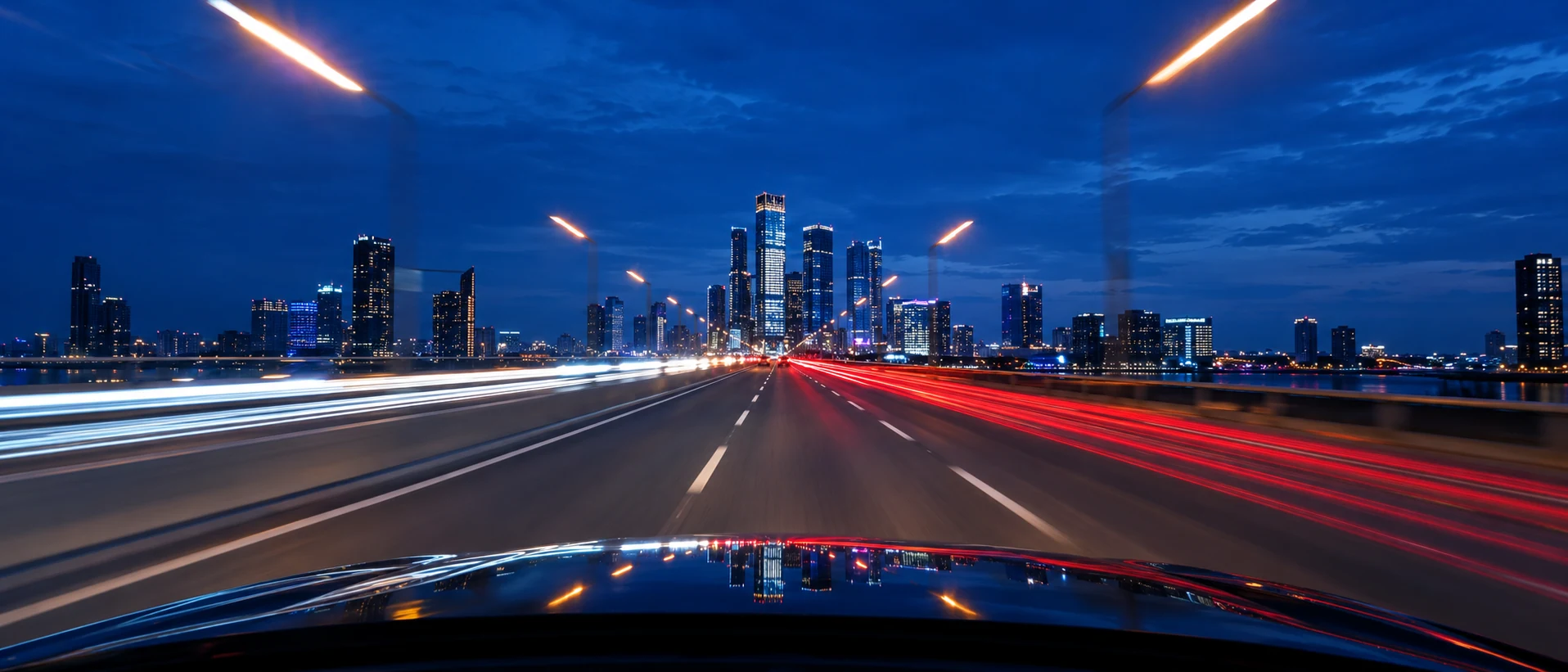
A second take with a new vehicle and height. Mounted low on a car hood defines a drivelapse, the skyline where the lanes converge is the anchor, and light trails replace ghosted crowds.
Open FlashBoardsHyperlapse, time-lapse speed, fast and perfectly steady from the first frame. Camera: glides straight forward down the center of the boulevard at constant high speed, covering the whole street, the clock tower locked in the exact center and growing larger. Action: the streaked crowds already flow and clouds race as the shot begins. In the middle the sunlight fades and buildings slide past on both sides. At the end the sky turns deep blue, the iron street lamps switch on, and the camera arrives near the base of the tower.Already flow keeps it alive from frame one, avoiding a slow push-in on the still. Covering the whole street sets distance, locked in the exact center holds the anchor, and the light change reuses the lamps and sky already in the frame.
Open FlashBoardsCommon mistakes
- Frozen street. State the shutter and describe crowds as streaks.
- Dolly instead of journey. Give a destination, a distance and constant high speed.
- Drifting anchor. Repeat locked in the exact center in the camera line.
- No passing time. Name a visible change already in the frame, like lamps switching on.
- Wobble. Add perfectly steady.
Keep the reference frames, prompts and every generated take side by side — images and video in one canvas.
FAQ
4 questionsWhat is a hyperlapse video?
A hyperlapse video is a time-lapse shot while the camera travels. You take a photo, move a set distance, re-aim at the same landmark, and repeat, then play the frames at normal speed. A ten-minute walk to a monument becomes a smooth five-second approach, with crowds and clouds racing past.
What is the difference between hyperlapse and time-lapse?
In a time-lapse the camera stays put, or moves slightly on a slider, while the scene changes. In a hyperlapse the camera itself travels meters between frames. Both compress time, but only a hyperlapse carries the viewer through space, which is why it needs an anchor point and stabilization.
What is a walklapse?
A walklapse is a hyperlapse shot on foot: take a frame, walk a step or two in a straight line, re-aim at the same landmark, shoot again. It is the most common form for streets, plazas and bridges and needs only a camera, a wide lens and patience.
How many photos do you need for a hyperlapse?
Multiply the seconds you want on screen by the playback frame rate. Five seconds at 24 fps needs 120 frames; at 30 fps, 150. Shoot 10–20 percent extra, because stabilization crops the frame and the first and last steps are often uneven.
Related terms
4- Time LapseCameras & Capture
A time lapse captures frames at long intervals — one every few seconds or minutes — and plays them at normal speed, so clouds race, cities pulse and flowers open in seconds.
- UndercrankingCameras & Capture
Undercranking shoots at a lower frame rate than playback — for example 12 fps played at 24 — so action runs faster than life on screen, used for slapstick, frantic chases and punchier action.
- Speed RampPost-Production & VFX
A speed ramp changes playback speed within one continuous shot — slowing into a key moment and snapping back to real time or faster — to accent a beat of action.
- Long ExposureLenses, Focus & Exposure
A long exposure keeps the shutter open for a long time, so still things stay crisp while anything moving — car lights, water, crowds, stars — smears into streaks and silky blur.
Further reading
American Cinematographer Manual (ASC Press), sections on time-lapse and interval photography.