 FlashBoards Learn
- Learn
- Cameras & Capture
- White Balance
Cameras & Capture · Film language
White Balance
Also called: WB, color balance
White balance is the camera setting that decides which color of light counts as neutral white. Set it to match the light, around 3200K for tungsten or 5600K for daylight, and skin and white objects look natural. Set it off on purpose and the whole image shifts warm or cool.
- What it does
- Tells the camera which light color to render as white, so every other color in the frame falls into place around it.
- Use it when
- Every setup: lock it for the scene, match it across cameras, or move it on purpose to push the image warm or cool.
- Watch out
- Auto white balance drifts inside a take as the framing changes; set a fixed kelvin value and a tint before you roll.
- Try this prompt
overcast harbor at dawn, camera white balance set to tungsten 3200K, whole frame cold steel blue, white parka reads pale blue
What is white balance?
Every light has a color. Tungsten lamps are orange, noon daylight is near neutral, open shade is blue, many LEDs lean green. Our eyes adapt so fast that paper looks white under all of them. A sensor does not, so the camera has to be told.
White balance is that instruction, one of the basic settings covered in the cameras and capture hub. You give the camera a kelvin value, or point it at something white, and it scales its red, green and blue channels so light of that color records as neutral. Light warmer than the setting turns orange; light cooler turns blue.
The control has two axes:
- Kelvin (amber–blue): typically 2000K to 11000K on cinema cameras.
- Tint (green–magenta): corrects the green of fluorescent tubes and cheap LEDs, or the magenta of some HMIs.
Why does white balance matter in film?
First, skin. A face that turns green or sunburn-orange between two cuts reads as a mistake. A white balance matched to the key light keeps skin believable.
Second, continuity. If the A camera sits at 4300K and the B camera on auto lands at 4900K, the colorist spends hours matching reverse shots that should have matched in camera.
Third, intent. Setting the camera cooler than the light makes a scene warmer; setting it warmer makes it cold. That shift is where a warm color palette or a cool color palette often starts before any grade.
On film the same choice was made with stock and filters. Tungsten-balanced negative shot in daylight comes out blue without an 85 filter; daylight stock under tungsten turns orange without an 80A. Skipping the correction on purpose does what a digital kelvin dial does now.
How to set white balance on a camera
- Turn auto white balance off. AWB re-reads the scene constantly; pan from a white wall to a red sofa and the image drifts mid-take.
- Start from the dominant source. 3200K for tungsten light, 5600K for sun, HMIs and daylight LEDs, around 6000–6500K for overcast exteriors.
- Or take a custom reading. Hold a white or 18% gray card in the key light at the subject's position, fill the center of the frame with it and press the custom WB button.
- Check the tint. Under fluorescents or budget LED panels a reading may land around +10 green. Correct it with the tint control or minus-green gel on the lights.
- Verify. A gray card on a vectorscope should sit as a tight dot in the center.
With mixed lighting, no single setting makes everything neutral. Balance for the source on the face and let the others fall warm or cool, or gel the lights to one base.
White balance in log, RAW and post
In RAW formats, white balance is stored as metadata, and the colorist can move it later as precisely as on set. In log or compressed codecs it is written into the image. A grade can still shift it, but pulling a badly wrong balance back stretches the weakest channel (usually blue under tungsten) and adds noise. Shoot a few seconds of gray card at the head of every setup and note the kelvin value in the camera report.
Using white balance creatively
Once you know the "correct" setting, moving off it becomes a tool.
- Cool the image: set the camera below the light's temperature. Daylight recorded at 3200K turns deep blue, a starting point for day for night.
- Warm the image: set it above. Daylight at 7500K picks up an amber cast.
- Warm cards: calibrating on a pale blue card warms the image by a fixed, repeatable amount.
Keep the shift consistent within a scene. A steady cast reads as style; a wandering one reads as a mistake.
White balance vs. color temperature
Both use kelvin numbers, so they get confused. Color temperature describes the light: a tungsten lamp is 3200K whether or not a camera is in the room. White balance describes the camera: the kelvin value it treats as neutral.
The look comes from the gap. Light and setting equal: neutral. Light warmer than the setting: orange. Light cooler: blue. Changing a light, with bulbs or lighting gels, moves one source; changing white balance moves every source in the frame at once. Lights build the warm and cool zones; white balance decides where neutral falls between them.
How to create a white balance with AI
3 promptsModels have no white balance dial, but they respond to its language: a named camera setting, a named light source and a white object that shows the cast. Put a white shirt or tiled wall in the prompt and say what color it should read. On a FlashBoards board, keep the neutral take beside the shifted one to compare.
Cinematic wide-medium shot on a wooden fishing pier at overcast dawn: a broad-shouldered woman in her fifties with a weathered face, a gray braid, a gap between her front teeth and a white hooded parka hauls a wet rope from the gray sea. Camera white balance set to tungsten 3200K under daylight, whole frame shifted cold steel blue: the white parka reads pale blue, her skin cool and pale. Flat soft light, 35mm lens at chest height, fine film grain.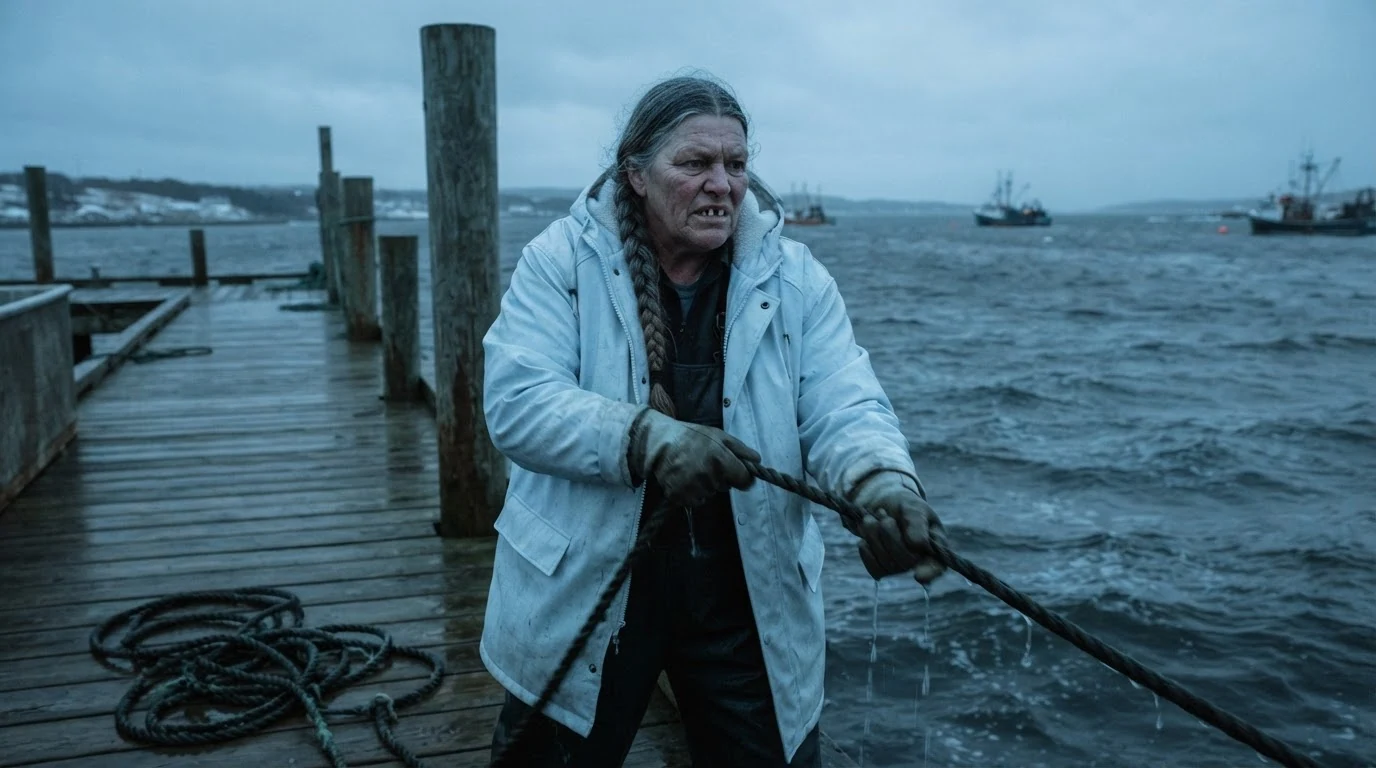
"White balance set to tungsten 3200K under daylight" names the mismatch behind an overall blue cast. The white parka that "reads pale blue" gives the model a reference, so the cast looks like a camera setting, not a blue lamp.
Open FlashBoardsMedium shot in a small bakery kitchen at night lit by warm tungsten work lamps: a slim young man with dark curly hair under a white cap, a short red beard and flour on his forearms shapes dough on a steel table. Camera white balance matched to the 3200K tungsten, so the result is neutral: his apron and the white wall tiles read clean white, skin natural, steel neutral gray. A gray card leans against a flour bin. 40mm lens at eye level, realistic color.
This take shows the correct balance. "Matched to the 3200K tungsten" plus whites that "read clean white" stop the orange glow models usually give tungsten scenes.
Open FlashBoardsCamera: slow truck to the left along the pier at chest height, steady speed, ending a little closer to her profile. Action: She is already pulling the wet rope hand over hand, water dripping onto the planks. She leans back, pulls harder, and rope coils at her feet. She stops, breathes out a small cloud of breath and looks down at the gray water. The cold blue cast stays the same across the whole shot.Hauling starts on the first frame, so the clip is alive at once. The last sentence holds the cast, because video models tend to drift toward neutral.
Open FlashBoardsCommon mistakes
- Cast becomes a colored light. "Blue" alone often adds a blue lamp on one side. Say "camera white balance" and describe a white object's cast.
- Tungsten always glows orange. For a neutral interior, state the match and name what reads clean white.
- Kelvin backwards. Pair each value with its effect: "set to 3200K in daylight, frame shifts blue."
- Drift in video. End the prompt with a sentence that holds the cast steady.
Keep the reference frames, prompts and every generated take side by side — images and video in one canvas.
FAQ
4 questionsWhat white balance should I use for video?
Match the dominant light: 3200K for tungsten and warm LEDs, 5600K for sunlight, HMIs and daylight LEDs, around 6000–6500K for overcast or shade. For accuracy, take a custom reading off a white or gray card placed at the subject. Then lock it, because auto white balance can drift during a shot.
Should I use auto white balance for video?
Rarely. Auto white balance re-measures the frame continuously, so a pan, a costume change or someone entering the shot can shift color mid-take, which is hard to grade out. It is acceptable for run-and-gun work in changing light, but a fixed preset usually cuts together better.
What is tint in white balance?
Tint is the second white balance axis, running green to magenta, at right angles to the kelvin amber-blue axis. Fluorescent tubes and many inexpensive LEDs add green that no kelvin value removes. Adding magenta tint on the camera, or minus-green gel on the lights, brings skin back to neutral.
Why does my footage look blue or orange?
The white balance does not match the light. Footage turns blue when the camera is set warmer than the light, as with a 3200K setting outdoors. It turns orange when the camera is set cooler than the light, as with 5600K under household bulbs. Set the kelvin to the source or take a custom reading.
Related terms
4- Color TemperatureLighting
Color temperature describes how warm or cool a light source is, measured in kelvin: candlelight around 1900K, tungsten about 3200K, daylight about 5600K, overcast and shade higher still.
- Mixed LightingLighting
Mixed lighting combines sources of different color temperature or spectrum in one scene — window daylight with tungsten lamps, fluorescent with neon — either corrected with gels or kept as a deliberate warm-cool contrast.
- Warm Color PaletteColor
A warm palette is dominated by reds, oranges, ambers and yellows; it usually reads as intimacy, nostalgia, heat, comfort — or, pushed hard, danger and sickness.
- Cool Color PaletteColor
A cool palette is dominated by blues, cyans and cold greens; it tends to read as distance, calm, loneliness, night or clinical control.
Further reading
Blain Brown, Cinematography: Theory and Practice (Routledge). American Cinematographer Manual (ASC Press).