 FlashBoards Learn
Editing · Film language
Cut
Also called: straight cut, hard cut, editing cut
A cut is the instant switch from one shot to the next, with no dissolve, fade or wipe between them. It is the basic unit of film editing: most cuts are meant to go unnoticed and carry the story forward, while jump cuts and smash cuts make the edit itself hit the viewer.
- What it does
- Replaces one image with another in a single frame, moving the viewer's attention, place or time with no visible effect.
- Use it when
- Almost always: the cut is the default join between shots unless you want time to visibly soften or pass.
- Watch out
- A cut between two near-identical framings reads as a jump; change angle or shot size to keep it smooth.
- Try this prompt
Extreme close-up, a woman blows out a match, smoke curling in dark room, 85mm, warm single-source light, cinematic still
What is a cut in film?
A cut is the point where one shot ends and the next begins, joined directly with no transition effect. On film, the editor literally cut the film and spliced two strips together; the name stayed in the digital timeline. Straight cut and hard cut mean the same thing: shot A, then shot B, frame to frame.
Keep two words apart. Film editing is the whole craft of choosing, ordering and timing shots; a cut is one join inside that work. It feels natural because the eye already works this way: glance from a face to a door and you don't see a pan, you jump.
What are the types of cuts in film?
Every named cut is a straight cut with a specific relationship between the two shots:
- Continuity cut. Changes angle or shot size inside a scene while time runs on.
- Cut on action. The edit falls mid-movement and the next shot finishes it; see match on action.
- Cut-in and cutaway. A cut-in moves closer to a detail; a cutaway leaves the action, then returns.
- Jump cut. Same subject, nearly the same position, so time visibly skips: the jump cut.
- Match cut. A shared shape, movement or sound links two scenes: the match cut.
- Smash cut. An abrupt jump to a contrasting scene, for shock or comedy: the smash cut.
- Cross-cutting. Alternates between two actions happening at once.
- J-cut and L-cut. Sound leads or trails the picture across the cut.
Why and where do editors cut?
An editor cuts when the current shot has given the audience what it needs, or when a new image will say something the old one can't. Walter Murch, in In the Blink of an Eye, ranks emotion above story, rhythm and spatial continuity: a slightly mismatched cut that feels right beats a perfect one that lands late.
The cut is also where meaning is made. In 2001: A Space Odyssey (1968), Stanley Kubrick cuts from a bone thrown into the air to an orbiting satellite, skipping millions of years in one frame. In Lawrence of Arabia (1962), David Lean cuts from Lawrence blowing out a match to the sun rising over the desert. In The Godfather (1972), cross-cutting between a baptism and a series of murders makes each shot comment on the other.
How to shoot footage that cuts well
Good cuts are planned on set.
- Change the image enough. Move the camera at least 30 degrees or change shot size by two steps; smaller changes read as jump cuts.
- Respect the axis. Keep coverage on one side of the 180-degree line so eyelines survive the cut.
- Overlap the action. Repeat the full movement in every setup, so the editor can cut anywhere inside it.
- Leave handles. Roll 2–3 seconds before action and after cut.
- Shoot inserts. An 85–100mm close-up of hands or an object bridges takes that don't match.
Cut vs. transition: what's the difference?
Strictly, the cut is one of the film transitions: the zero-length one. In practice editors treat it as the baseline and call everything else a transition, because a dissolve, fade or wipe adds duration, and duration carries meaning: time passing, a chapter closing. A cut claims nothing; the next shot simply is.
Cut in motion
8 clipsWatch the join, not the shots. In each clip, find the frame where one image replaces the next, notice what changes across it (shot size, angle or place), and what carries your eye over it: a look, a movement, a flame.
How to create a cut with AI
4 promptsA model generates shots; the cut happens between them. In FlashBoards you build both sides of the cut on one board, the out-point frame and the contrasting in-point beside it, then animate the first so it ends on a clean action. The fourth prompt re-shoots a real film shot from a text description alone, and the original plays next to the result so you can compare.
Extreme close-up film still: a woman in her fifties with a cropped silver undercut, a thin scar through her left eyebrow and weathered olive skin holds a burning match just below her lips, about to blow it out. Dark stone room, the match flame is the only light, warm glow on her eyes, background falls to black. 85mm, eye level, shallow depth of field, 35mm grain.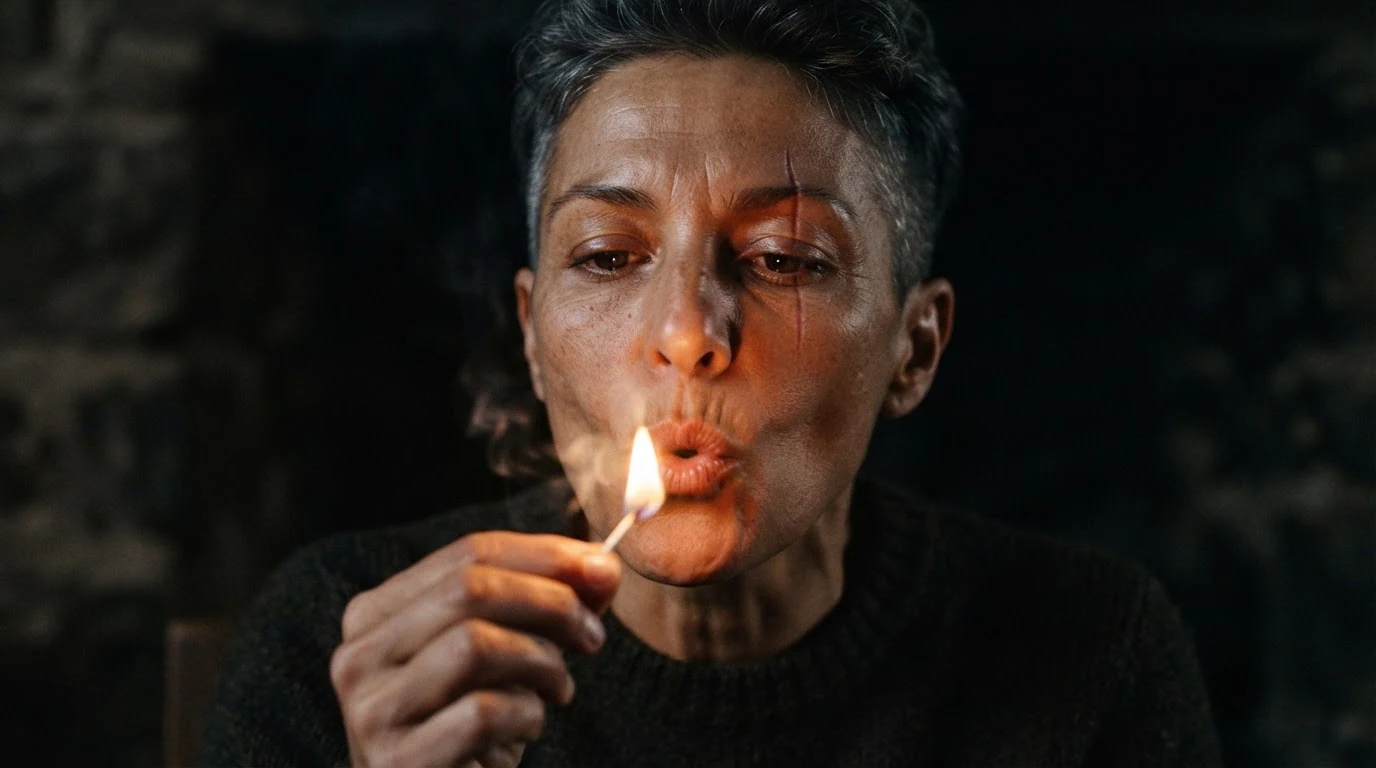
About to blow it out and the flame is the only light set up an out-point: a small action with a clear end, after which the frame goes dark. That dark beat is where the cut goes.
Open FlashBoardsExtreme wide anamorphic film still: the first sliver of sun breaks over a flat salt desert at dawn, one tiny figure in a rust-colored coat far away on the right third. White-gold sky, long blue shadows across cracked salt, vast empty space. Low tripod, 40mm anamorphic, horizontal lens flare.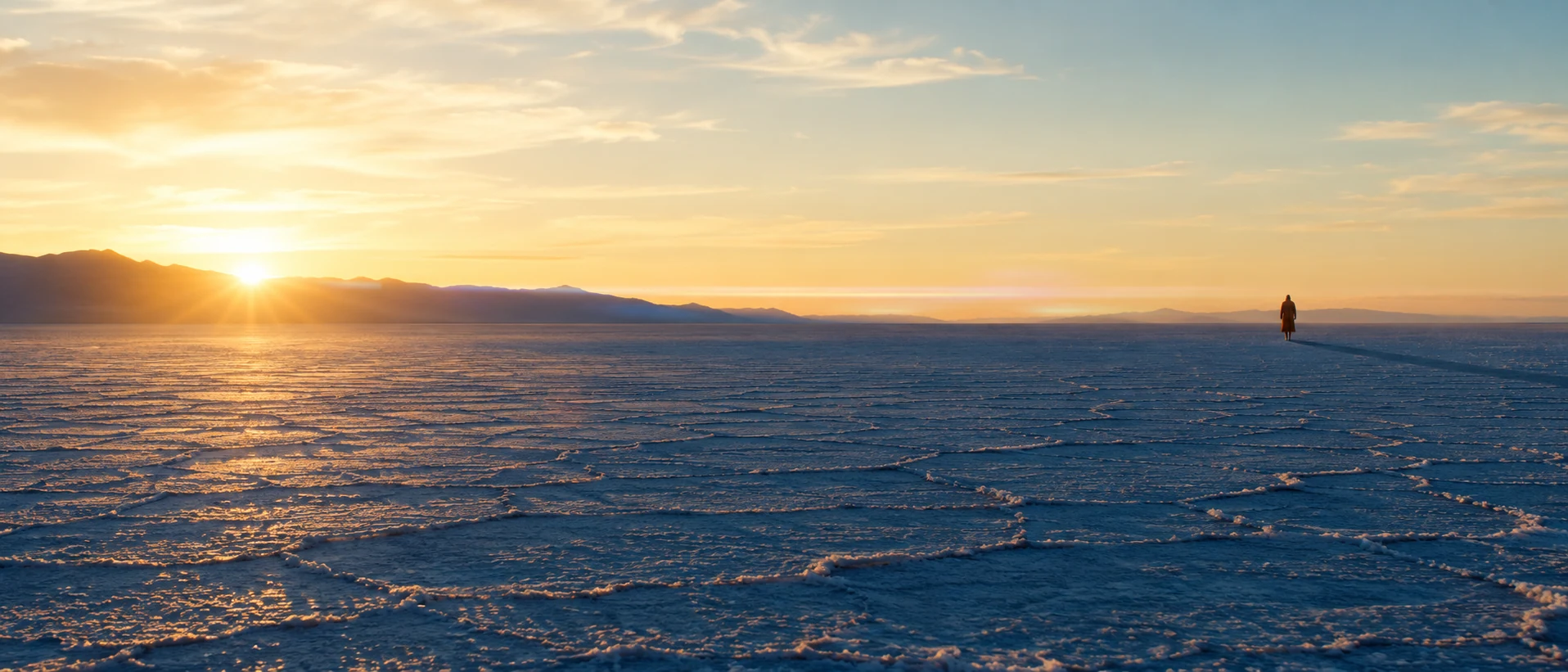
The in-point is everything the first frame is not: extreme wide, white-gold sky and vast empty space make the hard cut a jump in scale and time.
Open FlashBoardsCamera: locked-off on a tripod, holding the extreme close-up throughout. Action: the flame flickers as she draws a breath right away, then she blows the match out in one short puff. A thin ribbon of gray smoke rises past her eyes as her face sinks into darkness, lit only by the faint orange ember.Draws a breath right away keeps the clip alive from the first frame, locked-off prevents a slow push-in, and sinks into darkness gives a clean last frame to cut from to the desert.
Open FlashBoards{
"output": "Full-screen live-action scene from Escape from Alcatraz (1979), from its very first frame: two shots joined by one hard cut, a close-up and its reverse. Grainy late-1970s 35mm, prison dining hall by day, soft flat daylight from tall windows, pale institutional green-gray walls, faded chambray blue shirts, muted skin tones.",
"characters": {
"S1": {
"name": "Frank Morris, played by Clint Eastwood",
"look": "lean man in his late forties, thick dark-brown hair swept back and slightly tousled, deep lines around the eyes and mouth, pale blue striped chambray work shirt buttoned to the collar",
"voice": "silent"
},
"S2": {
"name": "Wolf, played by Bruce M. Fischer",
"look": "heavy-set man in his thirties, broad round ruddy face, close-cropped thinning brown hair, pale blue chambray work shirt",
"voice": "silent"
}
},
"shots": [
{
"shot": 1,
"camera": "static, eye level, long lens, medium close-up of S1 centred, head and shoulders filling the middle third; pale green-gray wall on the right half, a few blurred seated inmates with their heads bent over their trays at the far left edge",
"action": [
"BEGINNING: alive from the first frame, S1 sits with his head bowed, eyelids lowered, looking down at the table in front of him, hands out of frame.",
"THEN: he lifts his head a little and his eyes swing hard to screen right, brows rising, as if he has sensed someone there.",
"THEN: a faint wry tightening at the left corner of his mouth, eyes still on the person just off frame right.",
"THEN: the brows come down into a frown and the stare hardens; his head stays square to the lens, only the eyes point right, no nod.",
"END: he holds the sideways stare, jaw set, mouth closed, completely still."
],
"voice": "silence: nobody speaks in this shot, no voice at all",
"dialogue": []
},
{
"shot": 2,
"cut_at": "00:02.630",
"camera": "static, eye level, long lens, reverse angle: close-up of S2 facing the lens from centre-right, the dark out-of-focus back of S1's head as a soft black curve at the right edge of frame; bright blurred white window slats behind S2 on the upper right, darker wall on the left",
"action": [
"BEGINNING: right after the cut, S2 already holds a lit wooden match upright between the thumb and two fingers of his hand at frame left, the small yellow flame level with his eye and just beside his cheek.",
"THEN: he stares straight ahead at S1, calm and unblinking, mouth closed, the flame flickering and leaning gently while his hand stays steady.",
"END: he keeps the burning match raised in front of his face and his eyes fixed on S1, unmoving."
],
"voice": "silence: nobody speaks in this shot, no voice at all",
"dialogue": []
}
],
"sound": {
"ambience": "low murmur of a crowded dining hall, cutlery scraping metal trays, a soft hiss of the match flame in shot 2",
"speech": "no words in this video; the only human sounds are breaths and movement",
"never_spoken": "no narration and no voice-over: the descriptions, performance notes and step words of this prompt are never spoken aloud",
"music": "a film score under the scene, always below the voices: sparse low strings holding one uneasy note with a slow, muted pulse",
"subtitles": "none"
}
}Remakes the close-up and its reverse from Escape from Alcatraz (1979), dir. Don Siegel, DP Bruce Surtees: Frank Morris's sideways look, the hard cut at 2.6 s and Wolf's raised lit match carried over, silent as in the original.
The cut lives in cut_at: 00:02.630 is the frame where the original cuts, and the remake's cut landed at 2.625 s. The two camera fields build the reverse angle, eyes swing hard to screen right in shot 1 and the back of S1's head at the right edge in shot 2, so Morris's look carries the viewer across the cut. Nobody speaks, so each shot says so.
Common mistakes
- Models blend both ideas into one image (a match flame over a desert). Generate each side of the cut as its own shot.
- If both shots share size and angle, the cut reads as a jump. Name the shot size in both prompts.
- A clip that ends mid-gesture is hard to cut out of. Ask for an action that finishes: blows it out, turns away.
Keep the reference frames, prompts and every generated take side by side — images and video in one canvas.
FAQ
5 questionsWhat is a cut in film?
A cut is the instant change from one shot to the next with no transition effect between them. The editor ends shot A on one frame and starts shot B on the next. Most cuts are designed to be invisible and keep the story moving; jump cuts and smash cuts are meant to be felt.
What is a hard cut or straight cut?
Both mean a plain cut: shot A ends, shot B begins, with no dissolve, fade or wipe. Editors tend to say hard cut when the change is abrupt, such as between very different scenes or sound levels, and straight cut for an ordinary join. It is the same edit either way.
What are the main types of cuts in film?
The continuity cut, cut on action, cut-in, cutaway, jump cut, match cut, smash cut, cross-cutting, and the J-cut and L-cut. All are straight cuts; each type is defined by how the outgoing and incoming shots relate in time, space, shape or sound.
Is a cut a transition?
Technically yes: it is the simplest transition, with zero duration. In everyday editing language, though, a transition usually means an effect that takes time, like a dissolve, fade or wipe. Editors cut by default and reach for a transition only when the audience should feel time passing or a scene closing.
How do you make a cut invisible?
Change the angle by at least 30 degrees or the shot size by two steps, keep coverage on one side of the 180-degree line, match eyelines, and cut in the middle of a movement so the eye follows the action across the edit. Matching light and sound matters too.
Related terms
7- Film TransitionsEditing
Transitions are the ways one shot or scene gives way to the next — the plain cut, dissolve, fade, wipe, match cut and hidden or stylised moves like whip and mask transitions.
- Jump CutEditing
A jump cut joins two shots of the same subject from nearly the same angle, so time visibly skips forward and the cut itself becomes noticeable — used for energy, unease or elapsed time.
- Match CutEditing
A match cut joins two different shots through a shared shape, movement, composition or sound — the bone that becomes a satellite in 2001 — so the cut draws a link between them.
- Smash CutEditing
A smash cut jumps abruptly from one scene to a sharply contrasting one — loud to silent, calm to chaos, a promise to its opposite — for shock or comedy.
- Cutaway ShotEditing
A cutaway briefly leaves the main action for something else — a detail, a bystander, an object elsewhere — then returns, adding information, a joke or a way to hide a cut.
- Match on ActionEditing
Match on action cuts in the middle of a movement — a door opening, a punch, a glass raised — and continues it in the next shot from another angle, so the cut hides inside the motion.
- Film EditingEditing
Film editing is the selection and ordering of shots — where each one starts, ends and what follows it — to build continuity, rhythm and meaning out of the raw footage.
Further reading
Walter Murch, In the Blink of an Eye: A Perspective on Film Editing (Silman-James Press). Karel Reisz and Gavin Millar, The Technique of Film Editing (Focal Press).