 FlashBoards Learn
Editing · Film language
Match on Action
Also called: cutting on action, match cut on action
Match on action is an editing technique that cuts in the middle of a movement (a door swinging open, a punch, a glass being raised) and finishes that same movement in the next shot from a new angle or shot size. The viewer's eye follows the motion across the cut, so the edit feels invisible and the action feels continuous.
- What it does
- Hides the cut inside a movement, so two shots read as one unbroken action.
- Use it when
- You need to change angle or shot size during an action without the audience noticing the edit.
- Watch out
- If the speed, hand position or screen direction differs between the two takes, the cut jumps instead of flowing.
- Try this prompt
Wide shot, a woman in an olive canvas jacket pushes open a heavy steel door mid-stride, daylight flooding a dark corridor, 35mm, cinematic still
What is a match on action cut?
A match on action (also called cutting on action or a match cut on action) is a cut placed while something is moving. Shot A shows the start of a movement; shot B, filmed from a different position, picks up the same movement at the exact point where shot A left it and carries it to the end. A hand reaches for a door handle in a wide shot, and the cut lands on the handle turning in close-up. A boxer throws a punch in a medium shot, and the fist connects in a reverse angle.
The technique is the workhorse of continuity editing. Because the eye is busy tracking the moving object, it doesn't register the jump in camera position, so the audience experiences one action rather than two shots.
A common misconception is that match on action always moves closer: wide to medium, medium to close-up. It doesn't have to. The shot size can go in either direction (a close-up of a fist hitting a table can cut out to a wide of the whole room shaking), and it can even stay the same size as long as the angle changes enough. What defines the technique is not the direction of the change but three things:
- One continuous action split across the cut.
- A new camera position in shot B, different enough in angle or size that the cut reads as deliberate.
- Matched timing, so no part of the movement is visibly repeated or skipped.
It is the most common kind of cut, and the one viewers almost never notice.
Why do editors cut on action?
To make the cut invisible. Motion pulls attention. At the instant of the cut the viewer is watching where the arm, the door or the body is going, not where the camera is. This is the core of what editors call seamless transitions: the movement absorbs the change of shot.
To keep energy in the scene. Cutting on a completed action (the door already open, the character already standing still) gives the audience a small pause. Cutting mid-movement carries the momentum through the splice, so the sequence never settles.
To show a movement from its best angle twice. The start of a gesture might read best in a wide, and its payoff best in a close shot. A match on action lets the editor use both: the wide for geography, the close-up for impact. In fight scenes this is constant. John Wick (2014) is often cited for letting its fights play in wider, longer shots than most action films of its time, and its cuts tend to land on throws and strikes, so a change of angle arrives with a blow instead of interrupting one.
To hide what the camera can't show. Stunt doubles, prosthetics and breakaway props all rely on the cut happening at the peak of a movement. The Black Knight duel in Monty Python and the Holy Grail (1975) is a comic example: each blow falls on a cut, and the missing limbs are swapped in across it.
To build violence or shock out of fragments. The shower scene in Psycho (1960) is assembled from dozens of very short shots, and much of its effect comes from cuts timed to the motion of the knife and the victim's arms.
How to shoot for a match on action
A match on action is made on set. The editor can only cut on movement if the same movement exists, identically, in more than one setup.
1. Shoot overlapping action. Have the actor perform the whole action in every setup, not just the part you think you'll use. If the wide covers the walk to the door and the handle turn, the close-up on the handle should also start with the hand entering frame from the walk. That overlap of a second or two on each side gives the editor room to choose the cut point. This is standard practice when planning coverage.
2. Lock the choreography. Same hand, same speed, same number of steps, same prop in the same position. Rehearse the action to a count so every take hits the same rhythm.
3. Change the angle enough. Move the camera at least 30 degrees around the subject, change the shot size clearly, or both. If shot B is only slightly different from shot A, the cut reads as a stutter, which is a jump cut, not a match on action.
4. Stay on the right side of the line. Keep both setups on the same side of the action axis so movement travels the same way across the frame. A punch thrown toward frame right must still travel toward frame right after the cut. The 180-degree rule and consistent screen direction are what let the eye track motion straight through the edit.
5. Match lens character and light. Big jumps in exposure, color temperature or contrast between the two shots draw attention to the cut. A 35mm wide can cut to an 85mm close-up, as long as key direction and grade match.
6. Keep shutter and frame rate consistent. A 180-degree shutter at 24 fps (1/48 s) gives natural motion blur, and that blur helps the cut: a smeared arm on the last frame of shot A and the first frame of shot B hides the splice. If one setup was shot with a fast shutter and the other with a normal one, the movement will look choppy on one side of the cut.
7. Plan the insert. Many match cuts on action go to or from an insert shot: a hand on a latch, a foot hitting a pedal, a key turning. Shoot inserts with the same overlapping action, not as static details.
Where exactly to make the cut
In the edit, a match on action lives or dies on a few frames.
Cut during the movement, not before or after. A common working guide is to cut roughly a third of the way into the action: the arm has clearly started, so the viewer is already tracking it, and there is enough movement left in shot B for the eye to follow.
Watch for the double-take and the gap. If shot B starts slightly before the point where shot A ended, part of the action repeats and the viewer sees the door open twice. If it starts too late, the action skips. Scrub both sides frame by frame. Overlapping by one or two frames often plays smoother, because the eye needs a moment to find the object in the new composition. Trust full-speed playback over the timeline.
Place the moving object where the eye already is. If the hand exits shot A at the right edge of frame and appears in shot B at the left edge, the viewer's eye has to search, and the cut is felt. The strongest cuts on action keep the point of interest in roughly the same area of the frame on both sides, or move it along the direction of travel.
Let sound bridge it. The sound of the action (the latch clicking, the punch landing) is usually taken from the shot where it looks best and laid across the cut. A single continuous sound effect under two pictures is a strong glue.
Don't overdo it. In fast cutting sequences every cut can be on action, and that's the point. In a quiet dialogue scene, cutting on every small gesture feels restless.
Walter Murch's advice in In the Blink of an Eye still holds: emotion and story come before spatial continuity. A cut on action that is perfectly matched but lands on the wrong moment of the performance is worse than a slightly imperfect match on the right one.
Match on action vs. match cut
The names sound alike and both rely on a visual link across the cut, but they do opposite jobs.
| | Match on action | Match cut | |---|---|---| | What continues across the cut | The same action, in the same place and time | A shape, movement, composition or sound shared by two different things | | Space and time | Continuous: one scene, one moment | Usually a jump: different place, different time, or both | | What the audience should notice | Nothing: the cut should be invisible | The link itself: the cut is meant to be seen | | Typical example | A hand opens a door, then the door swings open from inside the room | The bone thrown into the air becomes a satellite in 2001: A Space Odyssey (1968) |
A match on action is a tool of invisible, continuity-driven film editing. A match cut is a figure of speech: it asks the audience to compare two things. Kubrick's bone-to-satellite cut does contain a movement (the bone tumbling upward, the satellite drifting), but it is not a match on action, because the action doesn't continue; millions of years pass across the splice and the rhyme between the objects is the point.
A quick test: if the audience is supposed to notice the cut, it's a match cut; if not, it's a match on action.
Match on Action in motion
9 clipsWatch the moment of each cut rather than the shots. In every clip a movement (a sword stroke, a throw, a leap, a gunshot) starts in one angle and finishes in the next, and the change of camera position slips by while your eye follows the motion.
How to create a match on action with AI
4 promptsA model generates one shot at a time, so a match on action with AI means building two shots of the same movement that will splice: same character, costume, light and screen direction, from two distances. Generate both angles on one FlashBoards board, animate the wide, and compare them side by side to find the frame where the cut hides. The fourth prompt re-shoots a real film shot from a text description alone, and the original plays next to the result so you can compare.
Cinematic wide shot in a dim concrete service corridor, a woman in her thirties with close-cropped bleached hair, a thin scar through her left eyebrow, an olive canvas work jacket and a rust-red scarf strides toward a heavy gray steel door at the end of the corridor, moving from frame left toward frame right, her right arm already reaching out for the push bar, camera at chest height behind her shoulder at a three-quarter angle, 35mm lens, a thin line of hard daylight leaking under the door, cool green fluorescent tubes overhead, deep shadows, film grain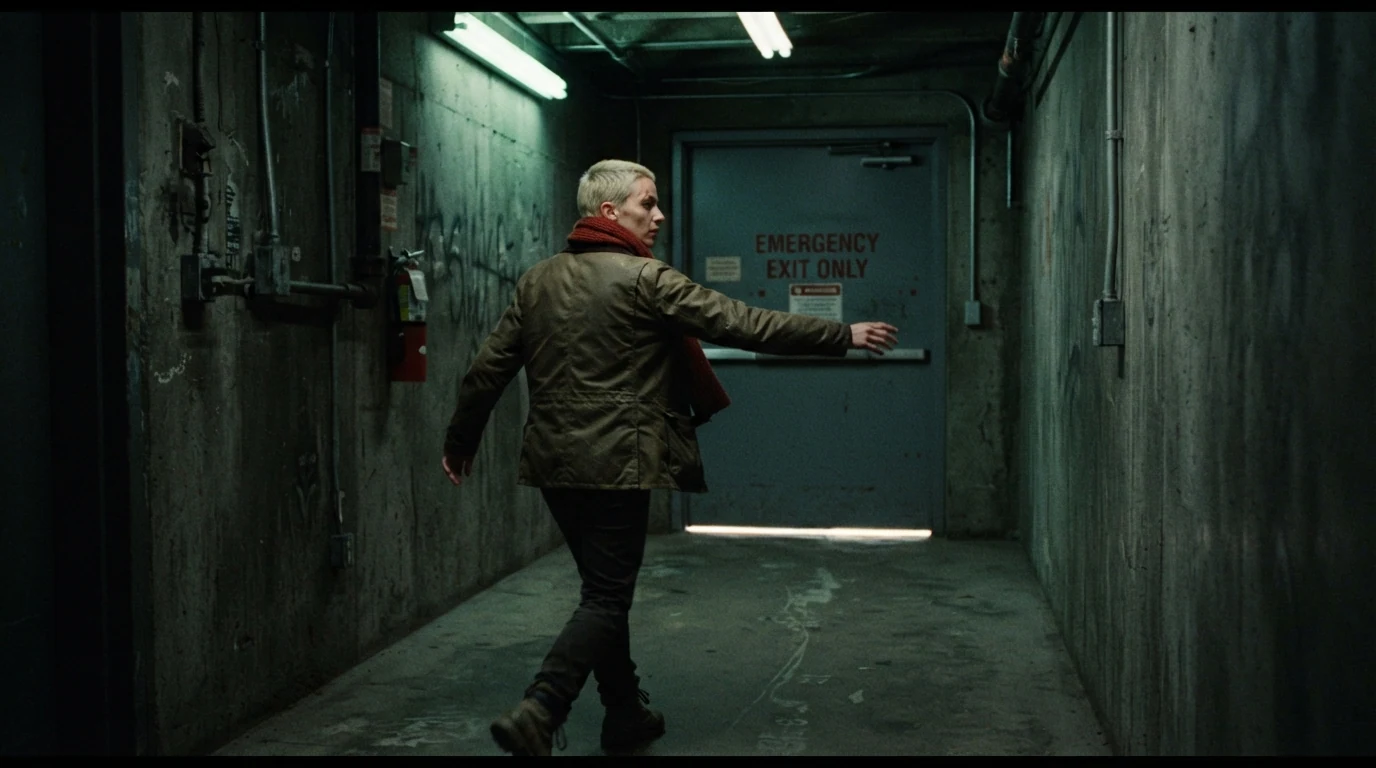
This is shot A, the outgoing half. Right arm already reaching out for the push bar catches the action at its start, so the cut has something to continue. Moving from frame left toward frame right sets the screen direction shot B must keep, and 35mm, three-quarter angle behind her shoulder gives a geographic wide a close-up can cut into. The scar, hair and scarf make her recognizable in the second angle.
Open FlashBoardsCinematic close-up from the side, a woman's right hand in a worn olive canvas jacket sleeve slams into the push bar of a heavy gray steel door, the door just starting to swing open toward frame right, a blade of hard white daylight cutting into the dark corridor and lighting her knuckles, the edge of a rust-red scarf visible at the left of frame, 85mm lens at hand height, shallow depth of field, cool green fluorescent spill on the steel, motion blur on the door edge, film grain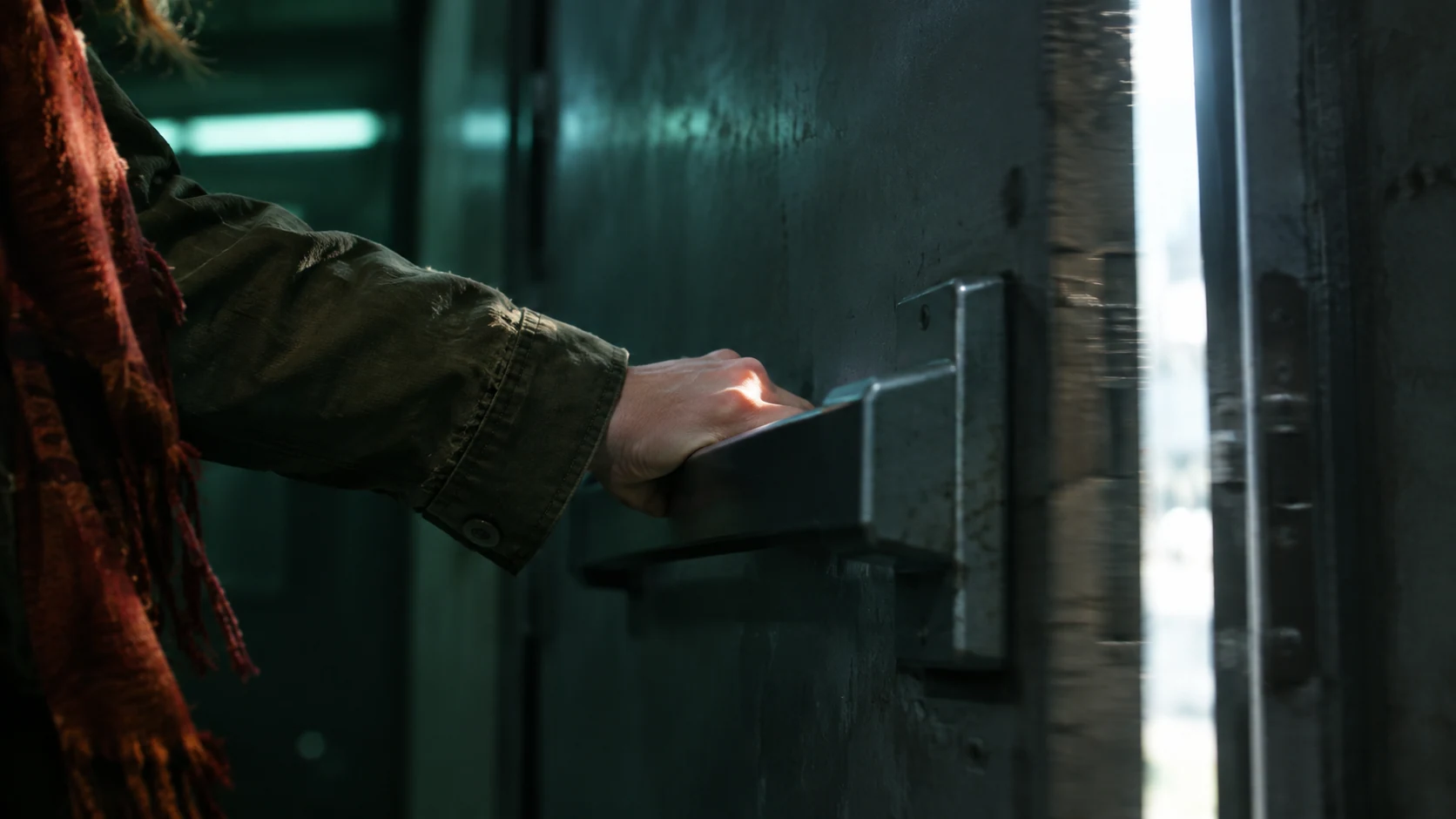
Shot B, the incoming half. Right hand, olive sleeve and rust-red scarf repeat the continuity anchors; swing open toward frame right keeps the direction of travel. 85mm at hand height, close-up from the side is a big enough change that the cut reads as a new angle, not a jump, and motion blur on the door edge keeps the action mid-movement.
Open FlashBoardsCamera: handheld follow from behind her shoulder, moving forward at walking pace and keeping her in the right third of the frame until the door opens. Action: she is already striding toward the steel door in the first frame, her right arm stretched out. Her palm hits the push bar without slowing down, the heavy door swings outward toward frame right and a flood of white daylight pours into the corridor, washing over her jacket and scarf. She steps into the bright doorway and her silhouette breaks into the light.Already striding in the first frame keeps the shot alive instead of drifting on a still. Palm hits the push bar without slowing down is one continuous movement, and that is where you cut to recipe 2's close-up. Toward frame right repeats the direction from both stills, and six seconds leaves overlapping action on both sides of the cut point.
Open FlashBoards{
"output": "Full-screen live-action period swordfight from The Count of Monte Cristo (2002) from its very first frame: three shots joined by two hard cuts. Early-2000s 35mm adventure film look, heavy gray-white overcast sky with low rolling clouds, soft flat daylight, an open field of tall green grass, a round-leaved tree and a ruined ivy-covered stone tower on one side, a low earth-and-stone rampart on the other, muted greens and grays, black and white costumes, fine film grain.",
"characters": {
"S1": {
"name": "Fernand Mondego, played by Guy Pearce",
"look": "lean man in his thirties, short tousled light-brown hair blown by the wind, black frock coat, dark patterned brocade waistcoat, loose black cravat flapping, black leather gloves, slim rapier in his right hand",
"voice": "hard breathing and effort grunts only, no words"
},
"S2": {
"name": "Edmond Dantes, played by Jim Caviezel",
"look": "man in his thirties, shoulder-length curly dark-brown hair, loose white linen shirt with billowing sleeves and red bloodstains on the shirt and one sleeve, open black waistcoat, black leather gloves, slim rapier",
"voice": "hard breathing and effort grunts only, no words"
}
},
"shots": [
{
"shot": 1,
"voice": "silence: nobody speaks in this shot, no voice at all",
"camera": "very low angle from just above the grass, looking up so the gray sky fills the upper two-thirds of the frame, medium shot, standard lens; S2's white sleeve and black waistcoat large in the right foreground at the start, cut off by the frame edge; the camera pans right and tilts up to follow S1 as he turns, the tree and then the ruined tower sliding into the right side of the frame",
"action": [
"BEGINNING: alive from the first frame, S1 in the left third faces frame right, both rapiers locked high above their heads, S2's white arm stretched across the top of the frame toward him.",
"THEN: S1 breaks off, drops his sword hand and whirls a full turn away from S2, his back briefly to the camera, coat tails and black cravat flaring out.",
"THEN: he comes round facing the camera and toward frame right, rapier low at his hip, jaw clenched, eyes fixed on S2 off frame right.",
"END: he swings his sword arm up and around over his head in a wide arc, the stroke travelling down toward S2 off frame right and still moving at the last frame."
],
"dialogue": []
},
{
"shot": 2,
"cut_at": "00:01.540",
"voice": "silence: nobody speaks in this shot, no voice at all",
"camera": "reverse angle, low, from behind S1's right shoulder, medium-wide; S1's back and tousled hair large in the left foreground, S2 facing the camera in the middle distance at the right, the low stone rampart and green field behind them; the camera holds still",
"action": [
"BEGINNING: S1's overhead stroke from the previous shot is still travelling and lands on S2's raised blade, the two rapiers crossing in a high X against the gray sky.",
"THEN: both men push against the crossed blades with their gloved hands high, then S2 breaks away and steps back toward frame right, his sword dropping low.",
"THEN: S1 pulls his sword arm back and twists his shoulders, S2 turning to face him again.",
"END: S1 lunges toward frame right, stepping far forward, sword arm shooting out straight and level at S2's body, the thrust still travelling at the last frame."
],
"dialogue": []
},
{
"shot": 3,
"cut_at": "00:02.840",
"voice": "silence: nobody speaks in this shot, no voice at all",
"camera": "very low angle close to S2, medium close-up looking steeply up at him against the gray sky; S1's black sleeve and gloved hand drive in from the lower left foreground; the camera swings slightly right with the action",
"action": [
"BEGINNING: S1's level thrust is still driving in from frame left as S2 whips his rapier up, hilt above his head and blade slanting down across his body, and catches it, steel sliding along steel.",
"THEN: S2 holds the parry with the hilt high, his gaze locked down-left on S1, white sleeves billowing.",
"END: S2 twists and throws S1's blade aside toward frame right, his own rapier sweeping out after it."
],
"dialogue": []
}
],
"sound": {
"ambience": "wind across open grass, boots thudding on turf, a bright ring of steel on each blade contact and a scrape as the blades slide",
"speech": "no words in this video; the only human sounds are breaths and movement",
"never_spoken": "no narration and no voice-over: the descriptions, performance notes and step words of this prompt are never spoken aloud",
"music": "a film score under the scene, always below the voices: surging low strings and pounding timpani in a fast heroic rhythm",
"subtitles": "none"
}
}This remakes the final duel between Fernand Mondego and Edmond Dantes from The Count of Monte Cristo (2002), dir. Kevin Reynolds; the prompt keeps its three shots, cut times, low angles, wordless fight under a score and the two strokes that carry across the cuts.
The three shots and both cut times come from the original, and each cut_at falls inside a movement: Fernand's spin ends mid-swing at the first cut, his lunge is still travelling at the second. That is why each new shot's BEGINNING finishes a stroke begun in the previous shot, and why the camera changes position (low front, behind the shoulder, low close-up) at every cut.
Common mistakes
- Different hands. Models often switch which hand does the action between shots. Name it every time ("her right hand", "right arm reaching") in both prompts.
- Flipped direction. A close-up generated on its own may show the door opening the other way. State the direction of travel ("toward frame right") in every shot of the pair.
- Frozen action. Image models like to show a finished pose: the door already open, the arm at rest. Use words that put the movement in the middle: "slams into", "just starting to swing", "motion blur on the door edge".
- Costume drift. Colors and garments change between generations. Repeat two or three hard continuity anchors (olive canvas jacket, rust-red scarf) and keep both shots on one board to compare before animating.
- Too-similar angles. If the second shot is the same lens and position, the cut jumps. Change both size and angle clearly: 35mm wide from behind, 85mm close-up from the side.
Keep the reference frames, prompts and every generated take side by side — images and video in one canvas.
FAQ
6 questionsWhat is match on action in film?
Match on action is an editing technique where a cut happens in the middle of a movement and the next shot, from a different angle or shot size, continues that exact movement. Because the eye follows the motion across the cut, the edit goes unnoticed and the action feels continuous. It is a basic tool of continuity editing.
Is cutting on action the same as match on action?
Yes. Cutting on action, match on action and match cut on action all describe the same thing: joining two shots during one continuous movement so the change of angle is hidden. Some editors use "cutting on action" more loosely for any cut timed to movement, but in most editing books and on set the terms are interchangeable.
Does match on action always cut to a closer shot?
No. The cut can move closer, wider, or stay at the same size with a clear change of angle. A close-up of a hand can cut out to a wide of the room as easily as the reverse. What matters is that the movement continues and the camera position changes enough not to look like a jump cut.
What are some match on action examples?
Everyday examples: a character opens a door in a wide and walks through it in a reverse angle; a glass is raised in a medium shot and reaches the lips in a close-up; a punch is thrown in one angle and lands in another. Well-known film examples include the shower scene in Psycho (1960) and the Black Knight duel in Monty Python and the Holy Grail (1975).
What is the difference between match on action and a match cut?
A match on action continues the same action in the same place and time, and it is meant to be invisible. A match cut links two different things (different places, times or objects) through a shared shape, movement or sound, and it is meant to be noticed. The bone becoming a satellite in 2001: A Space Odyssey is a match cut, not a match on action.
How do you shoot for a match on action?
Have the actor perform the full action in every setup so the movement overlaps between shots. Keep the choreography identical: same hand, same speed, same props. Change the angle or shot size clearly, stay on the same side of the 180-degree line, and keep light and shutter consistent.
Related terms
5- Match CutEditing
A match cut joins two different shots through a shared shape, movement, composition or sound — the bone that becomes a satellite in 2001 — so the cut draws a link between them.
- ContinuityFilmmaking Process & Crew
Continuity is the consistency of every visible and audible detail — props, costume, hair, eyelines, positions, light, weather — across shots that were filmed out of order, so the edited scene reads as one unbroken moment.
- 180-Degree RuleComposition & Framing
The 180-degree rule keeps the camera on one side of an imaginary line between two characters (or along a movement), so their left-right positions and eyelines stay consistent from shot to shot; crossing it flips the geography and disorients the viewer.
- CoverageDirecting & Staging
Coverage is the full set of shots filmed for one scene — master, singles, over-the-shoulders, inserts, reactions — that gives the editor choices of pace, emphasis and performance.
- Screen DirectionComposition & Framing
Screen direction is the left-to-right or right-to-left way characters move and look across the frame; keeping it consistent between shots tells the audience where people are heading and who is chasing whom.
Further reading
Walter Murch, In the Blink of an Eye: A Perspective on Film Editing (2nd ed., 2001). Karel Reisz and Gavin Millar, The Technique of Film Editing (1968). David Bordwell and Kristin Thompson, Film Art: An Introduction, chapter on continuity editing.