 FlashBoards Learn
Editing · Film language
Film Transitions
Also called: editing transitions, scene transitions, video transitions
Film transitions are the ways one shot or scene hands over to the next: the plain cut, the dissolve, the fade, the wipe, the match cut and hidden or stylized moves like whips and crash transitions. Each one tells the viewer something different about time, space and how the two shots are connected.
- What it does
- Controls how the audience crosses from one shot or scene to the next, and what that crossing means.
- Use it when
- You need to mark a jump in time or place, link two ideas, change energy, or hide the join between shots.
- Watch out
- A decorative transition with no reason behind it reads as a template; most joins should be plain cuts.
- Try this prompt
Locked-off night street, a passerby in a black wool coat walks right to left across the lens and fills the frame with black for an instant
What are film transitions?
Every edit has two sides: the last frame of the outgoing shot and the first frame of the incoming one. A transition is whatever happens at that seam. Most of the time nothing happens at all. The picture simply changes on a single frame, and that is a cut, the default join in film editing. Everything else makes the seam visible, or hides it deliberately.
Think of transitions as punctuation. A cut is a comma: the sentence keeps moving. A dissolve is a semicolon, a softer pause that links two thoughts, often across time. A fade to black is a full stop, sometimes the end of a chapter. A wipe is a flourish that announces itself.
Transitions happen in two places. Some are built in the edit: dissolves, fades, wipes and digital effects, laid over the join in the timeline. Others are built on set: a camera whips away and a second camera whips in, an actor's dark coat covers the lens, a wall slides aside and reveals a new room. The second kind has to be planned before the shoot.
What are the main types of transitions in film?
- Cut. An instant change on one frame. Invisible when it follows action; jarring on purpose as a jump cut or a smash cut.

- Dissolve. The outgoing shot fades out while the incoming shot fades in over the same frames, so for a moment both are on screen. The drain in Psycho (1960) dissolving into Marion's eye is the classic graphic dissolve.
- Fade. The picture goes to or comes up from black (or white, or another color).
- Wipe. A moving edge pushes one shot off the screen and replaces it with the next: a straight line, a clock hand, a closing iris. Kurosawa used wipes throughout Seven Samurai (1954), and Star Wars (1977) made them part of its identity.
- Match cut. Two different shots joined by a shared shape, movement or composition. The bone tossed into the air that becomes an orbiting satellite in 2001: A Space Odyssey (1968) is the most famous match cut there is.
- Whip transition. The camera pans so fast the image smears, and the cut is hidden inside the blur, joining two whip pans in the same direction. Citizen Kane (1941) links years of a marriage in its breakfast-table montage this way.
- Hidden or seamless transition. The cut is buried inside a dark object crossing the lens or a shared movement, so two shots play as one, as in Rope (1948) and 1917 (2019). See seamless transitions.
- Sound transitions. In a J-cut the next scene's sound arrives before its picture; in an L-cut the sound of the old scene lingers over the new picture.
- Crash and set transitions. A crash transition hits the join with a burst of zoom, flash or noise; a set transition changes the scene physically in front of the camera. Both get their own sections below.
Why do editors choose one transition over another?
Because each transition makes a claim about how the two shots relate, and the audience reads that claim instantly.
Time. A cut says "now, continuous." A dissolve says "later" or "meanwhile" without a clock. A fade says "a real gap, a new chapter."
Space. Wipes and whips feel like the camera is traveling from one place to another, which is why they suit adventure films, comedy and montage. A match cut claims that two places or eras are connected by something deeper than geography.
Meaning. The strongest transitions carry an idea. 2001 jumps millions of years on a single graphic match and says that the bone and the satellite are the same tool. In The Godfather (1972), the baptism is cross-cut with a series of killings, and the constant back-and-forth turns the ceremony into an alibi. In Saving Private Ryan (1998), a slow push into an old veteran's face carries the film from a quiet cemetery to Omaha Beach, so the whole war plays as memory.
Energy. Hard cuts and crash transitions speed a sequence up; long dissolves slow it down.
Invisibility. Hidden transitions let a filmmaker stitch several takes into what plays as a single shot, as Birdman (2014) does across almost its entire length.
How to plan and shoot transitions
Most transitions that look clever on screen were designed at the storyboard stage. A few working rules:
Give the editor handles. Roll at least two seconds before action and after cut on every setup. A one-second dissolve at 24 fps needs 24 frames of overlap from both shots; a slow three-second dissolve needs 72.
Design both ends of an in-camera transition together. For a whip transition, whip in the same direction at a similar speed on both setups, with the same lens height and focal length, and let the blur last six to eight frames. For a hidden wipe, the object that covers the lens has to move in the same direction in both shots: a passerby crossing right to left at the end of shot A should still be clearing frame left at the start of shot B. Keep the object close, within a meter of the lens, so it goes fully dark and soft.
Match the frame, not just the object. A graphic match works when the shape sits in the same place and at the same size on both sides of the cut. Circles, horizons, doorways and faces centered in frame are the easiest matches.
Keep the shutter honest. A 180-degree shutter (1/48 s at 24 fps) gives the motion blur that makes whips and crash zooms read as speed. A fast shutter turns them into stuttering, crisp frames.
Light for the fade. If a scene is meant to fade to black, let the last image already sit in low key. A bright exterior dropping to black feels like a power cut.
What is a crash transition?
A crash transition slams two shots together through a burst of motion, light or graphics, so the change feels like an impact rather than a hand-off. The usual ingredients are a crash zoom that punches in on the last frames of shot A, a flash to white or a single bright frame at the join, and a hard sound hit: a whoosh, a drum, a camera shutter.
Edgar Wright's comedies, Hot Fuzz (2007) above all, turned the device into a signature: routine actions such as stamping a form or opening a door become a string of punched, noisy micro-shots. Tarantino's Django Unchained (2012) borrows fast zooms from 1970s genre cinema for a similar jolt.
To shoot one, run the zoom on the lens (or punch in digitally in post); the move should take three to six frames. In the edit, add one to three frames of white or overexposed picture at the join, and let the sound design carry half the effect. In a quiet drama it reads as a gag.
What is a set transition?
A set transition moves the story to a new place without cutting: the scenery itself changes in front of the camera. Walls fall away, a flat slides aside, lights go out in one part of the room and come up in another, a rotating set turns the next location into frame. It is theater stagecraft filmed in a single shot.
Michel Gondry built Eternal Sunshine of the Spotless Mind (2004) partly on this idea: as memories are erased, the spaces around the characters darken and disappear in-camera. Wes Anderson's The Life Aquatic with Steve Zissou (2004) tracks through a ship built as a cross-section, room to room, so the geography changes as the camera moves rather than at a cut.
Planning one is production design work first. Every moving piece needs a cue, a crew member and a rehearsal; the camera usually tracks or pans to cover the moment of change, and the lighting has to switch on the same beat. Shoot extra takes: there is no cutting around a late flat.
Transition vs. cut: is a cut a transition?
Yes. The cut is the simplest transition and by far the most common, but editors often talk about the two as opposites, because "transition" in an editing program usually means an effect laid over the join: a dissolve, a wipe, a slide. The difference that matters is visibility.
A straight cut hides inside the story. When it follows a look, a movement or a line of dialogue, the audience does not register it at all. Any other transition takes frames away from the story to say something about the edit: this is later, this is elsewhere, these two things are linked.
The practical rule: cut by default, and use another transition only when it adds a meaning the cut cannot. If you cannot say what the dissolve is telling the audience, it should probably be a cut. Sound tricks, a J-cut or L-cut, often do the smoothing job better than any visual effect.
Film Transitions in motion











11 clipsWatch the seam between two images: a whip smear, a dark shoulder crossing the lens, a flash of white, a shape that carries over, or a set that changes while the camera keeps rolling. Each loop hides or stylizes the moment one shot becomes the next.
How to create a film transitions with AI
3 promptsAn image-to-video model animates one start frame, so it will not cut, dissolve or wipe for you; that happens in the edit. What AI can do well is generate the two halves of an in-camera transition so they meet cleanly. Below, Nano Banana 2 Lite draws the outgoing frame of a hidden wipe, GPT Image 2.5 the incoming one, and MiniMax H3 Max Turbo animates the first until a coat covers the lens. Keep both halves and every take on one FlashBoards board to line up the join side by side.
Cinematic film still, medium wide shot at eye level, 35mm lens, rainy city street at night: a woman in her thirties with a shaved head, large silver hoop earrings and a mustard-yellow raincoat waits under a glass bus shelter at frame left, looking down the street; at the right edge of the frame, very close to the lens and heavily out of focus, the shoulder and back of a tall passerby in a black wool coat already stepping into frame; wet asphalt reflecting red and cyan neon, light rain, shallow depth of field, 35mm film grain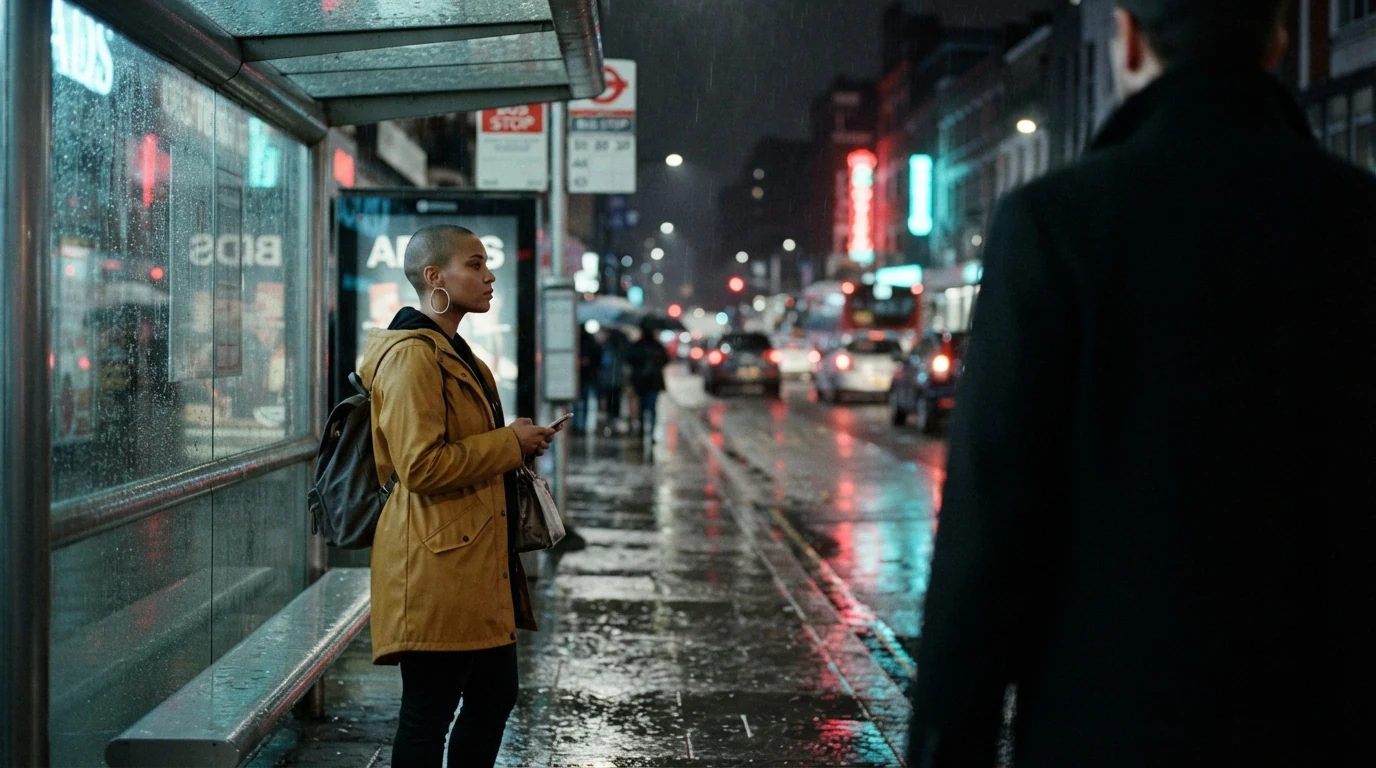
The start frame already contains the wipe: very close to the lens and heavily out of focus makes the passerby a dark soft mass rather than a character, and already stepping into frame at the right edge sets the direction of the move. The shaved head and silver hoops make the woman a clearly invented character.
Open FlashBoardsCinematic anamorphic film still, wide shot at eye level, 40mm lens, quiet train station concourse at dawn: at the left edge of the frame, very close to the lens and heavily out of focus, the back of a passerby in a black wool coat leaving frame and covering a third of the image; beyond, a man in his sixties with a white braided beard, round tortoiseshell glasses and a mustard-yellow scarf sits alone on a wooden bench under a tall arched window; pale blue morning light, long shadows on a polished stone floor, 35mm film grain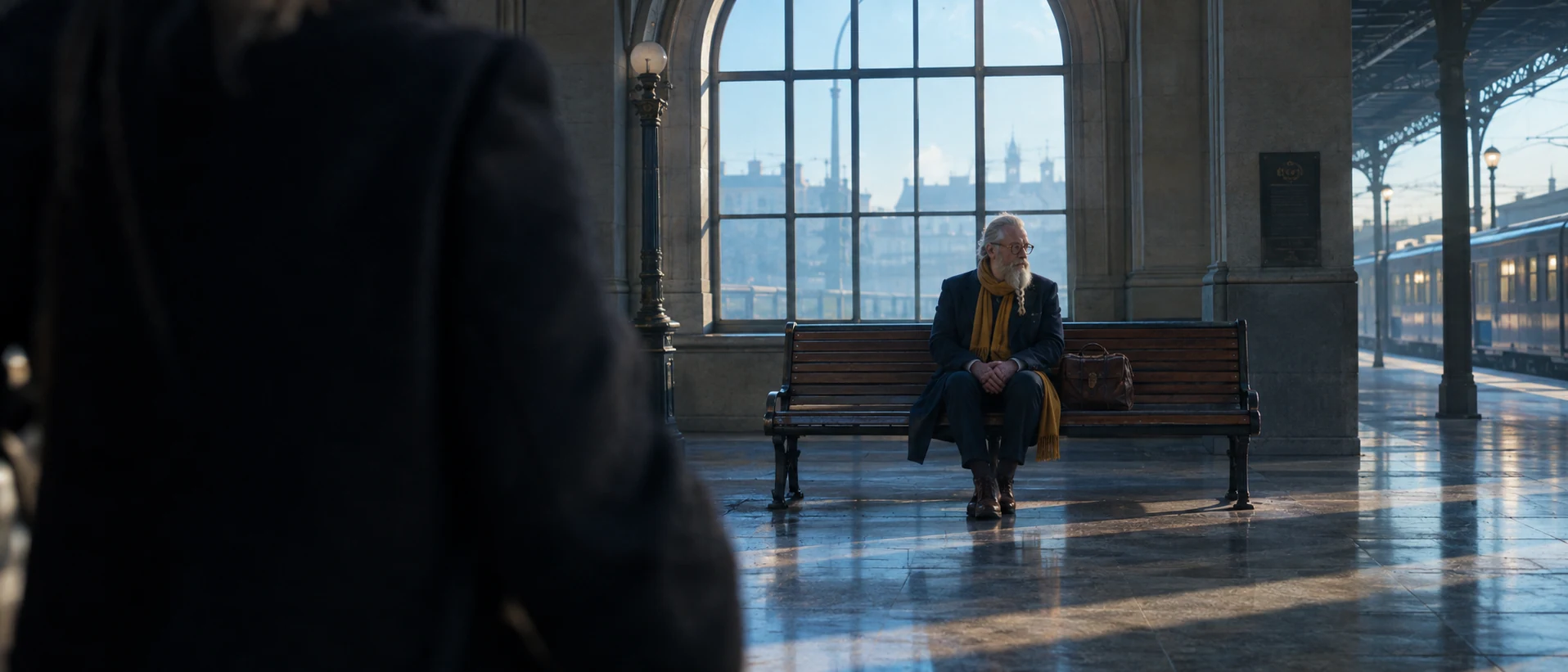
This is the other side of the join: the same black coat, now leaving frame at the left edge, so the motion continues right to left across the cut. Changing place, time of day and aspect gives the transition a real jump, while the mustard-yellow scarf repeats the raincoat's color and ties the two shots together.
Open FlashBoardsCamera: locked off on a tripod at eye level, perfectly still for the whole shot. Action: the tall passerby in the black wool coat is already walking briskly from right to left, so close to the lens that his coat brushes it, as the shot begins. Halfway through, his coat fills the entire frame edge to edge and the image goes fully black for a moment. Then he clears frame left and the rainy street is visible again, with the woman in the mustard-yellow raincoat stepping out from under the bus shelter and raising one hand, rain falling steadily through the neon light.Already walking briskly ... as the shot begins keeps the clip alive from the first frame, and so close to the lens that his coat brushes it with fills the entire frame edge to edge produces the dark wipe you cut on. Locked off ... perfectly still stops the model drifting into a push-in. In the edit, cut at the darkest frame and join it to a clip made from recipe 2.
Open FlashBoardsCommon mistakes
- Morphs instead of transitions. One clip asked to "transition to a station" melts two places together. Generate each side separately and join them in the edit.
- The word "transition" itself. It can trigger swirling light, glitch or double-exposure effects. Describe the physical event instead: his coat fills the entire frame.
- The wiping object stays sharp and small. Say very close to the lens, heavily out of focus and fills the entire frame, or the passerby walks politely behind the subject.
- Direction mismatch. If the coat crosses right to left in shot A, write leaving frame at the left edge in shot B; otherwise the eye feels a jolt at the join.
- Fades generated in camera. "Fade to black" in a video prompt often darkens the lighting in the scene. Add fades and dissolves in the edit, where you control their length.
Keep the reference frames, prompts and every generated take side by side — images and video in one canvas.
FAQ
5 questionsWhat are the types of transitions in film?
The main types are the cut, dissolve, fade (in or out, usually to black), wipe (including the iris), match cut, whip transition and hidden or seamless transitions, plus sound-led joins such as the J-cut and L-cut. Stylized variants include the smash cut, the crash transition with a burst of zoom or flash, and the set transition, where the scenery changes in front of the camera.
What is the most common transition in film?
The straight cut, by a huge margin. A typical feature contains well over a thousand cuts and only a handful of dissolves or fades. Cuts that follow a movement, a look or a line of dialogue go unnoticed, which is why editors reserve every other transition for moments when they want the audience to feel a change in time, place or meaning.
What is the difference between a dissolve and a fade?
A dissolve overlaps two shots: the first fades out while the second fades in over the same frames, so both are briefly visible. A fade involves one shot and a solid color, usually black: the picture goes down to black or comes up from it. Dissolves link scenes and suggest time passing; fades mark bigger breaks, like the opening, the ending or a new chapter.
How do you make a seamless transition between two shots?
Plan both shots together. Hide the join in something that fills the frame, such as a dark coat, a wall or a whip-pan blur, and keep direction, speed, lens and camera height consistent on both sides. Leave handles before and after the move, then cut on the frame where the image is darkest or most blurred so the eye cannot find the seam.
Are video transitions like slides and spins bad editing?
Not always, but they are easy to overuse. Preset effects draw attention to the software rather than the story, so they tend to look cheap in drama. They work when the tone invites them: comedy, music videos, sports packages, playful montages. Ask what the transition says that a cut cannot; if the answer is nothing, cut instead.
Related terms
7- CutEditing
A cut is the instant change from one shot to the next with no transition effect — the basic unit of editing, from invisible continuity cuts to jarring jump and smash cuts.
- DissolveEditing
A dissolve blends one shot into the next: the first fades out while the second fades in over the same frames, briefly overlapping — often to mark passing time or link two ideas.
- FadeEditing
A fade gradually brings the picture up from black (fade in) or takes it down to black or another colour (fade out), marking the start or end of a scene or a big jump in time.
- WipeEditing
A wipe replaces one shot with the next by a moving edge or shape travelling across the frame — a line, a clock hand, a closing iris — a stylised transition famous from Star Wars.
- Match CutEditing
A match cut joins two different shots through a shared shape, movement, composition or sound — the bone that becomes a satellite in 2001 — so the cut draws a link between them.
- Seamless TransitionEditing
A seamless transition hides the cut inside matching motion, a camera move, a dark object crossing the lens or a shared shape, so two shots play as one continuous action.
- Film EditingEditing
Film editing is the selection and ordering of shots — where each one starts, ends and what follows it — to build continuity, rhythm and meaning out of the raw footage.
Further reading
Walter Murch, In the Blink of an Eye (Silman-James Press, 2001). Karen Pearlman, Cutting Rhythms: Intuitive Film Editing (Focal Press, 2nd ed., 2016). Ken Dancyger, The Technique of Film and Video Editing (Routledge, 6th ed., 2019).