 FlashBoards Learn
Editing · Film language
Jump Cut
Also called: jump-cut
A jump cut joins two shots of the same subject from the same or nearly the same camera position, so the subject seems to lurch forward in time and the cut itself becomes visible. Editors use it to compress time, add nervous energy or unsettle the viewer, and it is the defining cut of the French New Wave.
- What it does
- Removes a slice of time inside one framing, so the viewer feels the skip instead of gliding over it.
- Use it when
- You want waiting, work or a talking head to race forward, or you want a scene to feel restless and fractured.
- Watch out
- One accidental jump cut reads as a mistake; commit to a pattern or hide it with a cutaway.
- Try this prompt
Locked-off tripod shot, same framing, a young man paces a small rented room at dusk, 32mm, static camera, film grain

What is a jump cut?
A jump cut is a cut between two shots that barely differ in framing: same subject, same lens, same camera position or close to it. Because the background holds still while the subject changes position, the edit cannot hide. The person on screen twitches, vanishes or reappears somewhere else in the frame, and the audience registers that time was removed.
That visibility is the whole point. Classical continuity editing works hard to make cuts disappear: editors change the angle and the shot size between cuts, match the action, and keep eyelines consistent. A jump cut breaks those rules on purpose. The editor's hand shows, and the film admits that it is made of pieces.
A useful working rule comes from continuity practice: if the camera moves less than about 30 degrees around the subject and the shot size barely changes, the cut will read as a jump. Cross that threshold, or go from a wide to a close-up, and the same edit becomes an ordinary cut.
The device is older than its fame. Georges Méliès stopped the camera and swapped objects to make them vanish, a trick that works on the same principle. But the jump cut as a style belongs to Jean-Luc Godard's Breathless (1960), where the French New Wave turned a supposed error into a signature. In its best-known passage, Patricia rides in a convertible while the shots of her keep jumping, and Michel's voice runs on over the cuts as if nothing happened. The sound flows; the picture skips.
Why do filmmakers use jump cuts?
A jump cut does three jobs, and the same edit can do all three at once.
It compresses time. Hold a fixed frame on someone waiting, working or packing, then cut out the boring middles. Three or four jumps can turn an afternoon into ten seconds without a single dissolve. This is the most practical use, and it sits close to the other tools for showing the passage of time. The secretary auditions in Schindler's List (1993) work this way: one candidate after another at the same desk in the same framing, the repetition doing the storytelling.
It creates unease. When a character's state is fractured (grief, a drug haze, sleeplessness) the jumps tell the audience that the film can no longer hold a steady line of time either. The bathroom scene in The Royal Tenenbaums (2001), where Richie cuts off his hair and beard, uses hard jumps to make a quiet moment feel alarming. The viewer can't settle, because every cut changes the body in front of them.
It adds energy and rhythm. Cut on a beat and the jumps become percussion. Music videos, trailers and crime comedies in the vein of Snatch (2000) use them for kinetic, cheeky pacing, often combined with fast cutting. On YouTube the jump cut became the house style of the talking-head video: trim every pause and filler word, and the speaker lurches forward in tight, fast sentences.
There is also an attitude in it. After Breathless, a jump cut says that the filmmaker doesn't care about polish, that the story matters more than the seamless surface. That is why it still feels young, handmade and a little rebellious, even decades later.
How to shoot and edit a jump cut
Most jump cuts are born in the edit, but they work far better when you plan for them on set.
- Lock the camera. A static shot on a tripod is the base of every clean jump cut. Tape the tripod legs to the floor and mark them, so the camera sits in exactly the same place across takes. Any drift in the background turns a deliberate jump into a sloppy one.
- Keep the lens and height fixed. Same focal length, same camera height, same focus distance. A 25–35mm lens on a medium or medium-wide frame gives the subject room to move around, which makes the jumps legible.
- Change one thing per jump. The subject's position, the light outside the window, a costume piece, the level of wine in a glass. The viewer should read what changed in under a second.
- Shoot long continuous takes. Let the actor pace, work or talk for a full minute, then cut out chunks in the edit. You get natural variety of position without resetting.
- Handle light deliberately. If the jumps span minutes, keep the lighting identical so only the action changes. If they span hours, let the window light move from hard afternoon to blue dusk; that shift sells the time skip on its own.
In the edit, carry sound across the cuts. Continuous music, room tone or a voice-over glues the jumping picture together, the way the voice does in Breathless. Decide how much time each jump removes and stay consistent; a regular rhythm reads as style, a random one as damage. A handheld frame makes jumps feel looser and more documentary; a locked tripod makes them graphic and precise.
For talking heads, the softer variant is the punch-in: alternate the full frame with a digital crop of about 110–130 percent. It still skips time, but the change of size gives the eye a reason for the cut. If you need to hide a jump instead, drop in a cutaway to a detail or a listener and come back.
Types of jump cuts
Time-compression jump cut
The same framing, the subject in a new position after each cut. Used for waiting, working, cleaning, getting ready, or any process too long to show in full. The most common and most useful form.
Talking-head jump cut
One speaker to camera with the pauses removed. Invented by necessity in interviews and vlogs, now a recognizable style. It works best with a clean background and steady eyeline, so the only thing that moves is the head.
Punch-in (axial) jump cut
The camera stays on the same axis but the frame tightens or widens between shots. Less jarring than a pure jump, and a good way to add emphasis to a line or a reaction.
Disorientation jump cut
Irregular jumps, sometimes within a single gesture, that break the viewer's sense of continuous time. Used for panic, intoxication, grief or memory, often mixed with a stutter effect or handheld camera.
Substitution jump cut
The frame stays still and something appears, disappears or turns into something else. This is the Méliès trick, still used for comedy and magic gags: a person is standing in the doorway, then the doorway is empty.
Jump cut vs. match cut
Both cuts are noticed by the viewer, but they pull in opposite directions. A jump cut keeps the same subject and framing while time breaks, so the effect is disruption. A match cut joins different subjects, places or times through a shared shape, movement or sound, so the effect is connection. The bone becoming a satellite in 2001: A Space Odyssey (1968) leaps millions of years yet feels smooth; a jump cut skips two minutes and feels abrupt.
A quick test: if the background stays the same and the subject lurches, it's a jump cut. If the background changes but a shape or motion carries across, it's a match cut.
The smash cut is the third cousin. It jumps between two contrasting scenes, loud to silent or calm to chaos, for shock or comedy. A smash cut changes the world; a jump cut changes only the moment. For the full family of edits, see the editing hub.
When is a jump cut a mistake?
A jump cut becomes a mistake when it is accidental and isolated. In a scene cut for invisible continuity, one pair of shots taken from nearly the same position, with the actor's hand in a different place, looks like a slip of the editor, not a choice. Audiences may not name it, but they feel the bump.
The fixes are standard. Cover the join with a cutaway or a reaction shot. Change the shot size enough that the cut reads as a new angle. Or cut on action, letting a movement start in one shot and finish in the next so the eye follows the motion across the edit.
The other failure is overuse. If every scene jumps, the device stops meaning anything. Keep jump cuts for the passages where time, mood or rhythm really needs to break, and let the rest of the film breathe with ordinary cuts. The contrast is what makes the jumps land. When the pattern arrives with a clear reason, and holds for the whole passage, the audience reads it as intent from the first cut.
Jump Cut in motion






6 clipsA jump cut only exists in motion, so watch the moment of the cut: the frame stays put and the people in it leap to a new position, pose or time of day. Keep an eye on the background. When it holds still across the splice, the missing time has nowhere to hide.
How to create a jump cut with AI
3 promptsAn AI model generates one continuous shot, so you build a jump cut the same way Godard did: shoot a long take on a locked frame, then remove time in the edit. Generate a static start frame, animate it into a 10-second clip of restless action, and cut chunks out of the middle. Keep the start frame, the clip and your cut points on one FlashBoards board so you can compare takes side by side before you commit to the rhythm.
Cinematic locked-off medium wide shot from a tripod at chest height, 32mm lens, a man in his late twenties with a shaved head, a thin gold hoop in his left ear and a faded mustard cardigan stands mid-stride in a small rented room, phone in his hand, an unmade bed and two stacked cardboard boxes behind him, one window on the right with low amber late-afternoon sun, bare white walls, the whole room visible from wall to wall, static composition, 35mm film grain, muted warm palette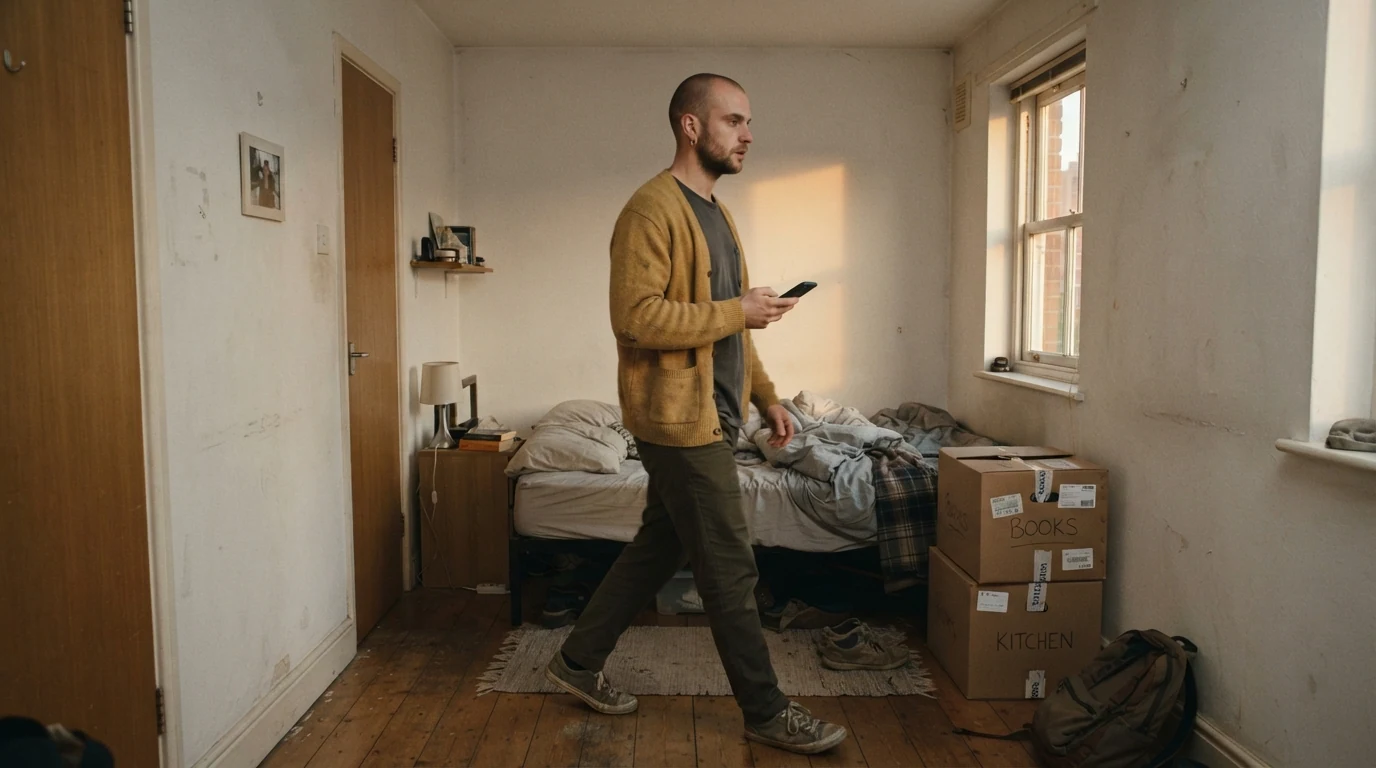
Locked-off, tripod at chest height, static composition tells the model this is a fixed frame, the precondition for every jump. The whole room visible from wall to wall leaves space for the character to be in different spots after each cut. Mid-stride, phone in his hand puts motion into the still, which the video recipe picks up. Simple, sparse props (unmade bed, two stacked boxes) give the eye stable landmarks, so each jump reads as the person moving, not the room changing.
Open FlashBoardsWide talking-head frame for a video diary, a woman in her early thirties with a short copper bob, a small silver nose stud, freckles and a green corduroy overshirt sits centered facing the camera, mouth open mid-sentence, one hand raised in a gesture, camera on a tripod at eye level, 28mm lens, framed from the waist up with headroom, plain pale-blue wall stretching to both sides with one potted fern on the left, soft window light from the left, natural daylight color, crisp detail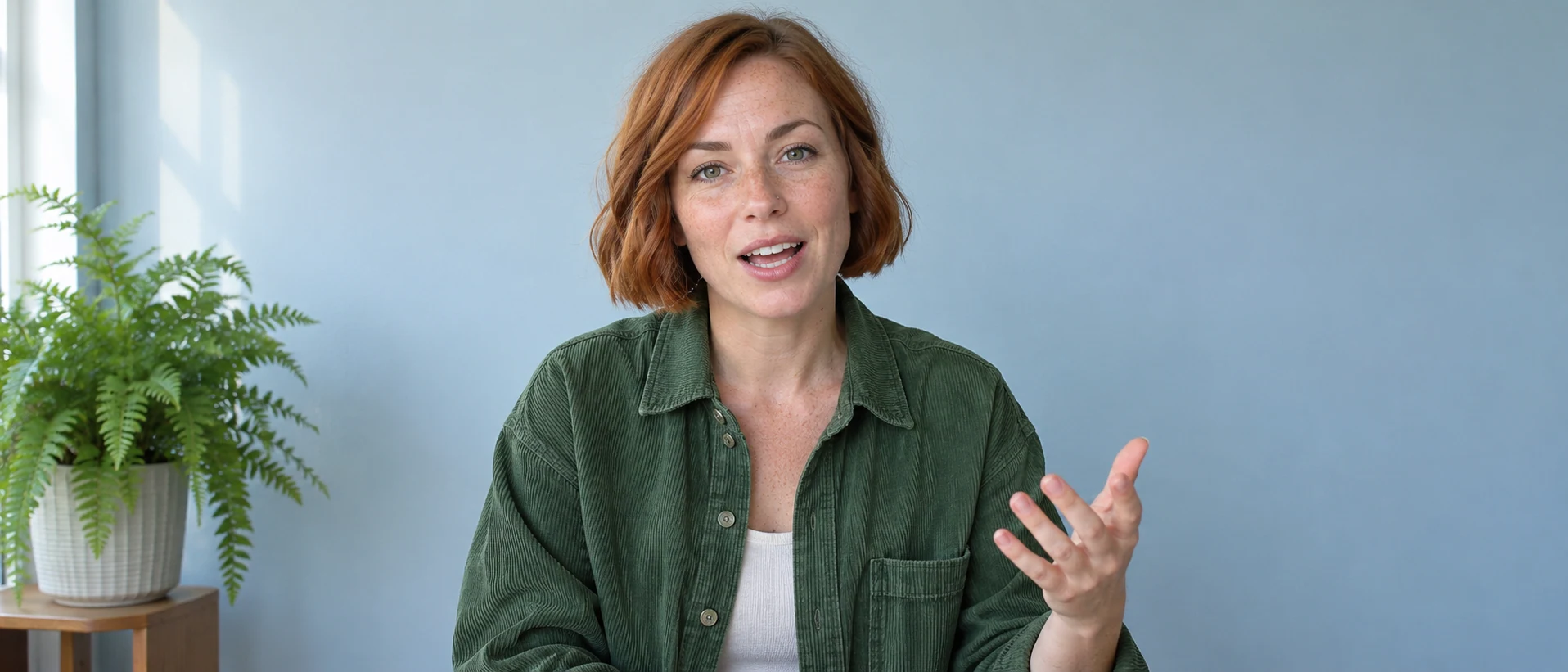
This is the other big family of jump cuts: the vlog. Centered, facing the camera, tripod at eye level fixes the eyeline so that only the head and hands change between cuts. Mouth open mid-sentence, one hand raised gives you a frame that looks like it was grabbed from the middle of speech, not a posed portrait. Plain pale-blue wall with one potted fern is a stable reference point, and the wide frame makes any jump in her position read instantly.
Open FlashBoardsCamera: locked off on a tripod, completely still for the whole shot, one continuous take with the full room in frame. Action: the man is already pacing from the first frame, walking quickly from the boxes toward the window while he checks his phone. He stops at the window, looks out, then turns and paces back past the bed. He sits on the edge of the bed, jumps up again, and walks back toward the boxes rubbing the back of his head. The amber sunlight stays on the right wall.Completely still for the whole shot and one continuous take keep the frame fixed, which is what makes the later cuts read as jumps. Already pacing from the first frame stops the model from drifting into a slow push-in on the still. The action lists several clearly different positions (window, bed, boxes), so in the edit you can cut from one to the next and remove the walking in between. Ten seconds gives enough material for four or five jumps.
Open FlashBoardsCommon mistakes
- The camera drifts. Video models like to add a slow push or float. Restate locked off on a tripod, completely still for the whole shot at the start of the camera line.
- The room changes between generations. Two separate images of "the same" room rarely match. Build your jumps from cuts inside one continuous clip, or reuse the same start frame for every take.
- The subject barely moves. If the jumps look like tiny twitches, the prompt has too little action. Name distinct positions and destinations: window, bed, boxes.
- The clip freezes at the start. State motion in the first sentence of the action (already pacing from the first frame) so the shot is alive immediately.
- Invented props appear. Describe only what is in the start frame; anything new you mention in the video prompt tends to be drawn into the room.
Keep the reference frames, prompts and every generated take side by side — images and video in one canvas.
FAQ
5 questionsWhat is a jump cut in film?
A jump cut is an edit between two shots of the same subject taken from the same or nearly the same camera position. Because the background stays fixed while the subject changes position, the viewer sees time skip forward and notices the cut. Filmmakers use it to compress time, add energy or create unease. It became famous with Jean-Luc Godard's Breathless (1960).
What is an example of a jump cut?
The classic example is Breathless (1960), where shots of Patricia riding in a convertible keep jumping while Michel's voice runs continuously over the cuts. Other well-known uses include the bathroom scene in The Royal Tenenbaums (2001) and the secretary auditions in Schindler's List (1993). On YouTube, almost every talking-head vlog uses jump cuts to remove pauses and filler words.
Why is it called a jump cut?
It is called a jump cut because the subject appears to jump within the frame at the moment of the cut. With the camera and background unchanged, the missing time has nowhere to hide, so a person's head, hands or whole body leaps to a new position. The name describes what the audience sees: a visible skip rather than a smooth transition from one shot to the next.
Is a jump cut a mistake?
Only when it is accidental. In continuity editing, a single unplanned jump between near-identical shots looks like a slip and bumps the viewer. When it is deliberate and consistent, it's a recognized stylistic tool for compressing time, building energy or showing a fractured state of mind. Editors hide accidental jumps with a cutaway, a reaction shot or a bigger change of angle.
How do you do a jump cut in editing?
Shoot from a locked tripod with a fixed lens and height, and let the subject move or talk through a long take. In the edit, remove sections of the take so the subject appears in a new position after each cut. Keep sound continuous across the cuts with music, room tone or voice-over, and keep the rhythm regular so the jumps read as a deliberate style.
Related terms
8- Match CutEditing
A match cut joins two different shots through a shared shape, movement, composition or sound — the bone that becomes a satellite in 2001 — so the cut draws a link between them.
- Smash CutEditing
A smash cut jumps abruptly from one scene to a sharply contrasting one — loud to silent, calm to chaos, a promise to its opposite — for shock or comedy.
- French New WaveFilm Movements & Styles
The French New Wave (late 1950s–60s) was launched by Cahiers du cinéma critics turned directors — Truffaut, Godard, Chabrol, Rohmer — who shot cheaply on the streets with handheld cameras, jump cuts and a personal, playful voice (The 400 Blows, Breathless).
- Fast CuttingEditing
Fast cutting strings together many very short shots in quick succession to create energy, chaos or overload — common in action, trailers and music videos.
- Passage of TimeStorytelling
Showing the passage of time means telling the audience that hours, seasons or years have gone by — through montage, dissolves, time-lapse, title cards, changing light or aging characters.
- Cutaway ShotEditing
A cutaway briefly leaves the main action for something else — a detail, a bystander, an object elsewhere — then returns, adding information, a joke or a way to hide a cut.
- ContinuityFilmmaking Process & Crew
Continuity is the consistency of every visible and audible detail — props, costume, hair, eyelines, positions, light, weather — across shots that were filmed out of order, so the edited scene reads as one unbroken moment.
- CutEditing
A cut is the instant change from one shot to the next with no transition effect — the basic unit of editing, from invisible continuity cuts to jarring jump and smash cuts.
Further reading
Karel Reisz and Gavin Millar, The Technique of Film Editing. Walter Murch, In the Blink of an Eye. David Bordwell and Kristin Thompson, Film Art: An Introduction (chapter on editing).