 FlashBoards Learn
- Learn
- Post-Production & VFX
- Speed Ramp
Post-Production & VFX · Film language
Speed Ramp
Also called: speed ramping, time ramping, variable speed
A speed ramp changes playback speed inside one continuous shot: the action runs at real time, slows into a key moment, then snaps back to normal or faster. Because there is no cut, the viewer feels time itself bend, which puts a sharp accent on a single beat of action.
- What it does
- Bends time inside one shot so a single beat of action lands with extra weight.
- Use it when
- An impact, a leap or a reveal needs emphasis without breaking the shot with a cut.
- Watch out
- Ramping 24 fps footage into slow motion stutters; capture at 60–120 fps if you plan to slow down.
- Try this prompt
Speed ramp: a runner sprints at full speed, slows to a near-freeze mid-leap in a spray of rain, then snaps back to real time

What is a speed ramp?
A speed ramp, also called speed ramping, time ramping or variable speed, is a change of speed within a shot rather than between shots. A typical ramp runs at 100%, eases down to 20–25% for the beat that matters, then eases back to 100% or past it.
The transition is the point. A clip played entirely at 40% is plain slow motion; a clip that travels from 100% to 20% and back is a ramp.
Ramping happens either in camera, where some cinema bodies change their capture frame rate mid-take and compensate exposure, or, far more often, in post-production, where the editor draws a speed curve over a clip shot at a high frame rate.
Why do filmmakers use speed ramps?
A ramp is punctuation. It says this frame matters without cutting away.
- Readable action. A punch lasts a few frames. Slowing into the contact lets the viewer see it land; the return to speed restores momentum. Zack Snyder's 300 (2006) built its battles this way, fighters slowing into poses and whipping back to full speed.
- Showing a plan. Sherlock Holmes (2009) slows its fight previews, then plays the blows at real speed.
- Rhythm. Music videos and trailers cut ramps to the beat, a question of pacing as much as camera work.
Ramp every shot and nothing is emphasized.
How to shoot and edit a speed ramp
1. Capture headroom. You cannot slow footage below its capture rate without inventing frames. On a 24 fps timeline, 60 fps allows a clean 40%, 120 fps a clean 20%.
2. Watch the shutter. At 120 fps a 180° shutter means about 1/240 s (shutter speed). Those crisp frames look staccato at 100%, so editors often add synthetic motion blur to the real-time legs.
3. Plan the peak. Pick the frame the ramp lands on and stage something that traces motion there, such as spray, dust or cloth, backlit.
4. Keep the camera smooth. A fast handheld push becomes a floaty drift at 20%.
5. Draw curves, not steps. Ease every change in the retime curve over 6–12 frames; hard steps read as a glitch.
6. Design the sound. Sync audio cannot follow a ramp: build a whoosh in, a held tone, a hit on the return.
How does a speed ramp transition work?
The last frames of shot A ramp up to 300–800%, the first frames of shot B ramp down from the same speed, and the cut hides in the blur. Match the direction of movement on both sides. It is a cousin of the whip pan and a staple of the seamless transition toolkit.
Speed ramp vs. slow motion
Slow motion holds one reduced speed for the whole shot; a speed ramp is built on the change between speeds. Slow motion makes a whole moment contemplative, while a ramp isolates one frame inside a moving moment. Both sit on the motion speed scale.
Speed Ramp in motion



6 clipsWatch for the moment the speed changes inside one shot: real-time action that suddenly stretches into slow motion, or a near-still hold that whips forward. The ramp is the gear change, not the slow motion itself.



How to create a speed ramp with AI
3 promptsDesign the frame the ramp lands on as a still, then write the speed change in phases in the video prompt. Keep start frames and takes on one FlashBoards board to compare which ramp lands the beat.
Cinematic film still, side-on medium wide shot from waist height, 35mm lens: a fictional woman in her late twenties with a bleached-blond buzz cut, heavy freckles and a faded olive bomber jacket leaps off a low concrete ledge above a rain-soaked parking lot at dusk, both feet off the ground, a sheet of rainwater spraying from her sneakers and suspended in the air, orange sodium streetlights backlighting every droplet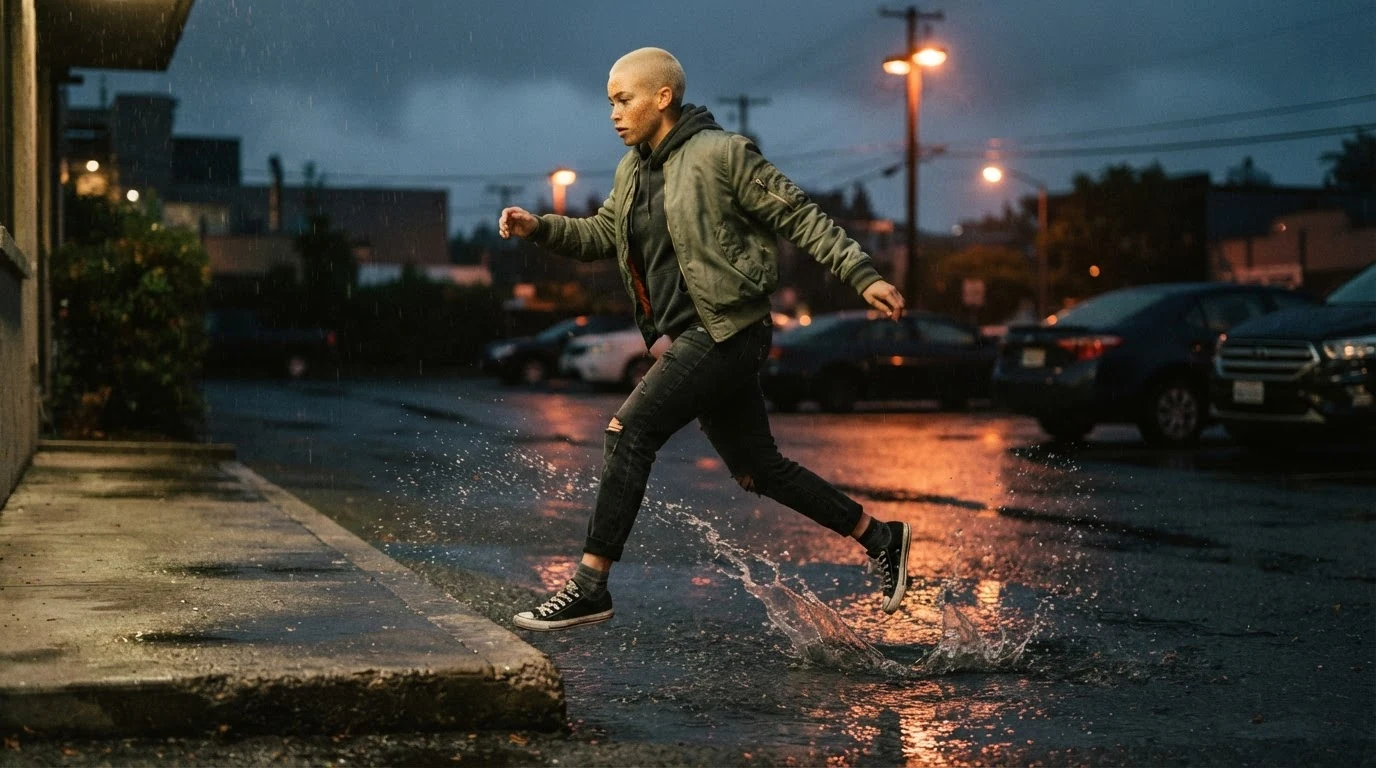
Both feet off the ground and spray suspended in the air build the peak instant a ramp lands on; backlighting every droplet gives the slow section particles to hold. Side-on keeps the motion lateral and readable.
Open FlashBoardsAnamorphic widescreen film still, low angle at chest height, 50mm lens: a fictional heavyweight boxer in his fifties, bald, with a grey braided beard and a thin scar through his left eyebrow, lands a right hook on a worn red heavy bag, the bag folding around his fist, a halo of sweat droplets bursting off the leather and frozen mid-air, one hard white top light
A second take with a new subject and aspect: the moment of contact, with the bag folding around his fist and droplets frozen mid-air, is the frame a fight ramp slows into.
Open FlashBoardsCamera: tracks right alongside her from the first frame, drifting slowly while time is slowed, then speeding up with her when time snaps back. Action: She is already in mid-air and the shot plays in extreme slow motion; the rainwater spray drifts off her sneakers and the droplets glow in the orange streetlight. Then the speed ramps sharply back to real time: she drops onto the wet asphalt, lands in a crouch and sprints out of frame to the right at full speed, kicking up spray.Naming the speeds in order, extreme slow motion then ramps sharply back to real time, gives the model two phases instead of one average pace. Already in mid-air keeps the shot alive from the first frame, and the camera follows the same slow-then-fast change.
Open FlashBoardsCommon mistakes
- One average speed. Models often play the clip at a single pace. Write each phase with its own speed words.
- No peak in the start frame. A neutral pose gives the slowdown nothing to land on; put the key instant in the image.
- Too many phases. Six seconds holds one slowdown and one release; more reads as jitter.
- Invented debris. Describe only particles already in the frame, or new ones get drawn in.
Keep the reference frames, prompts and every generated take side by side — images and video in one canvas.
FAQ
5 questionsWhat is a speed ramp in video?
A speed ramp is a change of playback speed inside one continuous shot. The clip runs at normal speed, slows sharply into a key moment such as a jump or impact, then returns to normal or faster. With no cut, the viewer feels time bend, which gives that beat extra weight.
What frame rate do I need for speed ramping?
Shoot higher than your timeline so you have real frames to slow down. On a 24 fps project, 60 fps gives a clean 40% and 120 fps a clean 20%. Footage shot at 24 fps can still be ramped faster, but slowing it needs interpolation that can smear complex motion.
How do you make a speed ramp transition?
Ramp the end of the first shot up to a very high speed, ramp the start of the second down from the same speed, and cut inside the blur. Match the direction of movement on both sides and ease both speed curves so the join feels like one continuous rush.
Is speed ramping the same as slow motion?
No. Slow motion holds one reduced speed for the whole shot. Speed ramping is the transition between speeds within a shot, from real time into slow motion and back, or into fast motion. A ramp usually contains a slow stretch, but the effect comes from the change.
Can AI video generate a speed ramp?
Yes, if you direct it in phases. Generate a start frame that already shows the peak moment, then write the video prompt as a sequence: extreme slow motion first, then a sharp return to real-time speed with a clear action. Keep one slowdown per clip and compare several takes.
Related terms
3- Slow MotionCameras & Capture
Slow motion stretches time on screen: the camera records at a higher frame rate than playback — for example 120 fps played at 24 — so action unfolds several times slower, used for spectacle, violence, grief or to reveal what the eye normally misses.
- Frame RateFormats & Exhibition
Frame rate is how many frames are captured or shown per second: 24 fps is the cinema standard, 25/30 fps is broadcast video, and 48–120 fps (HFR) looks hyper-smooth; shooting faster than playback creates slow motion.
- Post-ProductionPost-Production & VFX
Post-production is everything after the shoot that turns footage into a finished film: editing, sound design and mix, music, VFX, color grading, titles and delivery masters.
Further reading
Walter Murch, In the Blink of an Eye (Silman-James Press, 2001) — on rhythm and emphasis in editing.