 FlashBoards Learn
Editing · Film language
Pacing in Film
Also called: pace, film pacing
Pacing in film is how fast a movie feels to the viewer. It comes mostly from the edit: how long each shot is held, how much happens inside it and how much room a moment gets before the cut. Fast pacing builds energy; slow pacing builds attention, dread or contemplation.
- What it does
- Sets how fast time feels to the audience, scene by scene and across the whole film.
- Use it when
- You need a scene to hit harder, breathe longer, or change gear against the one before it.
- Watch out
- One tempo for the whole film; constant speed or constant stillness both go numb within minutes.
- Try this prompt
locked-off wide shot held long, lone woman at a rural bus stop at dusk, wind in tall grass, 35mm, quiet stillness
What is pacing in film?
Pacing is the felt speed of a film: what the audience experiences when a two-hour movie flies by, or a ninety-minute one drags. Three things produce it:
- Shot length. How long each shot is held before the cut.
- Density. How much new information arrives per shot and per scene.
- Breathing room. How long the edit lets a moment sit after it lands.
The script proposes a pace, but the final tempo is decided in film editing.
How does pacing affect the viewer?
Fast pacing raises tension and leaves no time to reflect, only to react. Mad Max: Fury Road (2015) runs on short shots and relentless motion, with action kept near the center of frame so the eye never searches after a cut. Pushed further, it becomes fast cutting.
Slow pacing gives the viewer time to look. Stalker (1979) holds shots so long that the audience scans the frame for danger, as the characters do.
Contrast is what the audience feels. A burst of short shots lands harder after a quiet hold. A montage compresses weeks into a minute; cross-cutting speeds a climax by shortening each strand as the lines converge.
Editing rhythm: the pulse under the pace
Pacing is the overall speed; editing rhythm is the pattern that creates it, in shot lengths and in where each cut falls.
- Regular rhythm (similar shot lengths) feels steady, even mechanical.
- Accelerating rhythm (each shot shorter than the last) builds toward a climax.
- Broken rhythm (a long hold hit by a sudden flurry) creates shock.
Cutting on a blink, breath or finished gesture feels natural; a few frames early feels urgent, a few frames late feels heavy. The drum finale of Whiplash (2014) locks cuts to the beat, and the shower scene in Psycho (1960) is the textbook burst of short shots breaking the calm. In dialogue, rhythm lives in the spacing of lines and reactions (see editing a dialogue scene).
How to control pacing, from set to edit
Plan tempo in the shot list. Fast scenes need many angles and short pieces of action; slow scenes need fewer, longer, better-composed setups.
Shoot handles. Roll 3–5 seconds before action and after cut, or the editor cannot let a moment breathe.
Check average shot length. Roughly: action sequences often cut every 2–3 seconds, dialogue dramas every 4–8, contemplative cinema holds 30 seconds or more.
Let movement carry speed. A moving camera feels faster at equal shot length.
Trim inside dialogue. Tightening gaps between lines speeds a scene; holding on the listener slows it. A jump cut removes time inside a shot.
Film pacing vs. story pacing
Story pacing is set on the page: how fast events escalate and where the quiet beats fall. Film pacing is the result on screen, and the edit can overrule the script: a slow scene on paper plays fast with tight cutting, a short action beat plays slow in a few wide shots.
Fix story pacing by moving or cutting scenes; fix film pacing by changing shot lengths and cut points. The extreme where screen time equals story time is real time, which gives up the editor's biggest tool, the ellipsis.
Pacing in Film in motion
9 clipsPacing is only visible in motion, so watch the clock rather than the picture. Count how long each shot is held and how much changes before the next cut: short, simple shots stack into speed, while long holds with little action make you wait and search the frame.
How to create a pacing in film with AI
4 promptsAn AI clip is one shot, so you direct pacing twice: inside the shot (how much moves) and on the board, by generating shots meant for long holds and shots meant for quick cuts. In FlashBoards you lay them out in order next to your references to feel the rhythm before you edit. The fourth prompt re-shoots a real film shot from a text description alone, and the original plays next to the result so you can compare.
Locked-off wide shot, eye level, 35mm lens: a woman in her fifties with a gray braided bun, a freckled weathered face and a rust-colored wool coat sits alone on a wooden bench at a rural bus stop at dusk. Tall pale grass, an empty road running to the horizon, low orange sky. She sits small in the lower left third with wide empty space around her. Quiet, patient mood, muted film colors.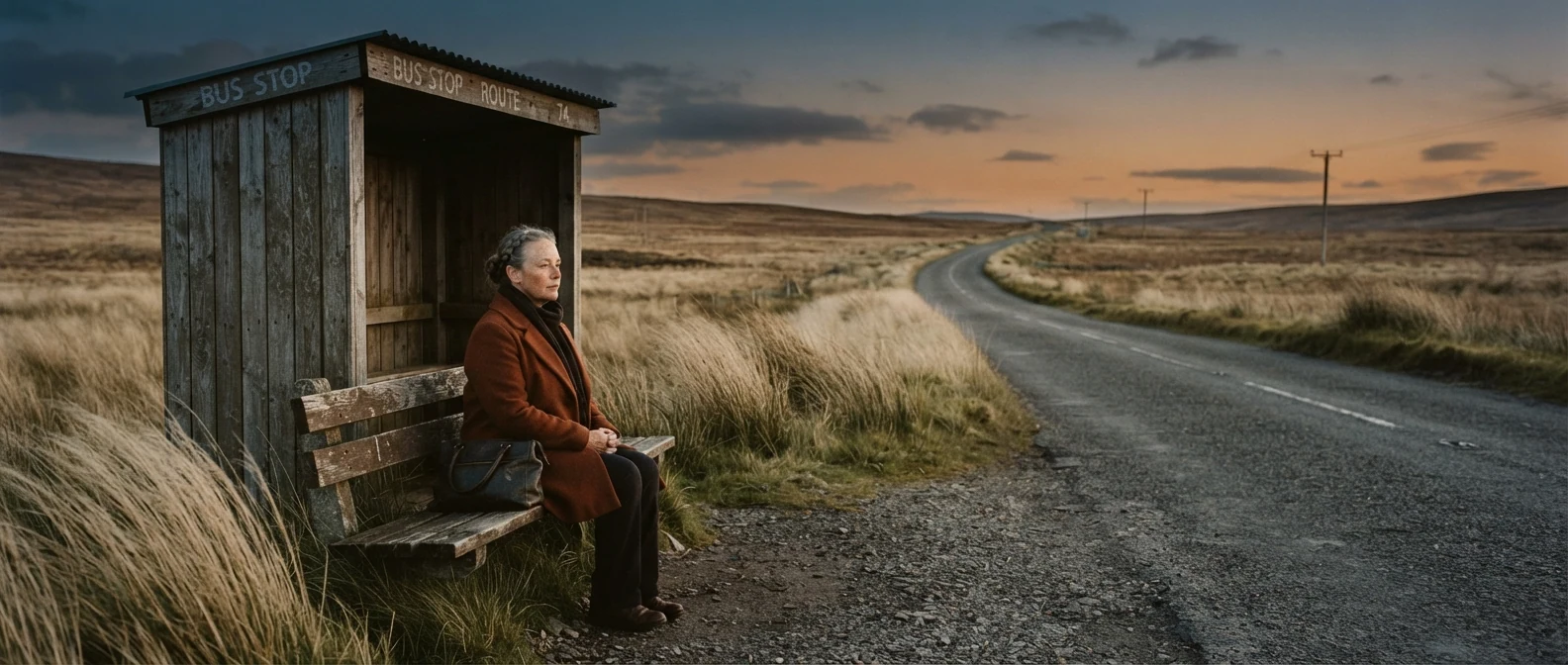
Locked-off, small in the lower left third and wide empty space build a frame the eye needs time to explore, which is what a long hold needs. Patient keeps the model from adding drama.
Open FlashBoardsStoryboard sheet of six film frames in a 3x2 grid, numbered 1 to 6, for a fast chase: a young bike courier with a shaved head, a thin scar through his left eyebrow and an orange windbreaker races down a wet city street at night. 1: extreme close-up of his eyes; 2: pedal and chain in motion blur; 3: low angle of the bike between two taxis; 4: hand slamming a brake lever; 5: tire spraying water; 6: medium shot of him glancing back. One action per frame, neon reflections.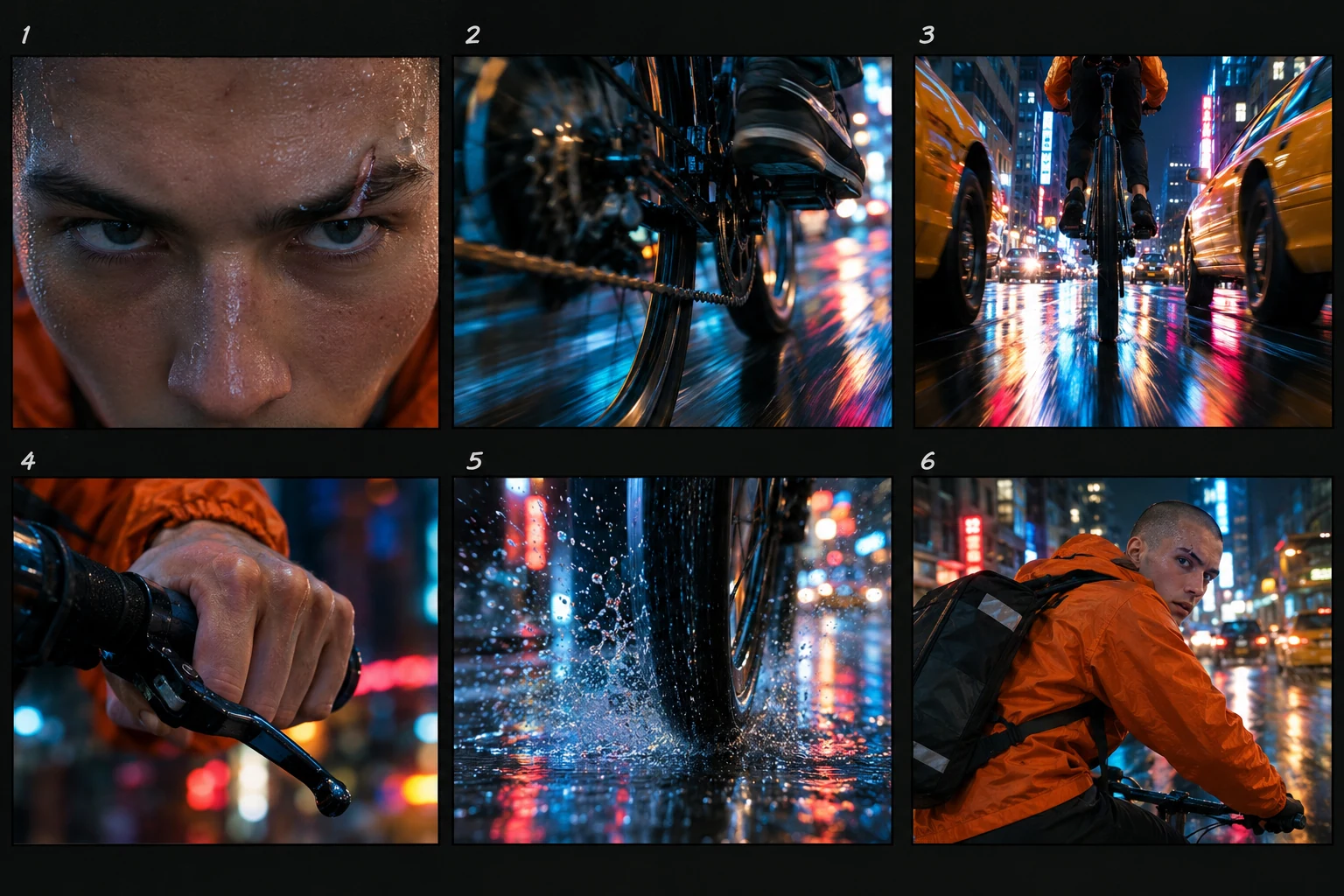
The opposite pole: one action per frame gives six inserts that read in under a second each, raw material for a fast rhythm. The numbered grid lets you plan cut order beside the slow take.
Open FlashBoardsCamera: locked-off, completely static for the whole shot. Action: from the first moment wind moves the tall grass in slow waves and the woman's coat collar flutters. She keeps looking down the empty road, then slowly lifts her head toward the horizon. At the end she folds her hands in her lap and exhales as the orange light dims slightly.Ten static seconds with small, slow actions give the editor a shot that can be held long. The wind starts at once so the clip is alive from the first frame, and every action uses only what is already in the image.
Open FlashBoards{
"output": "Full-screen live-action scene from its very first frame: one continuous shot with no cut, held for the whole clip, from There Will Be Blood (2007). 35mm film look, a bare pine-plank church in 1911 California, warm daylight glowing through a tall cross-shaped window in the back wall, honey-colored wood, deep black silhouettes of the congregation in the foreground.",
"characters": {
"S1": {
"name": "Eli Sunday, played by Paul Dano",
"look": "slight young preacher, pale face, dark bowl-cut hair, white shirt with rolled cuffs, black vest and black trousers; stands on the stage in the left half of the frame, left of the cross",
"voice": "high, reedy, rising to a preacher's pitch"
},
"S2": {
"name": "Daniel Plainview, played by Daniel Day-Lewis",
"look": "broad-shouldered man in his forties, short dark hair, dark mustache, white shirt, dark gray vest with a gold watch chain, dark trousers; stands on the stage just right of the cross",
"voice": "low, flat, reluctant"
}
},
"shots": [
{
"shot": 1,
"camera": "extreme wide shot from the back rows at seated eye level, long lens, symmetrical; the two men are small, full-figure, centered on a low wooden stage under the glowing cross; a dark lectern stands on the stage to their right; the backs of heads and shoulders of seated worshippers fill the lower third and both edges as black silhouettes, a large dark shoulder at the right edge; a very slow, steady zoom in for the whole shot, the stage growing only slightly larger; fixed focus on the stage",
"action": [
"BEGINNING: alive from the first frame, the congregation sits still; Eli stands on the left, hands clasped low in front of him, head turned toward Daniel; Daniel stands on the right facing the congregation, head lowered, his right hand resting on his stomach.",
"THEN: Daniel answers without looking up; his hand fidgets at his vest, then drops to his side.",
"THEN: Eli bows his head and sways slightly, hands still clasped low, then lifts his face toward the congregation.",
"THEN: Daniel stands straight and motionless, arms down, gaze fixed ahead over the seated heads.",
"THEN: Eli lifts his right hand to shoulder height and steps toward Daniel, swinging both arms out wide in a preacher's gesture.",
"END: Eli, now close beside Daniel, raises one open hand high near Daniel's shoulder, urging him on; Daniel stays rigid, looking straight ahead; the seated silhouettes never turn."
],
"dialogue": [
{
"speaker": "S1",
"on_screen": true,
"when": "from the first frame",
"delivery": "loud, testing, carrying across the church",
"line": "<d>[English] Daniel, are you a sinner?</d>"
},
{
"speaker": "S2",
"on_screen": true,
"when": "right after the question",
"delivery": "quiet, flat",
"line": "<d>[English] Yes.</d>"
},
{
"speaker": "S1",
"on_screen": true,
"when": "while Eli bows and lifts his face",
"delivery": "scolding, sing-song",
"line": "<d>[English] The Lord can't hear you, Daniel.</d>"
},
{
"speaker": "S1",
"on_screen": true,
"when": "as Eli steps toward Daniel and swings his arms out, running to the last frame",
"delivery": "coaxing, rising in volume",
"line": "<d>[English] Say it to him. Go ahead and speak to him. It's all right.</d>"
}
]
}
],
"sound": {
"ambience": "a large wooden room: faint creak of pews, a cough and shuffling from the seated congregation, the men's voices echoing off the planks",
"speech": "exactly these spoken phrases, each said once, in this order",
"never_spoken": "no narration and no voice-over: the descriptions, performance notes and step words of this prompt are never spoken aloud",
"music": "a film score under the scene, always below the voices: a low, sustained dissonant string drone that slowly swells",
"subtitles": "none"
}
}This remakes Paul Thomas Anderson's unbroken wide of the church baptism in There Will Be Blood (2007); the prompt carried over the framing, the slow zoom, Eli's escalating gestures and the exact lines.
A long hold only works if the shot is built for it, so the prompt locks the geometry the original relies on: an extreme wide from the back rows, silhouettes framing a small stage, one slow zoom and no cut. The beats are written in order, so the eight seconds fill with a slow escalation instead of random movement.
Open FlashBoardsCommon mistakes
- Video models tend to add a slow push-in; write locked-off, completely static when a hold is the point.
- A calm prompt can freeze everything; name one small continuous motion (wind, breath, smoke) so the hold stays alive.
- One clip full of action is not fast pacing; generate several short, simple shots and cut them together.
Keep the reference frames, prompts and every generated take side by side — images and video in one canvas.
FAQ
4 questionsWhat is pacing in film?
Pacing in film is how fast a movie feels as it moves. It is shaped by how long shots are held, how much happens in each scene and how much time moments get to land. The script suggests a pace, but the editor sets the final tempo by trimming shots, choosing cut points and ordering scenes.
What is the difference between rhythm and pacing in film?
Pacing is the overall speed a viewer feels; rhythm is the pattern of shot lengths and cut points that produces it. Two scenes with the same average pace can feel different: one with even shots, another with long holds broken by sudden bursts. Rhythm is the pulse, pacing is the tempo you perceive.
How do editors control the pace of a film?
Editors shorten or lengthen shots, trim pauses between lines, enter or leave a moment earlier or later and choose how many angles to use. They also reorder or remove scenes and shape the transitions between them. Music and sound overlaps change the felt speed without changing the story.
Is fast pacing always better for action scenes?
No. Constant fast cutting flattens action because the viewer loses geography and stops feeling impact. Strong sequences vary tempo: a wide shot for orientation, a pause before the hit, a burst of short shots, then a hold on the result. Contrast is what makes the fast parts land.
Related terms
5- PacingStorytelling
Pacing is how fast the story feels as it moves — set in the script by scene length, how quickly events escalate and where the quiet moments fall, then fine-tuned in the edit.
- Fast CuttingEditing
Fast cutting strings together many very short shots in quick succession to create energy, chaos or overload — common in action, trailers and music videos.
- Cross-CuttingEditing
Cross-cutting alternates between two or more lines of action happening in different places, usually at the same time, so each strand builds tension or meaning against the other.
- MontageEditing
A montage is a sequence of short shots, usually set to music, that compresses time or builds an idea — weeks of training, a relationship, a city waking up — in a minute or two.
- Film EditingEditing
Film editing is the selection and ordering of shots — where each one starts, ends and what follows it — to build continuity, rhythm and meaning out of the raw footage.
Further reading
Walter Murch, In the Blink of an Eye (Silman-James Press). Karel Reisz and Gavin Millar, The Technique of Film Editing (Focal Press).