 FlashBoards Learn
Editing · Film language
Editing a Dialogue Scene
Also called: dialogue scene editing, cutting a conversation
Editing a dialogue scene means deciding, line by line, whether the audience watches the speaker, the listener or both, and cutting on words, pauses and reactions so the conversation keeps its rhythm. Done well, the cuts carry the subtext: who holds power, who is lying, and when the scene turns.
- What it does
- Turns separate angles of a conversation into one continuous exchange with rhythm, subtext and a clear point of view.
- Use it when
- Any scene where two or more people talk and the meaning sits in how they react, not only in what they say.
- Watch out
- Cutting to whoever speaks on every line flattens the scene into ping-pong; the listener often matters more.
- Try this prompt
Over-the-shoulder shot at a kitchen table at night, a woman in her sixties with cropped silver hair talking, a man's shoulder soft in the foreground, 50mm, warm lamp light.
What does editing a dialogue scene mean?
A dialogue scene usually arrives in the cutting room as coverage: a master shot of the whole exchange, over-the-shoulders and singles on each actor, sometimes a two-shot and inserts, several takes deep. The editor picks one moment at a time from all of that and decides three things: whose face we see, how long we stay, and which frame the cut lands on.
It is not the same as dialogue editing in post-sound, which cleans up production audio. Here we mean the picture cut, the most common job in film editing, because most films are mostly people talking.
Who should the audience be watching?
The beginner's rule is to show whoever is speaking. Experienced editors ask a different question: whose reaction tells the story right now? A line of bad news often lands harder on the face of the person hearing it, so the cut goes to a reaction shot while the line continues off-screen.
This choice sets point of view. Stay on one character through the other's lines and the scene becomes theirs: we read the conversation through what they hear. Withholding an angle works too. The Godfather (1972) opens on a long, slow pull-back from the undertaker making his plea, and the reverse on the man he is asking is held back, which builds the Don's authority before we see his face.
Shot size is the other lever. Many scenes start wide, move to over-the-shoulders and end in close singles as the stakes rise. Jumping to the tightest angle too early leaves nowhere to go when the real turn arrives, so save it for the moment that needs it.
Where to cut: on the line, the pause or the reaction
Three kinds of cut point cover most of it:
- Straight cut at the end of a line. Picture and sound change together. Clean, but repeated on every line it feels mechanical.
- Overlap cuts. In a J-cut we hear the next speaker before we see them; in an L-cut the line runs on over the listener's face. Overlaps let a conversation flow instead of stepping from shot to shot.
- Cut on the thought. The best cut often lands where a character decides something: a blink, a glance away, a breath before answering. Walter Murch argues in In the Blink of an Eye that a blink marks the end of a thought, so a cut there feels natural.
Pauses are material, not dead air. A two-second silence before an answer can say more than the answer. Build the rhythm first, then trim the pauses that carry nothing.
How to edit a dialogue scene, step by step
- Watch everything first. Note the best reading of each key line per angle, and the best silent reactions, often hiding between takes.
- Find the turn. Mark the line where the scene changes direction; your coverage choices build toward it.
- Assemble on performance. Lay in the strongest reading of each line regardless of angle, then fix continuity. Audiences forgive a hand in the wrong place, not a false line reading.
- Protect geography. Keep eyelines on one side of the 180-degree rule line so A always looks right to left and B the other way. If the camera crossed the axis, pass through a wide shot before using the flipped angles.
- Match the sizes. Cut an over-the-shoulder against its matching reverse, as in classic shot reverse shot. Mismatched sizes suggest one character dominates, so use that only when you mean it.
- Add overlaps and reactions, then play the scene at full speed. If you feel every cut, there are too many.
The most common mistake is ping-pong cutting: one cut per line, always to the speaker. Stay on a listener through two lines instead, and keep the tightest close-up for the turn.
How to create a editing a dialogue scene with AI
3 promptsAI video models generate one shot at a time, so a dialogue scene with AI is built like one from a shoot: you generate coverage, then edit it. Generate the over-the-shoulder, the reverse and the reactions with the same light and wardrobe notes, keep them side by side on one FlashBoards board, and plan cut points before animating.
Over-the-shoulder shot at a small kitchen table at night. In focus, facing camera on the right third of the frame: a woman in her sixties with cropped silver hair, a thin scar through her left eyebrow and a moss-green cardigan, mid-sentence, hands wrapped around a chipped white mug. In the left foreground, out of focus: the back of a man's shaved head and the shoulder of a navy work jacket. Camera at seated eye level, 50mm lens, shallow depth of field. A single warm lamp above the table, dark window behind her. Quiet, tense, natural color, 35mm film grain.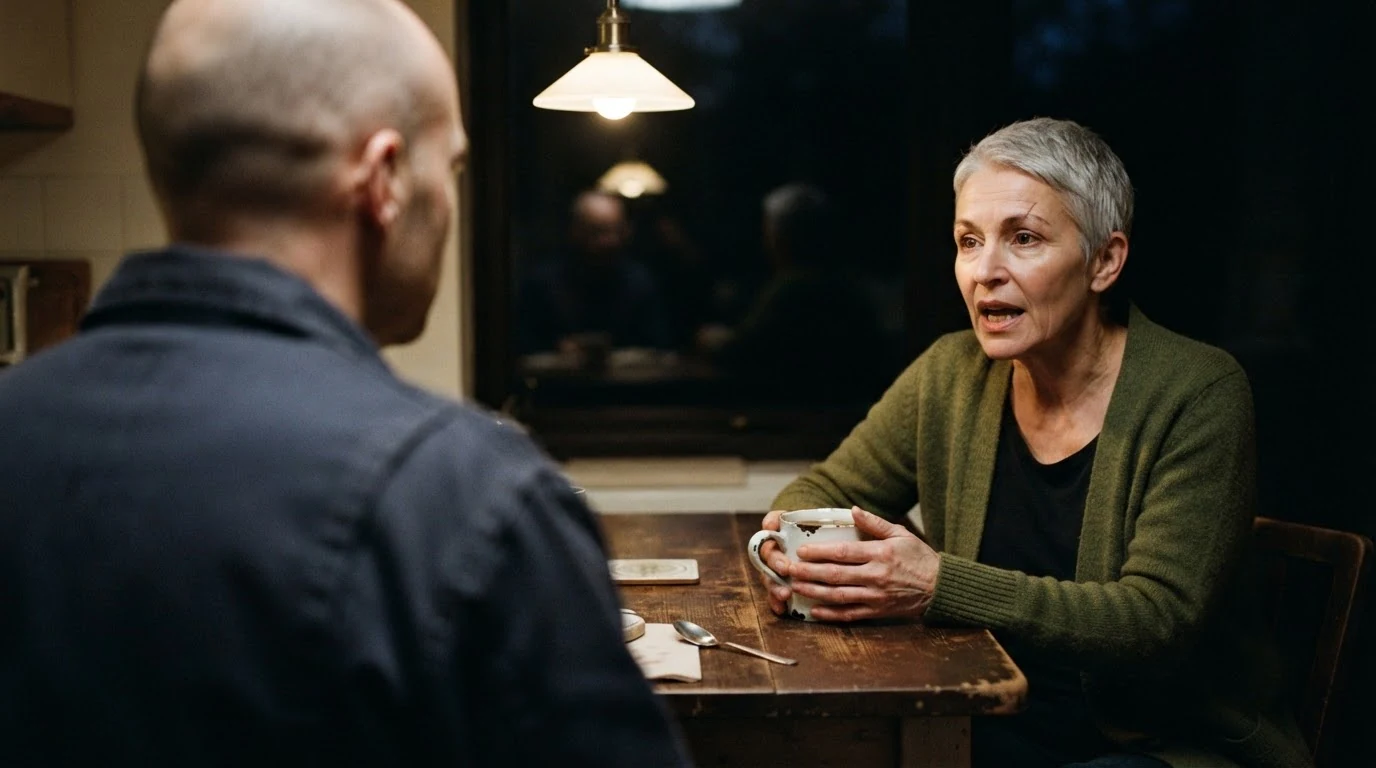
"Over-the-shoulder", "left foreground, out of focus" and "right third of the frame" build the classic setup and fix the eyeline, so a reverse can be matched later. "Mid-sentence" gives a speaking expression instead of a posed portrait; seated eye level and a 50mm keep the angle neutral.
Open FlashBoardsClose-up reaction shot inside a parked car at dusk, seen from the passenger side. A man in his thirties with a shaved head, a copper-red beard and a small gold hoop in his left ear sits behind the steering wheel, silent, listening, jaw tight, eyes lowered toward the dashboard, the moment just before he answers. His face fills the right half of the frame and looks toward frame left. 85mm lens, shallow depth of field, cool blue light through the windshield, amber streetlight on his cheek, rain drops on the side window. Anamorphic widescreen, muted color.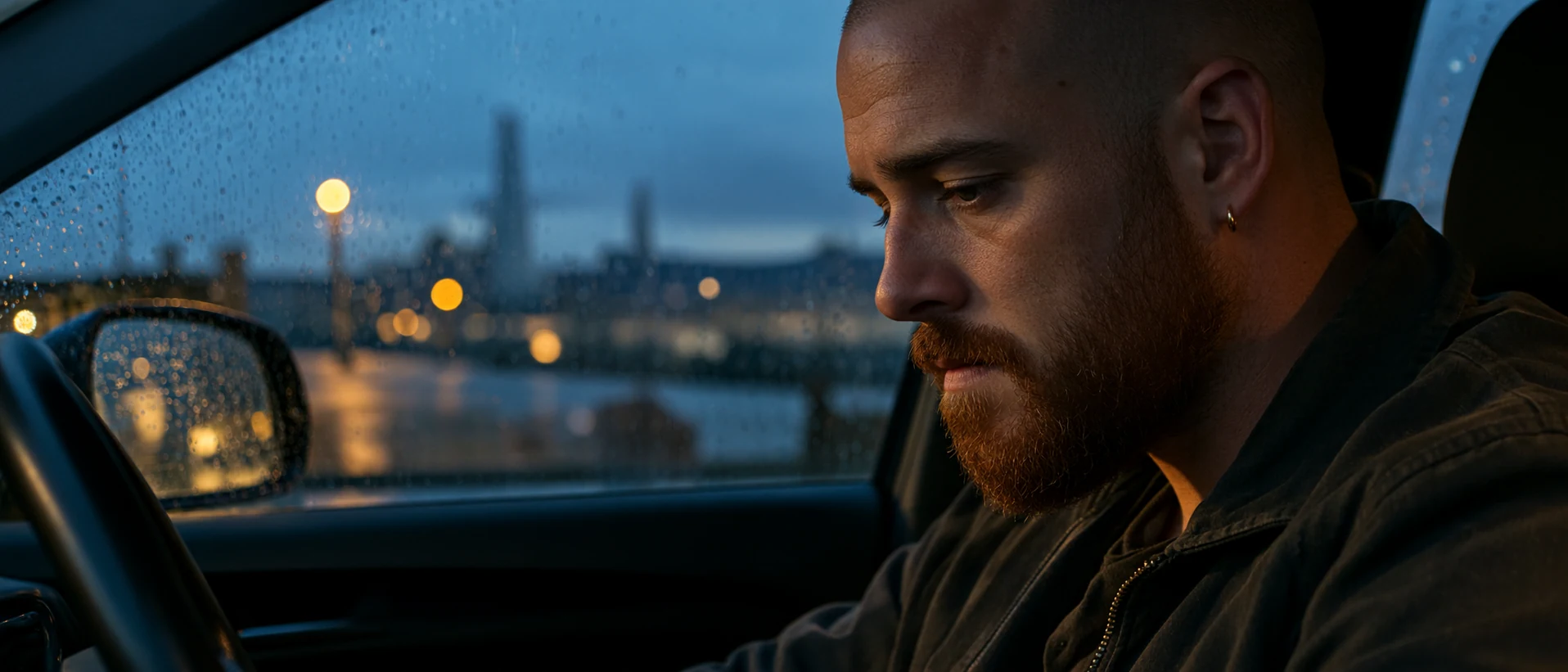
This is the listener's shot, the one editors most often wish they had. "Silent, listening" and "the moment just before he answers" ask for a reaction, not a line, and "looks toward frame left" gives an eyeline that cuts against a speaker looking right.
Open FlashBoardsCamera: locked off at seated eye level, completely static for the whole shot. Action: The silver-haired woman is already talking, her lips moving, her eyes fixed on the man across the table. She pauses, lowers her eyes to the mug and turns it slowly in her hands. Then she looks back up at him and says one short final sentence. At the end she holds his gaze in silence while the out-of-focus shoulder in the foreground shifts slightly.She is talking from the first frame, so the shot is alive at once. The pause and the turned mug give a natural cut point mid-shot, and the silent hold at the end is the handle for a J-cut or a cut to the reverse. A locked-off camera matches static coverage.
Open FlashBoardsCommon mistakes
- Eyelines drift between generations. Models center faces and point them at the lens. State the frame side and gaze direction in every shot ("looks toward frame left") so the reverse cuts correctly.
- Characters change from take to take. Repeat the same features, wardrobe and light in each prompt, and compare shots side by side on the board before animating.
- Mouths keep moving. For a reaction clip, describe the character as silent and give them a small action, such as swallowing or looking down.
Keep the reference frames, prompts and every generated take side by side — images and video in one canvas.
FAQ
4 questionsShould you cut to the person speaking or the person listening?
Neither by default. Cut to whoever carries the meaning at that moment. The speaker delivers information; the listener shows its effect. Important news often plays better on the listener's face while the line continues off-screen. Staying on one character across several lines also sets whose point of view the scene belongs to.
Where is the best place to cut in dialogue?
Often not at the end of a line. Strong cut points are where a thought ends or starts: a blink, a glance away, a breath before an answer, or a visible reaction. Cutting slightly before or after the line boundary, with the sound overlapping as a J-cut or L-cut, makes a conversation flow instead of stepping from angle to angle.
Is dialogue scene editing the same as dialogue editing?
No. In post-production sound, dialogue editing means cleaning and smoothing the recorded speech: removing noise, balancing takes and preparing tracks for the mix. Editing a dialogue scene is the picture edit: choosing which angle to show on each line and where the cuts fall. The two jobs meet, because picture cuts often move the audio.
What coverage do you need to edit a dialogue scene?
At minimum a wide master and a matching pair of over-the-shoulders or singles, one on each character, shot from the same side of the axis. Tighter singles give you room to escalate as the scene builds. Extra takes where the off-screen actor keeps performing give you usable listening reactions, which are often the most valuable shots in the cut.
Related terms
7- Shot Reverse ShotCamera Shots
Shot reverse shot alternates between two opposing camera setups — one on each character, typically over-the-shoulder shots or singles from the same side of the axis — so a conversation plays as a rhythmic back-and-forth.
- Reaction ShotCamera Shots
A reaction shot cuts away from an action or line to show how another character responds — usually a close-up of their face — so the emotional meaning of the moment lands through the listener.
- J-CutEditing
In a J-cut the sound of the next shot starts before its picture, so we hear the new scene or speaker a moment before we see it.
- L-CutEditing
In an L-cut the sound of a shot continues after the picture has cut to the next one — we still hear a line or a room while already seeing the reaction or the new scene.
- Eyeline MatchEditing
An eyeline match cuts from a character looking off-screen to what they are looking at, with the gaze direction matched so the audience instantly reads the second shot as their view.
- 180-Degree RuleComposition & Framing
The 180-degree rule keeps the camera on one side of an imaginary line between two characters (or along a movement), so their left-right positions and eyelines stay consistent from shot to shot; crossing it flips the geography and disorients the viewer.
- Film EditingEditing
Film editing is the selection and ordering of shots — where each one starts, ends and what follows it — to build continuity, rhythm and meaning out of the raw footage.
Further reading
Walter Murch, In the Blink of an Eye: A Perspective on Film Editing (Silman-James Press). Karel Reisz and Gavin Millar, The Technique of Film Editing (Focal Press).