 FlashBoards Learn
Editing · Film language
Seamless Transition
Also called: invisible cut, hidden cut, stealth edit
A seamless transition is a cut the audience never sees. The editor hides the join inside matching motion, a dark object crossing the lens, a camera move or a shared shape, so two separate shots play as one continuous action and the viewer stays in the moment.
- What it does
- Joins two shots so smoothly that they read as a single unbroken take.
- Use it when
- You want the feel of one continuous shot, or need to jump place or time without breaking momentum.
- Watch out
- Motion speed, direction and exposure must match on both sides of the cut, or the stitch shows.
- Try this prompt
Narrow hallway at night, out-of-focus charcoal coat filling the left third of the frame, woman opening a green door beyond, 35mm, shallow focus, cinematic still

What is a seamless transition, and why hide the cut?
A seamless transition (also called an invisible cut, hidden cut or stealth edit) is one of the film transitions built to disappear. Shot A ends on a moment shot B can continue: the frame goes black on a passing object, a pan blurs into streaks, a screen fills the image. The eye follows that element across the join and never registers a new shot.
Editors hide cuts for two reasons. One is the illusion of one take: Hitchcock's Rope (1948) masks about half of its cuts by moving into a dark jacket or piece of furniture, and Birdman (2014) and 1917 (2019) stitch many takes into what plays as nearly one shot. The other is momentum: a hidden cut can jump a city or a decade while the move carries straight through, a staple of film editing in music videos and commercials.
How to shoot a seamless transition
Every hidden cut needs an exit at the end of shot A and a matching entry at the start of shot B.
- Pick the carrier. Darkness (a coat or doorframe passing within 30 cm of the lens), motion blur (a whip pan at the same speed and direction in both shots), or a shape in the same screen position.
- Match the camera. Same lens, height, direction and speed; a 35mm push won't cut against a 50mm push.
- Overlap the action by 1–2 seconds so the editor can slide the cut.
- Match exposure at the join: both sides fully black or fully blurred.
Some crews build the join on set, the logic of in-camera editing; most finish it in the edit with a short blend or mask.
Object portal

In an object portal the camera moves into something in the shot (a keyhole, a tunnel, a mouth, a lens) and exits into a new scene. For a few frames the object fills the image; that moment of pure texture or darkness is where the cut lives.
Frame portal
A frame portal opens part of the frame itself as a doorway: an edge, a panel or a graphic window reveals the next scene behind it. The camera needn't travel; the composition splits and the new image grows into the gap.
Screen transition and screen to full frame
A screen transition passes through a phone, monitor or TV. In the full-frame version the screen image grows until the bezel leaves the frame and the picture becomes the new scene; reversed, a scene shrinks into a device. Shoot the screen flat-on.
Arc transition
An arc transition hides the cut inside an orbit. Two arc shots are joined at the same point of the circle, often as a pillar wipes the lens, so the orbit keeps turning while location or time changes.
Roll transition
A roll transition hides the cut in a rotation around the lens axis: shot B picks up shot A's spin at the same speed. It works best on frames with no horizon (water, sky, a ceiling), where a camera roll leaves nothing to compare.
Infinite transition
An infinite transition chains hidden cuts so each scene flows into the next through an endless push, zoom or pass-through. Every join lands at the same speed, so the viewer rides one motion instead of counting scenes.
Seamless transition vs. match cut
A match cut wants you to notice the join: the bone that becomes a satellite in 2001: A Space Odyssey (1968) means something because you see the rhyme. A seamless transition uses shared shape or motion for the opposite purpose, to make the edit vanish.
Seamless Transition in motion




11 clipsEach loop hides at least one cut. Watch for the moment the frame fills with a single thing, whether darkness, a screen, a passing object, blur or a round shape, and for the new scene that grows out of it.



![Seamless Transition in YUNGBLUD - When We Die [feat. Lil Yachty]](https://media.flashboards.app/v1/h01/objects/17e82377c9be8fdee32878101d05f2dc39498b620f59bbf7a89adc3764362bff.webp)

How to create a seamless transition with AI
3 promptsWith AI, build the hidden cut into the shots: end one clip on a clean exit (full darkness, a filled screen) and start the next from that same state. On a FlashBoards board, keep both frames side by side to check the match.
Cinematic film still. Night, a narrow apartment hallway lit by one warm ceiling bulb. Filling the left third of the frame in the foreground, the back and shoulder of a tall man in a matte charcoal wool coat, soft and out of focus. Beyond him, in sharp focus, a fictional woman in her sixties with a silver buzz cut, round tortoiseshell glasses and a mustard cardigan opens a green door at the end of the hall. 35mm lens, shoulder height, shallow focus.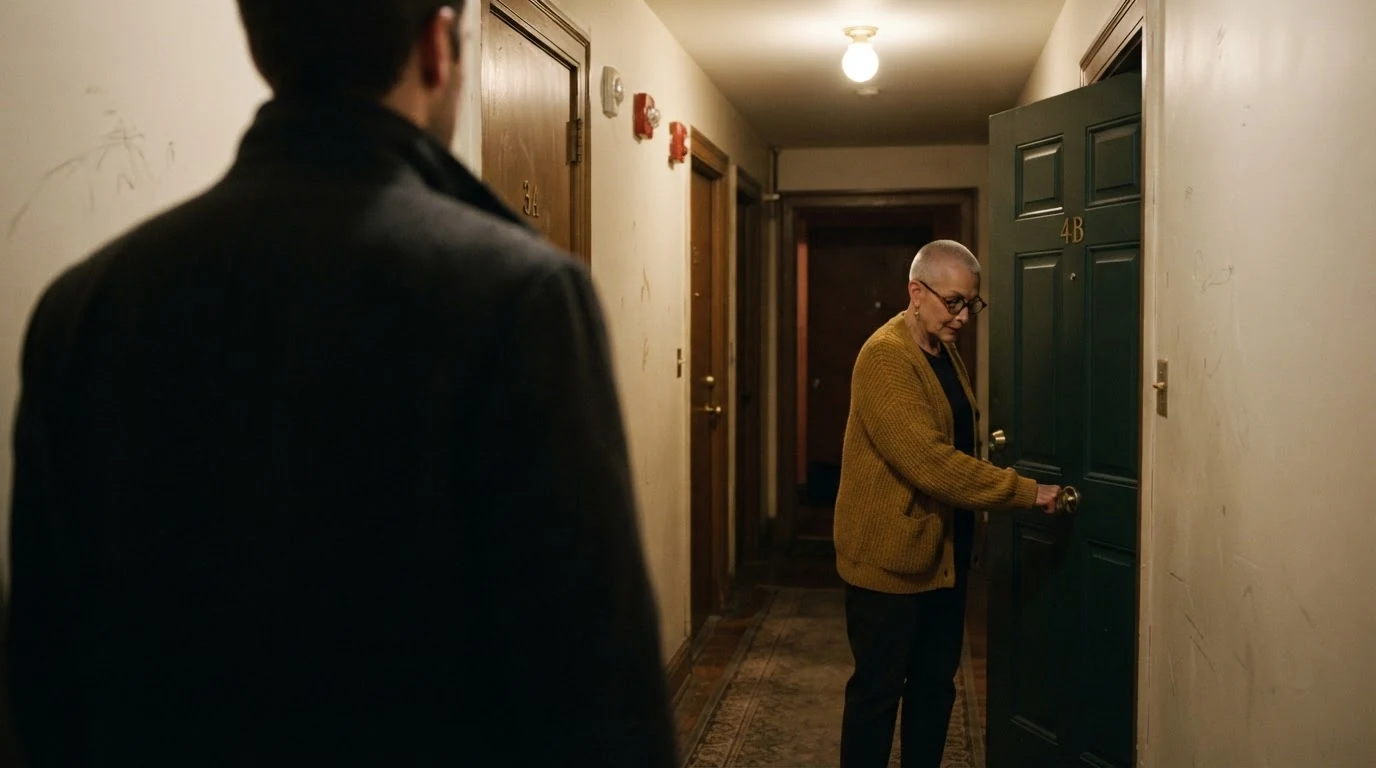
The matte charcoal coat in the foreground is the exit, a dark surface the next move can fill the lens with, as in Rope. Matte and out of focus keep the black even.
Open FlashBoardsCinematic film still, dark bedroom at night. A vintage widescreen television on a wooden dresser, camera close and level so the glowing screen fills about 80 percent of the frame, only a thin black bezel and a sliver of dark room at the edges. On the screen: a sunlit desert highway, an unbranded red pickup truck driving toward camera. 50mm lens, flat-on, cool blue room light against the warm screen.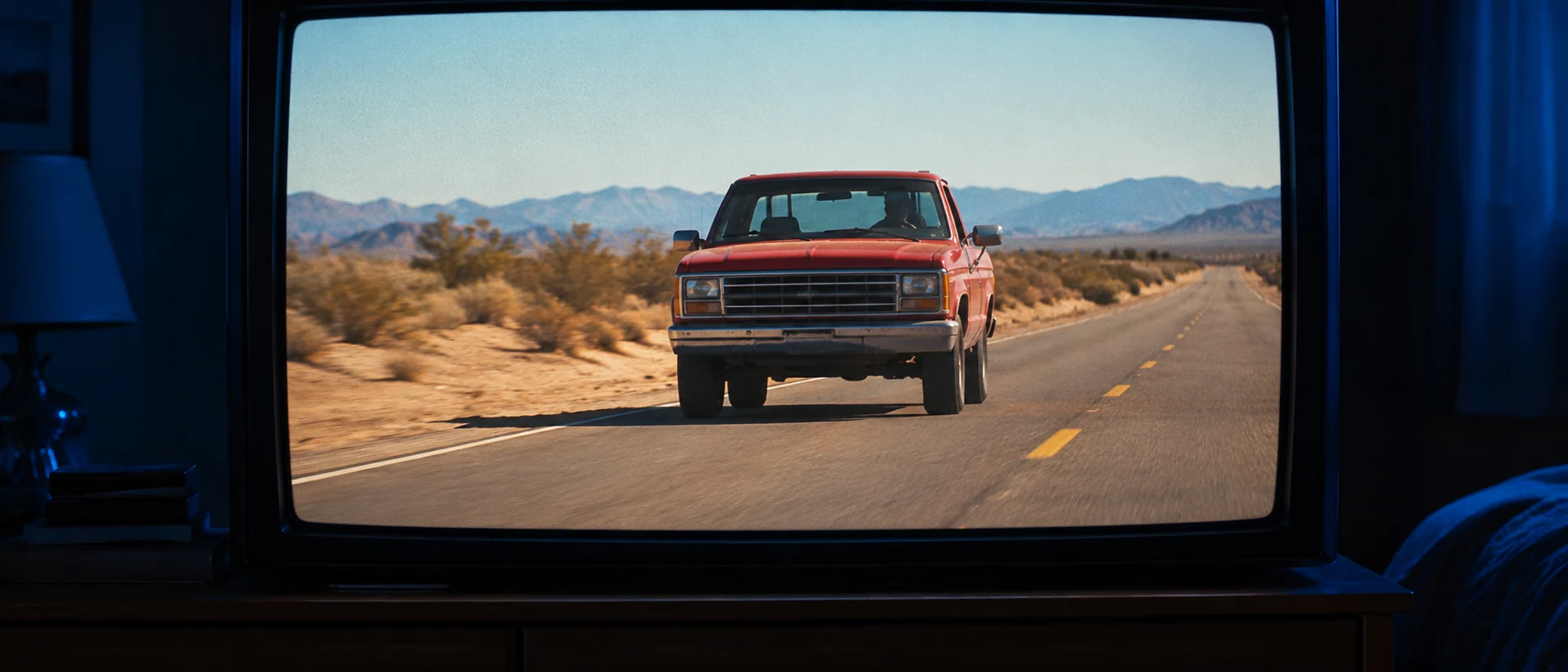
A screen-transition entry: fills about 80 percent and flat-on mean one short push clears the bezel. Generate the highway as its own shot with matching framing.
Open FlashBoardsCamera: a steady dolly push that starts immediately at walking pace, drifting left and forward into the out-of-focus charcoal coat, ending when the coat covers the whole frame. Action: the woman is already stepping through the green door as the shot begins and disappears into the next room while the man stands still. The dark wool grows across the frame until the image is completely black.Starts immediately and already stepping keep the clip alive from frame one. Covers the whole frame gives a full-black exit for the next clip to start from.
Open FlashBoardsCommon mistakes
- "Seamless transition" in a prompt gets a visible effect or crossfade. Describe the physical event: "the dark coat fills the whole frame".
- Models light and sharpen the foreground carrier. Say "matte, unlit, out of focus".
- Clips often stop short of full coverage. State the end state ("completely black") and allow 6 seconds.
- Give both clips at the join the same direction and pace.
Keep the reference frames, prompts and every generated take side by side — images and video in one canvas.
FAQ
4 questionsWhat is a seamless transition in video?
A seamless transition is an edit hidden inside the action, so two shots look like one. The cut sits where the image is briefly unreadable or continuous: a dark object covering the lens, a fast blur, a screen filling the frame or a matching camera move. Viewers follow the motion across the join and never notice the new shot.
How do you make a seamless transition?
End shot A on a clean exit and start shot B on the same state: full darkness from an object passing the lens, a whip-pan blur or a frame-filling screen. Match lens, height, direction and speed in both shots, overlap the action, and trim the cut where both frames look identical.
What is an invisible or hidden cut?
Another name for a seamless transition: a cut placed where the audience can't see it. Classic hiding places are a character's dark back filling the frame, a pillar wiping past the lens, and fast camera moves. Long-take films use hidden cuts to join separate takes into one apparent shot.
Are 1917 and Birdman really one shot?
No. Both are built from many separate takes joined with hidden cuts, so they play as if the camera never stops. The stitches hide in dark doorways, passing objects, fast moves and digital blends. The idea goes back to Hitchcock's Rope (1948), which hid about half of its cuts in dark jackets and furniture.
Related terms
4- Match CutEditing
A match cut joins two different shots through a shared shape, movement, composition or sound — the bone that becomes a satellite in 2001 — so the cut draws a link between them.
- In-Camera EditingEditing
In-camera editing means shooting shots in their final order and length, or building transitions physically on set, so the film is effectively cut during the shoot rather than afterwards.
- Whip PanCamera Movement
A whip pan is a pan so fast that the image dissolves into motion blur; it snaps attention between two points, links two characters with energy or hides a cut, making it one of the liveliest transitions in film.
- Film TransitionsEditing
Transitions are the ways one shot or scene gives way to the next — the plain cut, dissolve, fade, wipe, match cut and hidden or stylised moves like whip and mask transitions.
Further reading
Walter Murch, In the Blink of an Eye (Silman-James Press). Karel Reisz and Gavin Millar, The Technique of Film Editing (Focal Press).