 FlashBoards Learn
- Learn
- Directing & Staging
- Car Chase Scene
Directing & Staging · Film language
Car Chase Scene
Also called: car chase, vehicle chase, chase sequence
A car chase scene is a sequence built around one vehicle pursuing another, staged as a map of routes, speeds and obstacles. The director keeps screen direction and the gap between pursuer and pursued readable, while stunt drivers, camera cars and editing turn that geography into felt velocity and danger.
- What it does
- Turns distance between two vehicles into suspense: every shot says whether the gap is closing or opening.
- Use it when
- The story needs escape, pursuit or a race against time that the audience can track beat by beat.
- Watch out
- Shots that flip direction or hide the pursuer make the chase unreadable, and no amount of speed fixes it.
- Try this prompt
Low-angle tracking shot, dusty yellow coupe racing left to right on a desert road, black pickup close behind, 24mm at bumper height, motion blur
What is a car chase scene?
A car chase is less a shot than a system: a route, two or more vehicles, a changing gap between them and obstacles that interrupt the run. Every setup answers three questions: who is chasing whom, how far apart they are, and what comes next.
In the directing and staging toolkit it follows the logic of a fight scene: clear geography, readable action and reaction. But a chase covers blocks or miles, so the director rebuilds the map in almost every shot.
Why do car chases work on an audience?
Because the stakes are visible. The gap between two cars is a meter the audience reads without dialogue: when it shrinks, tension rises; when the hero slips through a closing gap, it releases. Traffic, a train or a narrow alley create the beats.
The classics are remembered for clarity as much as speed. Bullitt (1968) lets long runs play through San Francisco's hills. The French Connection (1971) sets a car against an elevated train. Mad Max: Fury Road (2015) keeps a film-long chase legible by holding each shot's subject near the center of frame, so fast cuts never make the eye search.
How to film a car chase
Start with a map. Draw the route from above: every turn and obstacle, which way each car travels on screen, where the gap closes and opens. It drives the storyboard, shot list and safety plan.
Plan coverage by rig.
- Camera car with a crane arm for the running tracking shot beside, ahead of or behind the hero car.
- Hard mounts on hood, door or bumper, 30–60 cm off the road.
- Interior mounts or a process trailer for driver close-ups.
- Low static cameras at road level, often in crash boxes.
- Aerial shots from a drone or helicopter to show the whole map.
Pick lenses for the feeling. Wide lenses (18–28mm) low and close exaggerate speed. Long lenses (200mm and up) compress distance and make the pursuer look closer than it is. Slight undercranking (20–22 fps played at 24) adds pace.
Safety first. The stunt coordinator sets speeds, closed roads and half-speed rehearsals. Most running footage comes from a second unit while the main unit films actors in the cars.
How do you keep a chase readable?
Hold screen direction. If the chase runs left to right, both cars run left to right in every shot until a turn is shown; flip it without reason and the pursuer seems to flee. To change direction, show the turn, cut through a neutral head-on or tail-away shot, or cross the line within one take.
Keep both vehicles in one frame whenever the gap matters: a long-lens two-shot tells the distance at a glance. Give the route landmarks, such as a bridge or a colored building, so the viewer knows where the chase is.
How is a car chase edited?
Fast cutting builds velocity, but only when each shot has one clear read. Alternate scales: a wide to reset the map, a mount shot for speed, the driver's face, an insert of the obstacle. A long unbroken take proves the danger is real; strong chases open long and cut faster as the gap closes. Engine pitch and tire squeal tell distance even off screen.
Car Chase Scene in motion
6 clipsEach clip is a few seconds of real chase footage. Watch who leads and who follows, which way the cars travel on screen and how the gap changes. In the cut sequences, notice how a wide resets the map before a close-up or a mount shot adds speed.
How to create a car chase scene with AI
4 promptsDirect an AI chase as you would on set: fix the route and screen direction, then generate each rig position as its own shot. In FlashBoards, keep the route sketch, reference frames and every take on one board so cars, light and direction stay consistent. The fourth prompt re-shoots a real film shot from a text description alone, and the original plays next to the result so you can compare.
Low-angle tracking shot from a camera car, a dusty mustard-yellow 1970s coupe racing left to right on a desert dirt road, seen in side profile, a black pickup truck chasing close behind it on the left in the same frame, both noses pointing at the right edge of frame, dust trailing out to the left, both moving left to right, unbadged vehicles, thick dust plume, camera at bumper height on a 24mm lens, motion blur on road and wheels, low late-afternoon sun, cinematic film still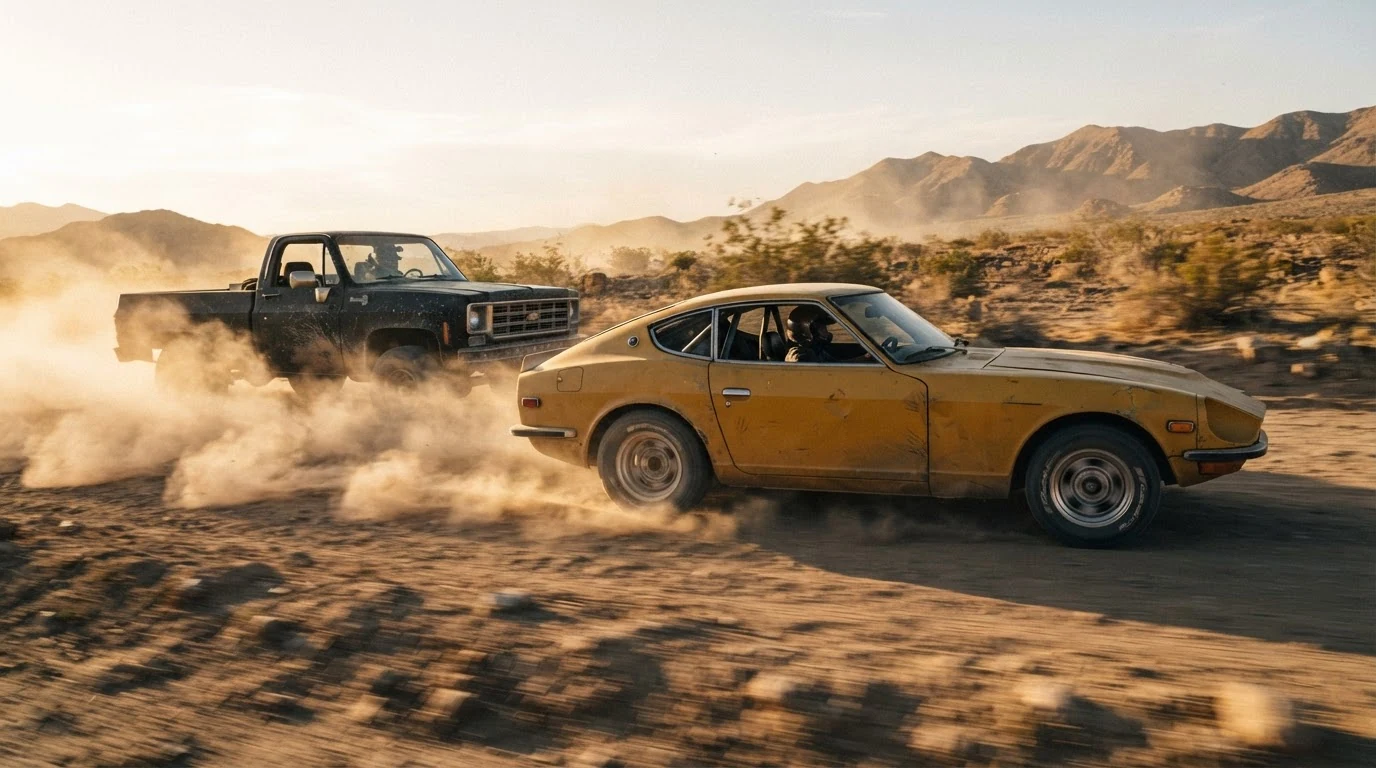
Camera car and bumper height on a 24mm lens give the low, wide perspective that sells speed. Both moving left to right, noses pointing at the right edge and behind it on the left fix direction and who chases whom; in the same frame shows the gap; motion blur keeps the cars from looking parked.
Open FlashBoardsNight car chase, shot through the windshield from a hood mount, a woman in her fifties with a cropped grey buzz cut, a thin scar through her left eyebrow and an olive bomber jacket grips the wheel of a dark-green hatchback, jaw clenched, two bright headlights of a pursuing sedan fill the rear window behind her, orange streetlights streaking across the glass, wet city street, 35mm lens, cinematic still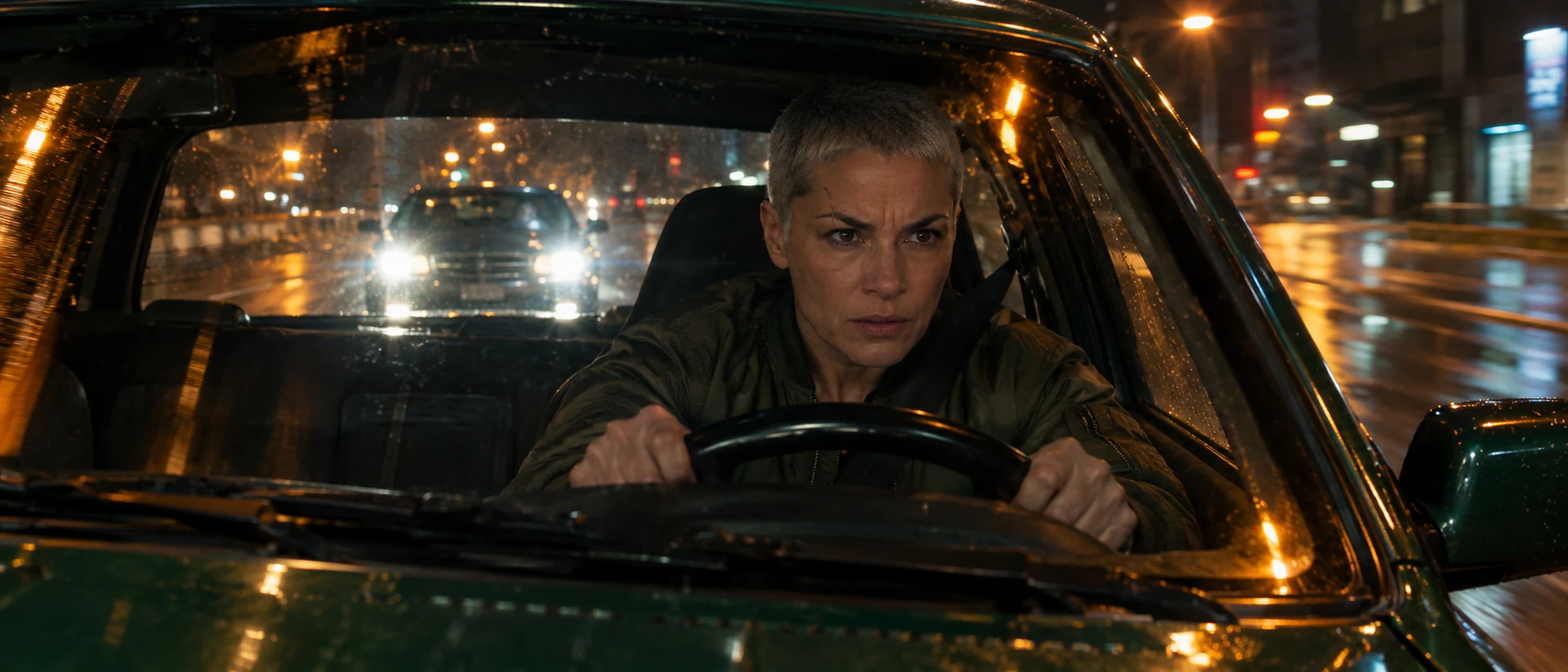
The reaction side of the chase. Hood mount sets the rig; headlights fill the rear window keeps the pursuer in the close-up, so the gap still reads. The specific face and jacket keep the driver fictional and consistent.
Open FlashBoardsCamera: fast tracking shot, the camera car keeps pace beside the yellow coupe at bumper height, coupe on the left of frame and the pickup behind it for the whole shot. Action: the coupe is already racing left to right, dust pouring from its wheels. The black pickup accelerates until its bumper almost touches the coupe. The coupe swerves right across the road, throwing a wall of dust, and pulls away.Already racing makes the shot alive from frame one instead of a slow push-in. The Camera line locks rig and framing so direction holds; the Action line gives a beginning, middle and end: close, near-contact, escape.
Open FlashBoards{
"output": "Full-screen live-action shot from Badlands (1973) from its very first frame: one continuous wide shot, no cuts. A flat, empty prairie of dry olive-gold grass under a pale blue sky with rows of small white cumulus, hard bright sun, cool desaturated teal-green grade, 1970s 35mm film grain, natural 24 fps motion blur.",
"shots": [
{
"shot": 1,
"camera": "wide shot on a 35mm lens at chest height, horizon a little above the middle of the frame at the start; the camera dollies slowly straight back while tilting down, so the horizon climbs toward the top fifth of the frame and a line of weathered wooden fence posts strung with barbed wire rises into the lower foreground, with low dry scrub along it",
"action": [
"BEGINNING: alive from the first frame, the camera almost still, empty grass filling the lower half; far away on the horizon, just right of centre, a tiny speck of a car trails a pale plume of dust toward the camera.",
"THEN: a second car appears out of the dust beside it; the two 1950s sedans race toward the camera side by side, a black sedan with chrome trim on the left a little ahead, a pale sky-blue sedan on the right, both throwing up dust, drifting toward the right third of the frame.",
"THEN: the camera starts to pull back and tilt down; the first bare fence post enters from the bottom edge at right of centre, then more posts rise along the bottom as the fence line becomes the foreground.",
"THEN: the black sedan reaches the right edge of the frame in the middle distance, its drivers unseen behind the windshield glare, the sky-blue sedan one car length behind it.",
"THEN: the black sedan swings hard and tears right to left across the frame just beyond the fence, its nose low, a thick cloud of dust boiling up behind it on the right.",
"END: the sky-blue sedan follows through the dust one car length behind, passing so close to the lens that it smears into a long horizontal blur across the lower frame as the black sedan exits left; dust hangs over the fence posts at right."
],
"dialogue": [],
"voice": "silence: nobody speaks in this shot, no voice at all"
}
],
"sound": {
"ambience": "prairie wind across dry grass; two big V8 engines growing from a distant drone to a roar, tyres tearing through grass and dirt, gravel and dust spraying as the cars pass the camera",
"speech": "no words in this video; the only human sounds are breaths and movement",
"never_spoken": "no narration and no voice-over: the descriptions, performance notes and step words of this prompt are never spoken aloud",
"music": "a film score under the scene, always below the voices: a light, repeating mallet-and-pizzicato ostinato with a steady pulse, detached and almost innocent against the chase",
"subtitles": "none"
}
}Remakes the prairie chase from Badlands (1973): the prompt carries over the slow pull back that raises a barbed-wire fence into frame, the two sedans growing out of the horizon, the silence under the engines and the final right-to-left pass past the lens.
The camera line holds both cars in one continuous wide, so the gap between them reads without a cut. Starting them as a speck on the horizon sets the map, one car length behind fixes who hunts whom, and the final right to left pass past the lens turns distance into speed.
Open FlashBoardsCommon mistakes
- Parked-looking cars. Add motion blur on road and wheels, dust plume and tracking shot.
- Direction flips between shots. Write left to right in every prompt; compare takes side by side on the board.
- Pursuer drops out. Say close behind it in the same frame, or the model shows one car alone.
- Cars change between shots. Describe each vehicle by color, era and body type every time.
Keep the reference frames, prompts and every generated take side by side — images and video in one canvas.
FAQ
4 questionsWhat makes a good car chase scene?
Clarity first, then speed. The audience must always know who is chasing whom, how far apart the cars are and which way they are heading. Consistent screen direction, both cars in frame when the gap matters and obstacles that create beats build that clarity. Low wide lenses, sound and cutting rhythm then add the speed.
How do you film a car chase on a low budget?
Keep real speeds low and let the camera fake the rest. Mount a small camera low on the car with a wide lens, shoot driver close-ups in a parked car with moving light, and use a closed private road with permission. Never race on public roads; have a stunt coordinator plan every run.
What are the best car chase scenes?
Filmmakers often cite Bullitt (1968) for its long runs through San Francisco, The French Connection (1971) for its car-versus-elevated-train pursuit, Ronin (1998) for practical driving through Paris, and Mad Max: Fury Road (2015) for sustaining one chase across a whole film. Each keeps direction and distance readable as speed builds.
How do filmmakers make cars look faster?
They put a wide lens close to the car and low to the road, so the ground rushes through frame. Objects passing near the lens, motion blur, dust, hard-mount shake and engine sound add perceived speed. Some productions undercrank slightly, shooting a few frames per second below playback rate. Long lenses do the opposite and compress speed.
Related terms
6- Screen DirectionComposition & Framing
Screen direction is the left-to-right or right-to-left way characters move and look across the frame; keeping it consistent between shots tells the audience where people are heading and who is chasing whom.
- Stunt PerformerActing & Casting
A stunt performer executes dangerous physical action on camera — falls, fights, car hits, fire burns — often doubling for an actor under the stunt coordinator's direction.
- Tracking ShotCamera Movement
A tracking shot moves the camera through space with a moving subject — on a dolly, Steadicam, vehicle or drone — following, leading or flanking it so the audience travels with the action.
- Fast CuttingEditing
Fast cutting strings together many very short shots in quick succession to create energy, chaos or overload — common in action, trailers and music videos.
- Second UnitFilmmaking Process & Crew
The second unit is a separate crew with its own director and DP that shoots material without the principal cast — establishing shots, inserts, stunts, car work, plates and crowds — in parallel with the main unit.
- Fight SceneDirecting & Staging
A fight scene is staged as choreography, camera and editing working together: clear geography, readable action–reaction beats and a rhythm of blows and pauses that tells who is winning.
Further reading
Walter Murch, In the Blink of an Eye (Silman-James Press) — on cutting for eye trace and rhythm. Steven D. Katz, Film Directing Shot by Shot (Michael Wiese Productions) — on staging, coverage and screen direction.