 FlashBoards Learn
- Learn
- Camera Movement
- Dolly Zoom
Camera Movement · Film language
Dolly Zoom
Also called: Vertigo effect, Hitchcock zoom, contra-zoom, trombone shot
A dolly zoom moves the camera toward or away from the subject while zooming the lens the opposite way, so the subject holds the same size in frame while the background stretches away or rushes in. The result reads as vertigo, dread or sudden realization, the effect Alfred Hitchcock made famous in Vertigo (1958).
- What it does
- Locks the subject's size while the background stretches or closes in, so the world seems to shift under the character.
- Use it when
- A character's perception tilts in one beat: fear of heights, shock, dread, a sudden realization.
- Watch out
- Used as decoration it reads as a gimmick, and if the subject drifts in size the illusion collapses.
- Try this prompt
Dolly zoom: camera pulls back on a track while zooming in, the man stays exactly the same size in the center, the corridor behind him compresses and rushes toward him, slow 4-second move
What is a dolly zoom?
A dolly zoom is two opposite moves done at once. The camera physically travels toward or away from the subject on a dolly or slider, and the focal length changes in the opposite direction so the subject stays the same size in frame. Because the camera's position changes, perspective changes. Because the zoom compensates, the subject doesn't. Everything else gives the game away: the background swells or shrinks and walls lean and slide.
It goes by many names: the Vertigo effect, Hitchcock zoom, contra-zoom, trombone shot, zolly. It is not a lens setting or an in-camera mode but a coordinated move by the dolly grip, the zoom operator and the focus puller.
The technique is usually credited to Paramount camera operator Irmin Roberts, who worked it out for the stairwell shots in Hitchcock's Vertigo. It is now one of the most recognizable moves in the camera movement vocabulary.
How does a dolly zoom work?
How big a subject appears in frame depends on the ratio of focal length to camera distance. Double the distance and double the focal length, and a face stays exactly the same size. The background sits much farther away, so it changes size while the subject holds.
Two versions, two feelings:
- Dolly in, zoom out. The camera moves closer while the lens goes wider. The subject holds, the background falls away and shrinks, and the frame takes on the stretched, exaggerated depth of a wide-angle lens. It feels like the floor dropping out from under the character.
- Dolly out, zoom in. The camera pulls back while the lens goes longer. The background compresses and looms up behind the subject, the way it does on a telephoto lens. It feels like the world closing in.
A worked example: start 3 m from the actor on 50mm, dolly in to 1.5 m, and you must end on 25mm to keep the face the same size. The zoom range caps the effect: a 24-70mm allows just under a 3:1 change in distance, a 25-250mm cine zoom a violent 10:1.
Why do filmmakers use the Vertigo effect?
A dolly zoom breaks a rule the eye takes for granted: if something stays the same size, the space around it shouldn't change. When it does, the viewer feels it before understanding it: a tool for the moment perception tilts.
- Fear of falling. In Vertigo (1958), Hitchcock uses it for Scottie's view down the bell-tower stairwell. The drop stretches and snaps back, and his fear of heights becomes the audience's.
- Realization. In Jaws (1975), Spielberg lands the move on Chief Brody on the beach at the instant he sees the shark attack in the water. The shoreline warps behind him.
- Paranoia. In Goodfellas (1990), Scorsese stages a dolly zoom on Henry and Jimmy talking at a diner window. The street behind them creeps closer while they talk, and a friendly conversation turns quietly threatening.
- The uncanny. In The Lord of the Rings: The Fellowship of the Ring (2001), the road ahead of Frodo stretches as he senses a Ringwraith coming. In Poltergeist (1982), a hallway lengthens as a mother runs down it toward her children's room and gets no closer.
The common thread: the move is a single beat, not a style. Used once, at a turning point, it lands; used for decoration, it reads as a trick. Its louder cousin, the crash zoom, shocks through speed. The dolly zoom unsettles through contradiction.
How to shoot a dolly zoom
Pick the space first. The effect lives in the background, so you need depth and lines: a corridor, a road, a street, a stairwell, a room with strong verticals. Put the subject 1.5-3 m from the camera and the background as far away as the location allows. A blank wall close behind the actor shows almost nothing.
Gear.
- A dolly on straight track or a slider. A gimbal works only if it holds height and line perfectly.
- A parfocal zoom, one that holds focus as it zooms, ideally with a constant T-stop so exposure doesn't dip at the long end. Cine zooms in the 24-290mm or 25-250mm class are the classic tools. A 24-70mm gives a subtler version.
- A zoom motor with a hand or wireless controller, and a focus puller. Subject distance changes throughout, so focus must follow.
Rehearse to a frame guide. Mark the subject's eyes and headroom on the monitor. Run the move slowly and adjust until the head doesn't grow or shrink. Most usable dolly zooms run 3-6 seconds. Fast ones of 1-2 seconds read as a jolt.
Choose the direction for the emotion. Dolly in and zoom out for the falling-away feeling; dolly out and zoom in for the world closing in. Keep the actor still.
Light and dress for the widest frame. At the long end the lens sees a small patch of background, at the wide end it sees the whole set, including stands and flags.
Post fallback. Without a smooth zoom, shoot a dolly out on a wide prime at high resolution and scale into the image in the edit, keyframing the scale so the subject holds size.
Dolly zoom vs. zoom shot vs. dolly shot
- A zoom shot changes focal length from a fixed position. Everything scales together and perspective stays the same.
- A dolly shot moves the camera. Near objects pass faster than far ones, which is parallax, and perspective shifts the way it does when you walk.
- A dolly zoom sets the two against each other. The subject behaves like a zoom (no size change), the background behaves like a dolly (perspective shift), and the contradiction is the effect.
A quick test for any clip: watch the subject's size and the background at the same time. Subject and background grow together: zoom. Subject grows while the background barely changes: dolly or tracking shot. Subject holds while the background warps: dolly zoom.
Don't confuse it with the double dolly, where the actor rides a second dolly alongside the camera. There the character glides, but the perspective behaves normally.
Dolly Zoom in motion
7 clipsTrue dolly zooms are rare, so the clips pair the effect with its two ingredients. Watch the subject's size and the background at the same time. Subject holds while the space behind it stretches or closes in: dolly zoom, as in the first two loops. Subject and background scale together: a plain zoom. Near objects slide past far ones: a dolly. The film clips are labeled zooms and dollies, included to train the eye for the difference.
How to create a dolly zoom with AI
3 promptsVideo models understand zoom and dolly in separately, but a dolly zoom asks for two contradicting instructions at once, so the prompt has to spell out the result: subject size locked, background changing. Below, Nano Banana 2 Lite builds a wide-lens start frame with a long, lined background, GPT Image 2.5 draws the compressed long-lens look the move ends on, and MiniMax H3 Max Turbo animates the start frame. In FlashBoards, keep the Jaws and Vertigo references next to your generations on one board and compare how well each take holds the face size.
Cinematic film still, shot on a 24mm lens from about one meter away: a man in his forties with a shaved head, a thin scar through his left eyebrow and a gray hospital porter's uniform stands chest-up in the center of the frame at the near end of a long, empty hospital corridor. The corridor stretches far behind him, rows of doors and ceiling lights shrinking toward a single green exit sign at the far end. Cold fluorescent light, pale green walls, reflections on the polished floor, 35mm film grain.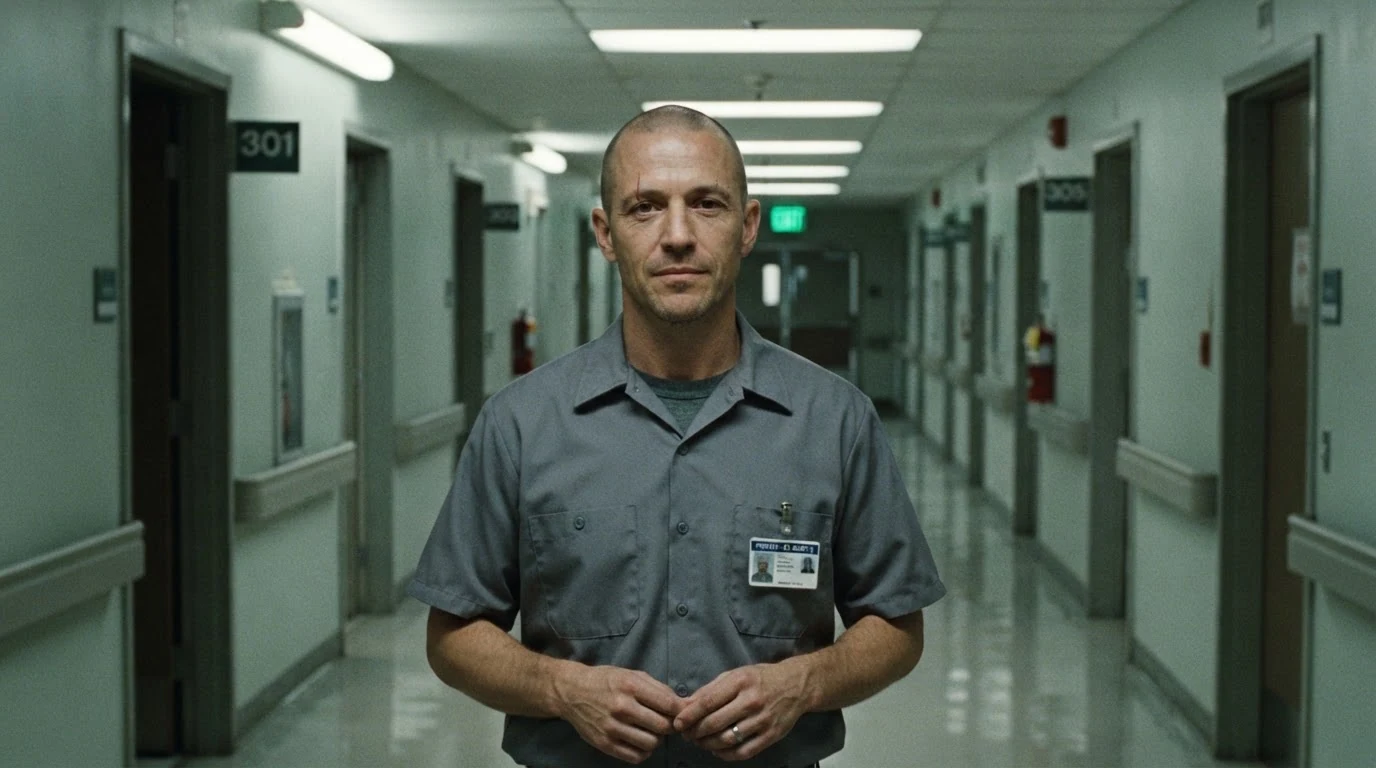
24mm from about one meter is the wide end of the move: the subject is big, the background far and small, with doors and lights as rulers for the later change. A centered, chest-up subject gives the video model one clear thing to hold at a fixed size.
Open FlashBoardsCinematic film still, shot on a 135mm telephoto lens from about six meters away: a woman in her thirties with a gray-streaked braid, round wire glasses and a mustard cardigan sits in a striped deck chair on a crowded summer beach, chest-up and centered, eyes wide, staring just past the camera. Behind her the swimmers, the shoreline and the horizon are compressed and loom large and close, the sky pressed into a thin band. Bright midday light, 35mm film look.
A second take showing the other end of a dolly zoom: 135mm from about six meters keeps a face nearly the size a 24mm lens gives at one meter, but pulls the background up close behind her. Put it next to the corridor frame and you can see what the move travels between.
Open FlashBoardsCamera: a dolly zoom. From the first frame to the last, the camera pulls straight back down the corridor on a track at a slow, even speed while the lens zooms in at the same rate, so the man stays exactly the same size in the center of the frame. Behind him the corridor compresses: the far doors, ceiling lights and green exit sign grow larger and crowd in toward his shoulders. Action: as the shot begins his eyes are already widening and his chest rises and falls with quick breaths. In the middle his hands tighten into fists at his sides. At the end he swallows hard and stares straight into the lens as the far end of the corridor looms right behind his head.Pulls straight back while the lens zooms in at the same rate describes the mechanics; stays exactly the same size is the constraint that makes it a dolly zoom rather than a pull back, and the background change gets its own sentence. His breathing and widening eyes keep the shot alive from the first frame without letting him walk, and the doors, lights and exit sign all exist in the start frame.
Open FlashBoardsCommon mistakes
- Plain push in or pull back. The subject grows or shrinks and the background follows. Add the subject stays exactly the same size in frame and describe the background change as a separate sentence.
- Zoom without dolly. The image simply crops in and perspective never changes. Say the camera physically moves on a track, and name what the background does.
- Morphing instead of optics. The model redraws the background: doors multiply, the corridor bends. Keep shots to about 5 seconds and name only what the start frame shows.
- The subject drifts or walks. Say he stands still in the center of the frame and give him small actions in place (breathing, eyes, hands).
- A frozen start. With only the camera move in the prompt, MiniMax H3 Max Turbo creeps slowly toward a still frame. Start
Action:with something already happening. - Too fast. A full-range move in one second reads as a glitch; ask for a slow, even move unless you want the jolt.
- What our take shows. The first MiniMax H3 Max Turbo try ignored the size lock and simply pushed in on his face. The second, shown above, comes close: the far doors and the exit sign grow to roughly three times their size and go soft, while the man stays about the same size, but not exactly. He shrinks a little in the middle of the shot and grows back by the end. Expect to generate several takes and pick the one where the face holds steadiest.
Keep the reference frames, prompts and every generated take side by side — images and video in one canvas.
FAQ
6 questionsWhat is a dolly zoom also called?
The dolly zoom is also called the Vertigo effect, Hitchcock zoom, contra-zoom, trombone shot and zolly. All of these names describe the same move: the camera dollies toward or away from the subject while the lens zooms in the opposite direction, keeping the subject the same size while the background stretches or compresses behind it. “Vertigo effect” comes from Hitchcock's 1958 film, which made the technique famous.
Who invented the dolly zoom?
The dolly zoom is usually credited to Irmin Roberts, a Paramount camera operator who developed it for Alfred Hitchcock's Vertigo (1958). Hitchcock used it for the stairwell point-of-view shots that convey the hero's fear of heights. Spielberg's use of it in Jaws (1975) made it a staple of film language.
What are famous dolly zoom examples?
The best-known examples are the stairwell in Vertigo (1958), Chief Brody on the beach in Jaws (1975), the hallway that stretches in Poltergeist (1982), the diner window scene in Goodfellas (1990) and the road shot in The Lord of the Rings: The Fellowship of the Ring (2001). Each uses it once, at a moment of fear or realization.
What is the difference between a dolly zoom and a zoom?
A zoom only changes focal length from a fixed position, so the subject and background scale up or down together and perspective stays the same. A dolly zoom also moves the camera, and zooms the opposite way to cancel the change in subject size. The subject holds while perspective shifts, so the background seems to stretch or close in.
Can you do a dolly zoom without a zoom lens?
Yes, in post. Shoot a smooth dolly or gimbal move away from the subject on a wide prime at the highest resolution you can, then scale into the image in your editor, keyframing the scale so the subject keeps its size. It only works for the dolly-out, zoom-in direction, and the stretch is limited by how far you can crop.
Can AI video models make a dolly zoom?
They can, but they tend to default to a plain push in or zoom. Spell out the move (“camera pulls back on a dolly while zooming in at the same rate”), the constraint (“the subject stays exactly the same size”) and what the background does. Building a start frame with a subject close to a wide lens and a long, lined background, then animating it with an image-to-video model such as MiniMax H3 Max Turbo, is the most reliable method.
Related terms
6- Zoom ShotCamera Movement
A zoom shot changes the lens's focal length during the take, so the image grows or shrinks from a fixed camera position; because the camera doesn't move, perspective stays the same — the key difference from a dolly.
- Dolly ShotCamera Movement
A dolly shot is filmed with the camera on a wheeled dolly, usually on track, so it can glide smoothly toward, away from or alongside the action; unlike a zoom, the camera really moves, so perspective and parallax change.
- Double DollyCamera Movement
In a double dolly the actor stands on a dolly that travels together with the camera dolly, so the character floats through the location without walking — a dreamlike, unsettling move that is Spike Lee's signature.
- Focal LengthLenses, Focus & Exposure
Focal length, measured in millimetres, sets a lens's angle of view: short focal lengths see wide and stretch space, long ones see narrow and compress it — which is why the same framing feels different on 24mm and on 135mm.
- Crash ZoomCamera Movement
A crash zoom is an abrupt, very fast zoom in or out that slams the frame onto a face or detail; it punctuates a shock or a joke and openly announces the camera's presence.
- Camera MovementCamera Movement
Camera movement is any change of the camera's position or direction during a shot — pans, tilts, dollies, cranes, handheld and more — used to guide attention, reveal space and set the emotional rhythm of a scene.
Further reading
Alfred Hitchcock and François Truffaut, Hitchcock/Truffaut. Blain Brown, Cinematography: Theory and Practice. Steven D. Katz, Film Directing Shot by Shot.