 FlashBoards Learn
- Learn
- Camera Movement
- Zoom Shot
Camera Movement · Film language
Zoom Shot
Also called: zoom, zoom in, zoom out, zoom lens shot
A zoom shot changes the lens's focal length during the take, so the image grows or shrinks while the camera stays put. Because the camera doesn't move, perspective never changes: a zoom in singles out a detail as if the viewer's attention sharpened, a zoom out widens the world around it.
- What it does
- Magnifies or widens the image from one fixed camera position, with no change in perspective or parallax.
- Use it when
- You want to steer attention to a face or detail, or reveal context, without moving the camera through the space.
- Watch out
- A zoom reads as the camera looking, not the viewer moving; used without a reason it feels cheap and flat.
- Try this prompt
Slow optical zoom in over 8 seconds from a wide shot of a town square to a medium close-up of a woman on a bench, camera locked on a tripod
What is a zoom shot?
A zoom shot is a shot in which the focal length of a zoom lens changes while the camera is rolling. Turn the zoom ring toward the long end and the angle of view narrows, so the subject fills more of the frame; turn it toward the short end and the angle widens, pulling more of the scene into view. The camera body stays where it is, and that explains the whole look.
Perspective, how big near things look compared to far things, depends only on where the camera stands. A zoom doesn't change where the camera stands, so it doesn't change perspective: every part of the image, foreground and background alike, is scaled by the same amount. A zoom in is optically the same as cropping into the center of the wide frame. You get no parallax and no change in the angle of walls. That flat, uniform magnification is what separates it from a dolly shot, where the camera physically travels.
Zooms belong to the wider family of camera movement even though nothing moves but glass inside the lens. They are described by direction (in or out), speed (a slow creep or a snap) and range, and in narrative film they are often combined with a pan, a tilt or a focus pull.
Why do filmmakers use zoom shots?
A zoom feels like attention rather than travel. When the frame tightens on a face without the camera moving, the viewer reads it as someone looking harder. A dolly in brings you closer; a zoom in makes you see closer, which is why it suits observation, surveillance and moments of recognition. Filmmakers reach for it for a few jobs:
- Isolating a detail from a crowd. From a fixed position far back, a zoom can find one face in a hall full of people without the camera walking through the room. Robert Altman built whole films around this roving, eavesdropping zoom.
- Revealing context. A zoom out starts on a detail and opens onto the situation around it.
- Holding distance while getting close. On a telephoto lens the camera can stay across a street or a field and still end on a close-up, useful with crowds, animals and documentary subjects.
- Style and period. The zoom is the house style of 1970s cinema, of spaghetti westerns and Hong Kong action films. Quentin Tarantino's Kill Bill and Django Unchained quote that language on purpose; Wes Anderson uses crisp, mechanical zooms as part of his storybook look.
The zoom also carries a reputation: overused in television and home video, a lazy zoom looks amateur. Stanley Kubrick answered that by making zooms deliberate and slow: in Barry Lyndon (1975) he opens scene after scene on a detail and zooms out into a composed tableau, so the move feels like a painting revealing itself.
How to shoot a zoom shot
Lens. Use a true cine zoom if you can. Cine zooms are parfocal: they hold focus as the focal length changes. Many stills zooms are varifocal and drift out of focus mid-zoom, which ruins a slow move. Check for breathing and for a T-stop ramp at the long end. Ranges such as 24–290mm, 25–250mm or 19–90mm cover most narrative needs; a long 10x range gives you a dramatic reveal, a short 2–3x range gives a subtle adjustment.
Support. Lock the camera on a solid tripod or a heavy dolly. At the long end every vibration is magnified; a handheld shot on 200mm looks like an accident unless that is the style.
Control. Don't turn the zoom ring by hand for anything but a snap. Use a zoom motor with a rocker or thumb control, or a lens control system with a programmable speed and ease in and out. A good slow zoom starts and stops so softly the viewer can't find where it began. As a guide, a 2x change over 8–10 seconds reads as slow; the same change in under half a second becomes a crash zoom.
Focus and depth. As you zoom in, depth of field gets shallower at the same stop, so a background that was readable at 35mm may melt at 135mm. Set focus at the long end first, then pull back and zoom from there. Mark the zoom positions for both ends like focus marks.
Blocking and light. Frame the subject near the center of the zoom axis, or combine the zoom with a slight pan or tilt so the subject stays where you want it as the frame narrows. Light for both ends: a zoom out reveals the edges of your set.
Zoom in
A zoom in narrows the angle of view from a fixed position, so the subject grows in the frame without any change of perspective. We start wide, the frame tightens, and whatever sits at the center becomes the point of the shot.
Use it to single out a character in a crowd, to push emotional weight onto a reaction, or to draw the eye to an object the audience needs to remember. Because the background magnifies as much as the subject, the environment keeps pressing in behind the face, which feels observational and a little detached compared to a dolly push in. At high speed it becomes a crash zoom: a punchline or a shock rather than a realization.
Zoom out
A zoom out widens the angle of view from a fixed position, so new information arrives at the edges of the frame while the center shrinks. It is a reveal: a close detail turns out to belong to a room, a battlefield, a crowd, a ballroom.
The classic use is the one Kubrick made his own in Barry Lyndon: begin on a face, a hand or an object and zoom slowly out until the full composition appears. A zoom out can also isolate a character by making them small in a big space, without the parallax of a crane or drone pullback. Everything at the edges becomes visible as the frame opens, so dress the set for the widest framing.
Slow zoom
A slow zoom changes focal length so gradually that the viewer barely notices the frame tightening or opening. The effect works below conscious attention: tension creeps up, a character seems to drift further away, or a static composition acquires an unsettling pull.
It is a hallmark of 1970s filmmaking. Francis Ford Coppola's The Conversation (1974) opens with a long, slow zoom from high above a crowded San Francisco square down toward the people in it, a surveillance shot that sets up the whole film. Kubrick's slow zoom outs in Barry Lyndon do the reverse. Modern directors use slow zooms to evoke that period or to add movement to a locked-off shot.
The craft is in the speed and the ramps. Set a zoom motor to its slowest setting that still moves smoothly, feather the start and the stop, and let the move run for the whole shot; 10–30 seconds is common.
Super zoom
A super zoom travels through an unusually large range in one move: from a wide vista down to a tiny distant detail, or from a detail back out to the whole landscape. The jump in scale is so extreme that it often plays as spectacle or comedy.
On a real set you get it with a long-range zoom (a 10x or longer cine zoom, a broadcast box lens, or a consumer bridge camera with a very long zoom), from a very stable support, and usually with a pan to hold the target on the zoom axis. Haze, heat shimmer and vibration show up at the long end and become part of the look. When optics can't go further, editors stack digital magnification on top or composite several photographs into one continuous push; taken to its extreme, that becomes an infinite zoom.
Yo-yo zoom
A yo-yo zoom repeatedly zooms in and out along the same axis, pulsing the frame. It is a deliberate break of the rule that camera moves should be invisible. Played fast, it is comic punctuation: a double take, a spit take, a character who can't believe what they just heard. Played slower, it suggests dizziness, panic or a mind that can't settle.
Shoot it with a motorized zoom or by hand on a lens with a short zoom throw, and decide the rhythm in advance. Two or three pulses in time with a beat of music or dialogue read as intentional; anything aimless looks like an operator hunting for framing. You can also build it in post by scaling the image.
Zoom vs. dolly: what's the difference?
Both make the subject bigger or smaller in the frame, but they do it in opposite ways. A zoom stays in place and changes the lens: everything scales together, perspective stays the same, and there is no parallax. A dolly moves the camera through space on a fixed lens: foreground objects slide past faster than the background, walls change angle, and the viewer feels carried into the scene.
The practical test is the edges. In a zoom in, a lamp at the frame's edge and a mountain behind it both grow by exactly the same factor. In a dolly in, the lamp rushes toward the lens and slides out of frame while the mountain barely changes. The dolly feels physical; the zoom feels optical, like binoculars.
The zoom also compresses nothing by itself. The flattened, stacked look people associate with long lenses comes from standing far away; a zoom in from that position just crops into it. For more on how lens length shapes a frame, see focal length. Combine the two moves in opposite directions and you get the dolly zoom, where the subject stays the same size while the background stretches or collapses, as in Vertigo (1958).
Zoom Shot in motion

11 clipsWatch the relationship between foreground and background. In every clip below, near and far elements grow or shrink at the same rate, and nothing slides past anything else: that is a zoom. Some clips zoom in to single out a figure, some zoom out to reveal a whole space, and a few combine the zoom with a pan or tilt.
How to create a zoom shot with AI
3 promptsVideo models understand zoom in and zoom out, but they often substitute a dolly push with parallax, or a slow drift that barely changes size. Anchor the move in lens language: optical zoom, tripod, start and end framing, speed. Below, Nano Banana 2 Lite builds a wide start frame with the subject near the center of the zoom axis, GPT Image 2.5 draws a telephoto variation for a zoom out, and MiniMax H3 Max Turbo animates the first frame with a slow zoom in. Keep the clips, frames and takes on one FlashBoards board to compare speeds side by side.
Cinematic film still, wide shot from across a small cobbled town square on an overcast morning, camera on a tripod at standing eye height, 35mm lens. In the center of the frame, a woman in her sixties with cropped silver hair, round tortoiseshell glasses and a mustard-yellow raincoat sits alone on a green wooden bench, tossing crumbs to a dozen gray pigeons at her feet. A dry stone fountain stands to her left, a row of shuttered cafés with striped awnings behind her. Soft diffused daylight, muted colors, 1970s film grain.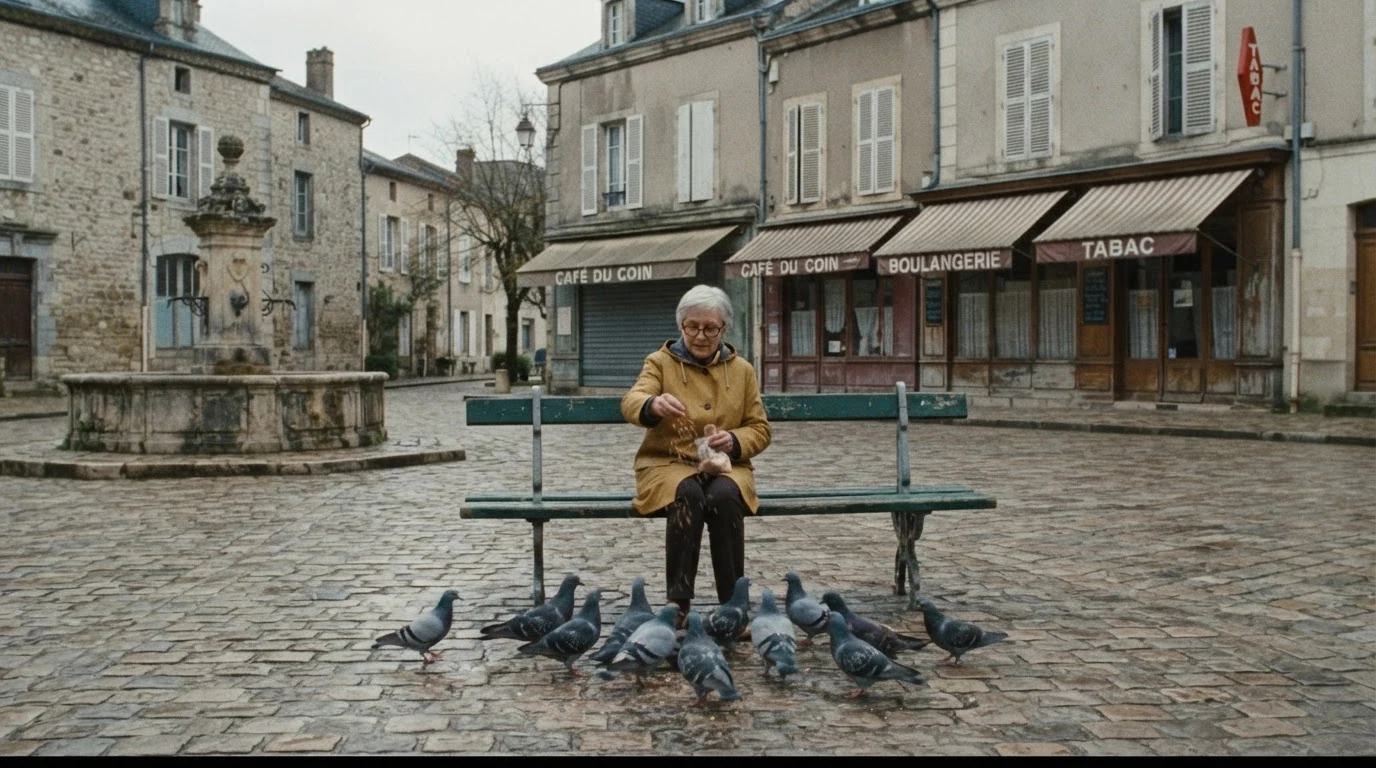
Wide shot from across the square and center of the frame put the subject exactly on the zoom axis, so the video model can tighten onto her without having to reframe. The pigeons give the shot motion from the first frame.
Open FlashBoardsCinematic film still, tight telephoto medium close-up on a 200mm lens from far away: a lanky young man with a shaved head, a thin red mustache and a navy peacoat leans on the rail of a harbor ferry, looking out at the water. The background is compressed and soft: stacked shipping cranes and gray water fill the frame behind him at the same scale. Flat overcast light, cool steel-blue tones, shallow depth of field, anamorphic widescreen, subtle film grain.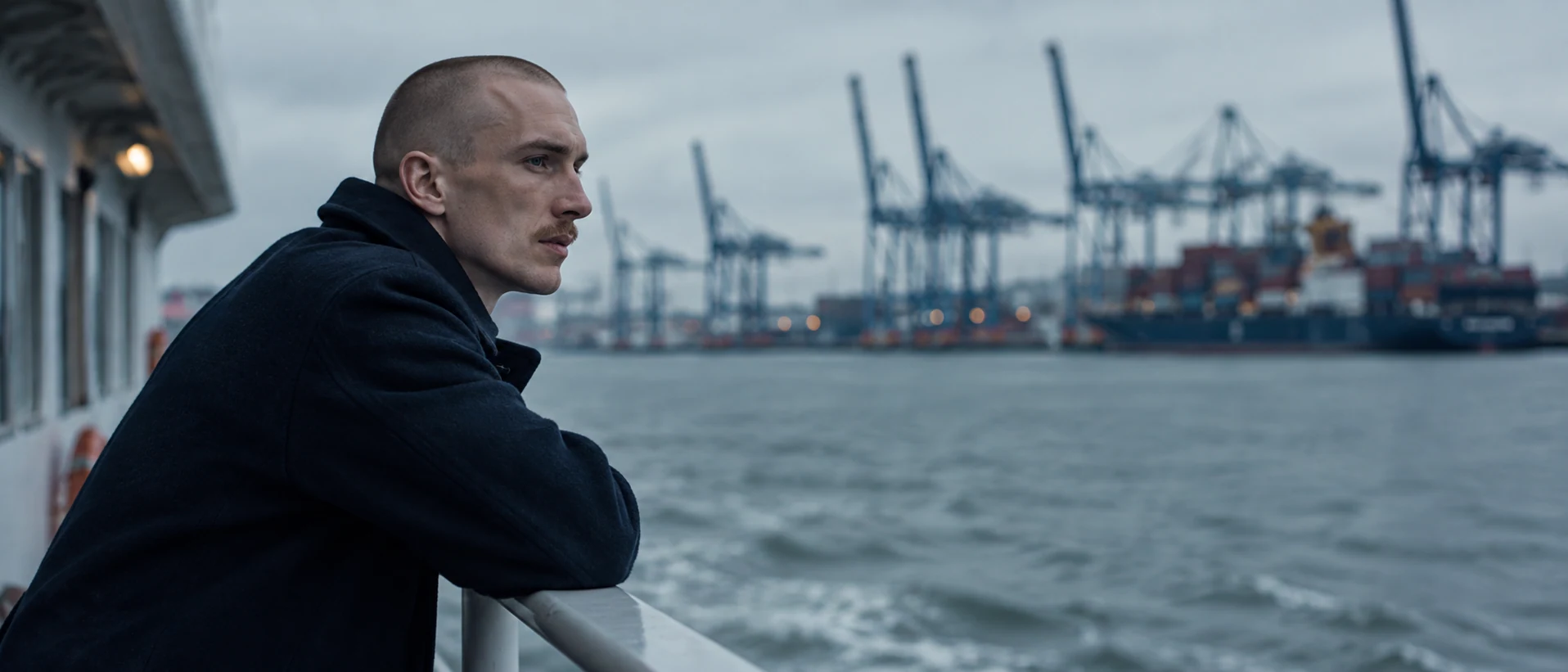
This is the tight end of a zoom out, framed on a different subject and lens. 200mm from far away and background compressed give the flat, stacked look a long zoom position has; animate it as the opening frame of a zoom out that reveals the ferry deck.
Open FlashBoardsCamera: locked on a tripod, a slow, steady optical zoom in at constant speed from the wide shot of the square to a medium close-up of the woman on the bench, ending with her head and shoulders filling the center of the frame. The camera position and perspective stay fixed; the fountain and the cafés behind her magnify at the same rate as she does. Action: the pigeons are already pecking and hopping around her feet as she tosses a handful of crumbs; two pigeons flutter up and land again beside the bench; she brushes the crumbs from her palms, looks up past the camera and gives a small, private smile.Locked on a tripod, optical zoom and perspective stay fixed steer the model away from a dolly push, and naming the background magnifying at the same rate describes the zoom's signature. The pigeons move from the first frame, and the stated end framing makes the move land on her face.
Open FlashBoardsCommon mistakes
- Zoom turns into a dolly. Models often move the camera forward with parallax. Write optical zoom, camera locked on a tripod, perspective stays fixed and describe the background magnifying with the subject.
- Too little movement. A bare zoom in can produce a timid drift. State the start and end framing (from a wide shot to a medium close-up) so the model knows the range.
- Subject off axis. A subject at the frame edge drifts out as the frame narrows. Place it near the center of the start frame.
- Uneven speed. For a slow zoom, say slow, steady, constant speed; for a snap, very fast zoom in.
- Invented edges in a zoom out. New content appears at the frame edges as it widens. Name what should be revealed (the ferry deck, the crowd, the room) so the model draws that instead of improvising.
Keep the reference frames, prompts and every generated take side by side — images and video in one canvas.
FAQ
5 questionsWhat is a zoom shot in film?
A zoom shot is a shot in which the focal length of a zoom lens changes during the take, so the image magnifies or widens while the camera stays in place. Because the camera doesn't move, perspective stays the same and there is no parallax. Filmmakers use it to single out a detail, reveal context or evoke 1970s cinema.
What is the difference between zoom in and zoom out?
A zoom in narrows the angle of view by moving to a longer focal length, so the subject grows and the surroundings leave the frame. A zoom out widens the angle by moving to a shorter focal length, so the subject shrinks and more of the space appears. The first concentrates attention; the second reveals where the subject really is.
Is a zoom the same as a dolly shot?
No. A zoom changes the lens and keeps the camera still, so the whole image scales evenly with no change in perspective. A dolly moves the camera through space on a fixed lens, so foreground and background shift against each other with parallax.
Why do some filmmakers avoid zoom shots?
Zooms were overused in television and home video, where they often looked like an operator hunting for framing, so a careless zoom can feel cheap. Used deliberately, with a motor, controlled speed and a clear reason, a zoom is a strong tool, as Kubrick, Altman and Wes Anderson show.
How do you do a smooth zoom on a camera?
Use a parfocal cine zoom so focus holds, mount the camera on a solid tripod, and drive the zoom with a motor and rocker control instead of your hand. Set the speed before the take, feather the start and the stop, and mark the end framing. Set focus at the long end first.
Related terms
7- Dolly ShotCamera Movement
A dolly shot is filmed with the camera on a wheeled dolly, usually on track, so it can glide smoothly toward, away from or alongside the action; unlike a zoom, the camera really moves, so perspective and parallax change.
- Crash ZoomCamera Movement
A crash zoom is an abrupt, very fast zoom in or out that slams the frame onto a face or detail; it punctuates a shock or a joke and openly announces the camera's presence.
- Dolly ZoomCamera Movement
A dolly zoom moves the camera toward or away from the subject while zooming the opposite way, so the subject keeps the same size but the background seems to stretch away or rush in — a jolt of dread or sudden realisation made famous by Hitchcock's Vertigo (1958).
- Focal LengthLenses, Focus & Exposure
Focal length, measured in millimetres, sets a lens's angle of view: short focal lengths see wide and stretch space, long ones see narrow and compress it — which is why the same framing feels different on 24mm and on 135mm.
- Infinite ZoomPost-Production & VFX
An infinite zoom is a composited effect in which the camera seems to zoom endlessly into or out of the picture, each detail opening onto a new scene nested inside the previous one.
- Telephoto LensLenses, Focus & Exposure
A telephoto (long) lens has a narrow angle of view that magnifies distant subjects; used from far away it compresses space, stacking the background onto the subject — the look of long-lens crowd shots, heat-haze chases and isolated faces.
- Camera MovementCamera Movement
Camera movement is any change of the camera's position or direction during a shot — pans, tilts, dollies, cranes, handheld and more — used to guide attention, reveal space and set the emotional rhythm of a scene.
Further reading
Blain Brown, Cinematography: Theory and Practice (Routledge). American Society of Cinematographers, American Cinematographer Manual (ASC Press).