 FlashBoards Learn
- Learn
- Filmmaking Process & Crew
- Storyboard
Filmmaking Process & Crew · Film language
Storyboard
Also called: storyboards, film storyboard, shooting board, storyboarding
A storyboard is a sequence of drawn or generated panels, one or more per planned shot, that shows framing, action and camera movement with short notes underneath. It is the film's first visual draft: the director, cinematographer and crew see every cut before a camera is rented, and problems cost an eraser instead of a shoot day.
- What it does
- Turns the script into pictures shot by shot, so everyone agrees on framing, order and movement before the shoot.
- Use it when
- In pre-production for any scene with action, effects, stunts, tricky geography or a crew that must work fast.
- Watch out
- Beautiful drawings are not the goal; a board that hides a staging problem or ignores the real location is worse than stick figures.
- Try this prompt
Storyboard panel, graphite pencil and gray marker, medium shot, a bearded lighthouse keeper with a lantern turns toward a door, rain on the window
What is a storyboard?
A storyboard is the script redrawn as the audience will see it. Each panel is a frame of a planned shot, in the aspect ratio of the finished film, and the panels run in cutting order, so reading the board left to right is a rough way of watching the movie.
A storyboard is not the software used to draw one, and it is not an illustration of the story's big moments. It is a practical document of the pre-production phase with a narrow job: show what the camera sees in every shot and how the shots connect. A panel carries three layers of information:
- The picture. Shot size, angle, who is where in the frame, what they do, and the key props.
- The movement. Arrows for the characters' paths and for the camera's path, drawn by convention (more on that below).
- The notes. Scene and shot number, a one-line action description, dialogue or sound cues, the transition to the next shot, and anything the crew needs to know: lens, rig, effects.
Storyboarding grew up in animation. Disney's story department in the early 1930s is usually credited with pinning sequential sketches to boards on the wall so a whole short could be read, argued over and rearranged before anyone animated a frame. Live action adopted the method within the decade, and production designer William Cameron Menzies planned large parts of Gone with the Wind (1939) in sketches.
Why do filmmakers use storyboards?
A board answers what the screenplay leaves open. The page says she runs for the door; the board decides whether we see it wide from the hallway, tight on her feet, or from behind the door as the handle turns. That decision is the core of visual storytelling, and making it early pays off in four ways.
It locks the director's intent. Alfred Hitchcock treated shooting as the execution of a film already designed on paper. For Psycho (1960), the shower sequence was worked out in storyboards drawn by title designer Saul Bass, credited as pictorial consultant: dozens of short, tight shots that suggest violence the camera never actually shows.
It gives the crew one shared picture. The cinematographer plans lenses and lighting from it, the first AD plans the day, art department knows which walls will be seen, and VFX knows which shots need plates. Ridley Scott, trained as a designer and art director, draws his own rough boards, nicknamed Ridleygrams, and used them to brief his departments on films such as Alien (1979), where his boards helped persuade 20th Century Fox to roughly double the budget.
It saves money where mistakes are expensive. Stunts, car work, crowd scenes, effects and anything shot with multiple units must be boarded, because each setup costs hours. On Mad Max: Fury Road (2015), George Miller developed the film as thousands of storyboard panels with a team of artists before a conventional script existed; for a nearly continuous chase, the board was the screenplay.
It exposes problems early. A board reveals a 180-degree rule jump, a chase that reverses its screen direction, a location that cannot hold the planned wide shot, or a scene that needs one more angle to cut.
How to make a storyboard, step by step
You do not need to draw well. You need to think in shots.
- Break the scene into beats. Read the scene and mark each change: a new action, a new piece of information, a shift in who holds the power. Each beat usually needs at least one shot. A script breakdown or shooting script is the natural starting point.
- Draw the floor plan first. A top-down sketch of the set with the actors' marks and the camera positions keeps the geography honest and shows where the line of action sits. Decide blocking before shots.
- Choose each shot. For each beat, pick a size and angle from the types of camera shots: an establishing shot to orient, singles and over-the-shoulders for dialogue, an insert shot for the object that matters. Ask what the viewer must understand at that moment and frame only that.
- Thumbnail fast. Draw small, rough frames, stick figures and all, in the right aspect ratio. Speed matters more than polish while you can still rearrange them.
- Mark movement. Add arrows for action and for the camera (see the notation below). A move that changes the framing a lot gets two or three panels: start, middle, end.
- Write the notes. Under each panel: shot number, action, dialogue or sound cue, transition. Keep it to one or two lines.
- Read it as a cut. Flip through the panels at speed or cut them into a rough slideshow timed to the dialogue. A cut that feels wrong on paper will feel wrong on screen.
Panel notation that crews read. Arrows inside the frame show subject movement; arrows outside or across the frame border show camera movement. A smaller rectangle drawn inside the panel, with corner arrows pointing in or out, means push in or pull out. A pan or tilt is drawn as one extra-wide or extra-tall panel with the start and end frames outlined. Shots are numbered by scene and letter (12, 12A, 12B), so the board lines up with the shot list and the call sheet.
A storyboard template: what goes on each panel
A good template is a grid of frames with a notes block under each one. Match the frame shape to the delivery format: 2.39:1 for widescreen cinema, 16:9 for most streaming and online work, 9:16 for vertical social video. Three to six panels per page keeps them large enough to read on set.
Copy this block for each panel:
- Scene / shot / panel: 12 / 12B / 1 of 2
- Frame: the drawing or generated image
- Shot: size + angle (e.g. MCU, low angle)
- Camera: static, pan left, dolly in, handheld; lens if known
- Action: one line, present tense
- Dialogue / sound: the line or cue that plays over the shot
- Transition: cut, match cut, dissolve
- Notes: VFX, stunt, prop, continuity flags
The header of each page should carry the project title, scene number and heading, the page number and a version date. An outdated page on set means the wrong setup gets lit. Flag anything that affects continuity (a broken glass, a wet coat) right in the notes so the script supervisor sees it.
Most productions use four kinds of boards:
- Thumbnails: the director's private shorthand, a few centimeters wide.
- Shooting boards: clean, numbered panels the crew works from on the day.
- Presentation boards: polished, often in color, drawn to pitch a commercial or sell a sequence to a studio; they sit close to a lookbook.
- Animatics: the panels timed and cut to a soundtrack, sometimes with simple moves, the step before full previsualization.
Storyboard vs. shot list
The two documents describe the same shots in different languages, and most productions need both.
- A storyboard is pictures in cutting order. It shows composition, staging and how shots connect, and it is the best tool for the director, DP, editor and anyone who needs to see the sequence.
- A shot list is a table in shooting order. It lists every setup with size, angle, movement, lens, cast and gear, grouped by camera position and lighting so the day runs efficiently. It is the tool of the AD and camera department.
Think of the storyboard as the design and the shot list as the plan to build it. Small shoots can skip boards for simple dialogue scenes and rely on the shot list plus coverage; action, effects and anything with tight geography should never skip them.
A mood board is different again: a loose collage of tone, color and texture with no shots or order. It usually comes first and feeds the style of the storyboard panels.
How to storyboard with AI in FlashBoards
AI image models change who can make a readable board: a director who cannot draw can now produce panels with real staging, light and lens choices in minutes. The craft stays the same, since you still decide every shot, but the loop between idea and picture shrinks.
In FlashBoards the whole filmmaking process of boarding happens on one infinite board. Lay out the panels left to right in cutting order, put the script page, floor plan and mood-board references beside them, and keep the notes block under each frame. Generate each panel as its own image, try alternative angles for a beat side by side, and turn a key panel into a short clip to test timing, which gives you the first pieces of an animatic.
Keep AI panels rough on purpose. A pencil-and-marker look reads as a plan and invites changes; a photoreal frame looks finished and gets argued about as if it were the final film.
How to create a storyboard with AI
3 promptsA storyboard is exactly the kind of artifact FlashBoards is for, so these recipes produce the board itself rather than a finished shot. Nano Banana 2 Lite draws one panel, GPT Image 2.5 lays out a six-panel page of the same scene, and MiniMax H3 Max Turbo turns the first panel into a moving sketch for a rough animatic.
Single storyboard panel, rough storyboard drawing, graphite pencil and gray marker on white paper, loose confident lines, grayscale with light cross-hatching, thin black frame border. Medium shot at eye level inside a cramped lighthouse lamp room at night: a wiry lighthouse keeper in his late sixties with a bald sunburned head, a long gray beard tied in a single braid, bushy white eyebrows and a yellow oilskin coat, stands at a rain-streaked window holding a lit hurricane lantern at shoulder height, his head turned in three-quarter profile toward a heavy wooden door at the right edge of the frame. Diagonal rain lines across the glass, the lantern glow drawn as soft white paper left clean around his face, deep gray marker shadows in the corners.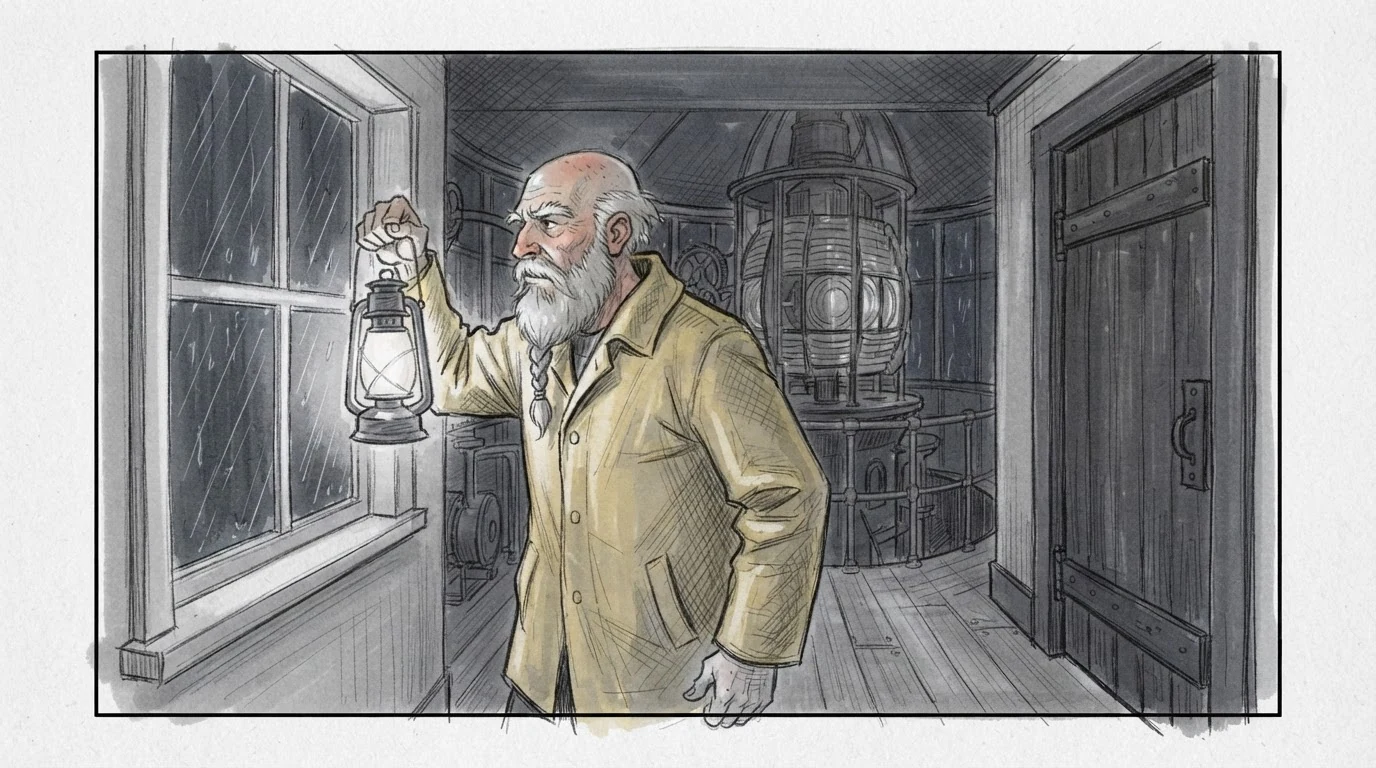
Single storyboard panel and graphite pencil and gray marker on white paper stop the model from making a photo, and loose confident lines keeps it rough enough to read as a plan. The shot is stated first (medium shot at eye level), then the action and the direction of the look toward the door at the right edge, which sets up the next cut. The braided beard, bald head and yellow oilskin coat are the character anchors to repeat in every later panel.
Open FlashBoardsA storyboard page with six 16:9 panels in a grid of three columns and two rows, one consistent rough storyboard drawing, graphite pencil and gray marker on white paper, loose confident lines, grayscale with light cross-hatching, same character in every panel: a wiry lighthouse keeper in his late sixties with a bald sunburned head, a long gray beard tied in a single braid, bushy white eyebrows and a yellow oilskin coat. Under each panel one short handwritten caption. Panel 1: wide shot, a lighthouse on a rocky point in a night storm, a curved arrow along the beam, caption 12 WIDE. Panel 2: medium shot, the keeper at a rainy window with a lantern, looking toward a door on the right, caption 12A MS. Panel 3: extreme close-up of his eyes under white eyebrows, looking right, caption 12B ECU. Panel 4: insert of a rattling iron door latch with motion lines, caption 12C INSERT. Panel 5: over-the-shoulder from behind the keeper as he opens the door on a silhouetted figure in the rain, an inner rectangle with corner arrows for a push in, caption 12D OTS. Panel 6: close-up of a freckled young woman in the doorway, soaked short copper hair, holding a burning red flare, caption 12E CU. Page header at the top: SC 12 - LAMP ROOM - NIGHT.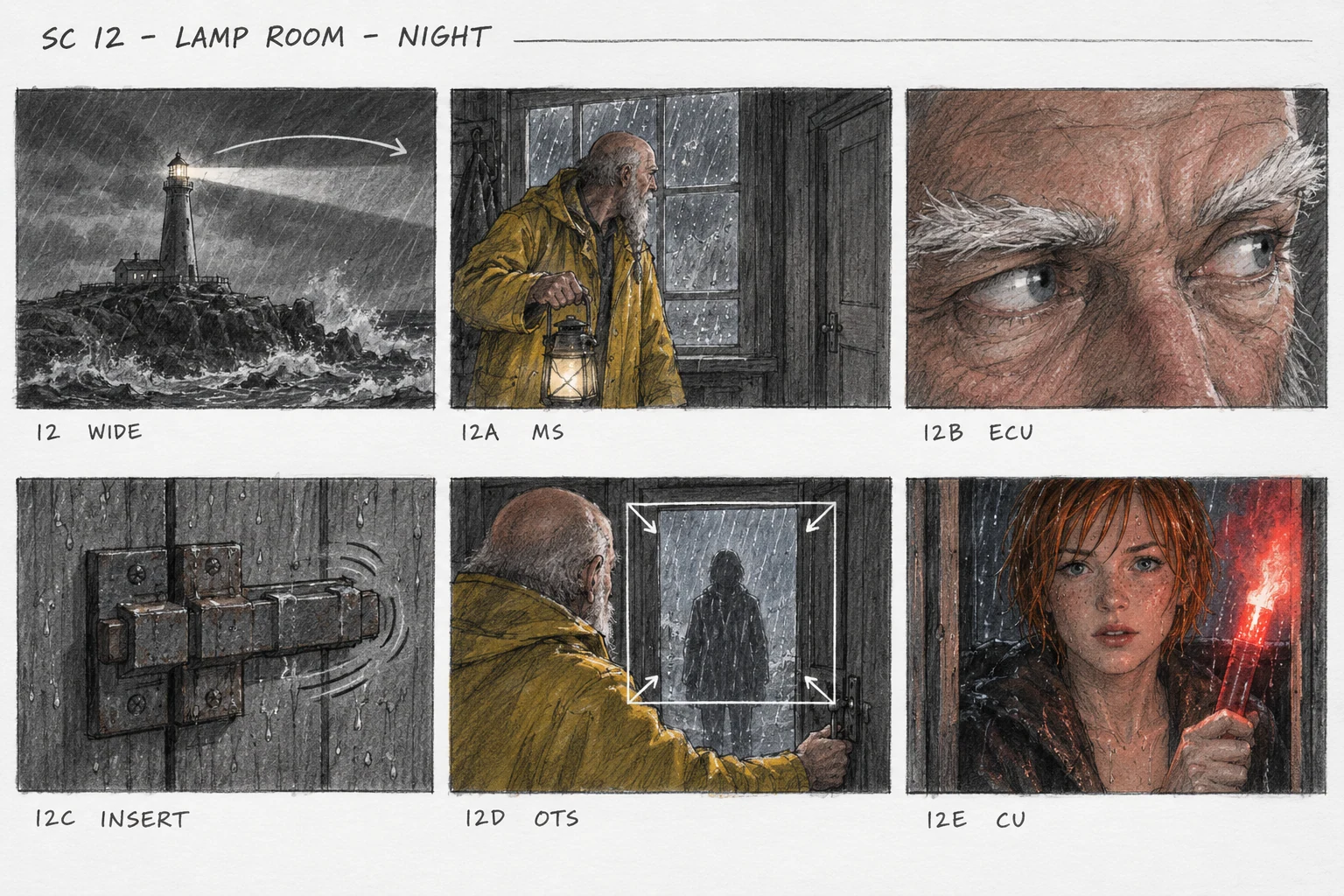
Storyboard page, grid of three columns and two rows and one consistent style block produce a real board instead of six unrelated sketches. Each panel is written in the order a board artist thinks: shot size first, then action, then the caption with the shot number, so the page reads as a cut from wide to insert to reveal. The curved arrow and the inner rectangle with corner arrows ask for standard camera notation; keep captions this short so the lettering stays legible.
Open FlashBoardsCamera: a slow, steady push in from the medium shot toward the keeper's face, starting immediately and ending on a medium close-up. Action: the whole shot stays a grayscale pencil and marker drawing on white paper. From the first frame the drawn rain lines stream down the window glass and the lantern flame flickers. The keeper turns his head from the window toward the wooden door on the right, lowers the lantern to his chest, then takes one slow step toward the door as the push in finishes on his bearded face in profile.Stays a grayscale pencil and marker drawing keeps the sketch look instead of letting the clip drift toward live action, which turns the panel into an animatic shot. Rain and a flickering flame from the first frame make the shot alive at once, so the model does not just creep toward the still. The move is stated with direction, speed and end framing, and the action names only what is already in the panel: window, lantern, door, keeper.
Open FlashBoardsCommon mistakes
- Photoreal instead of a sketch. Put the medium first: storyboard panel, graphite pencil and gray marker on white paper. Words like cinematic or 8K pull the image toward a finished frame.
- Style and faces drift between panels. Paste the same style block and character block into every prompt, in the same order, and keep them on the board as a text note.
- Garbled captions. Keep lettering to a shot number and two or three words; write longer notes as board text next to the panel instead of inside the image.
- Arrows move in the video. Generate the video from a panel without arrows or captions, and keep notation for the static board.
- Staging that breaks geography. Models ignore the line of action unless you say where each character is (door at the right edge, looking right); check each panel against the floor plan.
Keep the reference frames, prompts and every generated take side by side — images and video in one canvas.
FAQ
5 questionsWhat is a storyboard in film?
A storyboard is a sequence of drawn or generated frames, one or more per planned shot, laid out in cutting order with short notes on action, dialogue and camera movement. It is a visual draft of the film made in pre-production, so the director and crew agree on framing, staging and transitions before the shoot, when changes still cost nothing.
How do you make a storyboard?
Break the scene into beats, sketch a top-down floor plan with actor and camera positions, then choose a shot size and angle for each beat. Draw quick thumbnails in the film's aspect ratio, add arrows for subject and camera movement, and write shot number, action and dialogue under each panel. Finally, flip through the panels at speed to check that the cuts work.
Do you need to be able to draw to storyboard?
No. Stick figures with clear arrows and honest framing are enough for a shooting board, and many directors work that way. What matters is choosing the right shot size, angle and order for each beat. Polished drawings are for pitch and presentation boards. AI image models can now turn a well-written shot description into a readable panel in a consistent style.
What is the difference between a storyboard and a shot list?
A storyboard shows the shots as pictures in the order they will be cut, so people can see composition, staging and continuity. A shot list is a table of every setup in the order it will be filmed, with size, angle, movement, lens and gear. The director and editor lean on the board; the assistant director and camera crew run the day from the list.
Can AI make a storyboard?
Yes, as long as you still direct each shot. Write every panel prompt starting with shot size and angle, reuse one fixed style description and one character description in every prompt, and keep the look rough, like pencil and marker, so it reads as a plan. Image models can also lay out a full page of panels with short captions, and video models can animate a panel into a rough animatic shot.
Related terms
7- Shot ListFilmmaking Process & Crew
A shot list is a scene-by-scene table of every planned setup — shot size, angle, movement, lens, action and notes — that tells the crew exactly what to capture and in what order on the day.
- Mood BoardFilmmaking Process & Crew
A mood board is a loose collage of images, colors, textures and frames that captures the emotional tone of a project before its look is locked — a starting point for a lookbook, storyboard or AI generation.
- LookbookFilmmaking Process & Crew
A film lookbook is a curated document of reference images, frames, palettes and short text that shows how a specific film will look and feel — used to pitch the project and to align the director, DP and designers.
- Visual StorytellingStorytelling
Visual storytelling conveys story, character and emotion through images — framing, blocking, light, color, objects and cuts — instead of dialogue; it's the core skill behind every storyboard and AI-generated shot.
- Types of Camera ShotsCamera Shots
Shot types classify a single shot by how much of the subject it shows (shot size), how many people it holds and what job it does in the story — from extreme wide to extreme close-up, singles to group shots, establishing shots to inserts.
- Camera MovementCamera Movement
Camera movement is any change of the camera's position or direction during a shot — pans, tilts, dollies, cranes, handheld and more — used to guide attention, reveal space and set the emotional rhythm of a scene.
- Pre-ProductionFilmmaking Process & Crew
Pre-production is the planning phase between greenlight and the first shoot day: casting, crewing, location scouting, design, storyboards and shot lists, breakdown, schedule and budget are locked here.
Further reading
Steven D. Katz, Film Directing Shot by Shot: Visualizing from Concept to Screen (1991). Mark Simon, Storyboards: Motion in Art. François Truffaut, Hitchcock (1966).