 FlashBoards Learn
- Learn
- Filmmaking Process & Crew
- Shot List
Filmmaking Process & Crew · Film language
Shot List
Also called: shooting list, shot breakdown, camera shot list
A shot list is a scene-by-scene table of every planned camera setup: shot size, angle, movement, lens, action and notes. It tells the crew exactly what to capture and in what order, so a scene becomes a countable set of jobs that can be lit, scheduled and checked off on the day.
- What it does
- Breaks each scene into numbered setups with size, angle, move and lens so the crew can prep, schedule and track them.
- Use it when
- Blocking is decided and the schedule is being built; revise it after every tech scout.
- Watch out
- Order the day by camera direction and lighting, not by story order, or turnarounds will eat the schedule.
- Try this prompt
Wide film still, 24mm, laundromat at night, woman with cropped silver hair and teal smock at the counter, teenage boy in orange hoodie in the doorway
What is a shot list?
A shot list is the camera department's plan for a scene, written as a table. Each row is one setup: a camera position with its lens, framing and move, plus the action it has to cover. Where the script says what happens, the shot list says how you will photograph it and how many times the camera has to move to get it all.
It gets written in pre-production, usually by the director and the cinematographer together, after the shooting script has locked its scene numbers and before the schedule is final. The first AD then uses it to estimate how long each scene will take. On the day it goes to the camera team, the script supervisor and the gaffer, and it gets checked off as each setup is in the can.
Crews also call it a shooting list, a shot breakdown or a camera shot list. It is one of the core documents of the filmmaking process, and the most practical one: it turns a scene into a countable number of jobs.
What goes into a shot list? (template)
Formats vary by production, but the columns hardly change. Here is a template you can copy into any spreadsheet:
| Shot | Size | Angle | Move | Lens | Subject / action | Audio | Notes | |---|---|---|---|---|---|---|---| | 14A | | | | | | | | | 14B | | | | | | | |
- Shot number. Scene number plus a letter: 14A, 14B, 14C. The same code goes on the slate, into the script supervisor's notes and onto the file names the editor gets. Many crews skip the letters I and O so they are never misread as 1 and 0.
- Shot size. Wide, full, medium, over-the-shoulder, close-up, insert. Use the vocabulary from types of camera shots so everyone reads it the same way.
- Angle. Eye level, low, high, overhead. Leave it blank only when it really is plain eye level.
- Move. Static, pan, tilt, dolly in, handheld, Steadicam. This column tells the grips what to build.
- Lens. A focal length such as 24mm, 50mm or 85mm. The first AC preps from it, and it sets how much background the art department has to dress.
- Subject and action. Who is in frame and which part of the scene the shot covers, e.g. "from door opening to 'You're late.'"
- Audio. Sync, MOS (no sound) or wild track. MOS shots can be grabbed quickly without holding the whole set.
- Notes. Props, VFX, rigs, stunt safety, and a priority mark. Many lists add columns for location, cast, estimated setup time and a checkbox for done.
Keep one row per setup, not one per take or per line of dialogue. If the camera does not move and the lens does not change, it is the same row.
Shot list example: one scene, six setups
Scene 14 of a fictional short, INT. LAUNDROMAT - NIGHT. Ines, the owner (late fifties, cropped silver hair, gold hoop earrings, teal smock), is counting the day's coins at the counter. Dev (sixteen, bleached buzz cut, oversized orange hoodie) comes in out of the rain to take back a bag he hid in dryer 7. She already knows it is there.
| Shot | Size | Angle | Move | Lens | Subject / action | Audio | Notes | |---|---|---|---|---|---|---|---| | 14A | Wide | Eye level | Static | 24mm | Master: Dev enters, crosses to dryer 7, the whole exchange to his exit | Sync | Light the room for this first. Must-have | | 14B | Medium | Eye level | Slow push-in | 40mm | Ines counting coins, looks up at the door | Sync | Same direction as 14A, no relight | | 14C | Over-the-shoulder | Eye level | Static | 50mm | Over Ines onto Dev at the dryers | Sync | Turnaround: relight toward the dryers | | 14D | Over-the-shoulder | Eye level | Static | 50mm | Reverse, over Dev onto Ines | Sync | Match eyeline to 14C | | 14E | Insert | High | Static | 100mm macro | Dryer 7 window, the canvas bag tumbling | MOS | Can go to a small unit | | 14F | Close-up | Slightly low | Handheld | 85mm | Dev when Ines holds up the bag | Sync | Nice-to-have if time runs short |
Two things decide the order. First the master shot, 14A, sets blocking, continuity and light for everything after it. Then the camera stays facing the counter for 14B and 14D, because both look the same way and the lighting barely changes. Only then does the crew turn around and relight toward the dryers for 14C and 14F. The insert shot 14E needs neither actor on set, so it goes last or to a second team. The shooting order becomes 14A, 14B, 14D, 14C, 14F, 14E: the letters stay in story order, and the day is ordered by setup.
How do you make a shot list?
- Start from the locked script and the breakdown. Work from numbered scenes, with the script breakdown open, so the list knows about the props, extras and vehicles in each scene.
- Block before you list. Decide where the actors stand and move first. A shot list written before blocking is a guess. Walk the location, or sketch a floor plan with arrows for the actors and triangles for the cameras.
- Write the master, then the coverage. List the wide shot that plays the whole scene, then the singles, over-the-shoulders, reactions and inserts that the editor needs for rhythm and emphasis. That is your coverage. Ask of every row: which moment of the cut is this for?
- Say what each shot is for. "CU Dev" doesn't explain much. "CU Dev, the moment he realizes she knows" tells the operator when the shot matters and tells the actor where the beat is.
- Group by direction and lens. Reorder the rows into the shooting order so every lighting setup is used up before you turn around. A turnaround on a small crew can easily cost half an hour or more, so a list that swings back and forth loses the day.
- Mark priorities and estimate time. Flag each row must-have or nice-to-have and add a rough minutes estimate. The first AD can then fit the list into the shooting schedule, and on the day everyone already knows what gets cut if the sun goes down early.
- Share one version. Date the list, send it out with the call sheet and keep it in one place. When the director changes a setup, the change goes into that copy, not into five texts.
Don't overshoot the page. A two-minute dialogue scene rarely needs fifteen setups; if the list is longer than the scene's importance, cut rows before the day does it for you.
Shot list vs. storyboard: which do you need?
A storyboard shows what each shot looks like: framing, composition, where the actor sits in the frame, the direction of a move. A shot list says what each shot is and how it gets made: lens, rig, audio, priority, order. One is a picture, the other is a spreadsheet, and they share shot numbers.
| | Shot list | Storyboard | |---|---|---| | Format | Table, one row per setup | Panels, one per shot | | Answers | What to shoot, with what, in which order | What the frame looks like | | Best for | Scheduling, gear, the day on set | Composition, action, VFX, stunts | | Time to make | Hours | Days to weeks | | Who reads it | Camera, grip, electric, AD, script supervisor | Director, DP, VFX, stunts, producers |
Most productions need a shot list for every scene and storyboards only where the picture is hard to describe: action, stunts, effects, anything with precise timing. A dialogue scene in one room is often fine as a list. A car crash is not. The shooting script sits upstream of both: it fixes the scene numbers that the list and the boards borrow.
How do you turn a shot list into AI frames?
A good shot list row is already a prompt. Its columns map one to one onto the words image and video models respond to:
- Size and angle become framing words: wide film still, over-the-shoulder shot, close-up, camera slightly below eye level.
- Lens stays as written: 24mm lens, 85mm, shallow focus.
- Subject and action become a concrete description of who is in frame and what they are doing at the start of the shot.
- Move goes to the video prompt, not the image: Camera: slow push-in toward the counter.
- Location and light come from the scene heading and repeat in every row of the scene.
In FlashBoards, paste the list as a note at the head of a scene column, then generate one frame per row beside it and label each result with its shot number. The board becomes a visual shot list, with the table on one side and a picture for every setup on the other. Repeat the character descriptions word for word in every prompt so Ines and Dev look like the same people from 14A to 14F, and send only the rows with a camera move to video.
How to create a shot list with AI
3 promptsThe recipes below run the laundromat example through the pipeline: Nano Banana 2 Lite renders setup 14A as a start frame, GPT Image 2.5 turns the whole list into a thumbnail sheet, and MiniMax H3 Max Turbo plays 14A as a shot. Keep the list and every take on one FlashBoards board so you can compare them against the rows.
Wide film still, 24mm lens, camera at eye level near the entrance of a narrow laundromat at night. Right side: a row of front-loading dryers, the door marked 7 with a canvas bag tumbling behind the glass. Left side: a counter where a woman in her late fifties with cropped silver hair, large gold hoop earrings and a teal work smock stacks coins. In the doorway, a teenage boy with a bleached buzz cut and an oversized orange hoodie, rain on his shoulders. Flickering fluorescent tubes, green-white light, wet street reflections in the front window, 35mm film grain.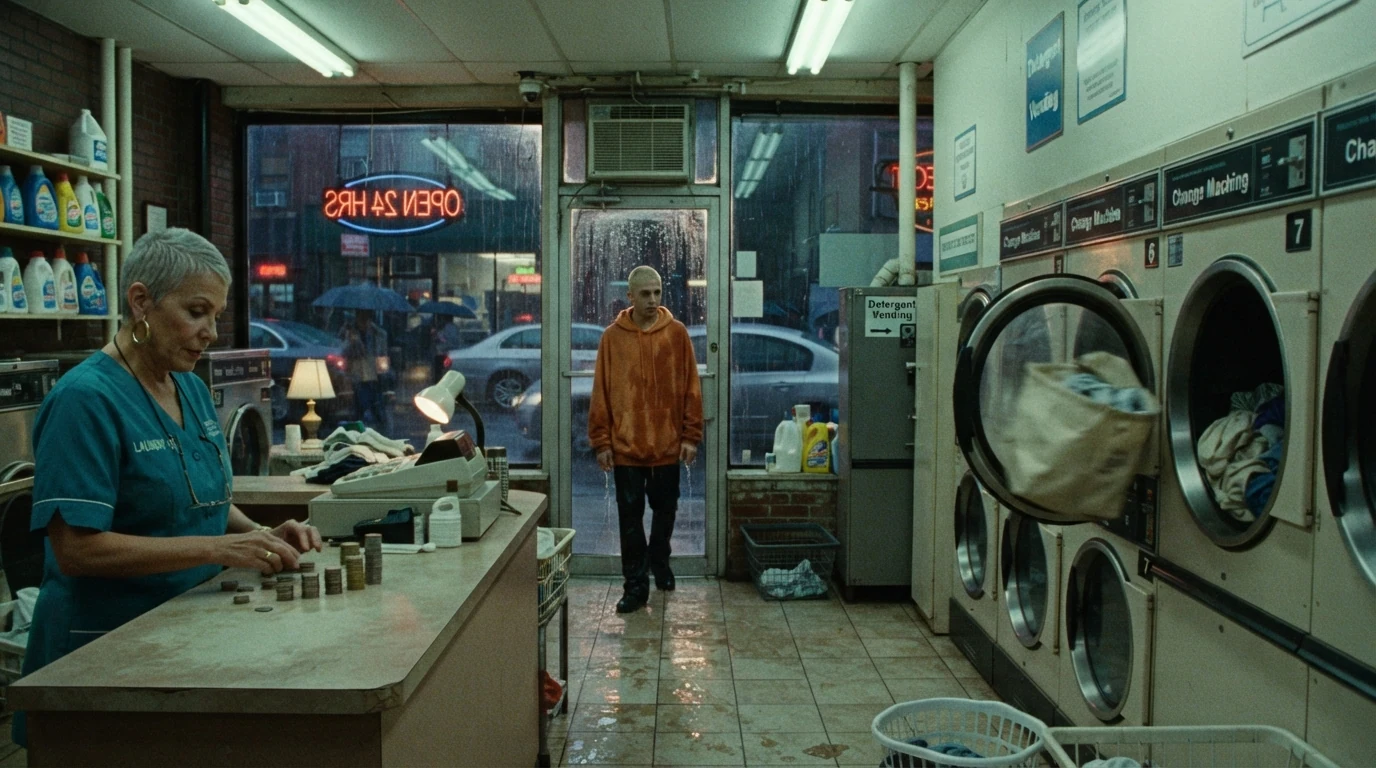
This is row 14A: wide, 24mm and eye level near the entrance are the size, lens and angle columns. Placing the counter left and the dryers right is the blocking, so later setups can hold the same geography.
Open FlashBoardsShot list thumbnail sheet: six film frames in a 3x2 grid on white paper, a short typed label under each: 14A WIDE, 14B MED, 14C OTS, 14D OTS, 14E INSERT, 14F CU. The same laundromat at night in green fluorescent light, the same two characters in every frame: a woman in her late fifties with cropped silver hair, large gold hoop earrings and a teal work smock; a teenage boy with a bleached buzz cut and an oversized orange hoodie. 14A: wide of the room, her at the counter, him at the door. 14B: medium shot of her counting coins. 14C: over her shoulder onto him at the dryers. 14D: over his shoulder onto her. 14E: close insert of dryer door 7 with a canvas bag behind the glass. 14F: close-up of the boy, 85mm, shallow focus.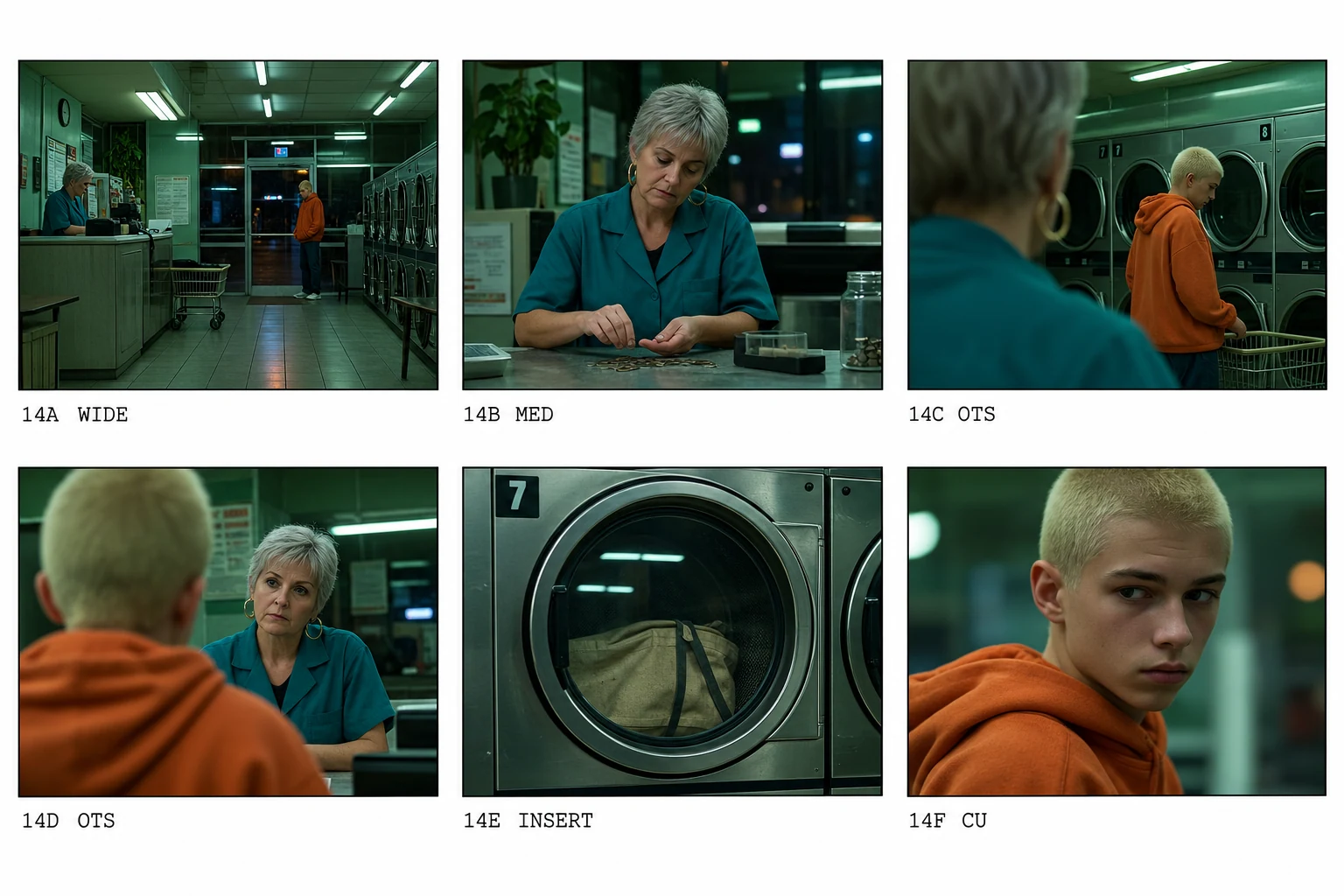
Each panel is one row of the list, in list order, with its size spelled out. Short labels like 14C OTS print cleanly, and repeating both character descriptions once for the whole sheet keeps them consistent across panels.
Open FlashBoardsCamera: static on a tripod at eye level, holding the wide master for the whole shot. Action: the fluorescent tubes are already flickering and the canvas bag is tumbling in dryer 7. The boy steps in from the doorway, shakes rain off his hood and walks toward the dryers. The woman stops stacking coins and watches him. As he reaches dryer 7 she slaps her palm flat on the counter, and he freezes with his hand on the dryer door.Static on a tripod matches the Move column for 14A. The flicker and the tumbling bag keep the shot alive from the first frame, and the action uses only what the start frame shows.
Open FlashBoardsCommon mistakes
- Pasting the table as the prompt. Column headers and cell borders get drawn as text. Rewrite each row as a sentence: size, lens, angle, subject, action, light.
- Everything comes out medium. Models default to a medium shot at eye level; state the size and the lens first and name the camera height when it isn't eye level.
- Characters drift between setups. Repeat age, hair and wardrobe in every row's prompt, word for word.
- Broken geography. If the counter jumps sides between 14C and 14D, say which side of the frame each character and object is on.
- Frozen video. Open the video prompt with motion that is already happening, and give it one beat of the scene, not the whole page.
Keep the reference frames, prompts and every generated take side by side — images and video in one canvas.
FAQ
5 questionsWhat should a shot list include?
At minimum: a shot number (scene plus letter, like 14A), shot size, camera angle, camera movement, lens, a short description of the subject and action, and whether it records sound. Useful extras are location, cast in frame, props or VFX notes, estimated setup time, a priority flag and a checkbox to mark the shot done on the day.
Who makes the shot list?
The director and the cinematographer write it together in pre-production, often while walking the location. The first assistant director uses it to build the schedule, and on set the script supervisor and camera team track it shot by shot. On small projects the director often writes it alone, and on documentaries it may be just a list of must-get moments.
What is the difference between a shot list and a storyboard?
A storyboard is a series of pictures that show what each shot looks like. A shot list is a table that tells the crew what each shot is technically, with lens, movement, audio and priority, and in what order to shoot it. They share shot numbers. Most films have a shot list for every scene but board only the complex ones.
How many shots should be on a shot list for one scene?
As many as the edit needs and the day can hold. A simple dialogue scene is often covered with a master, two over-the-shoulders, two close-ups and an insert or two. Count setups rather than shots, since moving the camera and relighting is what costs time, and mark which rows can be dropped if the day runs long.
Is there a free shot list template?
Any spreadsheet works. Make columns for shot number, size, angle, move, lens, subject and action, audio and notes, then add one row per setup, grouped by scene. Keep a second tab with the same rows sorted into shooting order. The template earlier on this page is a starting point you can copy straight into a sheet.
Related terms
7- StoryboardFilmmaking Process & Crew
A storyboard is a sequence of drawn or generated panels, one per planned shot, showing framing, action and camera movement with notes — a visual draft of the film before anything is shot.
- Shooting ScriptScreenwriting
A shooting script is the production version of a screenplay: scenes are numbered, locked and often annotated with shots, so it can drive the schedule, the shot list and the storyboard.
- CoverageDirecting & Staging
Coverage is the full set of shots filmed for one scene — master, singles, over-the-shoulders, inserts, reactions — that gives the editor choices of pace, emphasis and performance.
- Types of Camera ShotsCamera Shots
Shot types classify a single shot by how much of the subject it shows (shot size), how many people it holds and what job it does in the story — from extreme wide to extreme close-up, singles to group shots, establishing shots to inserts.
- Script BreakdownFilmmaking Process & Crew
A script breakdown goes through the screenplay scene by scene and tags every production element — cast, extras, props, wardrobe, vehicles, effects, locations — so it can be budgeted and scheduled.
- Master ShotDirecting & Staging
A master shot records an entire scene in one continuous take, usually wide enough to hold every actor, and serves as the backbone the rest of the coverage is cut into.
- Pre-ProductionFilmmaking Process & Crew
Pre-production is the planning phase between greenlight and the first shoot day: casting, crewing, location scouting, design, storyboards and shot lists, breakdown, schedule and budget are locked here.
Further reading
Steven D. Katz, Film Directing Shot by Shot. Blain Brown, Cinematography: Theory and Practice.