 FlashBoards Learn
- Learn
- Camera Movement
- Pan Shot
Camera Movement · Film language
Pan Shot
Also called: pan shot, panning, horizontal pan, pan left
A pan shot swivels the camera horizontally on a fixed base, turning left or right around its vertical axis while the camera itself stays in place. Like turning your head, it follows moving action, connects two points in a space or reveals a scene bit by bit, letting the viewer's attention travel without a cut.
- What it does
- Turns the view across a space from one fixed spot, carrying attention from one point to the next.
- Use it when
- You need to follow a subject, link two characters or places, or reveal something outside the opening frame.
- Watch out
- Too fast for the frame rate and the image judders; always compose the frame where the pan lands.
- Try this prompt
Camera locked on a tripod, only rotating: slow pan right over 8 seconds following a small white truck raising dust on a dirt road through dry hills, level horizon
What is a pan shot?
A pan is a rotation of the camera from side to side around its vertical axis. The camera does not travel: it stays on the same spot, usually on a tripod with a fluid head, and only its direction changes. The name comes from "panorama" — a slow pan unrolls a panoramic view over time.
Because the camera stays put, a pan behaves like a person turning their head. Near and far objects keep their relationship and the whole scene slides across the frame together, which is why a pan feels like looking rather than going.
The pan is one of the basic building blocks of camera movement. Its vertical twin is the tilt, and the two are often combined into one diagonal move from the same fixed base that holds a static shot.
Why do filmmakers use pan shots?
To follow action. The most common pan keeps a moving subject in frame: a rider crossing a valley, a car on a road, a character crossing a room. We watch them move through the space from one point of view rather than travel alongside them. Abbas Kiarostami builds whole scenes this way in The Wind Will Carry Us (1999), panning from a distant hillside as cars wind along dirt roads.
To connect. A pan from one character to another joins them in one continuous shot, so the audience feels the physical distance and the time it takes to cross it.
To reveal. The frame opens on one thing, turns and shows what was beside it all along — a figure in the doorway, an empty chair. The timing of the turn is the timing of the surprise.
To survey a place. A slow pan across a landscape works as an establishing shot seen from a point in the world rather than floated over it.
To set rhythm. A slow pan is contemplative, a brisk one alert; at the extreme it becomes a whip pan, where the image blurs into a transition.
How to shoot a smooth pan
Head and legs. Use a fluid head with adjustable drag: more drag gives a heavier, steadier move, less suits fast follows. Level the tripod bowl first — if the head is not level, the horizon climbs or falls as you pan.
Speed and frame rate. At 24 fps a pan that is too fast produces judder: the image stutters instead of flowing, most visibly on high-contrast verticals like poles and window frames. A common rule of thumb is to let an object take at least five to seven seconds to cross the frame on a wide or normal lens. If you must pan fast, follow a subject so the eye has something sharp to hold, or raise the frame rate.
Lens. A longer lens magnifies speed: a rotation that looks gentle at 24 mm races across the frame at 100 mm, and the compressed depth makes a follow-pan feel flatter and more observational.
Start and end frames. Every pan has two compositions. Frame the opening and the landing, rehearse the move between them, ease in and ease out, and hold a second or two at each end so the editor has clean handles.
Lead room. When following, keep the subject slightly behind center with space in front. A camera that arrives before its subject feels like it knows the future.
Pan left
A pan left turns the lens toward the operator's left. On screen the image slides the other way, left to right, as new space enters from the left edge. The direction names where the camera points, not where the picture moves — worth stating clearly on a shot list.
A pan left follows action moving right to left or reveals something to the left of the opening frame. Many directors feel that right-to-left movement runs against the Western reading direction and reads as resistance or return. It is a tendency, not a law — but decide it on purpose and keep screen direction consistent across the sequence.
Pan right
A pan right turns the lens toward the operator's right, and the image slides from right to left as new space enters from the right edge. It is the natural way to follow a subject moving left to right, and it often reads as forward progress — a journey continuing — because it matches the direction Western audiences read.
For reveals, a pan right lets new information arrive where the eye expects it. Across a sequence, consistent direction keeps geography readable, and a deliberate reversal signals that something has changed.
What is a yo-yo pan?
A yo-yo pan swings from one point to another and back again, sometimes more than once. Instead of cutting between two people, the camera shuttles between them, and the travel time becomes part of the joke or the tension.
In comedy it works like a double take: the camera pans to the person who said something outrageous, then swings back for the listener's reaction shot without a cut. The rhythm is what makes it read as a device, so keep the speed and the stops consistent.
Horror has used a mechanical version. In Paranormal Activity 3 (2011) a camera mounted on an oscillating fan base sweeps back and forth between two rooms, and the audience learns to dread each return: something may have changed while the camera looked away.
Lazy Susan shot
A lazy Susan shot puts the camera in the middle of a table or a circle of people and pans all the way round, passing from face to face as if riding the revolving tray of the same name. It covers a group scene in one take.
It is technically demanding. The camera sits low on the table or in a hole cut through it, usually on a remote head so no operator is in shot. Lighting must work through 360 degrees with no stands or crew visible, so it is often built from practicals: candles, pendant lamps, window light. Keep the speed constant and slow enough to hold faces; a 24–35 mm lens gives each diner a clean single as they pass.
Pan vs. tilt vs. tracking shot
These terms describe different physical moves:
- Pan — the camera stays in one place and rotates horizontally.
- Tilt — the camera stays in one place and rotates vertically.
- Truck — the whole camera slides sideways, parallel to the scene.
- Tracking shot — the camera travels through space with a subject, on a dolly, Steadicam, vehicle or drone.
The test is parallax. In a truck or track, near objects sweep past faster than distant ones; in a pan, foreground and background cross the frame together. The final shot of Antonioni's The Passenger (1975) is sometimes loosely called a pan, but the camera travels out through the window grille — it is a tracking move.
And pan and scan is not a camera move at all: it crops widescreen films for 4:3 TV by sliding a narrow window across the image, sometimes adding pans the director never shot.
Pan Shot in motion
11 clipsWatch the background: in a pan, near and far slide across the frame together because the camera only turns. Most clips follow a car or a rider across open country, where the rotation reads most clearly; the last ones move indoors and end on a yo-yo pan.
How to create a pan shot with AI
3 promptsVideo models blur rotating and travelling, so a prompt that just says pan often returns a truck, an orbit or a zoom. State that the camera stays in one place and only turns, give the direction, the size of the turn and where it lands, and make sure the landing is already in the start frame. Nano Banana 2 Lite builds that frame, GPT Image 2.5 sets up a lazy Susan take, and MiniMax H3 Max Turbo animates the first frame into a follow pan. On a FlashBoards board, keep the film clips beside your takes and compare their speed side by side.
Cinematic film still from a tripod on a dry hillside, eye level, 50mm lens: a dirt road winds through golden grass hills in late-afternoon light; a small white pickup truck on the road in the left third of the frame, heading right, a plume of pale dust trailing behind it; open road ahead of the truck; a lone oak tree on the slope at the right edge; long shadows, faint haze on the far ridges, level horizon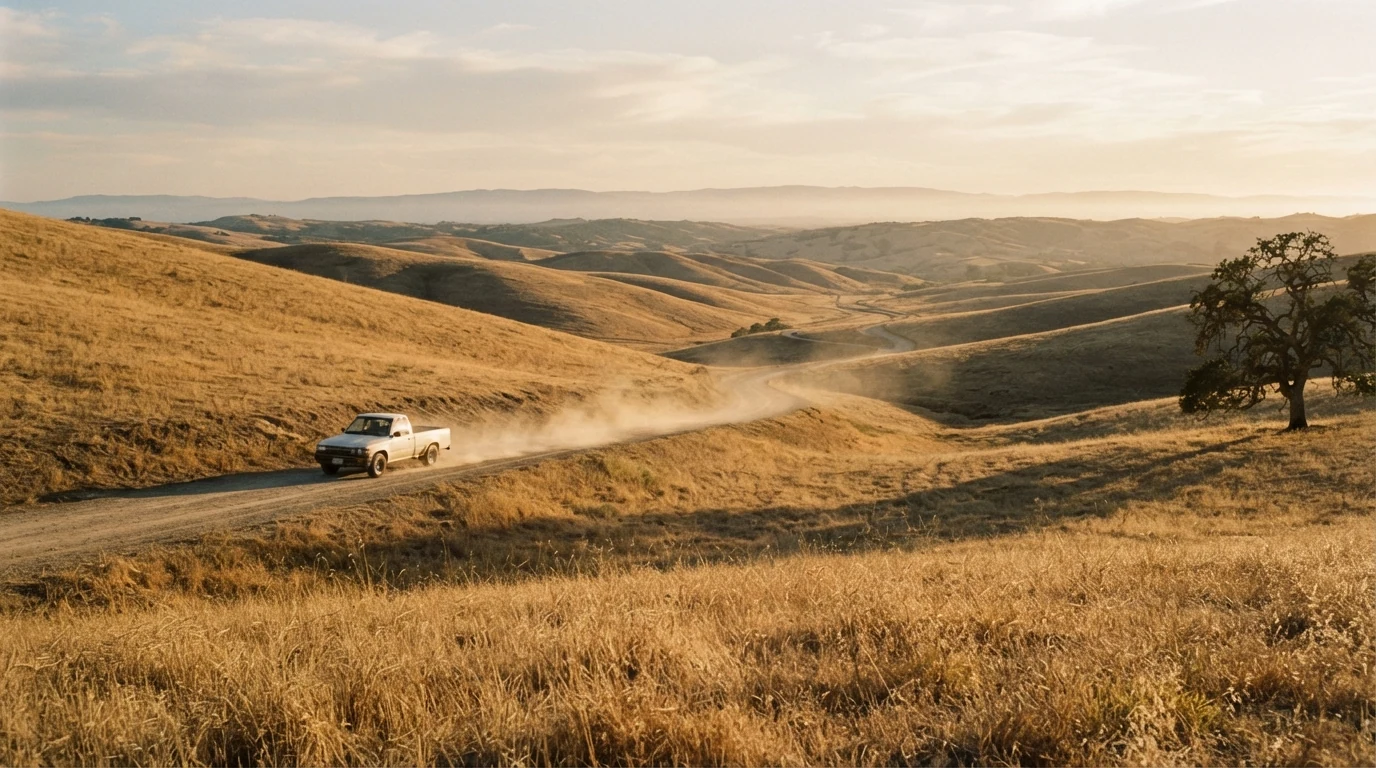
From a tripod and eye level, 50mm fix one camera position and a normal lens, the set-up for a clean pan. The truck in the left third, heading right with open road ahead builds lead room and tells the video model which way to turn. The oak at the right edge is the landmark the pan will reach, so the landing already exists.
Open FlashBoardsCinematic film still, camera at the center of a round wooden dinner table at the eye level of seated guests, 28mm lens: across the candles a man in his fifties with a thick gray beard and a green knit sweater laughs with his head thrown back; beside him a young woman with a shaved head and silver hoop earrings raises a glass of red wine; bowls of food and candle stubs in the foreground; warm candlelight, dark wood-paneled room, shallow depth of field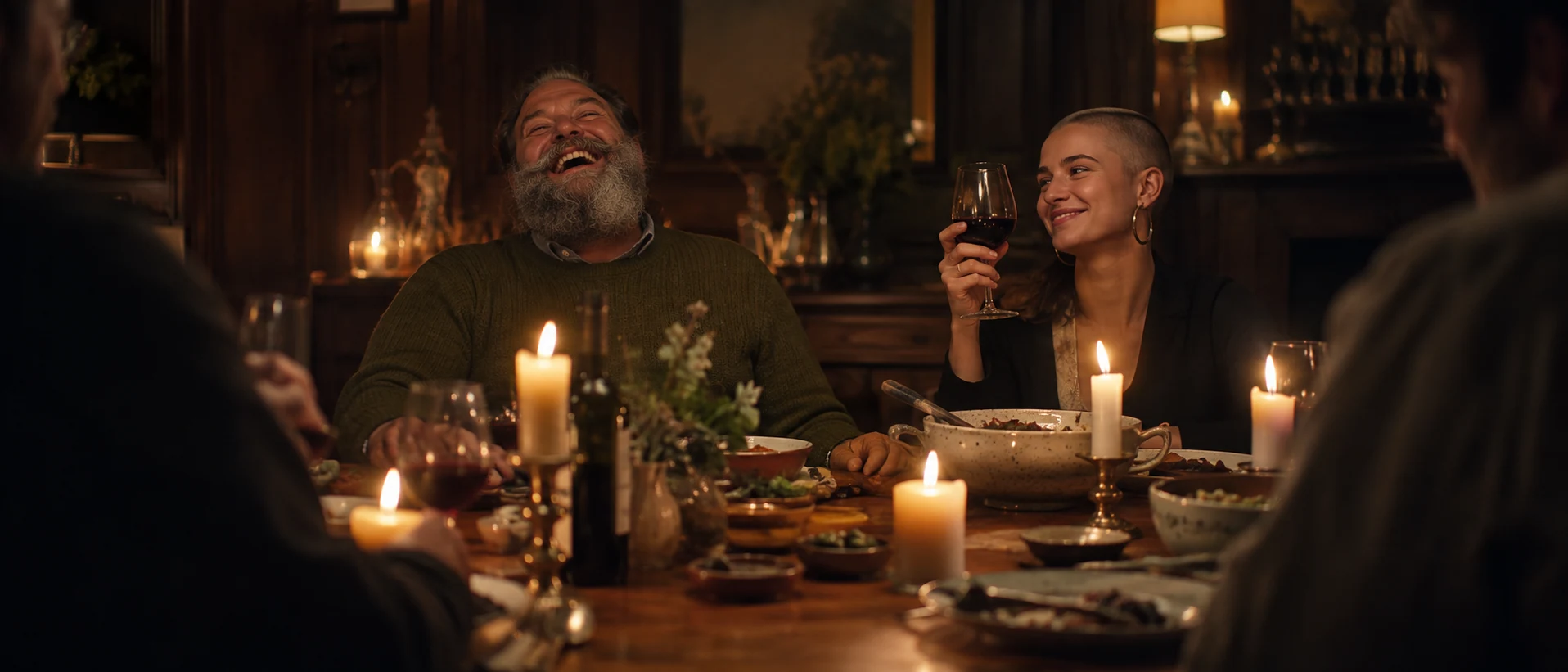
A second take on a different pan: the camera at the center of a round table is the lazy Susan set-up, and two neighboring faces give a rotation a path from guest to guest. Specific invented features — the beard and sweater, the shaved head and hoops — keep the guests clearly fictional and consistent across takes.
Open FlashBoardsCamera: locked on a tripod on the hillside with a fixed 50mm lens, the camera pans right at a slow, steady speed, turning about 45 degrees over the shot to follow the white pickup truck; it stays in the same spot and only rotates, the horizon stays level, the framing size stays constant, and the truck stays small, at the same distance, just left of center with open road ahead of it. The pan eases out and settles as the truck reaches the lone oak tree on the slope. Action: the truck is already driving at an easy pace along the far dirt road, heading right across the hillside with dust rising behind it, as the shot begins. In the middle it follows the road along the slope and the dust drifts across the golden grass. At the end it passes below the oak tree, still in frame, its dust hanging in the late light.Stays in the same spot and only rotates is the core of the prompt: it keeps the model from trucking or orbiting without writing negatives. About 45 degrees at a slow, steady speed is gentle enough to avoid judder and smearing, and the framing size stays constant with the truck small, at the same distance keeps a push-in from creeping in. The pan settles as the truck reaches the lone oak, so camera and subject land together and the truck never leaves the frame. The truck and dust are moving from the first frame, so the shot is alive at once.
Open FlashBoardsCommon mistakes
- The pan becomes a truck, dolly or orbit. The background shifts with parallax or the camera circles the subject. Write the camera stays in the same spot and only rotates.
- A zoom creeps in. Name one lens and say the framing size stays constant.
- The horizon drifts. Ask for a tripod and a level horizon.
- The turn stops short or overshoots. Give an angle, a speed and a landmark to land on, and put that landmark in the start frame.
- Invented space is inconsistent. Everything that enters during the turn gets invented. Keep the turn modest and describe only what the start frame shows.
- Fast pans warp. Quick rotations smear and bend verticals. Slow down, or ask for a whip pan if blur is the point.
- A frozen start. If nothing moves, MiniMax H3 Max Turbo creeps in on a still. Start
Action:with the subject already in motion.
Keep the reference frames, prompts and every generated take side by side — images and video in one canvas.
FAQ
5 questionsWhat is a pan shot in film?
A pan shot is a camera move in which the camera rotates horizontally, left or right, from a fixed position — usually on a tripod head. The camera itself does not travel. Pans are used to follow moving subjects, connect two characters or places in one continuous shot, reveal something outside the opening frame, or survey a landscape. The word comes from "panorama".
What is the difference between a pan and a tilt?
Both rotate the camera from a fixed spot. A pan turns it horizontally, left or right, like shaking your head; a tilt turns it vertically, up or down, like nodding. Pans follow sideways movement and sweep across a space; tilts reveal height and move attention between sky and ground. The two can combine into one diagonal move.
What is the difference between a pan and a tracking shot?
In a pan the camera stays in one place and only rotates, so foreground and background move across the frame together. In a tracking shot the whole camera travels through space on a dolly, vehicle, Steadicam or drone, usually alongside a subject, and near objects pass faster than distant ones. A pan watches the action from one spot; a tracking shot goes with it.
Does pan left mean the image moves left?
No. Pan left means the camera turns toward the left, so new space enters from the left edge and the image appears to slide to the right across the screen. The direction always describes where the lens points, not how the picture moves. Writing it clearly on a shot list avoids confusion between the director, the operator and the editor.
How fast should you pan a camera?
Slower than it feels on set. At 24 fps a fast pan judders, especially on vertical lines. A common rule of thumb is to let an object take at least five to seven seconds to cross the frame on a wide or normal lens, and slower still on a telephoto. Following a subject or raising the frame rate makes faster pans easier to watch.
Related terms
7- Truck ShotCamera Movement
A truck shot slides the whole camera sideways, parallel to the scene, on a dolly, slider or vehicle; nearby objects sweep past faster than distant ones, giving strong parallax and a sense of travelling along the action.
- Tracking ShotCamera Movement
A tracking shot moves the camera through space with a moving subject — on a dolly, Steadicam, vehicle or drone — following, leading or flanking it so the audience travels with the action.
- Pan and ScanFormats & Exhibition
Pan and scan crops a widescreen film to fill a 4:3 TV screen, moving a narrow window across the wide frame shot by shot — losing up to half the composition and sometimes whole characters.
- Tilt ShotCamera Movement
A tilt pivots the camera up or down from a fixed position, like nodding your head — to reveal a tall subject, follow a rise or fall, or shift attention between sky and ground.
- Whip PanCamera Movement
A whip pan is a pan so fast that the image dissolves into motion blur; it snaps attention between two points, links two characters with energy or hides a cut, making it one of the liveliest transitions in film.
- Static ShotCamera Movement
A static shot keeps the camera completely still — locked off on a tripod or dolly with no pan, tilt, zoom or move — so all the energy comes from actors, light and composition inside the frame.
- Camera MovementCamera Movement
Camera movement is any change of the camera's position or direction during a shot — pans, tilts, dollies, cranes, handheld and more — used to guide attention, reveal space and set the emotional rhythm of a scene.
Further reading
Blain Brown, Cinematography: Theory and Practice (Routledge). American Cinematographer Manual (ASC Press), sections on panning speeds. Joseph V. Mascelli, The Five C's of Cinematography.